2017 FORD F750 warning
[x] Cancel search: warningPage 261 of 382

CAPACITIES AND SPECIFICATIONS - 6.8L
Capacities
WARNING
The air conditioning refrigerant system contains refrigerant under high pressure.
Only qualified personnel should service the air conditioning refrigerant system.
Opening the air conditioning refrigerant system can cause personal injury.
Capacity
Item
7.0 qt (6.6 L)
Engine oil (with oil filter)
28.8 qt (27.3 L)1
Engine coolant
58 gal (219.5 L)
Fuel tank (Limited Series)
(Usable capacity)2
62 gal (234.6 L)
(Liquid capacity)
47 gal (177.9 L)
Fuel tank (Small)
(Usable capacity)2
50 gal (189.2 L)
(Liquid capacity)
59 gal (223.3 L)
Fuel tank (Large)
(Usable capacity)2
63 gal (238.4 L)
(Liquid capacity)
Between MIN and MAX on brake fluid reservoir
Brake fluid
17.4 qt (16.5 L)3
Automatic transmission fluid
6–7 fl oz (177 –207 ml)
Front axle wheel bearing oil (8500 lb axle)
12–13 fl oz (355– 385 ml)
Front axle wheel bearing oil (all except
8500 lb axle)
19 pt (9.0 L)4
Rear axle (S-140)(13.5k, 17.5k, 19k single
speed)
37 pt (17.5 L)4
Rear axle (S-170)(23k single speed)
258
F-650/750 (TBC) , enUSA, First Printing Capacities and Specifications
Page 266 of 382

•
Increased emission levels.
• Reduced engine performance.
• Reduced fuel economy.
• Degraded brake performance.
We recommend Motorcraft® motor oil for
your vehicle. If Motorcraft® oil is not
available, use motor oils of the
recommended viscosity grade that meet
API SN requirements and display the API
Certification Mark for gasoline engines. Do
not use oil labeled with API SN service
category unless the label also displays the
API certification mark. An oil that displays this symbol conforms
to current engine, emission system and
fuel economy performance standards of
the International Lubricants Specification
Advisory Committee (ILSAC).
Do not use supplemental engine oil
additives because they are unnecessary
and could lead to engine damage that may
not be covered by your vehicle warranty.
Note:
Ford recommends using DOT 4 Low
Viscosity (LV) High Performance Brake Fluid
or equivalent meeting WSS-M6C65-A2. Use
of any fluid other than the recommended
fluid may cause degraded brake
performance and not meet the Ford
performance standards. Keep brake fluid
clean and dry. Contamination with dirt,
water, petroleum products or other
materials may result in brake system
damage and possible failure.
Note: Automatic transmissions that require
MERCON LV transmission fluid should only
use MERCON LV transmission fluid. The
use of any other fluid may cause
transmission damage.
CAPACITIES AND SPECIFICATIONS - 6.7L DIESEL
Capacities WARNING
The air conditioning refrigerant system contains refrigerant under high pressure.
Only qualified personnel should service the air conditioning refrigerant system.
Opening the air conditioning refrigerant system can cause personal injury.
Capacity
Item
15.0 qt (14.2 L)
Engine oil (with oil filter)
35.1 qt (33.2 L)1
Engine coolant (primary high-temperature
cooling system loop)
48 fl oz (1.41 L)2
Engine coolant additive (primary high-
temperature cooling system loop)
263
F-650/750 (TBC) , enUSA, First Printing Capacities and SpecificationsE142732
Page 276 of 382
•
MP3 and WMA folder mode represents
a folder structure consisting of one
level of folders. The CD player numbers
all MP3 and WMA tracks on the disc
(noted by the MP3 or WMA file
extension) and all folders containing
MP3 and WMA files, from F001 (folder)
T001 (track) to F253 T255.
• Creating discs with only one level of
folders helps with navigation through
the disc files.
If you are burning your own MP3 and WMA
discs, it is important to understand how
the system reads the structures you create.
While various files may be present (files
with extensions other than MP3 and
WMA), only files with the MP3 and WMA
extension are played; other files are
ignored by the system. This enables you to
use the same MP3 and WMA disc for a
variety of tasks on your work computer,
home computer and your in-vehicle
system. In track mode, the system displays and
plays the structure as if it were only one
level deep (all MP3 and WMA files play,
regardless of being in a specific folder). In
folder mode, the system only plays the
MP3 and WMA files in the current folder.
AUDIO UNIT - VEHICLES WITH:
AM/FM WARNING
Driving while distracted can result in
loss of vehicle control, crash and
injury. We strongly recommend that
you use extreme caution when using any
device that may take your focus off the
road. Your primary responsibility is the safe
operation of your vehicle. We recommend
against the use of any hand-held device
while driving and encourage the use of
voice-operated systems when possible.
Make sure you are aware of all applicable
local laws that may affect the use of
electronic devices while driving. 273
F-650/750 (TBC) , enUSA, First Printing Audio SystemE163157
Page 277 of 382

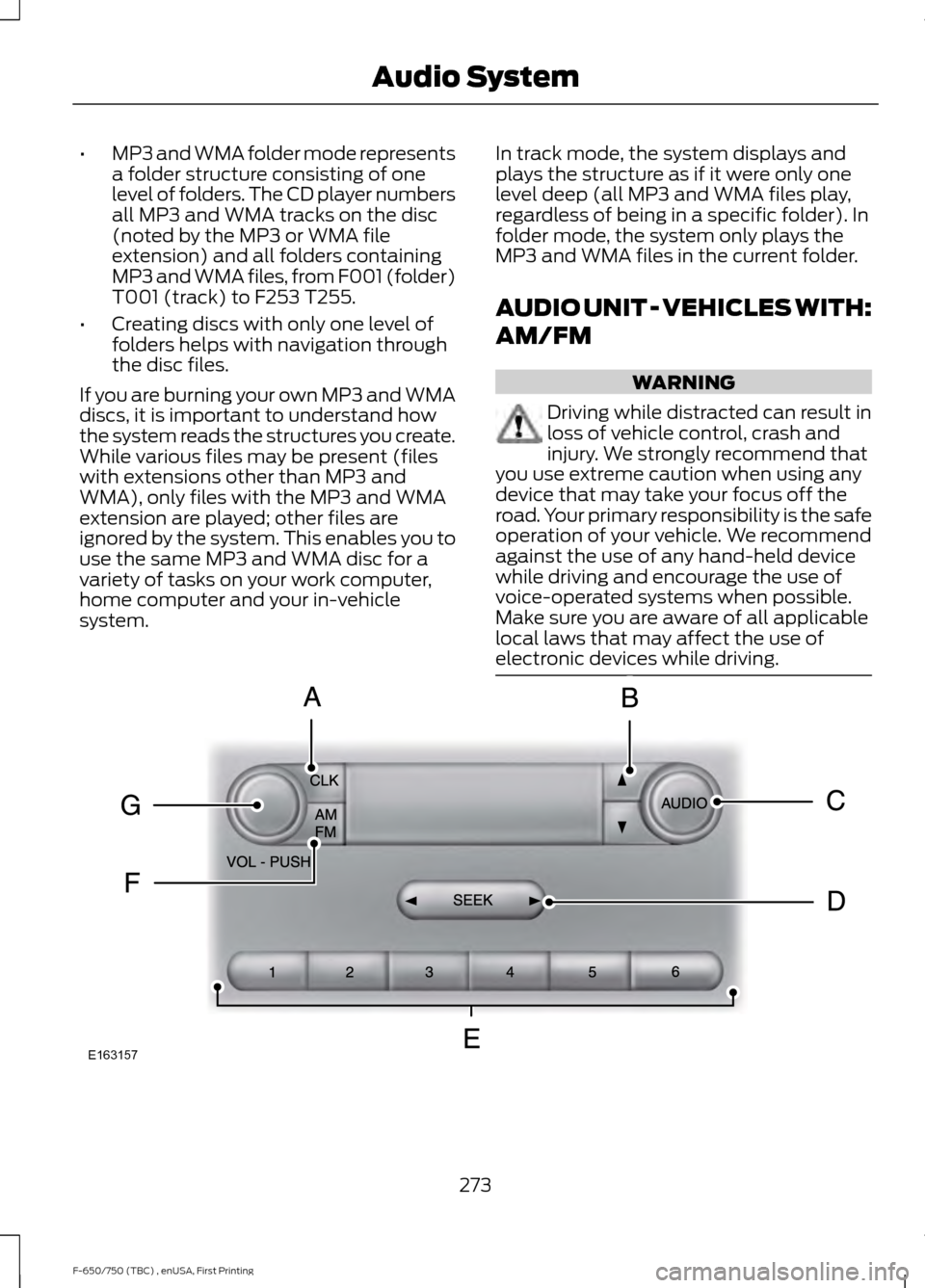
CLOCK: Press to display the clock. To set the time, press and hold until the
hours start to flash. Press the arrow buttons to adjust the hours, then repeat to
set the minutes. Press again to exit clock mode.
A
TUNE:
In radio mode, press to manually search through the radio frequency
band.
B
AUDIO:
Press to access settings for Treble, Midrange, Bass, Fade or Balance.
C
Seek, Fast Forward and Reverse:
In radio mode, select a frequency band
and press this button. The system stops at the first station it finds in that
direction.
D
Numeric keypad:
In radio mode, you can store your favorite radio stations. To
store a radio station, tune to the station, then press and hold a preset button
until sound returns.
E
AM/FM:
Press to access different audio modes, for example AM, FM, audio
input jack.
F
VOL and Power:
Press to switch the system on and off. Turn to adjust the
volume.
G
AUDIO UNIT - VEHICLES WITH:
AM/FM/CD/SYNC WARNING
Driving while distracted can result in
loss of vehicle control, crash and
injury. We strongly recommend that
you use extreme caution when using any
device that may take your focus off the
road. Your primary responsibility is the safe
operation of your vehicle. We recommend
against the use of any hand-held device
while driving and encourage the use of
voice-operated systems when possible.
Make sure you are aware of all applicable
local laws that may affect the use of
electronic devices while driving. 274
F-650/750 (TBC) , enUSA, First Printing Audio System
Page 282 of 382

AUDIO INPUT JACK
WARNINGS
Driving while distracted can result in
loss of vehicle control, crash and
injury. We strongly recommend that
you use extreme caution when using any
device that may take your focus off the
road. Your primary responsibility is the safe
operation of your vehicle. We recommend
against the use of any hand-held device
while driving and encourage the use of
voice-operated systems when possible.
Make sure you are aware of all applicable
local laws that may affect the use of
electronic devices while driving. For safety reasons, do not connect
or adjust the settings on your
portable music player while your
vehicle is moving. Store the portable music player in a
secure location, such as the center
console or the glove box, when your
vehicle is moving. Hard objects may
become projectiles in a collision or sudden
stop, which may increase the risk of serious
injury. The audio extension cable must be
long enough to allow the portable music
player to be safely stored while your
vehicle is moving. The auxiliary input jack allows you to
connect and play music from your portable
music player through your vehicle speakers.
You can use any portable music player
designed for use with headphones. Your
audio extension cable must have male
1/8th-inch (3.5 millimeter) connectors at
each end.
1. Make sure your vehicle, radio and
portable music player are turned off
and the transmission is in position P.
2. Plug the extension cable from the portable music player into the AIJ.
3. Turn on the radio. Select either a tuned
FM station or a CD.
4. Adjust the volume as desired.
5. Turn on your portable music player and
adjust its volume to half its maximum
level.
6. Press
AUX until LINE or LINE IN
appears in the display. You should hear
music from your device even if it is low.
7. Adjust the volume on your portable music player until it reaches the volume
level of the FM station or CD. Do this
by switching back and forth between
the AUX and FM or CD controls.
USB PORT
(If Equipped) 279
F-650/750 (TBC) , enUSA, First Printing Audio SystemE163160 E163161
Page 285 of 382

SYNC Owner Account
Why do I need a SYNC owner account?
•
Essential for keeping up with the latest
software downloads available for
SYNC.
• Access to customer support for any
questions you may have.
Driving Restrictions
For your safety, certain features are
speed-dependent and restricted when your
vehicle is traveling over 3 mph (5 km/h).
Safety Information WARNING
Driving while distracted can result in
loss of vehicle control, crash and
injury. We strongly recommend that
you use extreme caution when using any
device that may take your focus off the
road. Your primary responsibility is the safe
operation of your vehicle. We recommend
against the use of any hand-held device
while driving and encourage the use of
voice-operated systems when possible.
Make sure you are aware of all applicable
local laws that may affect the use of
electronic devices while driving. When using SYNC:
•
Do not operate playing devices if the
power cords or cables are broken, split
or damaged. Place cords and cables
out of the way, so they do not interfere
with the operation of pedals, seats,
compartments or safe driving abilities.
• Do not leave playing devices in your
vehicle during extreme conditions as it
could cause them damage. See your
device's manual for further information.
• Do not attempt to service or repair the
system. See an authorized dealer. Privacy Information
When a cellular phone is connected to
SYNC, the system creates a profile within
your vehicle that is linked to that cellular
phone. This profile is created in order to
offer you more cellular features and to
operate more efficiently. Among other
things, this profile may contain data about
your cellular phone book, text messages
(read and unread), and call history,
including history of calls when your cellular
phone was not connected to the system.
In addition, if you connect a media device,
the system creates and retains an index of
supported media content. The system also
records a short development log of
approximately 10 minutes of all recent
system activity. The log profile and other
system data may be used to improve the
system and help diagnose any problems
that may occur.
The cellular profile, media device index,
and development log will remain in the
vehicle unless you delete them and are
generally accessible only in the vehicle
when the cellular phone or media player
is connected. If you no longer plan to use
the system or the vehicle, we recommend
you perform a Master Reset to erase all
stored information.
System data cannot be accessed without
special equipment and access to the
vehicle's SYNC module. Ford Motor
Company and Ford of Canada will not
access the system data for any purpose
other than as described absent consent, a
court order, or where required by law
enforcement, other government
authorities, or other third parties acting
with lawful authority. Other parties may
seek to access the information
independently of Ford Motor Company and
Ford of Canada.
282
F-650/750 (TBC) , enUSA, First Printing SYNC™
(If Equipped)
Page 320 of 382

A message appears in the information
display when it is time for an oil change.
Make sure you perform the oil change
within two weeks or 500 miles (800
kilometers) of the message appearing.
Make sure you reset the Intelligent Oil-Life
Monitor after each oil change. See
Instrument Cluster (page 54).
If your information display resets
prematurely or becomes inoperative, you
should perform the oil change interval at
six months or 5000 miles (8000
kilometers) from your last oil change.
Never exceed one year or 10000 miles
(16000 kilometers) between oil change
intervals.
All Vehicles
Your vehicle is very sophisticated and built
with multiple, complex, performance
systems. Every manufacturer develops
these systems using different
specifications and performance features.
That is why it is important to rely upon your
dealership to properly diagnose and repair
your vehicle.
Ford Motor Company has recommended
maintenance intervals for various parts
and component systems based upon
engineering testing. Ford Motor Company
relies upon this testing to determine the
most appropriate mileage for replacement
of oils and fluids to protect your vehicle at
the lowest overall cost to you and
recommends against maintenance
schedules that deviate from the scheduled
maintenance information.
We strongly recommend the use of only
genuine Ford, Motorcraft or
Ford-authorized re-manufactured
replacement parts engineered for your
vehicle. Additives and Chemicals
This owner's manual and the Ford
Workshop Manual list the recommended
additives and chemicals for your vehicle.
We do not recommend using chemicals or
additives not approved by us as part of
your vehicle
’s normal maintenance. Please
consult your warranty information.
Oils, Fluids and Flushing
In many cases, fluid discoloration is a
normal operating characteristic and, by
itself, does not necessarily indicate a
concern or that the fluid needs to be
changed. However, a qualified expert, such
as the factory-trained technicians at your
dealership, should inspect discolored fluids
that also show signs of overheating or
foreign material contamination
immediately.
Make sure to change your vehicle ’s oils and
fluids at the specified intervals or in
conjunction with a repair. Flushing is a
viable way to change fluid for many vehicle
sub-systems during scheduled
maintenance. It is critical that systems are
flushed only with new fluid that is the same
as that required to fill and operate the
system or using a Ford-approved flushing
chemical.
Emissions Control System WARNING
Do not park, idle or drive your vehicle
on dry grass or other dry ground
cover. The emission system heats up
the engine compartment and exhaust
system, creating the risk of fire. 317
F-650/750 (TBC) , enUSA, First Printing Scheduled Maintenance
Page 321 of 382

To make sure the emissions control
systems operate effectively, you should
have the services listed in the maintenance
schedule performed at the specified time
and mileage intervals. You should avoid
running out of fuel or turning off the ignition
when your vehicle is moving, especially at
high speeds.
Do not make unauthorized modifications
to the engine or vehicle. Modifications
causing increased amounts of unburned
fuel to reach the exhaust system can
significantly increase the temperature of
the engine compartment and the exhaust
system.
Avoid driving your vehicle if it does not
operate properly. If the engine diesels
(more than five seconds of engine run-on
after shut-off), misfires, surges, stalls or
backfires, see an authorized dealer. Be alert
for fluid leakage, odor, smoke, loss of oil
pressure, or charge indicator or over
temperature warning.
Vehicles equipped with a diesel engine
cannot use diesel fuel blended with waste
oil if equipped with a catalytic
converter-muffler. Waste lube oil blending
in fuel plugs the catalytic
converter-muffler, resulting in a significant
loss of engine power.
Noise Emissions Warranty, Prohibited
Tampering Acts and Maintenance
On January 1, 1978, Federal regulations
became effective governing the noise
emissions on trucks over 10000 pounds
(4536 kilograms) GVWR. The following
statements concerning prohibited
tampering acts and maintenance and the
noise warranty are found in the warranty
information, and are applicable to
completed trucks.
Tampering with Noise Control System
Prohibited
Federal law prohibits the following acts or
the causing thereof: (1) The removal or
rendering inoperative, by any person other
than for purposes of maintenance, repair
or replacement, of any device or element
of design incorporated into any new vehicle
for the purpose of noise control prior to its
sale or delivery to the ultimate purchaser
or while it is in use, or (2) the use of the
vehicle after such device or element of
design has been removed or rendered
inoperative by any person.
Among those acts presumed to constitute
tampering are the following acts listed:
Acts
Vehicle system
Removal of noise shields, hood blanket, tunnel liner oracoustical absorptive material.
Acoustical shielding
Removal or rendering inoperative the engine speed
governor to allow engine speed to exceed manufacturer specifications. Removal of engine mounted noise shield or oil pan enclosure.
Engine
Removal of the air duct, silencer, air cleaner, and/or air
cleaner element and baffle in air cleaner; re-indexing of air cleaner.
Engine air induction
318
F-650/750 (TBC) , enUSA, First Printing Scheduled Maintenance