2017 FORD F450 SUPER DUTY USB
[x] Cancel search: USBPage 533 of 642
2. Select Apple CarPlay on thetouchscreen.
To disable this feature from theSettings screen, select:
Menu Item
Apple CarPlay Preferences
Your device is listed if SYNC detectsApple CarPlay. Select the name of yourdevice and select:
Disable
To return to SYNC 3, go to the AppleCarPlay home screen and select the SYNCapp.
Note:Contact Apple for Apple CarPlaysupport.
Android Auto
Android Auto is compatible with mostdevices with Android 5.0 or newer.
1. Download the Android Auto app toyour device from Google Play toprepare your device (this may requiremobile data usage).
Note:The Android Auto App may not beavailable within your current market.
2. To switch this feature on from theSettings screen, scroll left on thescreen and select:
Menu Item
Android Auto Preferences
Enable Android Auto
Note:Android Auto must be switched onprior to plugging your device.
You can then plug your device into a USBport. See USB Port (page 454).
To disable this feature from theSettings screen, select:
Menu Item
Android Auto Preferences
Your device is listed if SYNC detectsAndroid Auto. Select the name of yourdevice and select:
Disable
Note:You may need to slide your Settingsscreen to the left to select Apple CarPlayPreferences or Android Auto Preferences.
To return to SYNC 3, select thespeedometer icon in the Android Automenu bar at the bottom of thetouchscreen, and then touch the option toreturn to SYNC.
Note:Contact Google for Android Autosupport.
NAVIGATION
Your navigation system is comprised oftwo main features, destination mode andmap mode.
Map Mode
Map mode shows advanced viewingcomprised of 2D city maps, 3D landmarksand 3D city models (when available). 2Dcity maps show detailed outlines ofbuildings, visible land use, landscapefeatures, and detailed railroadinfrastructure for the most essential citiesaround the globe.
3D landmarks appear as clear, visibleobjects that are typically recognizable andhave a certain tourism value.
530
Super Duty (TFE) Canada/United States of America, enUSA, Edition date: 201710, Second Printing
SYNC™ 3 (If Equipped)
Page 541 of 642
SiriusXM Traffic and Travel Link
SiriusXM Traffic and Travel Link is availableon vehicles equipped with navigation andonly in select markets. You must activateand subscribe to receive SiriusXM Trafficand Travel Link information. It helps youlocate the best gas prices, find movielistings, get current traffic alerts, view theweather map, get accurate ski conditionsand see current sports scores. See Apps(page 538).
The system calculates a reasonableefficient route based on available speedlimits, traffic, and road conditions. You mayknow a local short cut that is more efficientat a given time than the route provided bySYNC 3, but you should expect a slightdifference in minutes or miles with theSYNC 3 route.
Navigation Map Updates
Annual navigation map updates areavailable for purchase through yourdealership, by calling 1-866-462-8837 inthe United States and Canada or01-800-557-5539 in Mexico. You can alsovisit:
Website
www.navigation.com/sync
You need to specify the make and modelof your vehicle to determine if there is anupdate available.
HERE is the digital map provider for thenavigation application. If you find map dataerrors, you may report them directly toHERE by going towww.here.com/mapcreator. HEREevaluates all reported map errors andresponds with the result of theirinvestigation by e-mail.
Map coverage includes the USA (includingPuerto Rico and the US Virgin Islands),Canada and Mexico.
APPS
The system enables voice, steering wheel,and touch screen control of SYNC 3AppLink enabled smartphone apps. Oncean app is running through AppLink, you cancontrol main features of the app throughvoice commands and steering wheelcontrols.
Note:Available AppLink enabled apps willvary by market.
Note:You must pair and connect yoursmartphone via Bluetooth to SYNC 3 toaccess AppLink.
Note:iPhone users need to connect thephone to the USB port.
Note:For information on available apps,supported smartphone devices andtroubleshooting tips please visit:
Websites
owner.ford.comwww.syncmyride.cawww.syncmaroute.ca
Note:Make sure you have an active accountfor the app that you have downloaded.Some apps will work automatically with nosetup. Other apps will want you to configureyour personal settings and personalize yourexperience by creating stations or favorites.We recommend you do this at home oroutside of your vehicle.
Note:We encourage you to review thesmartphone app’s terms of service andprivacy policies because Ford is notresponsible for your app or its use of data.
538
Super Duty (TFE) Canada/United States of America, enUSA, Edition date: 201710, Second Printing
SYNC™ 3 (If Equipped)
Page 545 of 642
Media Player
This button is available when a mediadevice such as a Bluetooth Stereo or USB
device is the active audio source. Pressingthe button allows you to access thefollowing options for active devices only.
Action and DescriptionMenu Item
For some Apple devices, SYNC 3 can adjust the playback speed ofpodcasts. When a podcast is playing, you can choose:Podcast Speed
FasterNormalSlower
For some Apple devices, SYNC 3 can adjust the playback speed ofaudiobooks. When an audiobook is playing, you can choose:Audiobook Speed
FasterNormalSlower
Cover art displays from your device’s musicfiles. If no cover art for the files exists on thedevice, then the Gracenote Database providescover art.
Media PlayerCover Art Priority
The Gracenote Database supplied cover art isused for your music files. This overrides anycover art from your device.
Gracenote®
Switches on and off Gracenote® to provide metadata informationsuch as genre, artist, album.Gracenote®Management
This allows you to view the version level of the Gracenote Database.Gracenote® Data-base Info
This allows you to view the manufacturer and model number of yourmedia device.Device Informa-tion
Erase the stored in media information in order to re-index.Update MediaIndex
Clock
To adjust the time, select the up and downarrows on either side of the screen. Thearrows on the left adjust the hour andarrows on the right adjust the minute. Youcan then select AM or PM.
You can adjust the following features:
542
Super Duty (TFE) Canada/United States of America, enUSA, Edition date: 201710, Second Printing
SYNC™ 3 (If Equipped)
Page 552 of 642
Navigation Preferences
Action and DescriptionMenu Item
Navigation Preferences
You can adjust how the system provides prompts.GuidancePrompts
Then select any of the following:
A tone sounds followed by voice instructions.Voice and Tones
Only voice instructions are given.Voice Only
Only a tone sounds to prompt you.Tones Only
Mobile Apps
You can enable the control of compatiblemobile apps running on your Bluetooth orUSB device on SYNC 3. In order to enablemobile apps, SYNC 3 requires user consentto send and receive app authorizationinformation and updates using the dataplan associated with the connected device.
The connected devices sends data to Fordin the United States. The encryptedinformation includes your VIN, SYNC 3module number, anonymous usagestatistics and debugging information.Updates may take place automatically.
Note: All Mobile Apps may not becompatible with the system.
Note:Standard data rates will apply. Fordis not responsible for any additional chargesyou may receive from your service provider,when your vehicle sends or receives datathrough the connected device. This includesany additional charges incurred due todriving in areas when roaming out of a homenetwork.
Action and DescriptionMenu Item
Enable or disable the use of mobile apps on SYNC 3.Mobile AppsDisabling mobile apps in the settings menu disables automaticupdates and the use of mobile apps on SYNC 3.
You can view the status of mobile app permissions in the settingsmenu.
Once Mobile Apps is enabled, you have the following options:
This provides information on the current state of available appupdates.Update MobileApps
There are three possible statuses:
549
Super Duty (TFE) Canada/United States of America, enUSA, Edition date: 201710, Second Printing
SYNC™ 3 (If Equipped)
Page 557 of 642
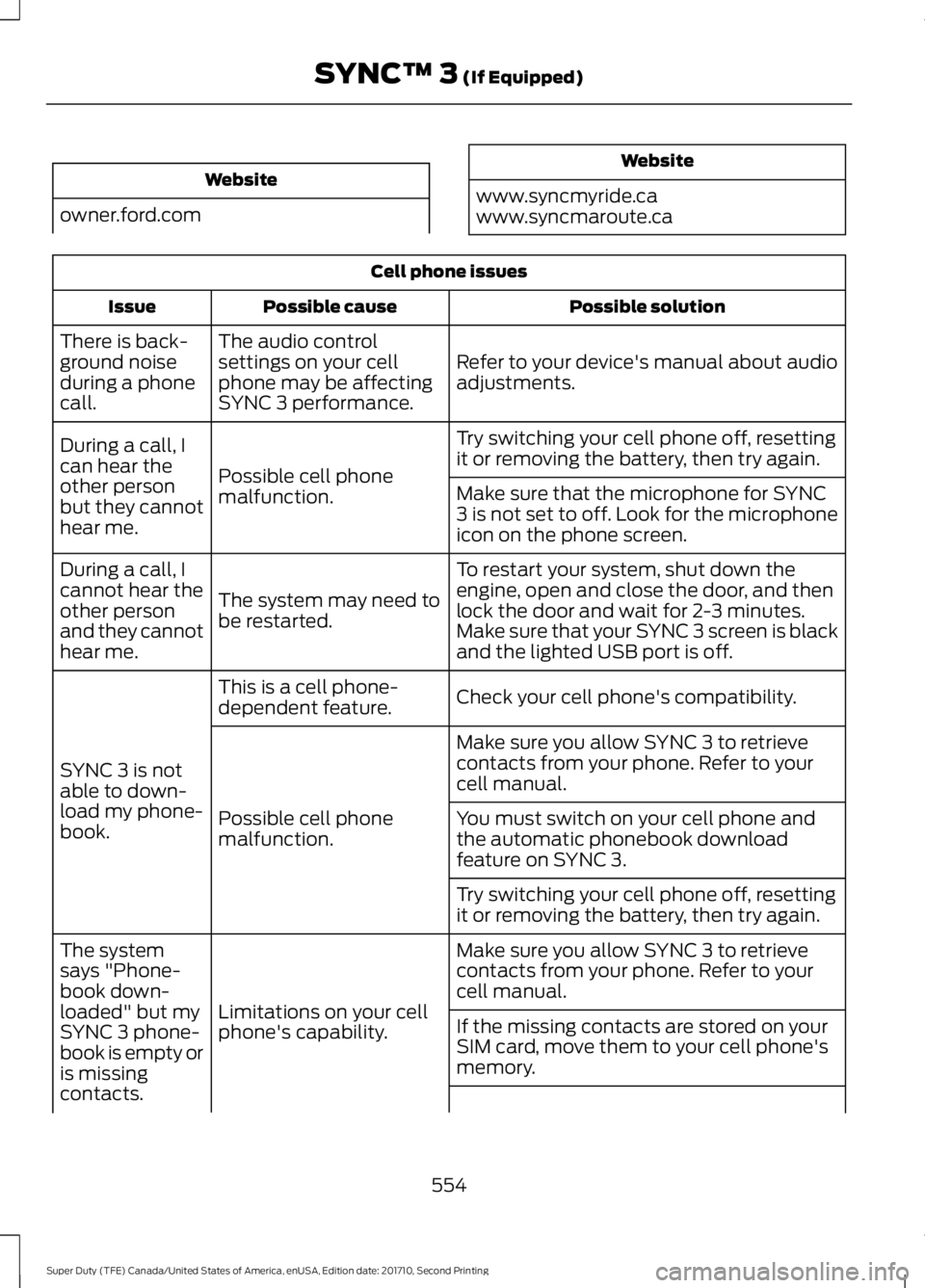
Website
owner.ford.com
Website
www.syncmyride.cawww.syncmaroute.ca
Cell phone issues
Possible solutionPossible causeIssue
Refer to your device's manual about audioadjustments.
The audio controlsettings on your cellphone may be affectingSYNC 3 performance.
There is back-ground noiseduring a phonecall.
Try switching your cell phone off, resettingit or removing the battery, then try again.Possible cell phonemalfunction.
During a call, Ican hear theother personbut they cannothear me.
Make sure that the microphone for SYNC3 is not set to off. Look for the microphoneicon on the phone screen.
To restart your system, shut down theengine, open and close the door, and thenlock the door and wait for 2-3 minutes.Make sure that your SYNC 3 screen is blackand the lighted USB port is off.
The system may need tobe restarted.
During a call, Icannot hear theother personand they cannothear me.
Check your cell phone's compatibility.This is a cell phone-dependent feature.
SYNC 3 is notable to down-load my phone-book.
Make sure you allow SYNC 3 to retrievecontacts from your phone. Refer to yourcell manual.
Possible cell phonemalfunction.You must switch on your cell phone andthe automatic phonebook downloadfeature on SYNC 3.
Try switching your cell phone off, resettingit or removing the battery, then try again.
Make sure you allow SYNC 3 to retrievecontacts from your phone. Refer to yourcell manual.Limitations on your cellphone's capability.
The systemsays "Phone-book down-loaded" but mySYNC 3 phone-book is empty oris missingcontacts.
If the missing contacts are stored on yourSIM card, move them to your cell phone'smemory.
554
Super Duty (TFE) Canada/United States of America, enUSA, Edition date: 201710, Second Printing
SYNC™ 3 (If Equipped)
Page 559 of 642
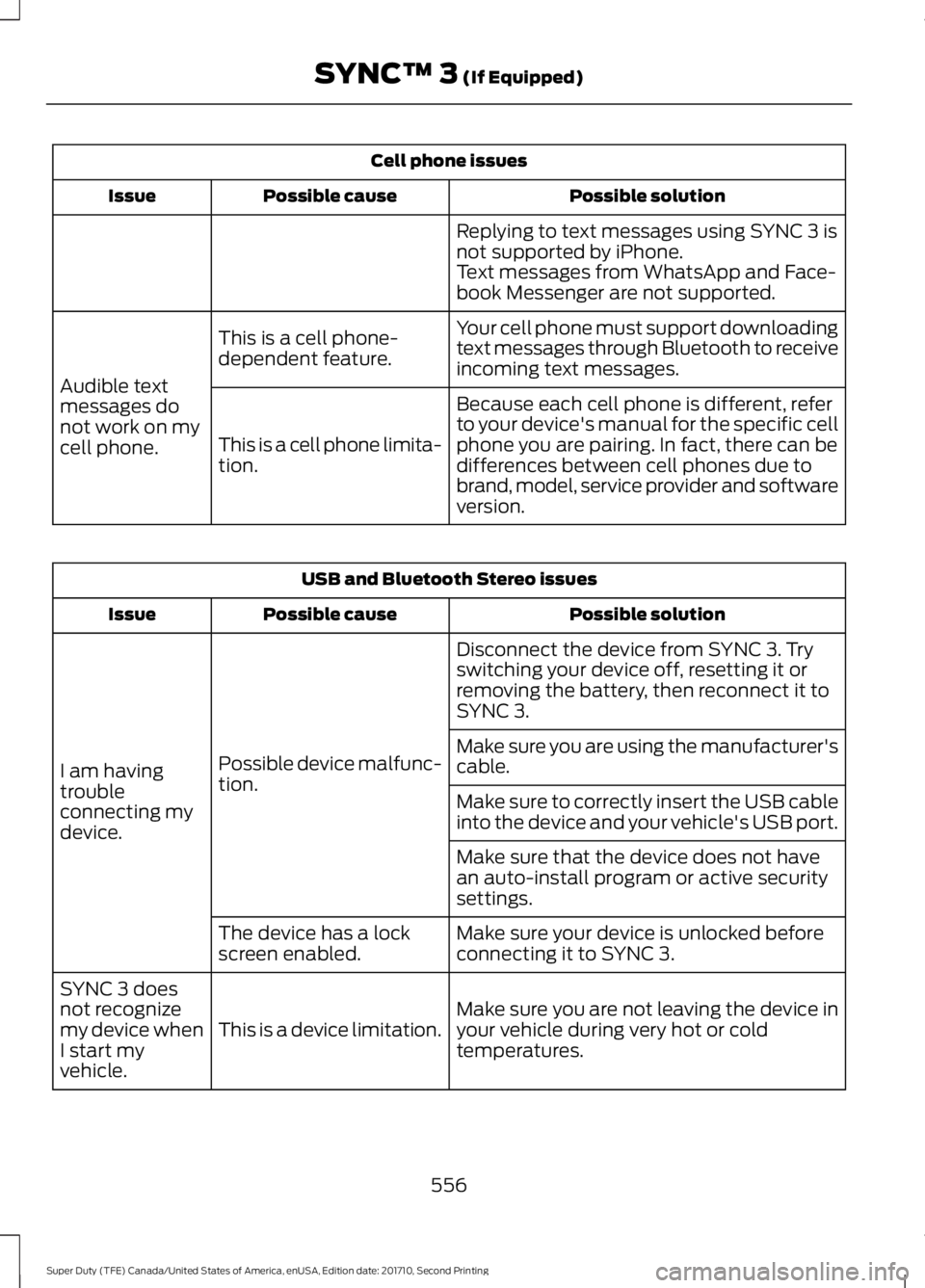
Cell phone issues
Possible solutionPossible causeIssue
Replying to text messages using SYNC 3 isnot supported by iPhone.Text messages from WhatsApp and Face-book Messenger are not supported.
Your cell phone must support downloadingtext messages through Bluetooth to receiveincoming text messages.
This is a cell phone-dependent feature.
Audible textmessages donot work on mycell phone.
Because each cell phone is different, referto your device's manual for the specific cellphone you are pairing. In fact, there can bedifferences between cell phones due tobrand, model, service provider and softwareversion.
This is a cell phone limita-tion.
USB and Bluetooth Stereo issues
Possible solutionPossible causeIssue
Disconnect the device from SYNC 3. Tryswitching your device off, resetting it orremoving the battery, then reconnect it toSYNC 3.
Possible device malfunc-tion.I am havingtroubleconnecting mydevice.
Make sure you are using the manufacturer'scable.
Make sure to correctly insert the USB cableinto the device and your vehicle's USB port.
Make sure that the device does not havean auto-install program or active securitysettings.
Make sure your device is unlocked beforeconnecting it to SYNC 3.The device has a lockscreen enabled.
Make sure you are not leaving the device inyour vehicle during very hot or coldtemperatures.This is a device limitation.
SYNC 3 doesnot recognizemy device whenI start myvehicle.
556
Super Duty (TFE) Canada/United States of America, enUSA, Edition date: 201710, Second Printing
SYNC™ 3 (If Equipped)
Page 560 of 642
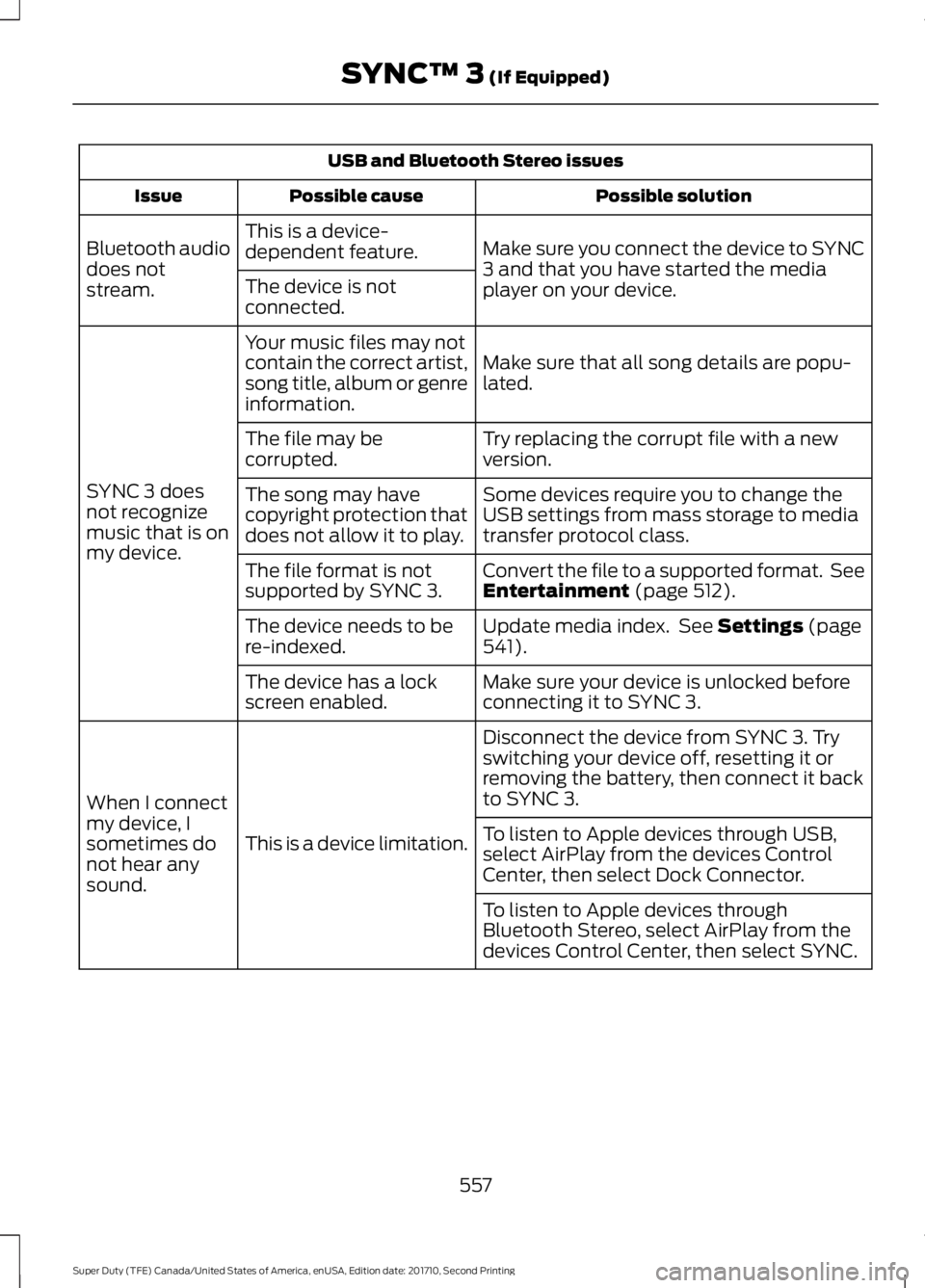
USB and Bluetooth Stereo issues
Possible solutionPossible causeIssue
Make sure you connect the device to SYNC3 and that you have started the mediaplayer on your device.
This is a device-dependent feature.Bluetooth audiodoes notstream.The device is notconnected.
Make sure that all song details are popu-lated.
Your music files may notcontain the correct artist,song title, album or genreinformation.
SYNC 3 doesnot recognizemusic that is onmy device.
Try replacing the corrupt file with a newversion.The file may becorrupted.
Some devices require you to change theUSB settings from mass storage to mediatransfer protocol class.
The song may havecopyright protection thatdoes not allow it to play.
Convert the file to a supported format. SeeEntertainment (page 512).The file format is notsupported by SYNC 3.
Update media index. See Settings (page541).The device needs to bere-indexed.
Make sure your device is unlocked beforeconnecting it to SYNC 3.The device has a lockscreen enabled.
Disconnect the device from SYNC 3. Tryswitching your device off, resetting it orremoving the battery, then connect it backto SYNC 3.
This is a device limitation.
When I connectmy device, Isometimes donot hear anysound.
To listen to Apple devices through USB,select AirPlay from the devices ControlCenter, then select Dock Connector.
To listen to Apple devices throughBluetooth Stereo, select AirPlay from thedevices Control Center, then select SYNC.
557
Super Duty (TFE) Canada/United States of America, enUSA, Edition date: 201710, Second Printing
SYNC™ 3 (If Equipped)
Page 563 of 642
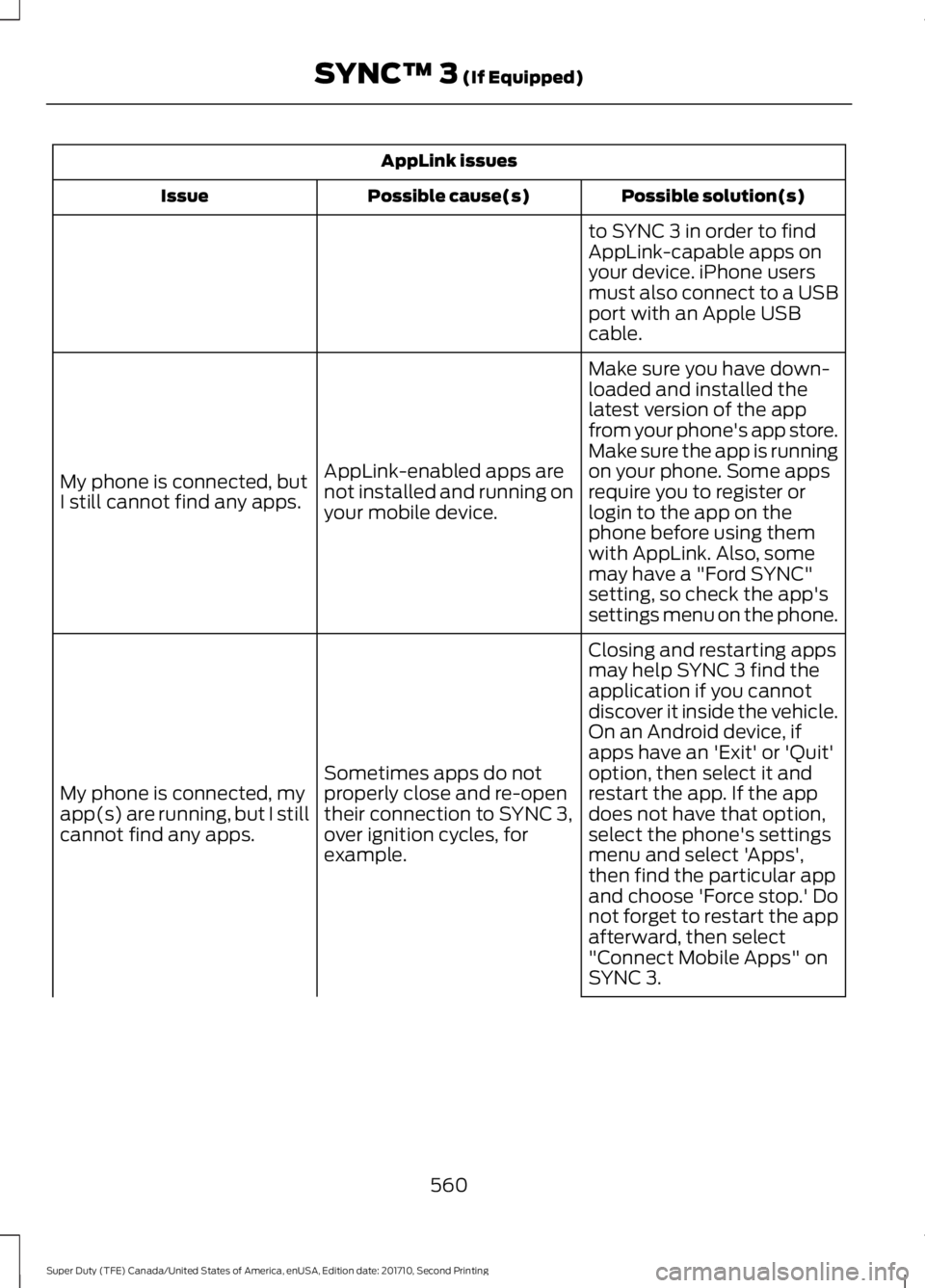
AppLink issues
Possible solution(s)Possible cause(s)Issue
to SYNC 3 in order to findAppLink-capable apps onyour device. iPhone usersmust also connect to a USBport with an Apple USBcable.
Make sure you have down-loaded and installed thelatest version of the appfrom your phone's app store.Make sure the app is runningon your phone. Some appsAppLink-enabled apps arenot installed and running onyour mobile device.
My phone is connected, butI still cannot find any apps.require you to register orlogin to the app on thephone before using themwith AppLink. Also, somemay have a "Ford SYNC"setting, so check the app'ssettings menu on the phone.
Closing and restarting appsmay help SYNC 3 find theapplication if you cannotdiscover it inside the vehicle.On an Android device, ifapps have an 'Exit' or 'Quit'Sometimes apps do notproperly close and re-opentheir connection to SYNC 3,over ignition cycles, forexample.
My phone is connected, myapp(s) are running, but I stillcannot find any apps.
option, then select it andrestart the app. If the appdoes not have that option,select the phone's settingsmenu and select 'Apps',then find the particular appand choose 'Force stop.' Donot forget to restart the appafterward, then select"Connect Mobile Apps" onSYNC 3.
560
Super Duty (TFE) Canada/United States of America, enUSA, Edition date: 201710, Second Printing
SYNC™ 3 (If Equipped)