2017 FORD F150 audio
[x] Cancel search: audioPage 5 of 599
Anti-Theft Alarm............................................76
Power Running Boards
Using Power Running Boards....................78
Steering Wheel
Adjusting the Steering Wheel...................80
Audio Control
...................................................81
Voice Control
...................................................82
Cruise Control..................................................82
Information Display Control
.......................83
Pedals
Adjusting the Pedals....................................84
Wipers and Washers
Windshield Wipers........................................85
Autowipers.......................................................85
Windshield Washers.....................................86
Lighting
Lighting Control
..............................................87
Autolamps........................................................87
Instrument Lighting Dimmer.....................88
Daytime Running Lamps
............................89
Automatic High Beam Control.................89
Front Fog Lamps.............................................91
Direction Indicators
........................................91
Spot Lamps
.......................................................91
Interior Lamps
.................................................92
Ambient Lighting
...........................................94
Windows and Mirrors
Power Windows
.............................................95
Exterior Mirrors
................................................96
Interior Mirror
...................................................99
Sliding Windows..........................................100
Sun Visors
.......................................................100
Moonroof........................................................100 Instrument Cluster
Gauges
..............................................................
102
Warning Lamps and Indicators...............105
Audible Warnings and Indicators...........108
Information Displays
General Information.....................................110
Information Messages
................................126
Climate Control
Manual Climate Control..............................141
Automatic Climate Control
.......................143
Hints on Controlling the Interior Climate.........................................................144
Heated Windows and Mirrors
...................147
Cabin Air Filter
................................................147
Remote Start.................................................148
Seats
Sitting in the Correct Position..................149
Head Restraints
............................................149
Manual Seats
..................................................151
Power Seats
....................................................152
Memory Function
.........................................154
Rear Seats.......................................................156
Heated Seats
.................................................156
Climate Controlled Seats...........................157
Front Seat Armrest......................................159
Rear Seat Armrest........................................159
Universal Garage Door Opener
Universal Garage Door Opener...............160
Auxiliary Power Points
Auxiliary Power Points................................164
Storage Compartments
Center Console
..............................................166
2
F-150 (TFC) Canada/United States of America, enUSA, First Printing Table of Contents
Page 8 of 599

Cleaning Products......................................340
Cleaning the Exterior...................................341
Waxing.............................................................342
Cleaning the Engine....................................342
Cleaning the Windows and Wiper Blades..........................................................343
Cleaning the Interior...................................343
Cleaning the Instrument Panel and Instrument Cluster Lens.......................344
Cleaning Leather Seats.............................344
Repairing Minor Paint Damage
..............345
Cleaning the Wheels
..................................346
Vehicle Storage
............................................346
Wheels and Tires
General Information...................................349
Tire Care
...........................................................351
Using Snow Chains.....................................366
Tire Pressure Monitoring System
...........367
Changing a Road Wheel............................372
Technical Specifications
..........................380
Capacities and Specific- ations
Engine Specifications - 2.7L EcoBoost™.................................................381
Engine Specifications - 3.5L.....................381
Engine Specifications - 3.5L Ecoboost™................................................382
Engine Specifications - 5.0L...................383
Motorcraft Parts - 2.7L EcoBoost™
......383
Motorcraft Parts - 3.5L..............................384
Motorcraft Parts - 3.5L Ecoboost™......385
Motorcraft Parts - 5.0L
.............................385
Vehicle Identification Number
...............386
Vehicle Certification Label.......................387
Transmission Code Designation............387
Capacities and Specifications - 2.7L EcoBoost™...............................................388
Capacities and Specifications - 3.5L....392 Capacities and Specifications - 3.5L
Ecoboost™................................................396
Capacities and Specifications - 5.0L..............................................................400
Audio System
General Information...................................405
Audio Unit - Vehicles With: AM/FM......406
Audio Unit - Vehicles With: AM/FM/ CD.................................................................408
Audio Unit - Vehicles With: AM/FM/ SYNC..............................................................411
Audio Unit - Vehicles With: AM/FM/CD/ SYNC/Satellite Radio
.............................413
Audio Unit - Vehicles With: Sony AM/FM/ CD...................................................................415
Digital Radio
...................................................417
Satellite Radio
...............................................419
USB Port
..........................................................422
Media Hub
......................................................422
SYNC™
General Information
...................................423
Using Voice Recognition...........................425
Using SYNC™ With Your Phone
............427
SYNC™ Applications and Services......439
Using SYNC™ With Your Media Player...........................................................444
SYNC™ Troubleshooting.........................453
SYNC™ 3
General Information
....................................461
Home Screen
.................................................472
Using Voice Recognition............................473
Entertainment..............................................480
Climate...........................................................490
Phone...............................................................492
Navigation......................................................498
Apps
.................................................................506
Settings...........................................................509
SYNC™ 3 Troubleshooting.......................521
5
F-150 (TFC) Canada/United States of America, enUSA, First Printing Table of Contents
Page 62 of 599
PRINCIPLE OF OPERATION
MyKey allows you to program keys with
restricted driving modes to promote good
driving habits. All but one of the keys
programmed to the vehicle can be
activated with these restricted modes.
Any keys that have not been programmed
are referred to as administrator keys or
admin keys. They can be used to:
•
Create a MyKey.
• Program configurable MyKey settings.
• Clear all MyKey features.
When you have programmed a MyKey, you
can access the following information using
the information display:
• How many admin keys and MyKeys are
programmed to your vehicle.
• The total distance your vehicle has
traveled using a MyKey.
Note: All MyKeys are programmed to the
same settings. You cannot program them
individually.
Note: For vehicles equipped with a
push-button start switch: When both a
MyKey and an admin key are present when
you start your vehicle, the system recognizes
the admin key only.
Non-configurable Settings
The following settings cannot be changed
by an admin key user:
• Belt-Minder or safety belt reminder.
You cannot disable this feature. The
audio system will mute when the front
seat occupants’ safety belts are not
fastened.
• Early low fuel. The low fuel warning is
activated earlier, giving the MyKey user
more time to refuel. •
Driver assist features, if equipped on
your vehicle, are forced on: parking aid,
blind spot information system (BLIS),
cross traffic alert, lane departure
warning and forward collision warning
system.
• Satellite radio adult content
restrictions (available only in some
markets).
Note: When you switch lane departure
warning off temporarily, it turns on at the
next ignition cycle.
Configurable Settings
With an admin key, you can configure
certain MyKey settings when you first
create a MyKey and before you recycle the
key or restart the vehicle. You can also
change the settings afterward with an
admin key:
• A vehicle speed limit can be set.
Warnings will be shown in the display,
followed by an audible tone when your
vehicle reaches the set speed. You
cannot override the set speed by fully
depressing the accelerator pedal or by
setting cruise control. WARNING
Do not set MyKey maximum speed
limit to a limit that will prevent the
driver from maintaining a safe speed
considering posted speed limits and
prevailing road conditions. The driver is
always responsible to drive in accordance
with local laws and prevailing conditions.
Failure to do so could result in accident or
injury. 59
F-150 (TFC) Canada/United States of America, enUSA, First Printing MyKey
™ (If Equipped)
Page 63 of 599
•
Various vehicle speed reminders so you
know when your vehicle approaches
the limits. Warnings appear in the
information display and an audible
warning sounds when you exceed the
limit.
• Audio system maximum volume of
45%. A message will be shown in the
display when you attempt to exceed
the limited volume. Also, the
speed-sensitive or compensated
automatic volume control will be
disabled.
• Always on setting. When this is
selected, you will not be able to turn
off Advance Trac or traction control,
911 Assist or Emergency Assistance, or
Do Not Disturb (if your vehicle is
equipped with these features).
CREATING A MYKEY
Use the information display to create a
MyKey.
To create a MyKey:
1. Place your key into the ignition or, if your vehicle is equipped with keyless
start, place your transmitter into the
backup position. Details on the backup
position's location are in another
chapter. See Starting a Gasoline
Engine (page 169).
2. Switch the ignition on.
3. Access the main menu using your left-hand-side steering wheel controls.
4. Depending on your display options, select either
Settings or Advanced
Settings, then MyKey and finally
Create MyKey.
5. When the menu reads
Hold OK to
Create MyKey, press and hold the OK
button to program a MyKey.
6. The display then prompts you to program the Configurable settings. You can program the configurable features
now or at any time. You can advance
through the settings without programming
them by pressing the
OK button. MyKey
then keeps all of the default settings.
When you finish programming your MyKey,
the Type 3 information display adds a
confirmation screen, New MyKey Has
Been Created
.
Programming/Changing
Configurable Settings
Use the information display to program or
change your configurable MyKey settings.
1. Place your admin key into the ignition or, if your vehicle is equipped with
keyless start, place your admin
transmitter into the backup position.
Details on the backup position's
location are in another chapter. See
Starting a Gasoline Engine
(page
169).
2. Depending on your display options, select either
Settings or Advanced
Settings, then MyKey and finally to
various configurable features.
3. Scroll down through the choices, and then highlight the feature you want to
configure.
Note: You can clear or change your MyKey
settings at any time during the same key
cycle as you created the MyKey. Once you
have switched the engine off, however, you
will need an admin key to change or clear
your MyKey settings.
CLEARING ALL MYKEYS
You can clear all MyKeys within the same
key cycle as you created the MyKey. If you
switch your ignition off, however, you will
need to use an admin key to clear your
MyKeys.
60
F-150 (TFC) Canada/United States of America, enUSA, First Printing MyKey
™
(If Equipped)
Page 84 of 599
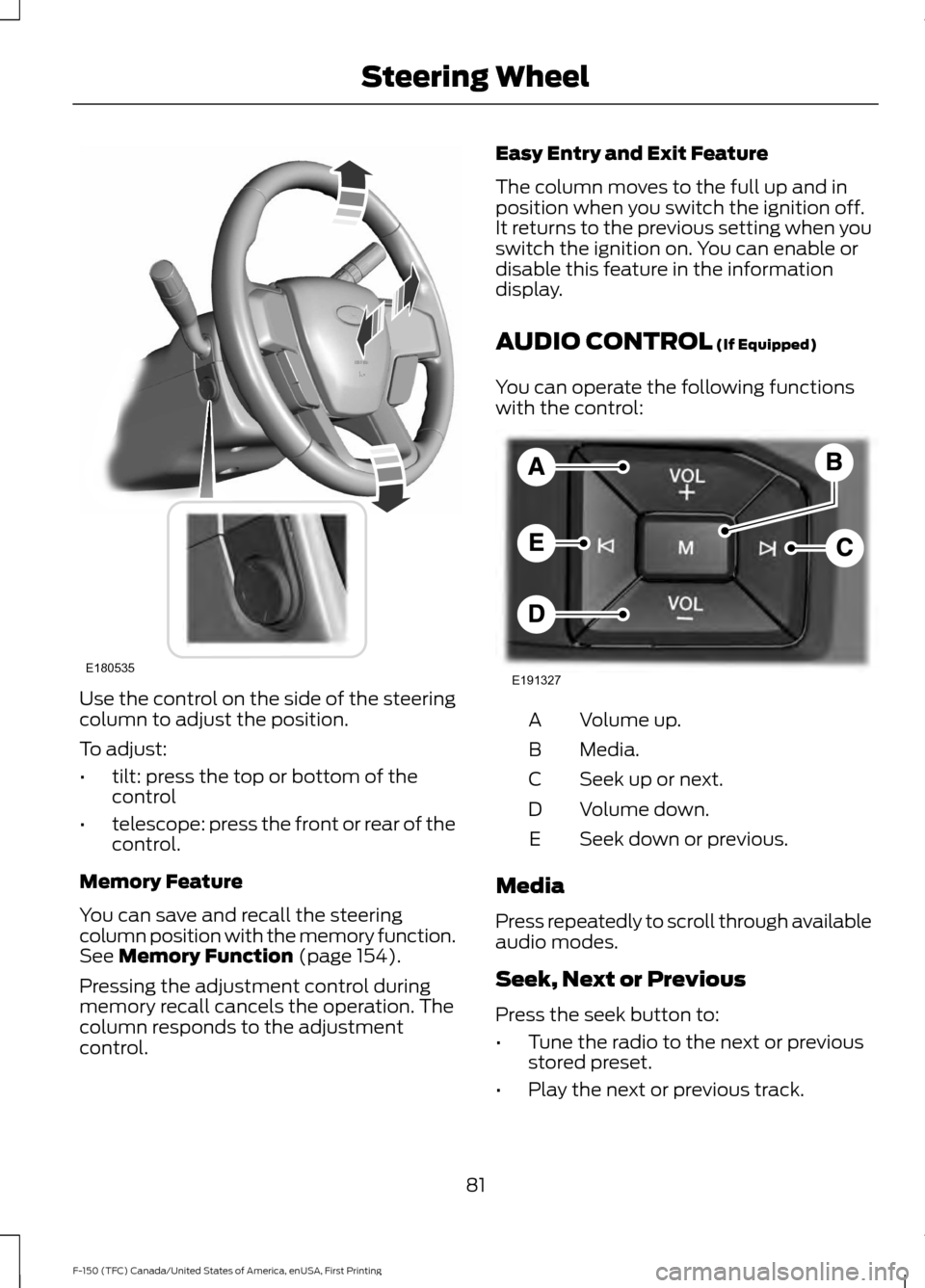
Use the control on the side of the steering
column to adjust the position.
To adjust:
•
tilt: press the top or bottom of the
control
• telescope: press the front or rear of the
control.
Memory Feature
You can save and recall the steering
column position with the memory function.
See Memory Function (page 154).
Pressing the adjustment control during
memory recall cancels the operation. The
column responds to the adjustment
control. Easy Entry and Exit Feature
The column moves to the full up and in
position when you switch the ignition off.
It returns to the previous setting when you
switch the ignition on. You can enable or
disable this feature in the information
display.
AUDIO CONTROL
(If Equipped)
You can operate the following functions
with the control: Volume up.
A
Media.
B
Seek up or next.
C
Volume down.
D
Seek down or previous.
E
Media
Press repeatedly to scroll through available
audio modes.
Seek, Next or Previous
Press the seek button to:
• Tune the radio to the next or previous
stored preset.
• Play the next or previous track.
81
F-150 (TFC) Canada/United States of America, enUSA, First Printing Steering WheelE180535 E191327
Page 137 of 599
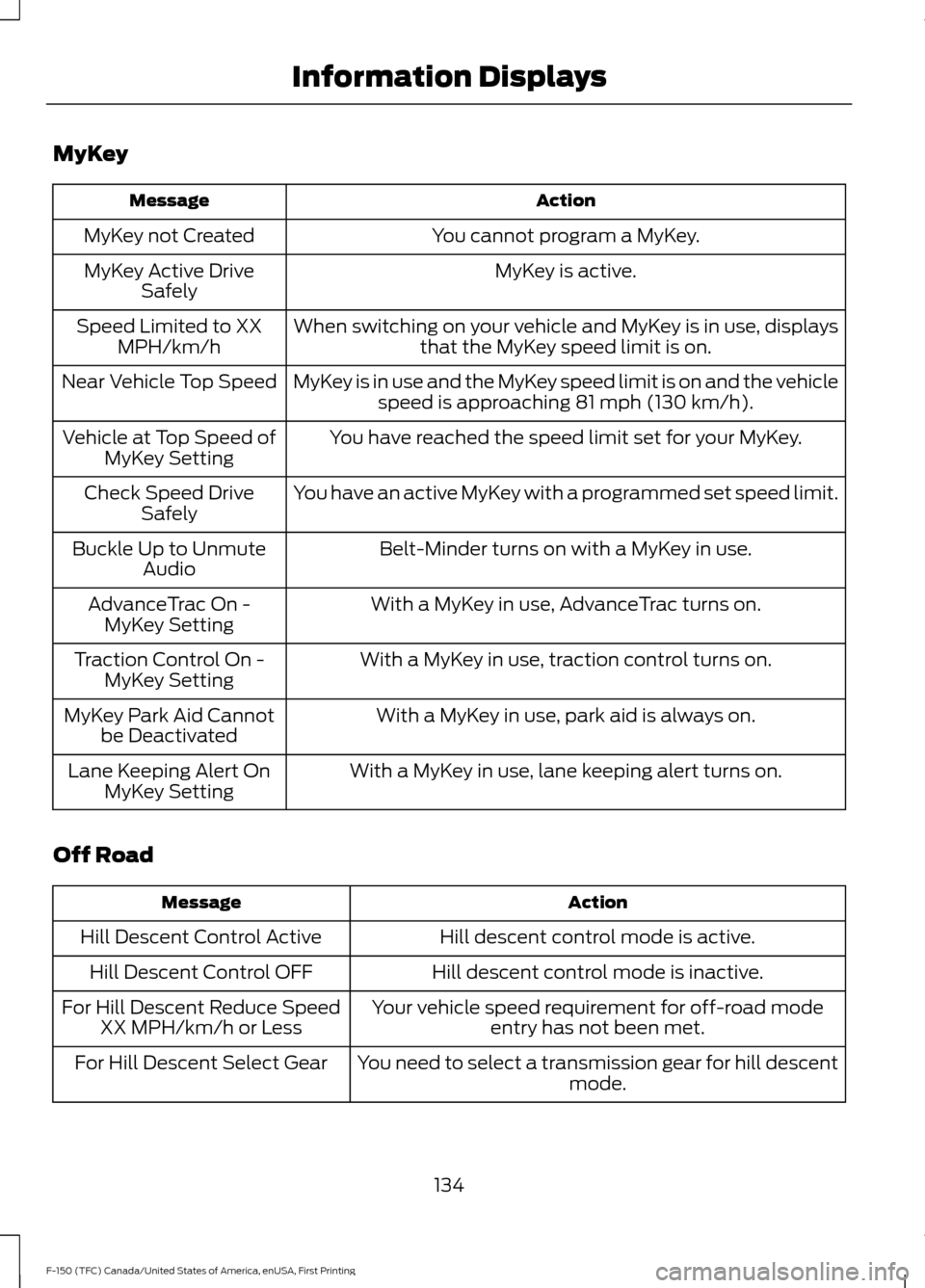
MyKey
Action
Message
You cannot program a MyKey.
MyKey not Created
MyKey is active.
MyKey Active Drive
Safely
When switching on your vehicle and MyKey is in use, displaysthat the MyKey speed limit is on.
Speed Limited to XX
MPH/km/h
MyKey is in use and the MyKey speed limit is on and the vehiclespeed is approaching 81 mph (130 km/h).
Near Vehicle Top Speed
You have reached the speed limit set for your MyKey.
Vehicle at Top Speed of
MyKey Setting
You have an active MyKey with a programmed set speed limit.
Check Speed Drive
Safely
Belt-Minder turns on with a MyKey in use.
Buckle Up to Unmute
Audio
With a MyKey in use, AdvanceTrac turns on.
AdvanceTrac On -
MyKey Setting
With a MyKey in use, traction control turns on.
Traction Control On -
MyKey Setting
With a MyKey in use, park aid is always on.
MyKey Park Aid Cannot
be Deactivated
With a MyKey in use, lane keeping alert turns on.
Lane Keeping Alert On
MyKey Setting
Off Road Action
Message
Hill descent control mode is active.
Hill Descent Control Active
Hill descent control mode is inactive.
Hill Descent Control OFF
Your vehicle speed requirement for off-road modeentry has not been met.
For Hill Descent Reduce Speed
XX MPH/km/h or Less
You need to select a transmission gear for hill descentmode.
For Hill Descent Select Gear
134
F-150 (TFC) Canada/United States of America, enUSA, First Printing Information Displays
Page 169 of 599
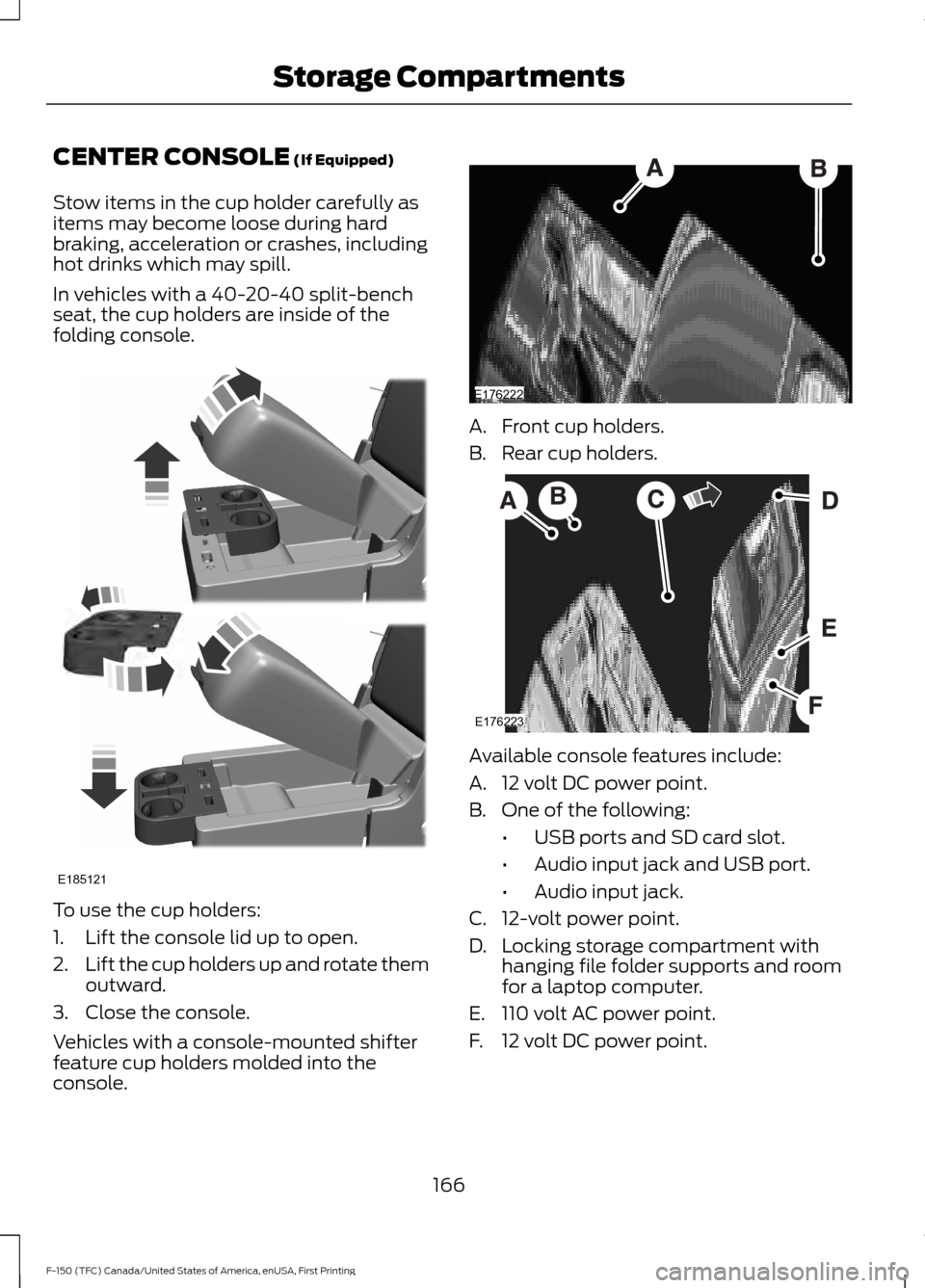
CENTER CONSOLE (If Equipped)
Stow items in the cup holder carefully as
items may become loose during hard
braking, acceleration or crashes, including
hot drinks which may spill.
In vehicles with a 40-20-40 split-bench
seat, the cup holders are inside of the
folding console. To use the cup holders:
1. Lift the console lid up to open.
2.
Lift the cup holders up and rotate them
outward.
3. Close the console.
Vehicles with a console-mounted shifter
feature cup holders molded into the
console. A. Front cup holders.
B. Rear cup holders.
Available console features include:
A. 12 volt DC power point.
B. One of the following:
•USB ports and SD card slot.
• Audio input jack and USB port.
• Audio input jack.
C. 12-volt power point.
D. Locking storage compartment with hanging file folder supports and room
for a laptop computer.
E. 110 volt AC power point.
F. 12 volt DC power point.
166
F-150 (TFC) Canada/United States of America, enUSA, First Printing Storage CompartmentsE185121 E176222 E176223
Page 217 of 599

Coverage area of up to 6 ft (1.8 m) from
the rear bumper. There may be decreased
coverage area at the outer corners of the
bumper.
The system detects certain objects while
the transmission is in reverse (R) :
• Your vehicle is moving toward a
stationary object at a speed of
3 mph
(5 km/h) or less.
• Your vehicle is not moving, but a
moving object is approaching the rear
of your vehicle at a speed of
3 mph
(5 km/h) or less.
• Your vehicle is moving at a speed of
less than 3 mph (5 km/h) and a moving
object is approaching the rear of your
vehicle at a speed of less than
3 mph
(5 km/h).
The system provides audio warnings only
when your vehicle is moving or when your
vehicle is stationary and the detected
obstacle is less than
12 in (30 cm) away
from the bumper.
Obstacle Distance Indicator
(If
Equipped)
The system provides obstacle distance
indication through the display screen. See
Rear View Camera
(page 218). ACTIVE PARK ASSIST (If Equipped) WARNINGS
Designed to be a supplementary park
aid, this system may not work in all
conditions. This system cannot
replace the driver ’s attention and
judgment. The driver is responsible for
avoiding hazards and maintaining a safe
distance and speed, even when the system
is in use. Active Park Assist does not apply the
brakes under any circumstances.
Note:
The driver is always responsible for
controlling the vehicle, supervising the
system and intervening if required.
Active Park Assist is an electronic parking
aid that uses ultrasonic sensors. The
system detects an available parallel
parking space and automatically steers
your vehicle into the space (hands-free)
while you control the accelerator, gearshift
and brakes. The system visually and
audibly instructs you to park your vehicle.
The system may not function correctly if
something passes between the front
bumper and the parking space (a
pedestrian or cyclist) or if the edge of the
neighboring parked vehicle is high off the
ground (for example, a bus, tow truck or
flatbed truck).
Note: The sensors may not detect objects
in heavy rain, snow or other conditions that
cause disruptive reflections.
Note: Keep the sensors, located on the
bumper or fascia, free from snow, ice and
large accumulations of dirt. Covered sensors
can affect the system's accuracy. Do not
clean the sensors with sharp objects.
Note: The sensors may not detect objects
with surfaces that absorb ultrasonic waves.
214
F-150 (TFC) Canada/United States of America, enUSA, First Printing Parking AidsE231381