2017 FORD F150 brake light
[x] Cancel search: brake lightPage 375 of 599

11.
Set all four tires to the recommended
air pressure as indicated on the
Safety Compliance Certification
Label (affixed to either the door hinge
pillar, door-latch post, or the door
edge that meets the door-latch post,
next to the driver's seating position)
or Tire Label located on the B-Pillar
or the edge of the driver's door.
CHANGING A ROAD WHEEL WARNINGS
Do not use tire sealants as they may
damage the tire pressure monitoring
system.
If the tire pressure monitor sensor
becomes damaged it may not
function.
Note:
The tire pressure monitoring system
indicator light will illuminate when the spare
tire is in use. To restore the full function of
the monitoring system, all road wheels
equipped with tire pressure monitoring
sensors must be mounted on this vehicle.
If you get a flat tire while driving, do not
apply the brake heavily. Instead, gradually
decrease your speed. Hold the steering
wheel firmly and slowly move to a safe
place on the side of the road.
Have a flat serviced by an authorized
dealer in order to prevent damage to the
system sensors See Tire Pressure
Monitoring System (page 367). Replace
the spare tire with a road tire as soon as
possible. During repairing or replacing of
the flat tire, have the authorized dealer
inspect the system sensor for damage. Dissimilar Spare Wheel and Tire
Assembly Information WARNING
Failure to follow these guidelines
could result in an increased risk of
loss of vehicle control, injury or death.
If you have a dissimilar spare wheel and
tire, then it is intended for temporary use
only. This means that if you need to use it,
you should replace it as soon as possible
with a road wheel and tire assembly that
is the same size and type as the road tires
and wheels that were originally provided
by Ford. If the dissimilar spare tire or wheel
is damaged, it should be replaced rather
than repaired.
A dissimilar spare wheel and tire assembly
is defined as a spare wheel and tire
assembly that is different in brand, size or
appearance from the road tires and wheels
and can be one of three types:
1.
T-type mini-spare:
This spare tire
begins with the letter T for tire size and
may have Temporary Use Only molded in
the sidewall.
2. Full-size dissimilar spare with label
on wheel:
This spare tire has a label on
the wheel that states: THIS WHEEL AND
TIRE ASSEMBLY FOR TEMPORARY USE
ONLY
When driving with one of the dissimilar
spare tires listed above, do not:
• Exceed
50 mph (80 km/h).
• Load the vehicle beyond maximum
vehicle load rating listed on the Safety
Compliance Label.
• Tow a trailer.
• Use snow chains on the end of the
vehicle with the dissimilar spare tire.
• Use more than one dissimilar spare tire
at a time.
372
F-150 (TFC) Canada/United States of America, enUSA, First Printing Wheels and Tires
Page 377 of 599
WARNINGS
Always use the jack provided as
original equipment with your vehicle.
If using a jack other than the one
provided, make sure the jack capacity is
adequate for the vehicle weight, including
any vehicle cargo or modifications. If you
are unsure if the jack capacity is adequate,
contact the authorized dealer. Switch off the running boards before
jacking or placing any object under
your vehicle. Never place your hand
between the extended running board and
your vehicle. A moving running board may
cause injury. Note:
Only use the spare tire carrier to stow
the tire and wheel combination provided
with your vehicle. Other tire and wheel
combinations can cause the tire carrier to
fail.
Note: Do not use impact tools or power
tools operating at over 200 RPM on the
spare tire carrier, this may cause a winch
malfunction and prevent a secure fit.
Override the winch at least three times
(there will be an audible click each time) to
make sure the wheel and tire have been
installed securely.
Note: Passengers should not remain in the
vehicle when the vehicle is being jacked.
Park on a level surface, activate the hazard
flashers and set the parking brake. Then,
place the transmission in park (P) and turn
the engine off.
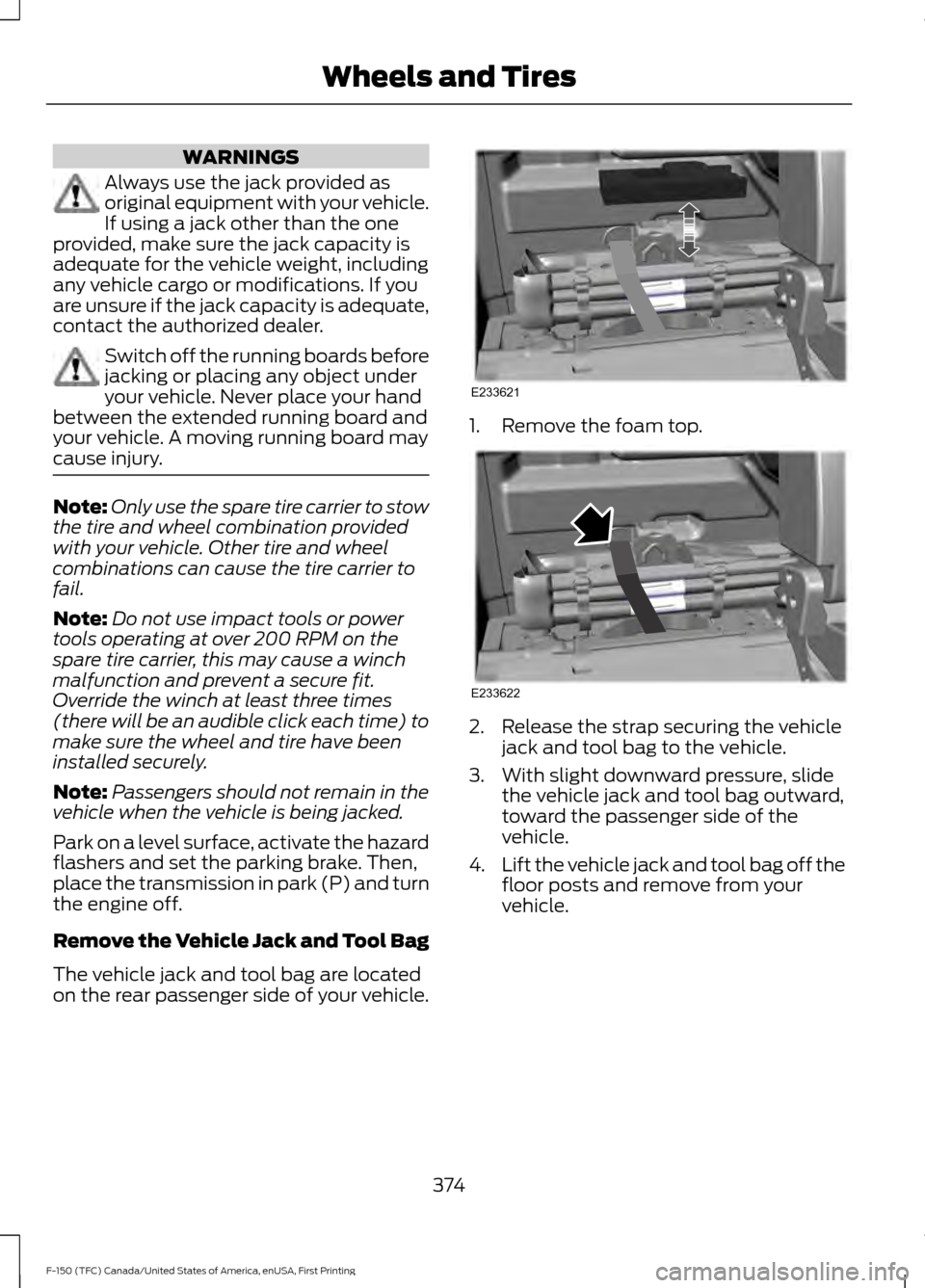
Remove the Vehicle Jack and Tool Bag
The vehicle jack and tool bag are located
on the rear passenger side of your vehicle. 1. Remove the foam top.
2. Release the strap securing the vehicle
jack and tool bag to the vehicle.
3. With slight downward pressure, slide the vehicle jack and tool bag outward,
toward the passenger side of the
vehicle.
4. Lift the vehicle jack and tool bag off the
floor posts and remove from your
vehicle.
374
F-150 (TFC) Canada/United States of America, enUSA, First Printing Wheels and TiresE233621 E233622
Page 537 of 599

For a complete listing of the accessories
that are available for your vehicle, please
contact your authorized dealer or visit the
online store web site:
Web Address (United States)
www.Accessories.Ford.com Web Address (Canada)
www.Accessories.Ford.ca
Ford Accessories are available for your
vehicle through an authorized Ford dealer.
Ford Motor Company will repair or replace
any properly authorized dealer-installed
Ford Original Accessory found to be
defective in factory-supplied materials or
workmanship during the warranty period,
as well as any component damaged by the
defective accessories.
Ford Motor Company will warrant your
accessory through the warranty that
provides the greatest benefit:
• 24 months, unlimited mileage.
• The remainder of your new vehicle
limited warranty.
Contact an authorized dealer for details
and a copy of the warranty.
Exterior style
• Bed rails.
• Chrome exhaust tips.
• Custom graphics*.
• Fender flares.
• Hood deflector.
• Running boards.
• Side window deflectors.
• Splash guards.
• Tailgate dampener. •
Tow hooks.
• Trim kits.
Interior style
• Ambient lighting.
• Floor mats.
• Leather-trimmed interior seating*.
• Tray floor liners.
Lifestyle
• Bed extender.
• Bedliners and bedmats.
• Bed ramps.
• Bed side step.
• Ford Telematics ™*.
• Hitch balls and towbars.
• Interior cargo organization and
management.
• In-vehicle safe*.
• Racks and carriers*.
• Rear-seat entertainment*.
• Smoker's package.
• Sportliner cargo liner*.
• Tonneau covers*.
• Towing mirrors.
• Trailer brake controller.
• Trailer hitches, wiring harnesses and
accessories.
• Truck bed camping tent*.
• Truck bed cargo organization and
management.
• Wireless charging*.
Peace of mind
• Back-up alarm*.
• Bed hooks*.
• Bumper- and hitch-mounted parking
sensors*.
534
F-150 (TFC) Canada/United States of America, enUSA, First Printing Accessories
Page 544 of 599

Check every month
Engine oil level.
Function of all interior and exterior lights.
Tires (including spare) for wear and proper pressure. Windshield washer fluid level. Check every six months
Battery connections. Clean if necessary.
Body and door drain holes for obstructions. Clean if necessary. Cooling system fluid level and coolant strength.
Door weatherstrips for wear. Lubricate if necessary.
Hinges, latches and outside locks for proper operation. Lubricate if necessary. Parking brake for proper operation.
Safety belts and seat latches for wear and function.
Safety warning lamps (brake, ABS, airbag and safety belt) for operation.
Washer spray and wiper operation. Clean or replace blades as necessary.
Multi-Point Inspection
In order to keep your vehicle running right,
it is important to have the systems on your
vehicle checked regularly. This can help
identify potential issues and prevent major
problems. We recommend having the
following multi-point inspection performed
at every scheduled maintenance interval
to help make sure your vehicle keeps
running great.
541
F-150 (TFC) Canada/United States of America, enUSA, First Printing Scheduled Maintenance
Page 588 of 599
3
360 Degree Camera....................................221
Camera Views...................................................... 221
Front Camera....................................................... 222
Side Camera........................................................ 222
4
4WD See: Four-Wheel Drive...................................... 193
A
A/C See: Climate Control.......................................... 141
About This Manual
...........................................7
ABS See: Brakes.......................................................... 203
ABS driving hints See: Hints on Driving With Anti-Lock
Brakes............................................................... 203
Accessories....................................................534 Exterior style........................................................ 534
Interior style......................................................... 534
Lifestyle................................................................. 534
Peace of mind..................................................... 534
Accessories See: Replacement Parts
Recommendation............................................ 12
ACC See: Using Adaptive Cruise Control............225
Active Park Assist
.........................................214
Automatic Steering into Parking
Space................................................................. 216
Deactivating the Park Assist Feature..........216
Troubleshooting the System........................... 217
Using Active Park Assist................................... 215
Adjusting the Headlamps.........................332 Horizontal Aim Adjustment........................... 333
Vertical Aim Adjustment................................. 332
Adjusting the Pedals....................................84
Adjusting the Steering Wheel...................80 Power Tilt and Telescope Steering
Column............................................................... 80
Airbag Disposal
...............................................52
Air Conditioning See: Climate Control.......................................... 141Air Filter
See: Changing the Engine Air Filter.............339
Alarm See: Anti-Theft Alarm........................................ 76
Ambient Lighting
...........................................94
Anti-Theft Alarm............................................76
Arming the Alarm.................................................. 77
Disarming the Alarm............................................ 77
Full Guard ................................................................ 77
Reduced Guard...................................................... 76
Appendices....................................................558
Apps
.................................................................506
........................................................................\
......... 506
SiriusXM Traffic and Travel Link.................. 508
Audible Warnings and Indicators...........108 Airbag Secondary Warning............................ 108
Beltminder Warning.......................................... 109
Door Ajar Warning.............................................. 109
Headlamps On Warning.................................. 109
Key in Ignition Warning..................................... 109
Keyless Warning Alert....................................... 109
Parking Brake On Warning.............................. 109
Rear Park Aid Warning..................................... 109
Service Advancetrac Warning....................... 109
Audio Control
...................................................81
Media........................................................................\
. 81
Seek, Next or Previous......................................... 81
Audio System
...............................................405
General Information......................................... 405
Audio Unit - Vehicles With: AM/FM/CD/ SYNC/Satellite Radio
..............................413
Audio Unit - Vehicles With: AM/FM/ CD..................................................................408
Audio Unit - Vehicles With: AM/FM/ SYNC...............................................................411
Audio Unit - Vehicles With: AM/ FM..................................................................406
Audio Unit - Vehicles With: Sony AM/ FM/CD............................................................415
Autolamps........................................................87 Windshield Wiper Activated
Headlamps........................................................ 88
Automatic Climate Control.......................143
Automatic High Beam Control.................89 Activating the System........................................ 90
Manually Overriding the System................... 90
Automatic Transmission
...........................186
Brake-Shift Interlock......................................... 190
585
F-150 (TFC) Canada/United States of America, enUSA, First Printing Index
Page 593 of 599
Recommended Settings for Cooling..........146
Recommended Settings for Heating..........146
Side Window Defogging in Cold
Weather............................................................. 147
Hints on Driving With Anti-Lock Brakes...........................................................203
Home Screen.................................................472
Hood Lock See: Opening and Closing the Hood............317
I
Ignition Switch
...............................................168
In California (U.S. Only).............................301
Information Display Control
.......................83
Information Displays....................................110
General Information........................................... 110
Information Messages
................................126
4WD........................................................................\
140
Active Park............................................................. 127
Adaptive Cruise Control.................................... 127
AdvanceTrac and Traction Control..............128
Airbag...................................................................... 128
Alarm and Security............................................ 128
Battery and Charging System........................ 129
Blind Spot Information and Cross Traffic Alert System.................................................... 129
Collision Warning System............................... 130
Doors and Locks................................................. 130
Driver Alert.............................................................. 131
Drivetrain................................................................. 131
Engine....................................................................... 131
Fuel........................................................................\
... 132
Keys and Intelligent Access............................ 132
Lane Keeping System........................................ 133
Maintenance......................................................... 133
MyKey...................................................................... 134
Off Road................................................................. 134
Park Aid.................................................................. 135
Park Brake.............................................................. 135
Power Steering.................................................... 136
Pro Trailer Backup Assist................................. 136
Remote Start........................................................ 137
Seats....................................................................... 138
Side-Wind............................................................. 138
Starting System ................................................. 138
Tire Pressure Monitoring System.................. 139
Trailer....................................................................... 139Installing Child Restraints.............................17
Child Seats............................................................... 17
Combining Seatbelt and LATCH Lower Anchors for Attaching Child Safety
Seats.................................................................... 26
Front Seat Tether Strap Attachment (Regular Cab).................................................... 27
Rear Seat Tether Strap Attachment (Crew Cab and Super Cab)...................................... 28
Use of Inboard Lower Anchors from the Outboard Seating Positions (Center
Seating Use) ..................................................... 25
Using Inflatable Seatbelts (Rear Seat Outboard Positions)....................................... 22
Using Lap and Shoulder Belts (Except Front Center Position of Super Cab and Crew
Cab)...................................................................... 18
Using Lap and Shoulder Belts (Front Center Position of Super Cab and Crew
Cab)..................................................................... 20
Using Lower Anchors and Tethers for CHildren (LATCH)........................................... 24
Using Tether Straps............................................. 26
Instrument Cluster
.......................................102
Instrument Lighting Dimmer.....................88
Interior Lamps
.................................................92
Front Interior Lamps........................................... 92
Rear Interior Lamps............................................. 94
Interior Mirror
...................................................99
Auto-Dimming Mirror......................................... 99
Introduction.........................................................7
J
Jump Starting the Vehicle........................295 Connecting the Jumper Cables.................... 295
Jump Starting..................................................... 296
Preparing Your Vehicle.....................................295
Removing the Jumper Cables....................... 296
K
Keyless Entry...................................................66 SECURICODE™ KEYLESS ENTRY
KEYPAD.............................................................. 66
Keyless Starting............................................168 Ignition Modes..................................................... 169
Keys and Remote Controls.........................53
590
F-150 (TFC) Canada/United States of America, enUSA, First Printing Index
Page 598 of 599
Hilly Condition and Trailer Tow
Usage................................................................. 229
Low Speed Automatic Cancellation..........229
Overriding the System..................................... 228
Resuming the Set Speed................................ 228
Setting a Speed.................................................. 226
Setting the Gap Distance................................ 227
Switching the System Off.............................. 229
Switching the System On............................... 226
Switching to Normal Cruise Control............231
System Not Available...................................... 230
Using Cruise Control...................................224
Switching Cruise Control Off......................... 225
Switching Cruise Control On and Off.........224
Using Four-Wheel Drive
.............................193
4WD Indicator Lights........................................ 193
Driving Off-Road With Truck and Utility Vehicles............................................................. 196
How Your Vehicle Differs From Other Vehicles............................................................. 196
Using the 2-Speed Automatic 4WD System............................................................... 194
Using the Electronic Shift on the Fly 4WD system............................................................... 193
Using Hill Descent Control
........................212
Hill descent modes............................................ 212
Using MyKey With Remote Start Systems..........................................................62
Using Power Running Boards....................78 Automatic Power Deploy.................................. 78
Automatic Power Stow...................................... 78
Bounce-back.......................................................... 79
Enabling and Disabling...................................... 78
Manual Power Deploy........................................ 78
Using Snow Chains.....................................366
Using Stability Control...............................210 AdvanceTrac ™ with Roll Stability Control ™
(RSC™)............................................................. 210
Using SYNC™ With Your Media Player............................................................444
Accessing Your USB Song Library...............448
Bluetooth Devices and System Settings............................................................ 450
Connecting Your Digital Media Player to the USB Port.......................................................... 444
Media Menu Features....................................... 447
Media Voice Commands................................ 445
USB 2..................................................................... 450Voice Commands for Audio Sources..........451
Using SYNC™ With Your Phone
............427
Accessing Features through the Phone
Menu.................................................................. 432
Accessing Your Phone Settings................... 435
Bluetooth Devices............................................. 436
Making Calls......................................................... 431
Pairing a Phone for the First Time...............428
Pairing Subsequent Phones.......................... 429
Phone Options during an Active Call..........431
Phone Voice Commands................................ 429
Receiving Calls..................................................... 431
System Settings................................................. 437
Text Messaging................................................... 433
Using Traction Control
..............................208
Switching the System Off ............................. 208
System Indicator Lights and Messages......................................................... 208
Using Voice Recognition...........................425 Audio Voice Commands.................................. 474
Climate Voice Commands.............................. 475
Initiating a Voice Session................................ 425
Mobile App Voice Commands...................... 478
Navigation Voice Commands........................ 477
Phone Voice Commands................................ 475
SiriusXM Traffic and Travel Link Voice Commands..................................................... 478
System Interaction and Feedback..............426
Voice Settings Commands............................ 479
Utilizing the Mediation/Arbitration Program (Canada Only)........................303
V
Vehicle Care
..................................................340
General Information......................................... 340
Vehicle Certification Label.......................387
Vehicle Identification Number
...............386
Vehicle Storage............................................346
Battery.................................................................... 347
Body....................................................................... 346
Brakes..................................................................... 347
Cooling system................................................... 347
Engine..................................................................... 347
Fuel system.......................................................... 347
General.................................................................. 346
Miscellaneous...................................................... 347
Removing Vehicle From Storage.................. 347
595
F-150 (TFC) Canada/United States of America, enUSA, First Printing Index