2017 FORD F150 key
[x] Cancel search: keyPage 498 of 599
Action and Description
Menu Item
Item
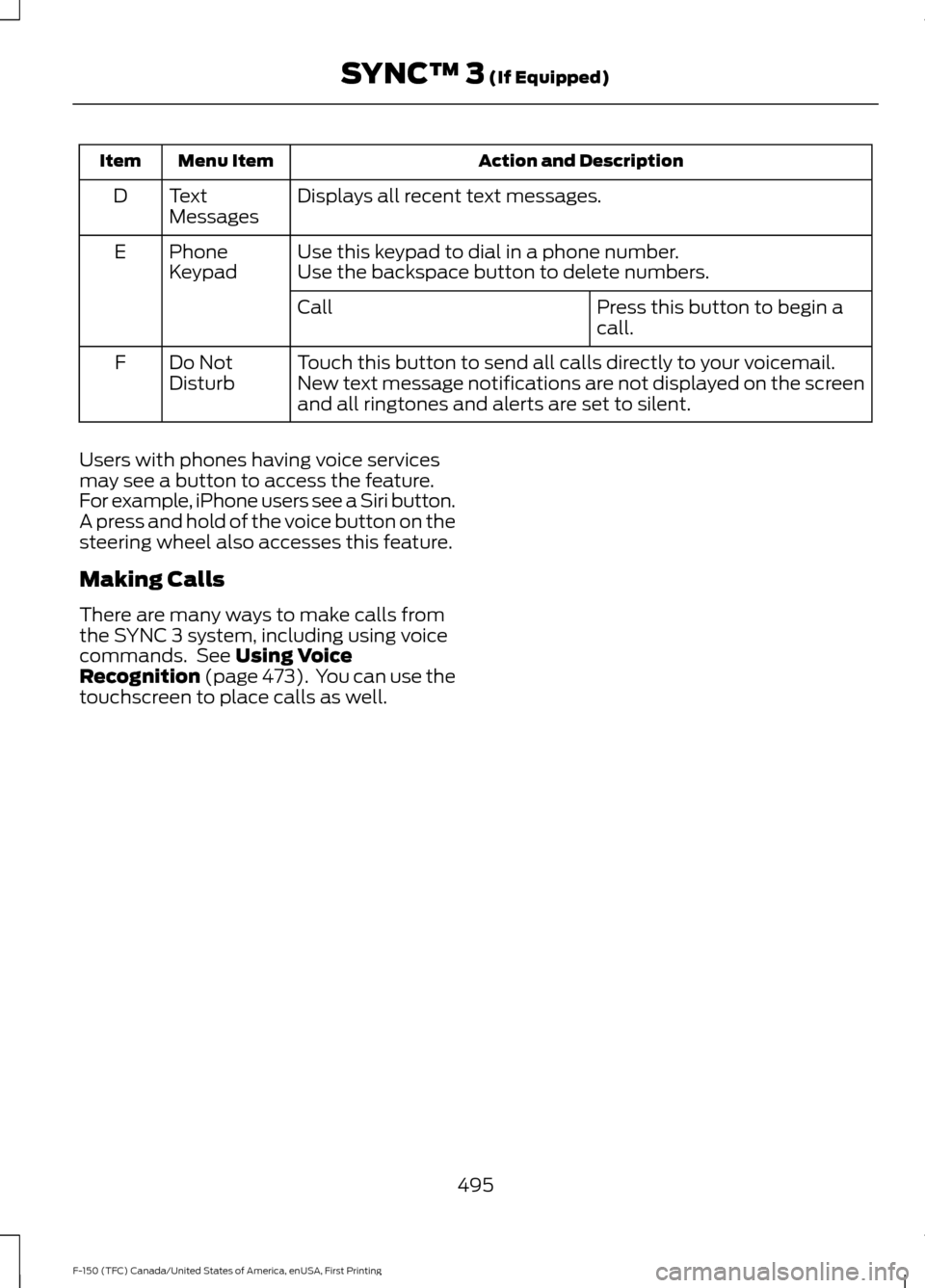
Displays all recent text messages.
Text
Messages
D
Use this keypad to dial in a phone number.
Phone
Keypad
E
Use the backspace button to delete numbers.
Press this button to begin a
call.
Call
Touch this button to send all calls directly to your voicemail.
New text message notifications are not displayed on the screen
and all ringtones and alerts are set to silent.
Do Not
Disturb
F
Users with phones having voice services
may see a button to access the feature.
For example, iPhone users see a Siri button.
A press and hold of the voice button on the
steering wheel also accesses this feature.
Making Calls
There are many ways to make calls from
the SYNC 3 system, including using voice
commands. See Using Voice
Recognition (page 473). You can use the
touchscreen to place calls as well.
495
F-150 (TFC) Canada/United States of America, enUSA, First Printing SYNC™ 3
(If Equipped)
Page 499 of 599
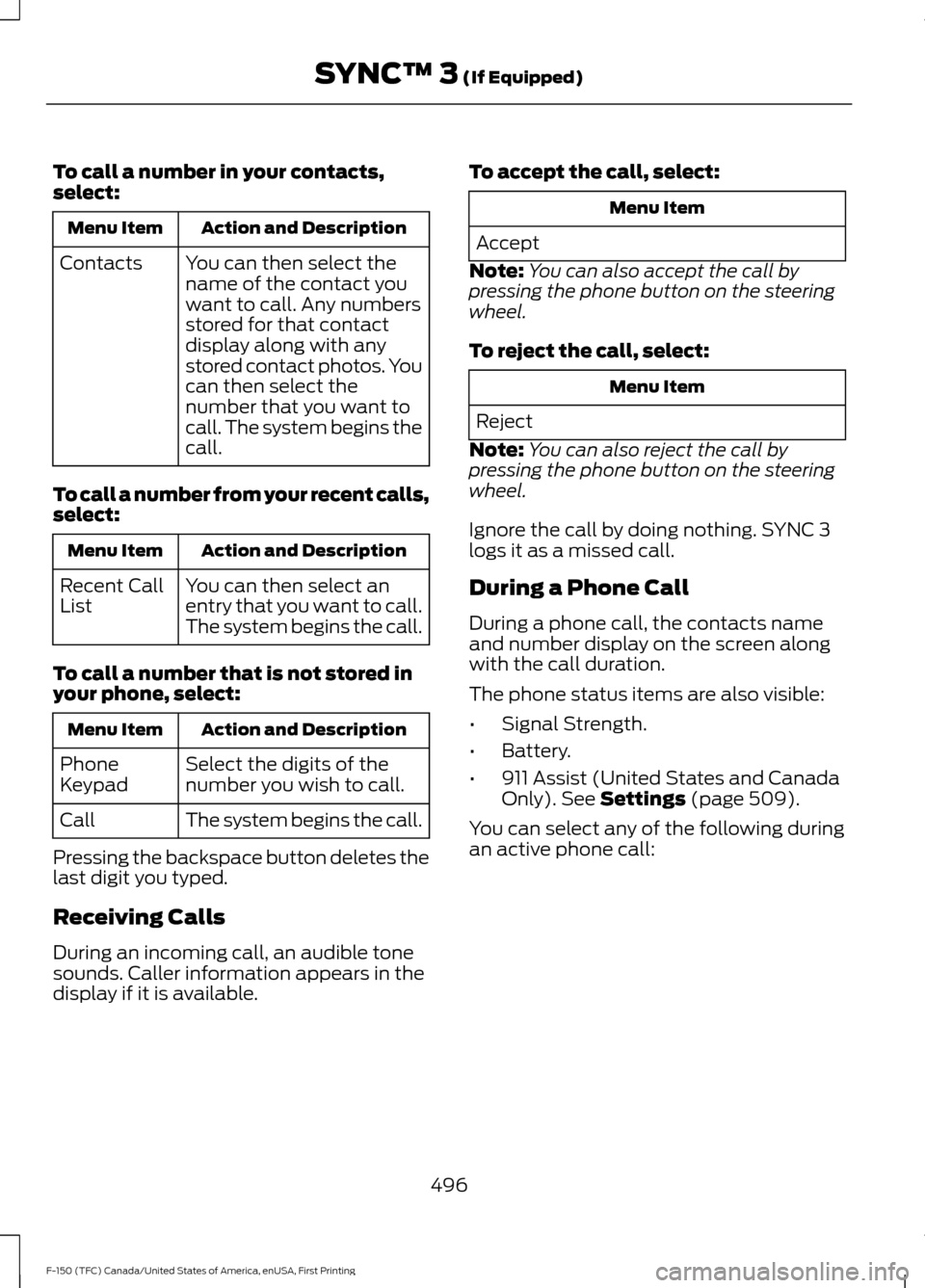
To call a number in your contacts,
select:
Action and Description
Menu Item
You can then select the
name of the contact you
want to call. Any numbers
stored for that contact
display along with any
stored contact photos. You
can then select the
number that you want to
call. The system begins the
call.
Contacts
To call a number from your recent calls,
select: Action and Description
Menu Item
You can then select an
entry that you want to call.
The system begins the call.
Recent Call
List
To call a number that is not stored in
your phone, select: Action and Description
Menu Item
Select the digits of the
number you wish to call.
Phone
Keypad
The system begins the call.
Call
Pressing the backspace button deletes the
last digit you typed.
Receiving Calls
During an incoming call, an audible tone
sounds. Caller information appears in the
display if it is available. To accept the call, select: Menu Item
Accept
Note: You can also accept the call by
pressing the phone button on the steering
wheel.
To reject the call, select: Menu Item
Reject
Note: You can also reject the call by
pressing the phone button on the steering
wheel.
Ignore the call by doing nothing. SYNC 3
logs it as a missed call.
During a Phone Call
During a phone call, the contacts name
and number display on the screen along
with the call duration.
The phone status items are also visible:
• Signal Strength.
• Battery.
• 911 Assist (United States and Canada
Only). See Settings (page 509).
You can select any of the following during
an active phone call:
496
F-150 (TFC) Canada/United States of America, enUSA, First Printing SYNC™ 3
(If Equipped)
Page 500 of 599
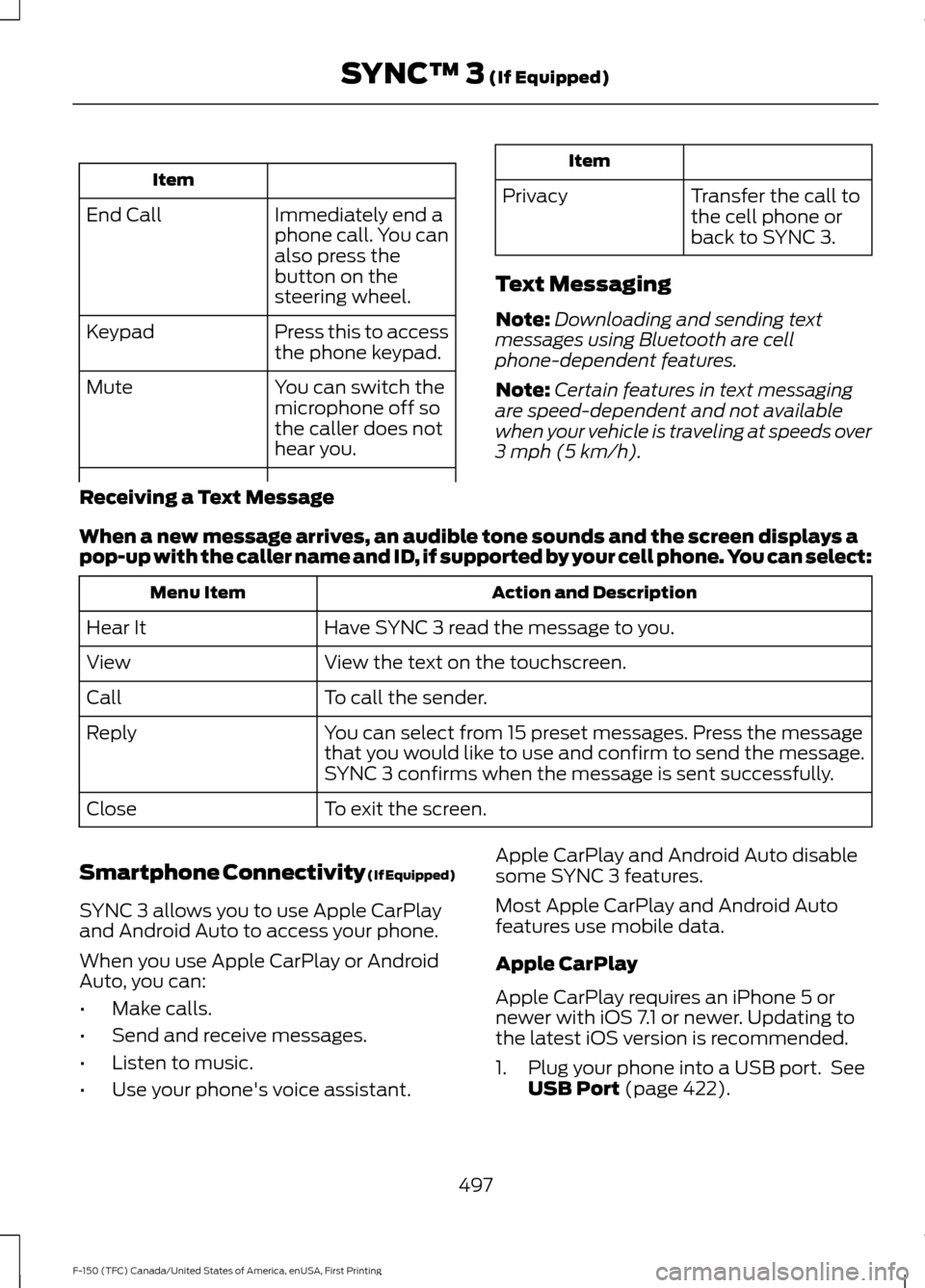
Item
Immediately end a
phone call. You can
also press the
button on the
steering wheel.
End Call
Press this to access
the phone keypad.
Keypad
You can switch the
microphone off so
the caller does not
hear you.
Mute Item
Privacy Transfer the call to
the cell phone or
back to SYNC 3.
Text Messaging
Note: Downloading and sending text
messages using Bluetooth are cell
phone-dependent features.
Note: Certain features in text messaging
are speed-dependent and not available
when your vehicle is traveling at speeds over
3 mph (5 km/h).
Receiving a Text Message
When a new message arrives, an audible tone sounds and the screen displays a
pop-up with the caller name and ID, if supported by your cell phone. You can select: Action and Description
Menu Item
Have SYNC 3 read the message to you.
Hear It
View the text on the touchscreen.
View
To call the sender.
Call
You can select from 15 preset messages. Press the message
that you would like to use and confirm to send the message.
SYNC 3 confirms when the message is sent successfully.
Reply
To exit the screen.
Close
Smartphone Connectivity (If Equipped)
SYNC 3 allows you to use Apple CarPlay
and Android Auto to access your phone.
When you use Apple CarPlay or Android
Auto, you can:
• Make calls.
• Send and receive messages.
• Listen to music.
• Use your phone's voice assistant. Apple CarPlay and Android Auto disable
some SYNC 3 features.
Most Apple CarPlay and Android Auto
features use mobile data.
Apple CarPlay
Apple CarPlay requires an iPhone 5 or
newer with iOS 7.1 or newer. Updating to
the latest iOS version is recommended.
1. Plug your phone into a USB port. See
USB Port
(page 422).
497
F-150 (TFC) Canada/United States of America, enUSA, First Printing SYNC™ 3
(If Equipped)
Page 523 of 599
Door Keypad Code
Select this button to add or erase a
personal door keypad code. To add or
erase a personal code, you first need to
enter the five-digit factory set code. You
can find this code on the owner's wallet
card in the glove box or from your
authorized dealer.
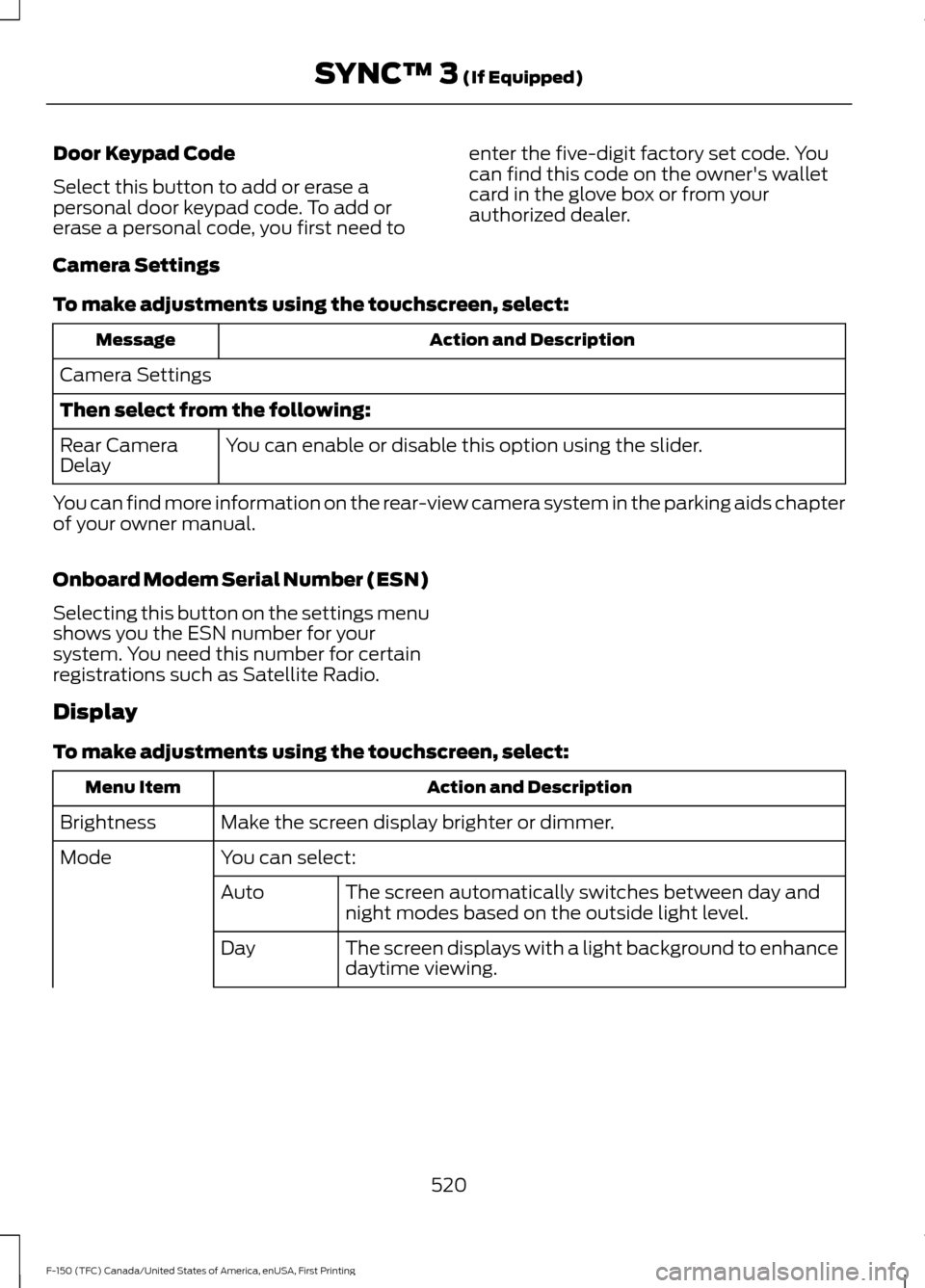
Camera Settings
To make adjustments using the touchscreen, select: Action and Description
Message
Camera Settings
Then select from the following: You can enable or disable this option using the slider.
Rear Camera
Delay
You can find more information on the rear-view camera system in the parking aids chapter
of your owner manual.
Onboard Modem Serial Number (ESN)
Selecting this button on the settings menu
shows you the ESN number for your
system. You need this number for certain
registrations such as Satellite Radio.
Display
To make adjustments using the touchscreen, select: Action and Description
Menu Item
Make the screen display brighter or dimmer.
Brightness
You can select:
Mode
The screen automatically switches between day and
night modes based on the outside light level.
Auto
The screen displays with a light background to enhance
daytime viewing.
Day
520
F-150 (TFC) Canada/United States of America, enUSA, First Printing SYNC™ 3 (If Equipped)
Page 534 of 599
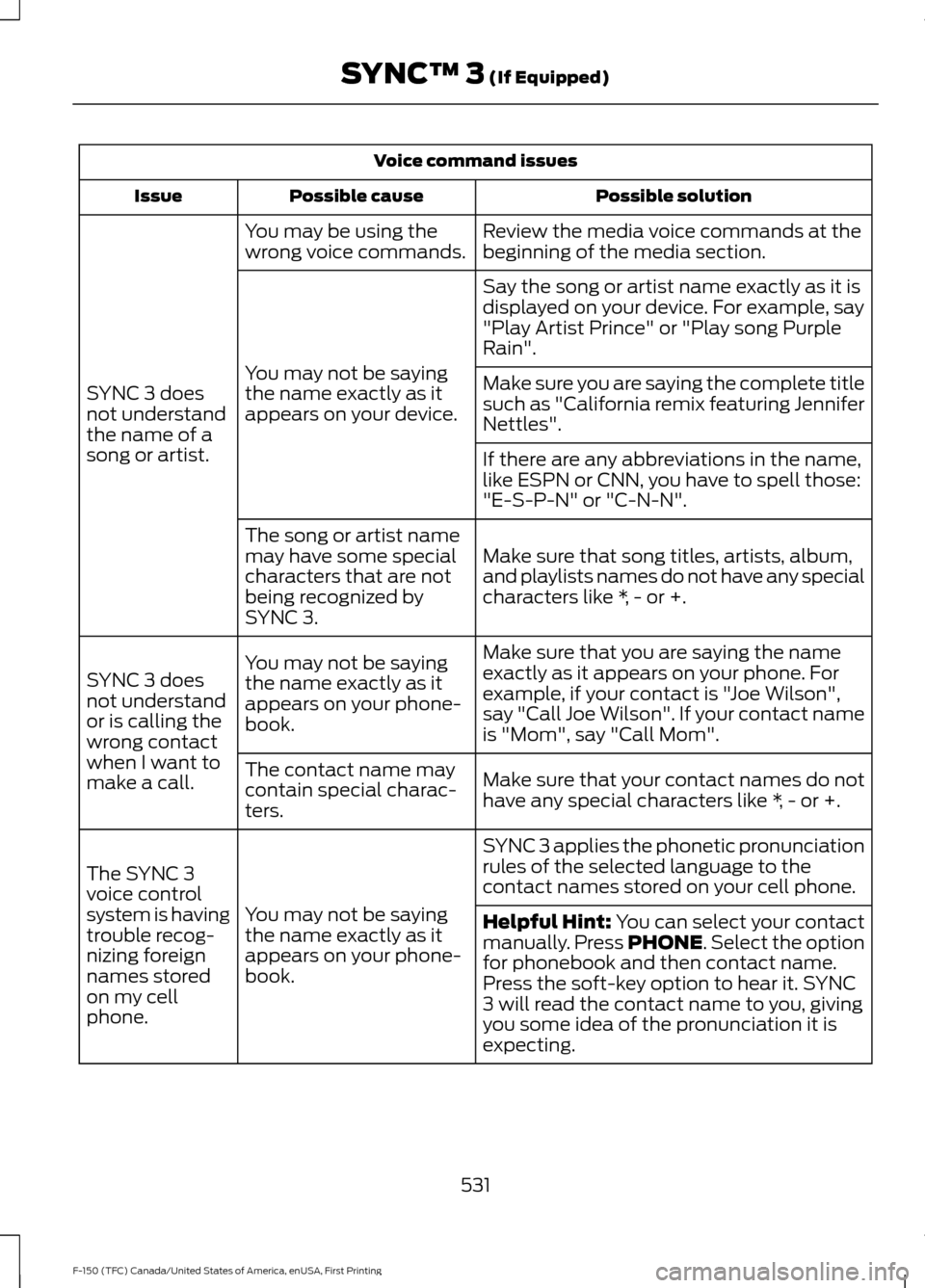
Voice command issues
Possible solution
Possible cause
Issue
Review the media voice commands at the
beginning of the media section.
You may be using the
wrong voice commands.
SYNC 3 does
not understand
the name of a
song or artist. Say the song or artist name exactly as it is
displayed on your device. For example, say
"Play Artist Prince" or "Play song Purple
Rain".
You may not be saying
the name exactly as it
appears on your device. Make sure you are saying the complete title
such as "California remix featuring Jennifer
Nettles".
If there are any abbreviations in the name,
like ESPN or CNN, you have to spell those:
"E-S-P-N" or "C-N-N".
Make sure that song titles, artists, album,
and playlists names do not have any special
characters like *, - or +.
The song or artist name
may have some special
characters that are not
being recognized by
SYNC 3.
Make sure that you are saying the name
exactly as it appears on your phone. For
example, if your contact is "Joe Wilson",
say "Call Joe Wilson". If your contact name
is "Mom", say "Call Mom".
You may not be saying
the name exactly as it
appears on your phone-
book.
SYNC 3 does
not understand
or is calling the
wrong contact
when I want to
make a call.
Make sure that your contact names do not
have any special characters like *, - or +.
The contact name may
contain special charac-
ters.
SYNC 3 applies the phonetic pronunciation
rules of the selected language to the
contact names stored on your cell phone.
You may not be saying
the name exactly as it
appears on your phone-
book.
The SYNC 3
voice control
system is having
trouble recog-
nizing foreign
names stored
on my cell
phone.
Helpful Hint: You can select your contact
manually. Press PHONE. Select the option
for phonebook and then contact name.
Press the soft-key option to hear it. SYNC
3 will read the contact name to you, giving
you some idea of the pronunciation it is
expecting.
531
F-150 (TFC) Canada/United States of America, enUSA, First Printing SYNC™ 3
(If Equipped)
Page 538 of 599
•
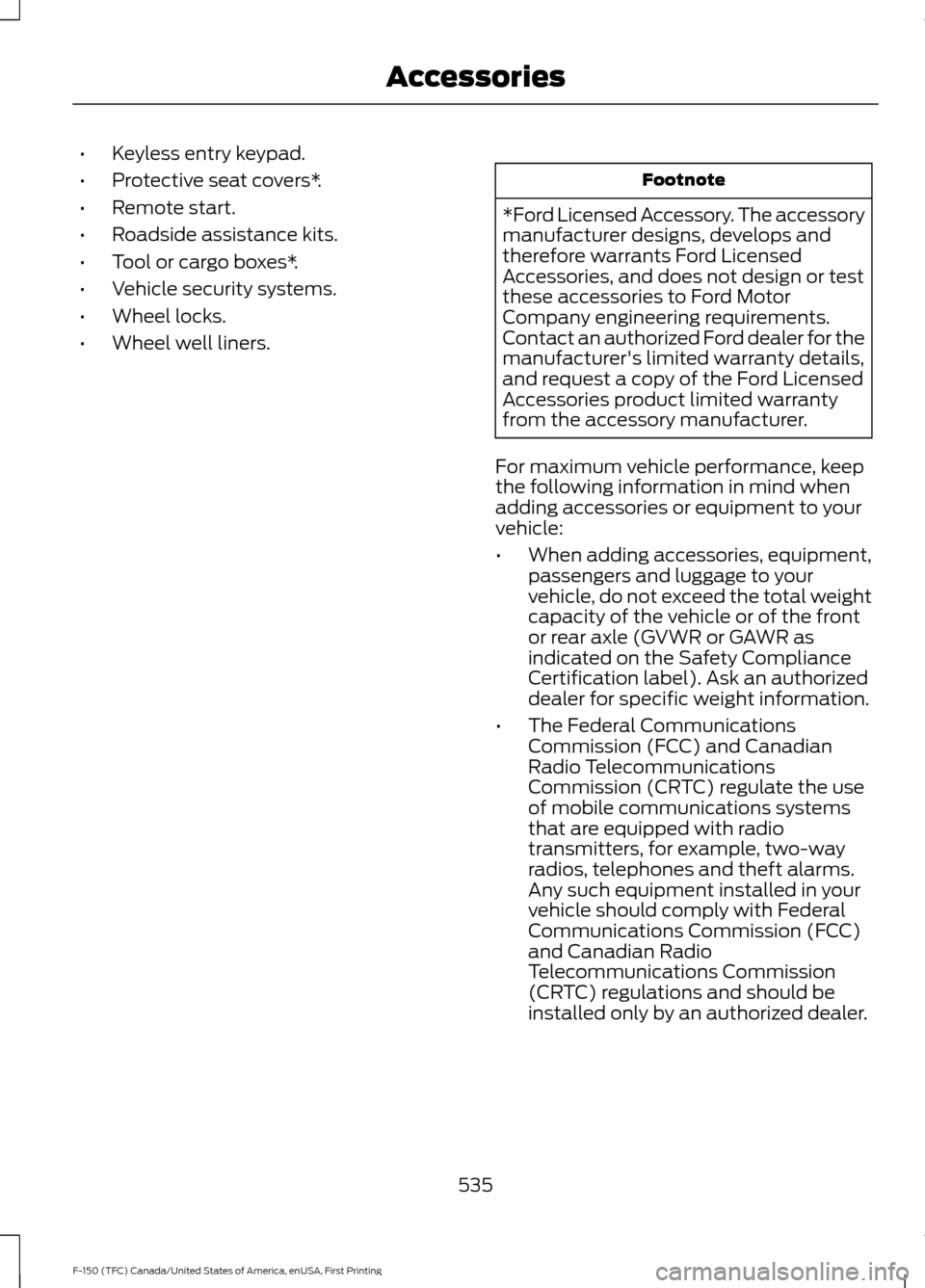
Keyless entry keypad.
• Protective seat covers*.
• Remote start.
• Roadside assistance kits.
• Tool or cargo boxes*.
• Vehicle security systems.
• Wheel locks.
• Wheel well liners. Footnote
*Ford Licensed Accessory. The accessory
manufacturer designs, develops and
therefore warrants Ford Licensed
Accessories, and does not design or test
these accessories to Ford Motor
Company engineering requirements.
Contact an authorized Ford dealer for the
manufacturer's limited warranty details,
and request a copy of the Ford Licensed
Accessories product limited warranty
from the accessory manufacturer.
For maximum vehicle performance, keep
the following information in mind when
adding accessories or equipment to your
vehicle:
• When adding accessories, equipment,
passengers and luggage to your
vehicle, do not exceed the total weight
capacity of the vehicle or of the front
or rear axle (GVWR or GAWR as
indicated on the Safety Compliance
Certification label). Ask an authorized
dealer for specific weight information.
• The Federal Communications
Commission (FCC) and Canadian
Radio Telecommunications
Commission (CRTC) regulate the use
of mobile communications systems
that are equipped with radio
transmitters, for example, two-way
radios, telephones and theft alarms.
Any such equipment installed in your
vehicle should comply with Federal
Communications Commission (FCC)
and Canadian Radio
Telecommunications Commission
(CRTC) regulations and should be
installed only by an authorized dealer.
535
F-150 (TFC) Canada/United States of America, enUSA, First Printing Accessories
Page 588 of 599
3
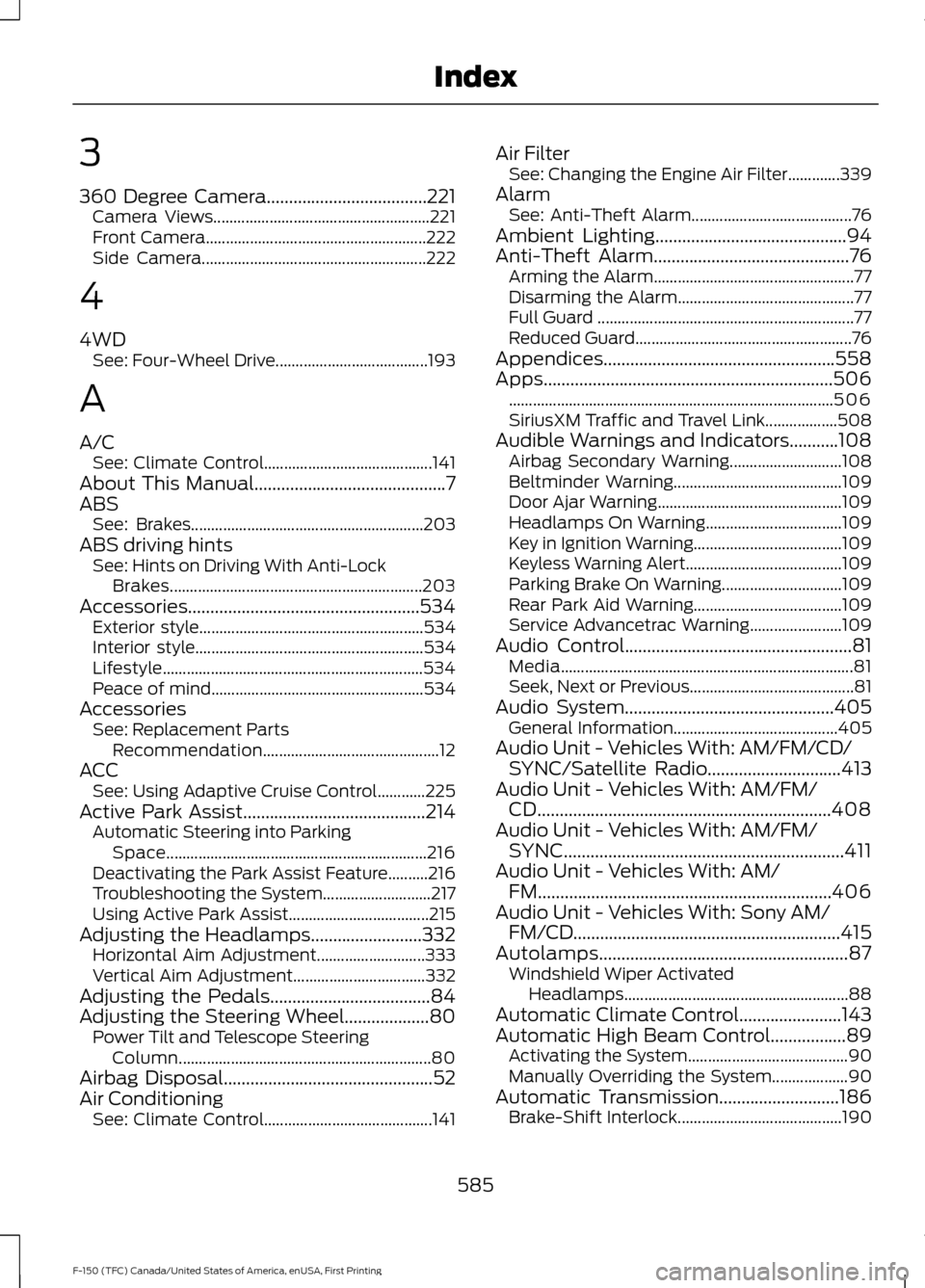
360 Degree Camera....................................221
Camera Views...................................................... 221
Front Camera....................................................... 222
Side Camera........................................................ 222
4
4WD See: Four-Wheel Drive...................................... 193
A
A/C See: Climate Control.......................................... 141
About This Manual
...........................................7
ABS See: Brakes.......................................................... 203
ABS driving hints See: Hints on Driving With Anti-Lock
Brakes............................................................... 203
Accessories....................................................534 Exterior style........................................................ 534
Interior style......................................................... 534
Lifestyle................................................................. 534
Peace of mind..................................................... 534
Accessories See: Replacement Parts
Recommendation............................................ 12
ACC See: Using Adaptive Cruise Control............225
Active Park Assist
.........................................214
Automatic Steering into Parking
Space................................................................. 216
Deactivating the Park Assist Feature..........216
Troubleshooting the System........................... 217
Using Active Park Assist................................... 215
Adjusting the Headlamps.........................332 Horizontal Aim Adjustment........................... 333
Vertical Aim Adjustment................................. 332
Adjusting the Pedals....................................84
Adjusting the Steering Wheel...................80 Power Tilt and Telescope Steering
Column............................................................... 80
Airbag Disposal
...............................................52
Air Conditioning See: Climate Control.......................................... 141Air Filter
See: Changing the Engine Air Filter.............339
Alarm See: Anti-Theft Alarm........................................ 76
Ambient Lighting
...........................................94
Anti-Theft Alarm............................................76
Arming the Alarm.................................................. 77
Disarming the Alarm............................................ 77
Full Guard ................................................................ 77
Reduced Guard...................................................... 76
Appendices....................................................558
Apps
.................................................................506
........................................................................\
......... 506
SiriusXM Traffic and Travel Link.................. 508
Audible Warnings and Indicators...........108 Airbag Secondary Warning............................ 108
Beltminder Warning.......................................... 109
Door Ajar Warning.............................................. 109
Headlamps On Warning.................................. 109
Key in Ignition Warning..................................... 109
Keyless Warning Alert....................................... 109
Parking Brake On Warning.............................. 109
Rear Park Aid Warning..................................... 109
Service Advancetrac Warning....................... 109
Audio Control
...................................................81
Media........................................................................\
. 81
Seek, Next or Previous......................................... 81
Audio System
...............................................405
General Information......................................... 405
Audio Unit - Vehicles With: AM/FM/CD/ SYNC/Satellite Radio
..............................413
Audio Unit - Vehicles With: AM/FM/ CD..................................................................408
Audio Unit - Vehicles With: AM/FM/ SYNC...............................................................411
Audio Unit - Vehicles With: AM/ FM..................................................................406
Audio Unit - Vehicles With: Sony AM/ FM/CD............................................................415
Autolamps........................................................87 Windshield Wiper Activated
Headlamps........................................................ 88
Automatic Climate Control.......................143
Automatic High Beam Control.................89 Activating the System........................................ 90
Manually Overriding the System................... 90
Automatic Transmission
...........................186
Brake-Shift Interlock......................................... 190
585
F-150 (TFC) Canada/United States of America, enUSA, First Printing Index
Page 590 of 599

Changing a Road Wheel............................372
Dissimilar Spare Wheel and Tire Assembly
Information...................................................... 372
Tire Change Procedure.................................... 373
Changing the 12V Battery.........................329 Battery Management System...................... 330
Changing the Engine Air Filter................339
Changing the Wiper Blades......................331
Checking MyKey System Status................61
Checking the Wiper Blades.......................331
Child Restraint and Seatbelt Maintenance.................................................42
Child Restraint Positioning..........................31
Child Safety.......................................................16 General Information............................................. 16
Child Safety Locks..........................................32 Left-Hand Side...................................................... 33
Right-Hand Side................................................... 33
Cleaning Leather Seats.............................344 With King Ranch Edition................................. 345
Without King Ranch Edition.......................... 344
Cleaning Products
......................................340
Cleaning the Engine....................................342
Cleaning the Exterior...................................341 Exterior Chrome Parts....................................... 341
Exterior Plastic Parts......................................... 341
Stripes or Graphics............................................. 341
Underbody........................................................... 342
Under Hood.......................................................... 342
Cleaning the Instrument Panel and Instrument Cluster Lens........................344
Cleaning the Interior...................................343
Cleaning the Wheels
..................................346
Cleaning the Windows and Wiper Blades...........................................................343
Clearing All MyKeys......................................60
Climate...........................................................490
Climate Control
..............................................141
Climate Controlled Seats...........................157 Cooled Seats........................................................ 158
Collision Warning System
........................244
Principle Of Operation..................................... 244
Coolant Check See: Engine Coolant Check............................ 323
Crash Sensors and Airbag Indicator.........51
Creating a MyKey...........................................60 Programming/Changing Configurable
Settings.............................................................. 60Cross Traffic Alert
........................................240
False Alerts........................................................... 242
Switching the System Off and On...............243
System Errors...................................................... 243
System Lights, Messages and Audible Alerts.................................................................. 242
System Limitations........................................... 242
Using the System.............................................. 240
Cruise Control..................................................82 Principle of Operation...................................... 224
Type 1........................................................................\
82
Type 2....................................................................... 82
Cruise control See: Using Cruise Control............................... 224
Customer Assistance
................................300
D
Data Recording
..................................................9
Event Data Recording.......................................... 10
Service Data Recording........................................ 9
Daytime Running Lamps............................89 Type 1 - Conventional
(Non-Configurable)....................................... 89
Type 2 - Configurable......................................... 89
Digital Radio
....................................................417
HD Radio Reception and Station
Troubleshooting............................................. 418
Direction Indicators
........................................91
Lane Change........................................................... 91
Doors and Locks.............................................64
Drive Control.................................................246 Selectable Steering.......................................... 246
Driver Alert
......................................................232
Using Driver Alert............................................... 232
Driver and Passenger Airbags...................46 Children and Airbags.......................................... 46
Proper Driver and Front Passenger Seating Adjustment....................................................... 46
Driving Aids
.....................................................232
Driving Hints..................................................288
Driving Through Water..............................289
DRL See: Daytime Running Lamps........................ 89
E
Economical Driving
.....................................288
587
F-150 (TFC) Canada/United States of America, enUSA, First Printing Index