Page 108 of 541

Display Mode
Tire pressure on demand screen
Digital speedometer - XXX MPH - Press OK for km/h
Intelligent 4WD - 4WD Gauge with Terrain Management System
* Vehicles with Intelligent 4WD only. You can choose to have only the fuel gauge show in
this mode. Refer to Display > Gauge Display found in the table under the Settings section
later in this chapter.
XXX mi (km) to empty
Shows approximate fuel level before the
fuel tank reaches empty. The value is
dynamic and can change (raise or lower)
depending on driving style.
Fuel gauge
Switch the ignition on. The fuel gauge
indicates approximately how much fuel is
in the fuel tank. The arrow next to the fuel
pump symbol shows the fuel filler door
side of your vehicle. When the fuel level
becomes low, the level indicator changes
to amber. When the fuel level becomes
critically low, the level indicator changes
to red.
Note: The fuel gauge level may vary slightly
when your vehicle is moving or when driving
on a slope.
Note: When a MyKey is in use, low fuel
warnings display earlier.
Bar or Round tachometer
Indicates the engine speed in revolutions
per minute. Driving with your tachometer
pointer continuously at the top of the scale
may damage the engine. During SelectShift
Automatic ™ transmission (SST) use, the
currently selected gear appears in the
display. Engine coolant temperature gauge
Indicates engine coolant temperature. At
normal operating temperature, the level
indicator is in the normal range. If the
engine coolant temperature exceeds the
normal range, stop your vehicle as soon as
safely possible, switch off the engine and
let the engine cool.
Intelligent 4WD (if equipped)
Displays power distribution between the
front and rear wheels. More power to either
the front or rear wheels displays by more
area filled in. Intelligent 4WD also displays
the currently selected terrain management
mode.
Trip 1 & 2
You can access the menu using the
information display control.
Note:
Some options may appear slightly
different or not at all if the items are
optional.
105
Explorer (TUB) Canada/United States of America, enUSA, Edition date: 03/2016, First Printing Information Displays
Page 111 of 541
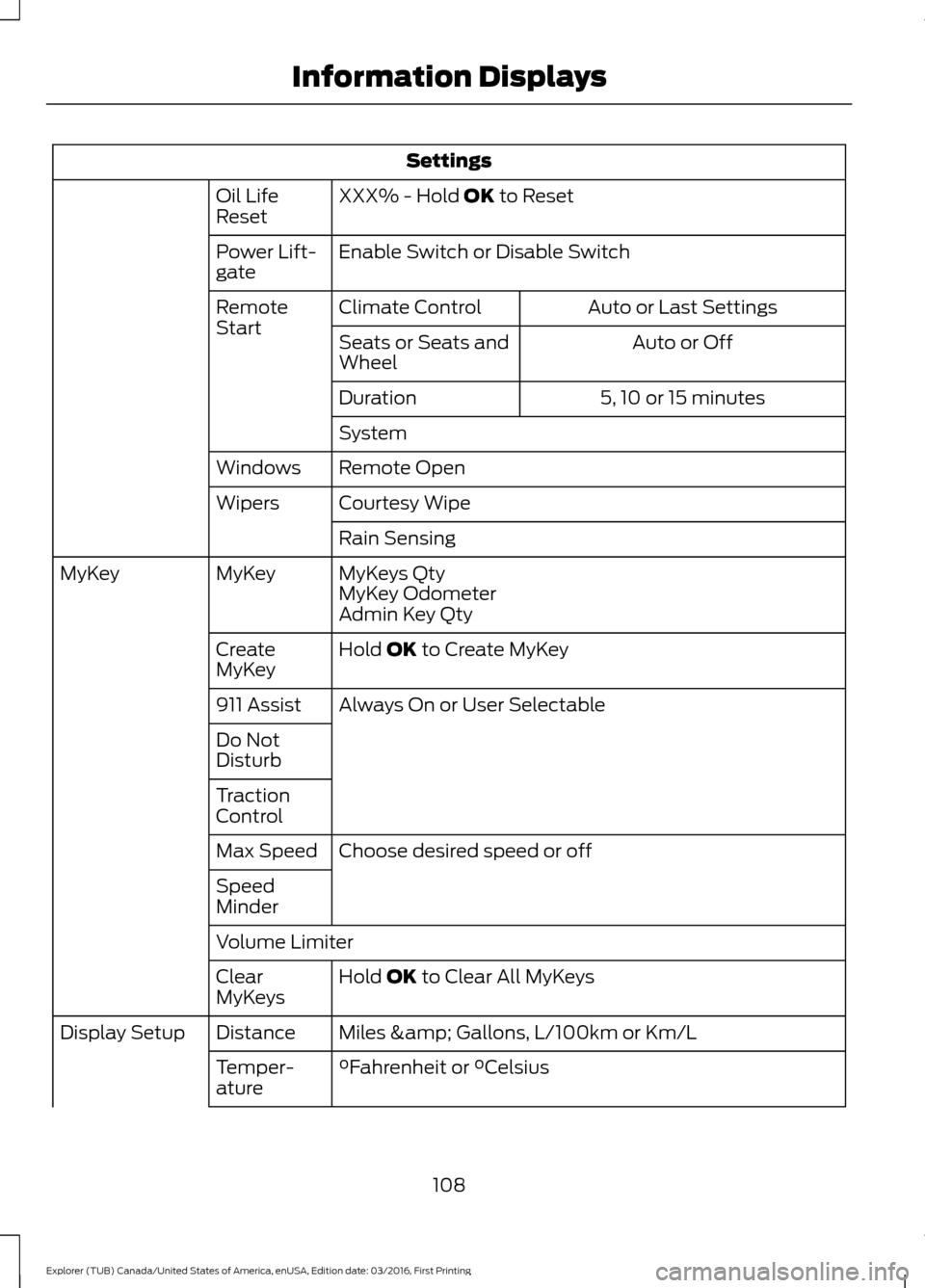
Settings
XXX% - Hold OK to Reset
Oil Life
Reset
Enable Switch
or Disable Switch
Power Lift-
gate
Auto or Last Settings
Climate Control
Remote
Start
Auto or Off
Seats or Seats and
Wheel
5, 10 or 15 minutes
Duration
System
Remote Open
Windows
Courtesy Wipe
Wipers
Rain Sensing
MyKeys Qty
MyKey
MyKey
MyKey Odometer
Admin Key Qty
Hold
OK to Create MyKey
Create
MyKey
Always On or User Selectable
911 Assist
Do Not
Disturb
Traction
Control
Choose desired speed or off
Max Speed
Speed
Minder
Volume Limiter
Hold
OK to Clear All MyKeys
Clear
MyKeys
Miles & Gallons
, L/100km or Km/L
Distance
Display Setup
°Fahrenheit
or °Celsius
Temper-
ature
108
Explorer (TUB) Canada/United States of America, enUSA, Edition date: 03/2016, First Printing Information Displays
Page 112 of 541

Settings
Fuel Gauge or Fuel + Tach
Gauge
Display
psi
, kPa or bar
Tire Pres-
sure
Choose your applicable setting
Language
Note: Some MyKey items only appear if a
MyKey is set.
Information Display Controls
(Type 3) •
Press and hold the left arrow button at
any time to return to the main menu
display (escape button).
• Press the
OK button to choose and
confirm settings or messages. •
Press the up and down arrow buttons
to scroll through and highlight the
options within a menu.
• Press the right arrow button to enter a
sub-menu.
• Press the left arrow button to exit a
menu.
Main Menu
From the main menu bar on the left side
of the information display, you can choose
from the following categories:
• Trip 1 & 2.
• Fuel Economy.
• Driver Assist.
• Settings.
Scroll up or down to highlight one of the
categories and then press the right arrow
key or OK to enter into that category. Press
the left arrow key as needed to exit back
to the main menu.
Trip 1 & 2
You can access the menu using the
information display control.
Note: Some options may appear slightly
different or not at all if the items are
optional.
109
Explorer (TUB) Canada/United States of America, enUSA, Edition date: 03/2016, First Printing Information DisplaysE203206
Page 115 of 541
Settings
Switch Inhibit
Autofold
Mirror
XXX% - Hold OK to Reset
Oil Life
Enable Switch or Disable Switch
Power Lift-
gate
Auto or Last Settings
Climate Control
Remote
Start
Auto or Off
Front Seats &
Wheel
5, 10 or 15 minutes
Duration
System
Remote Open
Windows
Courtesy Wipe
Wipers
Rain Sensing
MyKeys Qty
Mykey
Status
MyKey
MyKey Odometer
Admin Key Qty
Hold
OK to Create MyKey
Create
MyKey
Always On or User Selectable
911 Assist
On or Off
Do Not
Disturb
Always On or User Selectable
Traction
Control
Choose desired speed or off
Max Speed
Speed
Minder
Volume Limiter
Hold
OK to Clear All MyKeys
Clear
MyKeys
Miles & Gallons
, L/100 km or km/L
Distance
Unit
Display
112
Explorer (TUB) Canada/United States of America, enUSA, Edition date: 03/2016, First Printing Information Displays
Page 116 of 541

Settings
°Fahrenheit or °Celsius
Temper-
ature Unit
psi, kPa or bar
Tire Pres-
sure
Choose your applicable setting
Language
Speedo in km/h
Note: Some MyKey items only appear if a
MyKey is set.
INFORMATION MESSAGES
Note: Depending on the vehicle options
equipped with your vehicle, not all of the
messages will display or be available.
Certain messages may display abbreviated
or shortened depending upon which cluster
type you have. Press the OK button to acknowledge and
remove some messages from the
information display. Other messages
delete automatically after a short time.
You need to confirm certain messages
before you can access the menus.
4WD Action
Message
The four wheel drive system has automatically disabled itselfdue to the system overheating.
4WD Temporarily
Disabled
The four wheel drive system has automatically disabled itself
due to the system overheating or you are using the spare tire.
4WD Off
The four wheel drive system resumes normal function andclears this message after driving a short distance with the road tire re-installed or after the system cools.
4WD Restored
113
Explorer (TUB) Canada/United States of America, enUSA, Edition date: 03/2016, First Printing Information DisplaysE203207
Page 121 of 541

Action
Message
The hood is not completely closed.
Hood Ajar
The system has disabled the door switches.
Switches Inhibited
Security Mode
The factory keypad code displays in the information display
after the system resets the keypad. See Passive Anti-Theft System (page 68).
Factory Keypad Code
XXXXX
Driver Alert Action
Message
Stop and rest as soon as it is safe to do so.
Driver Alert Warning Rest
Now
Take a rest soon.
Driver Alert Warning Rest
Suggested
Electronic Stability Control Action
Message
The system detects a malfunction due to a blocked sensor.
ESC Service required
Displays the traction control system status.
ESC Off
Displays the traction control system status.
ESC On
Engine Action
Message
Displays when the engine temperature is too high. Stop yourvehicle in a safe place and allow the engine to cool. If the
problem persists, contact an authorized dealer. See
Engine
Coolant Check (page 279).
High Engine Temper-
ature Stop Safely
Engine service is required. Contact an authorized dealer.
Engine Fault Service
Now
Check the engine oil level. See Engine Oil Check (page 277).
Engine Oil Level Low
Check Level
118
Explorer (TUB) Canada/United States of America, enUSA, Edition date: 03/2016, First Printing Information Displays
Page 123 of 541

Keys and Intelligent Access
Action
Message
A reminder to press the brake while starting your vehicle.
To START Press Brake
The system does not detect the key. See Keyless Starting
(page 162).
No Key Detected
When you press the Start Stop button to shut off the engine,the system does not detect an Intelligent Access key inside your vehicle.
Restart Now or Key is
Needed
Your vehicle is in the run ignition state.
Full Accessory Power
Active
There is a problem with your vehicle ’s starting system. Contact
an authorized dealer for service.
Starting System Fault
You have successfully programmed an intelligent access keyto the system.
Key Program Successful
You have failed to program an intelligent access key to thesystem.
Key Program Failure
You have programmed the maximum number of keys to the system.
Max Number of Keys
Learned
You have not programmed enough keys to the system.
Not Enough Keys
Learned
The key battery is low. Change the battery as soon as possible.See
Remote Control (page 50).
Key Battery Low Replace
Soon
Informs you that you are exiting your vehicle with the intelli-gent access key and the engine is on.
Engine ON
120
Explorer (TUB) Canada/United States of America, enUSA, Edition date: 03/2016, First Printing Information Displays
Page 125 of 541

MyKey
Action
Message
You cannot program a MyKey during key programming.
MyKey Not Created
MyKey is active.
MyKey Active Drive
Safely
When starting your vehicle, a MyKey is in use and the MyKey speed limit is on.
Speed Limited to XX
MPH/km/h
When a MyKey is in use, the MyKey speed limit is on and yourvehicle speed is approaching 80 mph (130 km/h).
Vehicle Near Top Speed
MyKey is active.
Check Speed Drive
Safely
A MyKey is in use and Belt-Minder is active.
Buckle Up to Unmute
Audio
You attempted to program a spare key using two existing MyKeys.
Could Not Program
Integrated Key
Park Aid Action
Message
The system has detected a condition that requires service.
Contact an authorized dealer. See Principle of Operation
(page 195).
Check Park Aid
The system has detected a condition that requires service.
Contact an authorized dealer.
See Principle of Operation
(page 195).
Check Rear Park Aid
Displays the park aid status.
Front Park Aid On Off
Displays the park aid status.
Rear Park Aid On Off
Park Brake Action
Message
You have set the parking brake and you have driven the vehiclemore than 3 mph (5 km/h). If the warning stays on after you
have released the parking brake, contact an authorized dealer.
Park Brake Engaged
122
Explorer (TUB) Canada/United States of America, enUSA, Edition date: 03/2016, First Printing Information Displays