2017 FORD EXPLORER heating
[x] Cancel search: heatingPage 439 of 541
CLIMATE
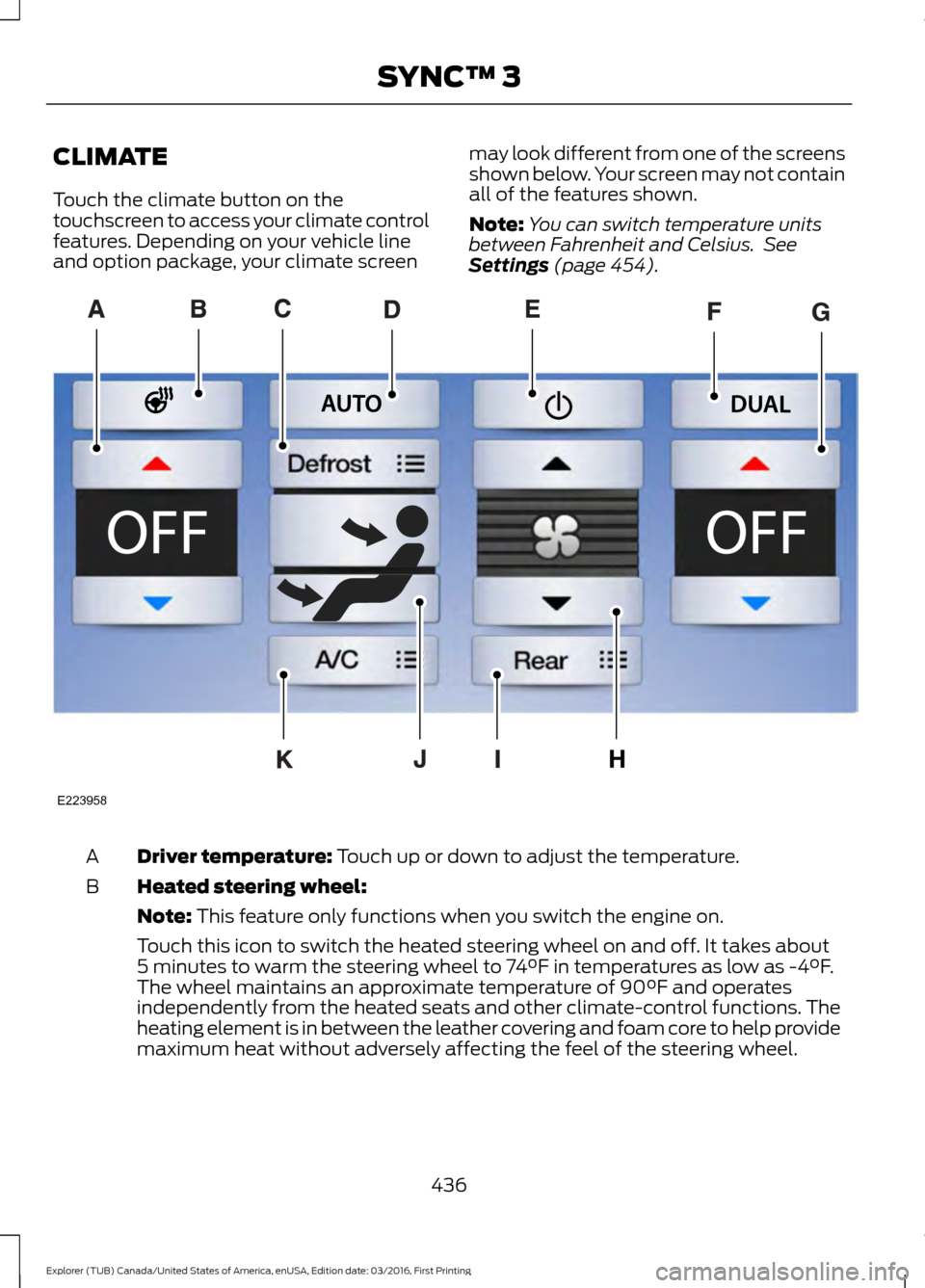
Touch the climate button on the
touchscreen to access your climate control
features. Depending on your vehicle line
and option package, your climate screen
may look different from one of the screens
shown below. Your screen may not contain
all of the features shown.
Note:
You can switch temperature units
between Fahrenheit and Celsius. See
Settings (page 454). Driver temperature:
Touch up or down to adjust the temperature.
A
Heated steering wheel:
B
Note:
This feature only functions when you switch the engine on.
Touch this icon to switch the heated steering wheel on and off. It takes about
5 minutes to warm the steering wheel to 74°F in temperatures as low as -4°F.
The wheel maintains an approximate temperature of 90°F and operates
independently from the heated seats and other climate-control functions. The
heating element is in between the leather covering and foam core to help provide
maximum heat without adversely affecting the feel of the steering wheel.
436
Explorer (TUB) Canada/United States of America, enUSA, Edition date: 03/2016, First Printing SYNC™ 3E223958
Page 440 of 541

Note: The heated steering wheel may remain on after remote starting the
vehicle, based on your remote start settings. The heated steering wheel may
also turn on when you start your vehicle, if it was on when you switched your
vehicle off.
Note:
For steering wheels with wood trim, the heating feature will not heat the
wheel between the 10 and 2 o'clock positions.
Defrost:
A pop up appears on the screen to display the defrost options.
C
MAX Defrost: Touch the button to maximize defrosting. Air flows through the
windshield vents, the fan automatically adjusts to the highest speed and the
driver and passenger temperatures are set to HI. You can use this setting to
defog or clear a thin covering of ice from the windshield. The heated rear window
also automatically turns on when you select MAX Defrost.
Defrost:
Distributes air through the windshield defroster vents and demister
vents.
Heated rear window:
Turns the heated rear window on and off. See Heated
Windows and Mirrors (page 135).
AUTO:
Touch the button to switch on automatic operation. Select the desired
temperature using the temperature control. The system adjusts fan speed, air
distribution, air conditioning operation, and selects outside air or recirculated
air to heat or cool the vehicle in order to maintain the desired temperature.
D
Power:
Touch the button to switch the system on and off. Switching off the
climate control system prevents outside air from entering the vehicle.
E
DUAL:
This button lights up when the passenger controls are active. To switch
the off and link the passenger temperature to the driver temperature, touch the
DUAL button.
F
Note:
the passenger side temperature and the DUAL indication automatically
turn on when you or your passenger adjust the passenger temperature.
Passenger temperature:
Touch up or down to adjust the temperature.
G
Fan speed:
Touch up or down to increase or decrease the volume of air that
circulates in your vehicle.
H
Note:
You cannot adjust the fan speed when the system is set to AUTO or MAX
A/C.
Rear:
A pop up appears on the screen to display the rear control options.
I
Touch the power icon to switch the rear climate control functions off and on.
Touch Rear Control to allow the rear seat passengers to adjust the rear climate
settings. Touch it again to prevent the rear seat passengers from adjusting the
settings. Rear Control
automatically turns off when you use the touchscreen
to adjust the rear climate settings.
If your vehicle has automatic climate controls, select
Auto to connect the rear
climate settings to the Auto settings of the driver.
437
Explorer (TUB) Canada/United States of America, enUSA, Edition date: 03/2016, First Printing SYNC™ 3
Page 487 of 541

When the oil change message appears in
the information display, it is time for an oil
change. Make sure you perform the oil
change within two weeks or 500 miles
(800 kilometers) of the message
appearing. Make sure you reset the
Intelligent Oil-Life Monitor after each oil
change. See Oil Change Indicator Reset
(page 278).
If your information display resets
prematurely or becomes inoperative, you
should perform the oil change interval at
six months or 5000 miles (8000
kilometers) from your last oil change.
Never exceed one year or 10000 miles
(16000 kilometers) between oil change
intervals.
Your vehicle is very sophisticated and built
with multiple, complex, performance
systems. Every manufacturer develops
these systems using different
specifications and performance features.
That is why it is important to rely upon your
dealership to properly diagnose and repair
your vehicle.
Ford Motor Company has recommended
maintenance intervals for various parts
and component systems based upon
engineering testing. Ford Motor Company
relies upon this testing to determine the
most appropriate mileage for replacement
of oils and fluids to protect your vehicle at
the lowest overall cost to you and
recommends against maintenance
schedules that deviate from the scheduled
maintenance information.
We strongly recommend the use of only
genuine Ford, Motorcraft or
Ford-authorized re-manufactured
replacement parts engineered for your
vehicle. Additives and Chemicals
This owner's manual and the Ford
Workshop Manual list the recommended
additives and chemicals for your vehicle.
We do not recommend using chemicals or
additives not approved by us as part of
your vehicle
’s normal maintenance. Please
consult your warranty information.
Oils, Fluids and Flushing
In many cases, fluid discoloration is a
normal operating characteristic and, by
itself, does not necessarily indicate a
concern or that the fluid needs to be
changed. However, a qualified expert, such
as the factory-trained technicians at your
dealership, should inspect discolored fluids
that also show signs of overheating or
foreign material contamination
immediately.
Make sure to change your vehicle ’s oils and
fluids at the specified intervals or in
conjunction with a repair. Flushing is a
viable way to change fluid for many vehicle
sub-systems during scheduled
maintenance. It is critical that systems are
flushed only with new fluid that is the same
as that required to fill and operate the
system or using a Ford-approved flushing
chemical.
Owner Checks and Services
Make sure you perform the following basic
maintenance checks and inspections every
month or at six-month intervals.
484
Explorer (TUB) Canada/United States of America, enUSA, Edition date: 03/2016, First Printing Scheduled Maintenance
Page 534 of 541

Type 1........................................................................\
.
91
Type 2....................................................................... 92
Type 3....................................................................... 93
General Information on Radio Frequencies...................................................49
Intelligent Access................................................. 49
General Maintenance Information.......483
Multi-Point Inspection..................................... 485
Owner Checks and Services......................... 484
Protecting Your Investment.......................... 483
Why Maintain Your Vehicle?......................... 483
Why Maintain Your Vehicle at Your Dealership?..................................................... 483
Getting Assistance Outside the U.S. and Canada.........................................................258
Getting the Services You Need...............255 Away From Home.............................................. 255
Global Opening..............................................86 Opening the Windows....................................... 86
H
Handbrake See: Parking Brake.............................................. 187
Hazard Warning Flashers
.........................250
HDC See: Using Hill Descent Control.................... 193
Headlamp Adjusting See: Adjusting the Headlamps.................... 288
Headlamp Exit Delay
...................................80
Headlamp Removal See: Removing a Headlamp......................... 290
Head Restraints
.............................................137
Adjusting the Head Restraint......................... 138
Tilting Head Restraints .................................... 139
Heated Seats...................................................151 Front Seats............................................................. 151
Second Row Heated Seats............................. 152
Heated Steering Wheel
................................73
Heated Windows and Mirrors..................135 Heated Exterior Mirrors..................................... 135
Heated Rear Window........................................ 135
Heated Wiper Park............................................. 135
Heating See: Climate Control.......................................... 127
Hill Start Assist..............................................187 Switching the System On and Off...............188
Using Hill Start Assist........................................ 187Hints on Controlling the Interior
Climate..........................................................132
Cooling the Interior Quickly............................. 133
General Hints........................................................ 132
Heating the Interior Quickly............................ 132
Recommended Settings for Cooling...........133
Recommended Settings for Heating...........133
Side Window Defogging in Cold Weather............................................................. 134
Hints on Driving With Anti-Lock Brakes............................................................186
Home Screen
.................................................418
Hood Lock See: Opening and Closing the Hood...........272
I
Ignition Switch
...............................................162
In California (U.S. Only)............................256
Information Display Control
.......................73
Information Displays....................................99 General Information........................................... 99
Information Messages
.................................113
4WD........................................................................\
.. 113
Adaptive Cruise Control.................................... 114
AdvanceTrac ™..................................................... 114
Alarm........................................................................\
114
Automatic Engine Shutdown.......................... 115
Automatic High Beam Control....................... 115
Battery and Charging System......................... 116
Blind Spot Information and Cross Traffic Alert System..................................................... 116
Brake System......................................................... 117
Collision Warning System................................. 117
Doors and Locks................................................... 117
Driver Alert............................................................. 118
Electronic Stability Control.............................. 118
Engine...................................................................... 118
Fuel........................................................................\
... 119
Hill Descent Control........................................... 119
Hill Start Assist..................................................... 119
Keys and Intelligent Access............................ 120
Lane Keeping System......................................... 121
Maintenance.......................................................... 121
MyKey...................................................................... 122
Park Aid................................................................... 122
Park Brake.............................................................. 122
Power Steering..................................................... 123
531
Explorer (TUB) Canada/United States of America, enUSA, Edition date: 03/2016, First Printing Index