Page 104 of 541

•
Distance to Empty - Shows the
approximate distance your vehicle can
travel before running out of fuel.
• Instantaneous Fuel Economy - Shows
a visual graph of your instantaneous
fuel economy along with your Avg MPG
since the function was last reset.
• Average MPG — Shows the average
fuel economy since last reset.
• Fuel History - Shows a bar chart of your
fuel history.
• All Values — Shows all fuel economy
values (DTE, Inst Fuel Econ, Avg Fuel). Note:
You can reset your average fuel
economy by pressing and holding the OK
button on the left hand steering wheel
controls.
Driver Assist
In this mode, you can configure different
driver setting choices.
Note: Some options may appear slightly
different or not at all if the items are
optional. Driver Assist
Traction Ctrl
Blindspot
Cross Traffic Adaptive
or Normal
Cruise Control
Driver Alert
Hill Start Assist
Intellig. 4WD
Alert
, Aid or Alert + Aid
Mode
Lane Keeping
High
, Normal or Low
Intensity
High
, Normal or Low
Alert Sensitivity
Pre-Collision
Rear Park Aid
Tire Monitor
Trailer Sway
Settings
In this mode, you can configure different
driver setting choices. Note:
Some items are optional and may
not appear.
101
Explorer (TUB) Canada/United States of America, enUSA, Edition date: 03/2016, First Printing Information Displays
Page 105 of 541
Settings
All Sensors
Alarm
Vehicle
Perimeter Sensing
Ask on Exit
Auto Engine Off Information
Chimes
Normal or Towing
DTE calcula-
tion
Easy Entry/Exit
Auto Highbeam
Lighting
Off or XX Seconds
Hdlamp Delay
Daytime Lights
Autolock
Locks
Autounlock
Relock All Doors
or Driver's Door
Remote Unlock
Switches inhibit
Autofold
Power
Mirror
Remaining Life XXX% - Hold
OK to Reset
Oil Life
Reset
Enable Switch
or Disable Switch
Power Lift-
gate
Auto or Last Settings
Climate Control
Remote
Start
Automatic or Off
Seats or Seats and
Wheel
5, 10 or 15 minutes
Duration
System
Remote Open
Windows
102
Explorer (TUB) Canada/United States of America, enUSA, Edition date: 03/2016, First Printing Information Displays
Page 109 of 541

Trip 1 & 2
All Values
• All Values — shows all trip values (Trip
Timer, Trip Odometer and Average
Fuel).
• Trip Odometer — Shows your
accumulated trip distance.
• Average Fuel — Shows your average
fuel economy for a given trip.
• Trip Timer — The timer stops when you
turn your vehicle off and restarts when
you restart your vehicle. Note:
You can reset your trip information
by pressing and holding the OK button on
the left hand steering wheel controls.
Fuel Economy
Use the left or right arrow buttons to
choose the desired fuel economy display. Fuel Economy
Inst Fuel Economy - Hold
OK to Reset
Fuel History
• Inst Fuel Economy - shows a visual
graph of your instantaneous fuel
economy, average fuel economy and
distance to empty.
• Fuel History - shows a bar chart of your
fuel history from the past 30 min,
average fuel economy and distance to
empty. Note:
You can reset your average fuel
economy by pressing and holding the
OK
button on the left hand steering wheel
controls.
Driver Assist
In this mode, you can configure different
driver setting choices.
Note: Some items are optional and may
not appear. Driver Assist
Traction Control
Blindspot
Cross Traffic Alert Adaptive
or Normal
Cruise Control
Driver Alert
Hill Start Assist
106
Explorer (TUB) Canada/United States of America, enUSA, Edition date: 03/2016, First Printing Information Displays
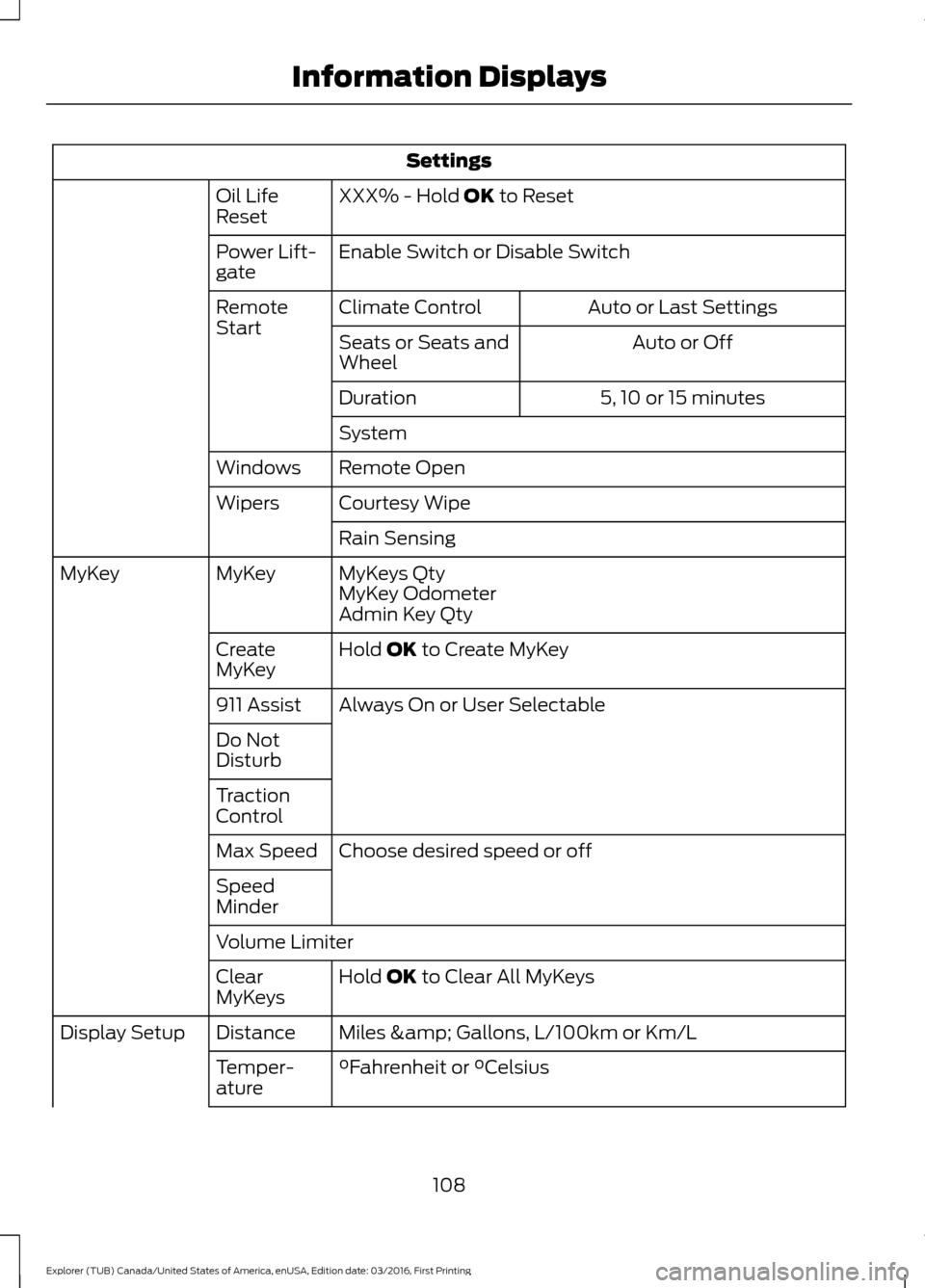
Page 111 of 541
Settings
XXX% - Hold OK to Reset
Oil Life
Reset
Enable Switch
or Disable Switch
Power Lift-
gate
Auto or Last Settings
Climate Control
Remote
Start
Auto or Off
Seats or Seats and
Wheel
5, 10 or 15 minutes
Duration
System
Remote Open
Windows
Courtesy Wipe
Wipers
Rain Sensing
MyKeys Qty
MyKey
MyKey
MyKey Odometer
Admin Key Qty
Hold
OK to Create MyKey
Create
MyKey
Always On or User Selectable
911 Assist
Do Not
Disturb
Traction
Control
Choose desired speed or off
Max Speed
Speed
Minder
Volume Limiter
Hold
OK to Clear All MyKeys
Clear
MyKeys
Miles & Gallons
, L/100km or Km/L
Distance
Display Setup
°Fahrenheit
or °Celsius
Temper-
ature
108
Explorer (TUB) Canada/United States of America, enUSA, Edition date: 03/2016, First Printing Information Displays
Page 113 of 541

Trip 1 & 2
All Values
• All Values — shows all trip values (Trip
Timer, Trip Odometer and Average
Fuel).
• Trip Odometer — Shows your
accumulated trip distance.
• Average Fuel — Shows your average
fuel economy for a given trip.
• Trip Timer — The timer stops when you
turn your vehicle off and restarts when
you restart your vehicle. Note:
You can reset your trip information
by pressing and holding the OK button on
the left hand steering wheel controls.
Fuel Economy
Use the left or right arrow buttons to
choose the desired fuel economy display. Fuel Economy
Instant Fuel Economy - Hold
OK to Reset
Fuel History
• Inst Fuel Economy - shows a visual
graph of your instantaneous fuel
economy, average fuel economy and
distance to empty.
• Fuel History - shows a bar chart of your
fuel history from the past 30 min,
average fuel economy and distance to
empty. Note:
You can reset your average fuel
economy by pressing and holding the
OK
button on the left hand steering wheel
controls.
Driver Assist
In this mode, you can configure different
driver setting choices.
Note: Some items are optional and may
not appear. Driver Assist
Traction Control Intelligent 4WD with Terrain Management System
Intelligent 4WD
Blindspot
Cross Traffic
Adaptive
or Normal
Cruise Control
Driver Alert
110
Explorer (TUB) Canada/United States of America, enUSA, Edition date: 03/2016, First Printing Information Displays
Page 115 of 541
Settings
Switch Inhibit
Autofold
Mirror
XXX% - Hold OK to Reset
Oil Life
Enable Switch or Disable Switch
Power Lift-
gate
Auto or Last Settings
Climate Control
Remote
Start
Auto or Off
Front Seats &
Wheel
5, 10 or 15 minutes
Duration
System
Remote Open
Windows
Courtesy Wipe
Wipers
Rain Sensing
MyKeys Qty
Mykey
Status
MyKey
MyKey Odometer
Admin Key Qty
Hold
OK to Create MyKey
Create
MyKey
Always On or User Selectable
911 Assist
On or Off
Do Not
Disturb
Always On or User Selectable
Traction
Control
Choose desired speed or off
Max Speed
Speed
Minder
Volume Limiter
Hold
OK to Clear All MyKeys
Clear
MyKeys
Miles & Gallons
, L/100 km or km/L
Distance
Unit
Display
112
Explorer (TUB) Canada/United States of America, enUSA, Edition date: 03/2016, First Printing Information Displays
Page 117 of 541

Action
Message
The four wheel drive system is not operating properly and thepowertrain fault indicator illuminates. See Warning Lamps
and Indicators (page 94). If the warning stays illuminated
or continues to illuminate, contact an authorized dealer as soon as possible.
4WD Malfunction
Service Required
Displayed when the transfer case fluid requires service.
Change 4WD Power
Transfer Unit Lube
Displayed when the transfer case fluid has been changed and reset to new.
4WD Power Transfer
Unit Lube Set to New
Adaptive Cruise Control Action
Message
A radar malfunction is preventing the adaptive cruise from
engaging. See
Using Adaptive Cruise Control (page 210).
Adaptive Cruise
Malfunction
Conditions exist such that the adaptive cruise cannot functionproperly. See
Using Adaptive Cruise Control (page 210).
Adaptive Cruise Not
Available
The radar is blocked because of poor radar visibility due tobad weather or ice/mud/water in front of radar. Driver can
typically clean the sensor to resolve. See
Using Adaptive
Cruise Control (page 210).
Adaptive Cruise Not
Available Sensor
Blocked See Manual
AdvanceTrac ™ Action
Message
The system detects a malfunction due to a blocked sensor.
Service AdvanceTrac
The driver has disabled or enabled the traction control.
AdvanceTrac Off On
Alarm Action
Message
Unauthorized entry triggered the alarm. See
Anti-Theft
Alarm (page 69).
Vehicle Alarm To Stop
Alarm, Start Vehicle
114
Explorer (TUB) Canada/United States of America, enUSA, Edition date: 03/2016, First Printing Information Displays
Page 121 of 541

Action
Message
The hood is not completely closed.
Hood Ajar
The system has disabled the door switches.
Switches Inhibited
Security Mode
The factory keypad code displays in the information display
after the system resets the keypad. See Passive Anti-Theft System (page 68).
Factory Keypad Code
XXXXX
Driver Alert Action
Message
Stop and rest as soon as it is safe to do so.
Driver Alert Warning Rest
Now
Take a rest soon.
Driver Alert Warning Rest
Suggested
Electronic Stability Control Action
Message
The system detects a malfunction due to a blocked sensor.
ESC Service required
Displays the traction control system status.
ESC Off
Displays the traction control system status.
ESC On
Engine Action
Message
Displays when the engine temperature is too high. Stop yourvehicle in a safe place and allow the engine to cool. If the
problem persists, contact an authorized dealer. See
Engine
Coolant Check (page 279).
High Engine Temper-
ature Stop Safely
Engine service is required. Contact an authorized dealer.
Engine Fault Service
Now
Check the engine oil level. See Engine Oil Check (page 277).
Engine Oil Level Low
Check Level
118
Explorer (TUB) Canada/United States of America, enUSA, Edition date: 03/2016, First Printing Information Displays