2017 FORD EXPEDITION transmission
[x] Cancel search: transmissionPage 78 of 500

INSTRUMENT LIGHTING
DIMMER
Use to adjust the brightness of the
instrument panel and all applicable lit
components in the vehicle during
headlamp and parking lamp operation.
•
Tap the top or bottom of the control
to brighten/dim all interior lit
components incrementally, or
• Press and hold at the first position the
top or bottom of the control until the
desired lighting level is reached.
• Press and hold the top of the control
to the full on position to activate the
“dome on ” feature. This will turn on the
interior courtesy lights. The lights will
remain on until the bottom of the
control is pressed. DAYTIME RUNNING LAMPS (If
Equipped) WARNING
The daytime running lamps system
does not activate the rear lamps and
may not provide adequate lighting
during low visibility driving conditions. Also,
the autolamps switch position may not
activate the headlamps in all low visibility
conditions, such as daytime fog. Make sure
the headlamps are switched to auto or on,
as appropriate, during all low visibility
conditions. Failure to do so may result in a
crash. Type 1 - Conventional (Non-
Configurable)
The daytime running lamps turn on when:
1. The ignition is switched to the on
position.
2. The transmission is not in park (P) for vehicles with automatic transmissions
or the parking brake is released for
vehicles with manual transmissions.
3. The lighting control is in the off, parking
lamp or autolamps positions.
4. The headlamps are off.
Type 2 - Configurable
Switch the daytime running lamps on or
off using the information display controls.
See
Information Displays (page 91).
The daytime running lamps turn on when:
1. They are switched on in the information
display. See
Information Displays
(page 91).
2. The ignition is switched to the on position.
75
Expedition (TB7) Canada/United States of America, enUSA, Edition date: 03/2016, First Printing LightingE163270
Page 79 of 500

3. The transmission is not in park (P) for
vehicles with automatic transmissions
or the parking brake is released for
vehicles with manual transmissions.
4. The lighting control is in the autolamps
position.
5. The headlamps are off.
The other lighting control switch positions
do not activate the daytime running lamps,
and you can use them to temporarily
override autolamp control.
When switched off in the information
display, the daytime running lamps are off
in all lighting control switch positions.
FRONT FOG LAMPS Pull the lighting control toward you to
switch the fog lamps on.
You can switch the fog lamps on when the
lighting control is in any position except
Off and the high beams are not on. DIRECTION INDICATORS •
To operate the left-hand direction
indicator, push the lever down until it
stops.
• To operate the right-hand direction
indicator, push the lever up until it
stops.
• To manually cancel direction indicator
operation, push the lever again in either
direction.
Lane Change
To indicate a left or right lane change:
• Push the lever up or down to the first
stop position and release. The direction
indicator will flash three times and
stop.
• Push the lever up or down to the first
stop position and hold. The direction
indicator will flash for as long as you
hold the lever in this position.
76
Expedition (TB7) Canada/United States of America, enUSA, Edition date: 03/2016, First Printing LightingE193834
A E163272
Page 92 of 500

Service Engine Soon
If the service engine soon
indicator light stays illuminated
after you start the engine, it
indicates that the On Board Diagnostics
system (OBD) has detected a malfunction
of the vehicle emissions control system.
Refer to On Board Diagnostics (OBD) in
the Fuel and Refueling chapter for more
information about having your vehicle
serviced. See Emission Control System
(page 156).
If the light is blinking, engine misfire is
occurring which could damage your
catalytic converter. Drive in a moderate
fashion (avoid heavy acceleration and
deceleration) and have your vehicle
serviced immediately. WARNING
Under engine misfire conditions,
excessive exhaust temperatures
could damage the catalytic
converter, the fuel system, interior floor
coverings or other vehicle components,
possibly causing a fire. Have your vehicle
checked as soon as possible. The service engine soon indicator light
illuminates when you first switch on the
ignition before engine start to check the
bulb and to indicate whether the vehicle
is ready for Inspection/Maintenance (I/M)
testing.
Normally, the service engine soon light
stays on until you crank the engine, then
turns itself off if no malfunctions are
present. However, if after 15 seconds the
service engine soon light blinks eight times,
it means that the vehicle is not ready for
I/M testing. See
Emission Control
System (page 156). Stability Control System Displays when the
AdvanceTrac®/Traction control
is active. If the light remains on,
have the system serviced immediately.
See
Using Stability Control (page 178).
Stability Control System Off Illuminates when you disable
AdvanceTrac®/Traction. See
Using Stability Control
(page
178).
Transmission Tow/Haul
(If Equipped) Illuminates when you activate
the tow/haul feature. If the light
flashes steadily, have the system
serviced immediately. Damage to the
transmission could occur. See
Automatic
Transmission (page 159).
4X2 Illuminates momentarily when
you engage two-wheel drive
high. If the light fails to display
or remains on when the ignition is on, have
the system serviced immediately by an
authorized dealer.
4X4 Auto Illuminates when you engage the
four-wheel drive system. If the
light fails to display or remains
on when the ignition is on, have the system
serviced immediately by an authorized
dealer.
89
Expedition (TB7) Canada/United States of America, enUSA, Edition date: 03/2016, First Printing Instrument Cluster E138639 E130458 E161509 E181778 E181781
Page 97 of 500

Settings
Volume Limiter - check enabled or uncheck disabled Always On or User Selectable
Do Not Disturb
Hold OK to Clear All MyKeys
Clear MyKeys
Miles & Gallons, L/100km or km/L
Distance
Display Setup
Fahrenheit or Celsius
Temperature
Select Language - Hold OK to set language
Language
*Some MyKey items only appear if a MyKey is set.
Main Menu (type 2)
From the main menu bar on the left side
of the information display, you can choose
from the following categories:
• Display Mode.
• Trip/Fuel.
• Towing.
• Off Road.
• Settings. Scroll up/down to highlight one of the
categories, then press the right arrow key
or OK to enter into that category. Press the
left arrow key as needed to exit back to the
main menu.
Display Mode
Use the arrow buttons to choose between
the following display options.Display Mode
Distance to Empty
Digital Speedometer - Press OK to change units
Gauge Detail (Oil pressure, Oil temperature and Transmission temperature)
Engine Information (Oil life, Engine hours and Engine idle hours)
Trip/Fuel
Use the arrow buttons to choose between
the following trip and fuel options. Note:
Press and hold
OK to reset the
currently displayed information.
94
Expedition (TB7) Canada/United States of America, enUSA, Edition date: 03/2016, First Printing Information Displays
Page 101 of 500

Settings
°Fahrenheit or °Celsius
Temperature
Select Language - Hold OK to Set
Language
*Some MyKey items only appear if a MyKey is set.
Information Display Controls
(Type 3) •
Press the up and down arrow buttons
to scroll through and highlight the
options within a menu.
• Press the right arrow button to enter a
sub-menu.
• Press the left arrow button to exit a
menu.
• Press the
OK button to choose and
confirm a setting or message. The arrows in the upper left corner of the
display indicate additional content
available when lit.
Main menu (type 3)
From the main menu bar on the left side
of the information display, you can choose
from the following categories:
•
Display Mode.
• Trip/Fuel.
• Towing.
• Off Road.
• Settings.
Scroll up/down to highlight one of the
categories, then press the right arrow key
or OK to enter into that category. Press the
left arrow key as needed to exit back to the
main menu.
Display Mode
Use the arrow buttons to choose between
the following display options. Display Mode
Digital tachometer and fuel level gauge
Digital tachometer, fuel level gauge and engine coolant temperature gauge
Gauge Detail (Oil pressure, Oil temperature and Transmission temperature)
Engine Hours (Engine hours and Engine idle hours)
98
Expedition (TB7) Canada/United States of America, enUSA, Edition date: 03/2016, First Printing Information DisplaysE205352
Page 111 of 500
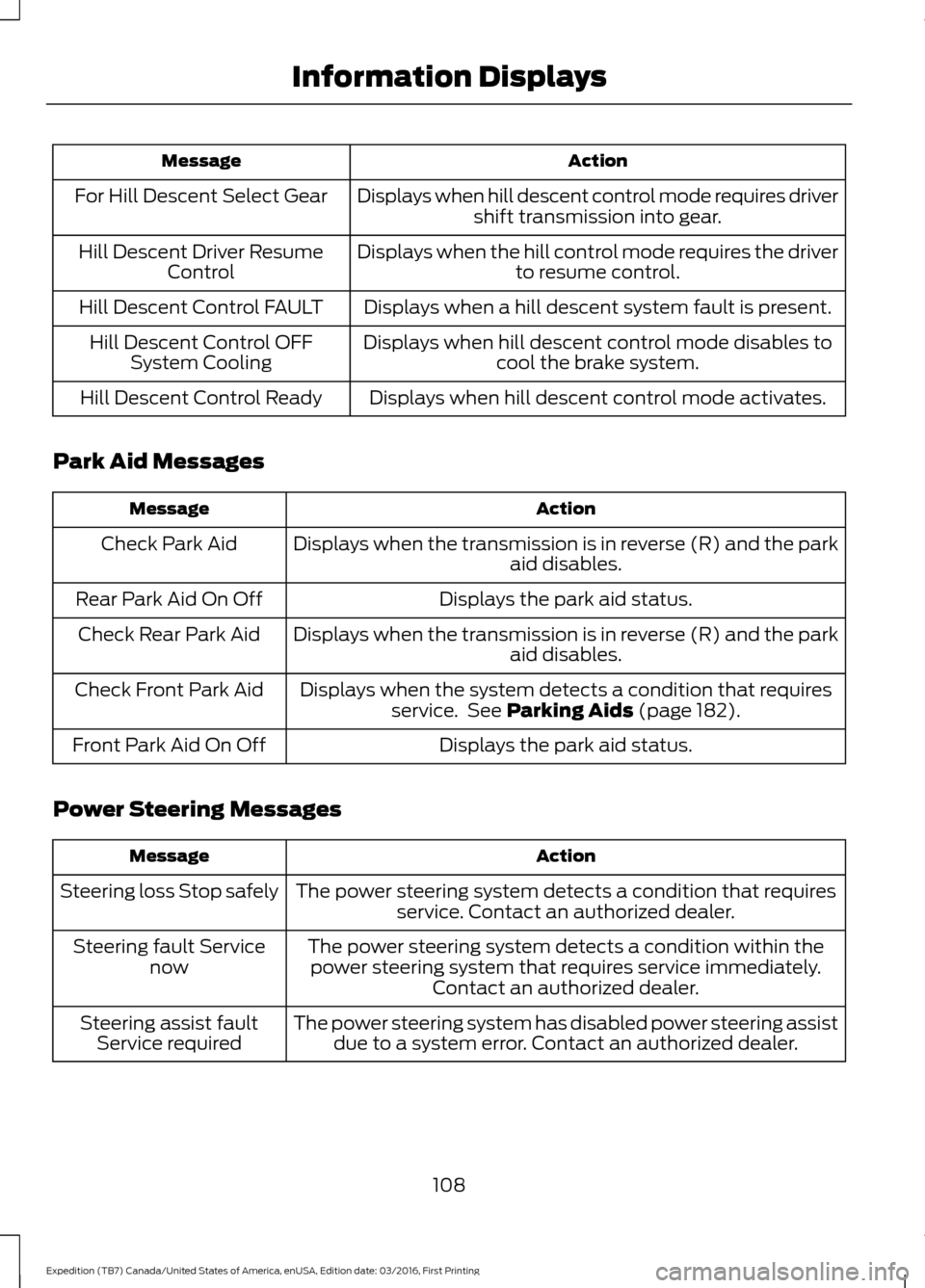
Action
Message
Displays when hill descent control mode requires drivershift transmission into gear.
For Hill Descent Select Gear
Displays when the hill control mode requires the driverto resume control.
Hill Descent Driver Resume
Control
Displays when a hill descent system fault is present.
Hill Descent Control FAULT
Displays when hill descent control mode disables tocool the brake system.
Hill Descent Control OFF
System Cooling
Displays when hill descent control mode activates.
Hill Descent Control Ready
Park Aid Messages Action
Message
Displays when the transmission is in reverse (R) and the park aid disables.
Check Park Aid
Displays the park aid status.
Rear Park Aid On Off
Displays when the transmission is in reverse (R) and the parkaid disables.
Check Rear Park Aid
Displays when the system detects a condition that requiresservice. See Parking Aids (page 182).
Check Front Park Aid
Displays the park aid status.
Front Park Aid On Off
Power Steering Messages Action
Message
The power steering system detects a condition that requiresservice. Contact an authorized dealer.
Steering loss Stop safely
The power steering system detects a condition within thepower steering system that requires service immediately. Contact an authorized dealer.
Steering fault Service
now
The power steering system has disabled power steering assistdue to a system error. Contact an authorized dealer.
Steering assist fault
Service required
108
Expedition (TB7) Canada/United States of America, enUSA, Edition date: 03/2016, First Printing Information Displays
Page 113 of 500

Action
Message
Displays when a trailer connection becomes discon-
nected, either intentionally or unintentionally, and the
system senses it during a given ignition cycle. Disregard
this status if your vehicle is not equipped with a factory installed trailer brake controller. This message may
appear when an aftermarket TBC is used even when the trailer is connected.
Trailer Disconnected
Displays when the trailer sway control detects trailersway.
Trailer Sway Reduce Speed
Displays if there are certain faults in your vehicle wiringand the trailer wiring or brake system.
Wiring Fault On Trailer
Displays the current gain setting from the trailer brake.
Trailer Brake Gain XX.X
There is a fault with your vehicle trailer lighting module.See Towing a Trailer (page 203).
Trailer Lighting Module Fault
See Manual
There is a fault with your trailer stop lamp. Check your lamp.
Trailer Stop Lamps Fault Check
Lamps
There is a fault with your trailer turn lamp. Check your lamp.
Trailer Left Turn Lamps Fault
Check Lamps
There is a fault with your trailer turn lamp. Check yourlamp.
Trailer Right Turn Lamps Fault
Check Lamps
There is a fault with your trailer park lamp. Check yourlamp.
Trailer Park Lamps Fault Check
Lamps
There is a fault with your trailer battery. See
Towing
a Trailer (page 203).
Trailer Battery Not Charging See
Manual
Transmission Messages Action
Message
Displays as a reminder to shift into park (P).
Transmission not in Park
Displays when the transfer case is NOT in the neutral position.The message indicates that your vehicle is NOT safe to tow with all four wheels on the ground.
Neutral Tow Disabled
Displays when the transfer case is in the neutral position. Themessage indicates that your vehicle is safe to tow with all four wheels on the ground.
Neutral Tow Enabled
Leave Transmission In Neutral
110
Expedition (TB7) Canada/United States of America, enUSA, Edition date: 03/2016, First Printing Information Displays
Page 128 of 500

2. Continue pressing the control until it
reaches the end of the seat track.
3. Continue pressing the control for about
two seconds. You will feel the seat
bounce back slightly.
Power Lumbar (If Equipped) The control is located on the outboard side
of the seat. Press the forward or rearward
side of the control for more or less support.
MEMORY FUNCTION
(If Equipped)
WARNINGS
Before activating the memory seat,
make sure that the area immediately
surrounding the seat is clear of
obstructions and that all occupants are
clear of moving parts. Do not use the memory function
when your vehicle is moving.
This feature automatically recalls the
position of the following:
•
Driver seat.
• Power mirrors.
• Power steering column.
• Optional power adjustable foot pedals.
The memory control is on the left side of
the driver seat. Saving a PreSet Position
1. Switch the ignition on.
2. Adjust the memory features to your
desired position.
3. Press and hold the desired preset button until you hear a single tone.
You can save up to two preset memory
positions.
You can save a memory preset at any time.
Recalling a PreSet Position
Switch the ignition on.
Press and release the preset button
associated with your desired driving
position. The memory features will move
to the position stored for that preset.
Note: You can only recall preset memory
position when you switch the ignition off, or
when you place the transmission in park (P)
or neutral (N) if you switch the ignition on.
You can also recall a preset memory
position by:
• Pressing the unlock button on your
remote control if it is linked to a preset
position.
• Unlocking the intelligent driver door
handle if a linked key fob is present.
• Entering a personal entry code on the
Securicode keypad. See
Doors and
Locks (page 52).
125
Expedition (TB7) Canada/United States of America, enUSA, Edition date: 03/2016, First Printing SeatsE164101 21
E205043