2017 FORD ESCAPE remote control
[x] Cancel search: remote controlPage 66 of 486

PASSIVE ANTI-THEFT
SYSTEM
Note:
The system is not compatible with
non-Ford aftermarket remote start systems.
Use of these systems may result in engine
starting problems and a loss of security
protection.
Note: Metallic objects, electronic devices
or a second coded key on the same key
chain may result in vehicle starting
problems, especially if they are too close to
the key when starting your vehicle. Prevent
these objects from touching the coded key
when starting your vehicle. Switch the
ignition off, move all objects on the key
chain away from the coded key and restart
your vehicle if a problem occurs.
Note: Do not leave a duplicate coded key
in your vehicle. Always take your keys and
lock all doors when leaving your vehicle.
SecuriLock®
The system helps prevent the engine from
starting unless you use a coded key
programmed to your vehicle. Using the
wrong key may prevent your vehicle from
starting. A message may appear in the
information display.
If you are unable to start your vehicle with
a coded key, it is not operating correctly.
A message may appear in the information
display.
Automatic Arming
The system arms when you switch the
ignition off.
Automatic Disarming
The system disarms when you switch the
ignition on with a coded key.
Replacement Keys
Note: Your vehicle comes with two keys. The integrated keyhead transmitter
functions as a programmed ignition key
that operates all the locks and starts your
vehicle, as well as a remote control.
The intelligent access key functions as a
programmed key that operates the driver
door lock and turns on the intelligent
access with push button start system, as
well as a remote control.
If your coded keys are lost or stolen and
you do not have an extra coded key, you
need to erase the key codes from your
vehicle and program new coded keys.
Contact an authorized dealer.
Store an extra programmed key away from
your vehicle in a safe place. You can
purchase replacement keys or remote
controls from an authorized dealer.
Programming a Spare Integrated
Keyhead Transmitter
Note:
You can program a maximum of
eight coded keys to your vehicle. All eight
can be integrated keyhead transmitters.
You can program your own integrated
keyhead transmitter or standard
SecuriLock coded keys to your vehicle.
This procedure programs both the vehicle
immobilizer keycode and the remote
control to your vehicle.
Only use integrated keyhead transmitters
or standard SecuriLock keys.
You must have two previously
programmed coded keys and the new
unprogrammed key readily accessible.
Contact an authorized dealer to have the
spare key programmed if two previously
programmed keys are not available.
Read and understand the entire procedure
before you begin.
1. Insert the first previously programmed
coded key into the ignition.
63
Escape/Kuga (TM2), enUSA, First Printing Security
Page 67 of 486

2.
Switch the ignition from off to on. Keep
the ignition on for at least 3 seconds,
but no more than 10 seconds.
3. Switch the ignition off and remove the
first coded key from the ignition.
4. After at least 3 seconds but within 10 seconds of switching the ignition off,
insert the second previously coded key
into the ignition.
5. Switch the ignition from off to on. Keep
the ignition on for at least 3 seconds,
but no more than 10 seconds.
6. Switch the ignition off and remove the
second previously programmed coded
key from the ignition.
7. After at least 3 seconds but within 10 seconds of switching the ignition off
and removing the previously
programmed coded key, insert the new
unprogrammed key into the ignition.
8. Switch the ignition from off to on. Keep
the ignition on for at least six seconds.
9. Remove the newly programmed coded
key from the ignition.
If you have successfully programmed the
new integrated keyhead transmitter, it will
start your vehicle and operate the remote
entry system.
If programming was unsuccessful, wait 10
seconds and repeat steps 1 through 9. If
you are still unsuccessful, take your vehicle
to your authorized dealer.
Programming a Spare Intelligent
Access Key
Note: You can program a maximum of eight
coded keys to your vehicle. All eight must
be intelligent access keys.
You can program your own intelligent
access keys to your vehicle. This procedure
programs both the vehicle immobilizer
keycode and the remote control to your
vehicle. You must have two previously
programmed intelligent access keys inside
your vehicle and the new unprogrammed
intelligent access key readily accessible.
Contact an authorized dealer to have the
spare key programmed if two previously
programmed keys are not available.
Make sure that the ignition is switched off
before beginning this procedure. Make sure
that you close all the doors before
beginning and that they remain closed
throughout the procedure. Carry out all
steps within 30 seconds of starting the
sequence. Stop and wait for at least one
minute before starting again if you carry
out any steps out of sequence.
Read and understand the entire procedure
before you begin.
1. Place the first programmed intelligent
access key in the middle of the tray as
shown.
2. Press the push button ignition switch.
3. Wait five seconds and then press the push button ignition switch again.
4. Remove the intelligent access key.
5. Within 10 seconds, place a second programmed intelligent access key in
the middle of the tray.
64
Escape/Kuga (TM2), enUSA, First Printing SecurityE218172
Page 68 of 486

6. Press the push button ignition switch.
7. Wait five seconds and then press the
push button ignition switch again.
8. Remove the intelligent access key.
9. Within 10 seconds, place the unprogrammed intelligent access key
in the middle of the tray.
10. Press the push button ignition switch.
Keep the ignition on for at least six
seconds.
11. Remove the newly programmed intelligent access key.
Programming is now complete. Check that
the remote control functions operate and
your vehicle starts with the new intelligent
access key.
If programming was unsuccessful, wait 10
seconds and repeat steps 1 through 11. If
programming remains unsuccessful,
contact an authorized dealer.
ANTI-THEFT ALARM (If Equipped)
The system will warn you of an
unauthorized entry to your vehicle. It will
be triggered if any door, the luggage
compartment or the hood is opened
without using the key, remote control or
keyless entry keypad.
The direction indicators will flash and the
horn will sound if unauthorized entry is
attempted while the alarm is armed.
Take all remote controls to an authorized
dealer if there is any potential alarm
problem with your vehicle.
Arming the Alarm
The alarm is ready to arm when there is
not a key in the ignition. Electronically lock
the vehicle to arm the alarm. The message indicator flashes
when theft protection is active. Disarming the Alarm
Disarm the alarm by any of the following
actions:
•
Unlock the doors or luggage
compartment with the remote control
or keyless entry keypad.
• Switch the ignition on or start the
vehicle.
• Use a key in the driver ’s door to unlock
the vehicle, then switch the ignition on
within 12 seconds.
Note: Pressing the panic button on the
remote control will stop the horn and signal
indicators, but will not disarm the system.
65
Escape/Kuga (TM2), enUSA, First Printing Security
Page 80 of 486
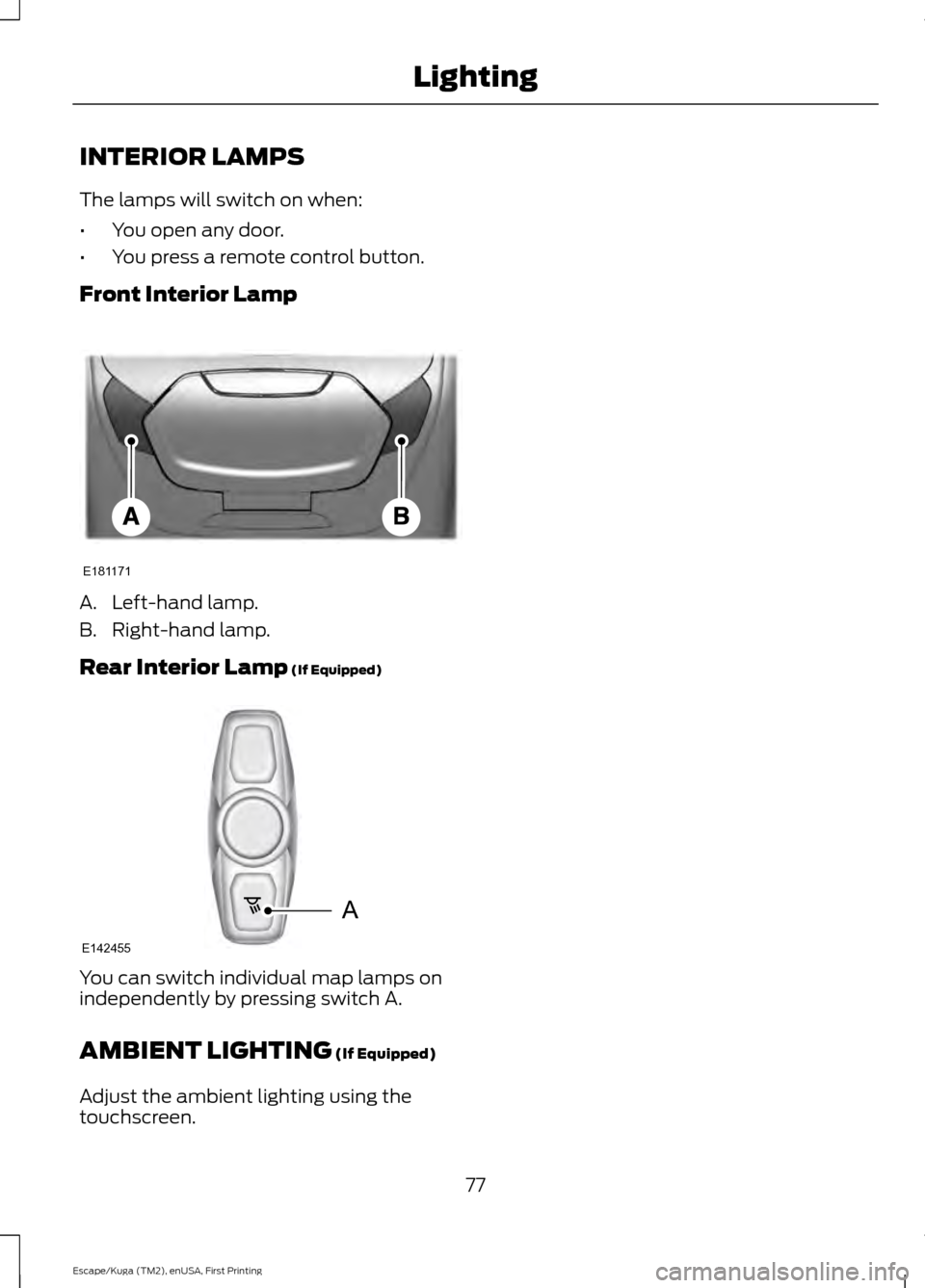
INTERIOR LAMPS
The lamps will switch on when:
•
You open any door.
• You press a remote control button.
Front Interior Lamp A. Left-hand lamp.
B. Right-hand lamp.
Rear Interior Lamp (If Equipped)
You can switch individual map lamps on
independently by pressing switch A.
AMBIENT LIGHTING
(If Equipped)
Adjust the ambient lighting using the
touchscreen.
77
Escape/Kuga (TM2), enUSA, First Printing LightingE181171 A
E142455
Page 94 of 486

Settings
Cross Traffic
Driver Alert
Tire Monitor Select Your Setting
Mode
Lane Keeping
Sensitivity
Intensity
Auto Engine Off
Vehicle
Select Your Setting
Alarm
Ask on Exit
Display
Compass
Park Slot
Chimes
Information
Warning
Rain Light
Lighting
Select Your Setting
Dimming
Hdlamp Delay
DRL
System
Remote Start
Heater - A/C
Climate Control
Heated Wheel
Front Defrost
Rear Defrost
Driver Seat
Passengr Seat
Select Your Setting
Duration
Quiet Start
Restore Default
91
Escape/Kuga (TM2), enUSA, First Printing Information Displays
Page 102 of 486

Action
Message
Indicator
Message
Displayed as a reminder to press the brakewhile starting the vehicle.
-
Press brake to start
Displayed when a valid key is not detected
within the vehicle. See Keyless Starting (page 128).
Red
Ford KeyFree Key not
inside car
Displays when the key battery is low. Change
the battery as soon as possible. See
Remote
Control (page 45).
-
Key Battery Low Replace
Soon
Lighting Action
Message
Indicator
Message
Displays when the brake lamp bulb has burnedout. Contact your authorized dealer.
-
Brake lamp Bulb fault
Displays when the low beam headlamp bulb
has burned out. Contact your authorized dealer.
-
Low beam Bulb fault
Displays when an electrical system problem
occurs with the headlamp system. Contact your authorized dealer.
Amber
Headlamp fault Service
required
Maintenance Action
Message
Indicator
Message
Displays when the engine oil life is depleted andrequires a change. See
Engine Oil Check
(page 241).
-
Engine oil change due
Indicates the brake fluid level is low and the
brake system should be inspected immediately. See
Brake Fluid Check (page 247).
Red
Brake fluid level low
Service now
99
Escape/Kuga (TM2), enUSA, First Printing Information Displays
Page 113 of 486

HEATED WINDOWS AND
MIRRORS (If Equipped)
Heated Rear Window
Note: Make sure the engine is running
before operating the heated windows. Press the button to clear the
heated rear window of thin ice
and fog. The heated rear window
will automatically turn off after a short
period of time. Start the engine before you
switch the heated rear window on.
Note: Do not use razor blades or other
sharp objects to clean or remove decals
from the inside of the heated rear window.
The vehicle warranty does not cover
damage caused to the heated rear window
grid lines.
Heated Exterior Mirror
(If Equipped)
When you switch the heated rear window
on, the heated exterior mirrors will
automatically turn on.
Note: Do not remove ice from the mirrors
with a scraper or adjust the mirror glass
when it is frozen in place.
Note: Do not clean the mirror housing or
glass with harsh abrasives, fuel or other
petroleum-based cleaning products.
CABIN AIR FILTER
Your vehicle is equipped with a cabin air
filter, which gives you and your passengers
the following benefits:
• It improves your driving comfort by
reducing particle concentration.
• It improves the interior compartment
cleanliness.
• It protects the climate control
components from particle deposits. Your cabin air filter is located under the
instrument panel in the passenger footwell
area.
Note:
Make sure you have a cabin air filter
installed at all times. This prevents foreign
objects from entering the system. Running
the system without a filter in place could
result in degradation or damage to the
system.
Replace the filter at regular intervals. See
Maintenance
(page 236).
For additional cabin air filter information,
or to replace the filter, see an authorized
dealer.
REMOTE START
(If Equipped)
The remote start feature allows you to
pre-condition the interior of your vehicle.
The climate control system works to
achieve comfort according to your previous
settings.
Note: You cannot adjust the system during
remote start operation.
Turn the ignition on to return the system
to its previous settings. You can now make
adjustments normally, but you need to turn
certain vehicle-dependent features back
on, such as:
• Heated seats.
• Cooled seats.
• Heated steering wheel.
• Heated mirrors.
• Heated rear window.
You can adjust the default remote start
settings using the information display
controls. See
Information Displays
(page 89).
110
Escape/Kuga (TM2), enUSA, First Printing Climate ControlE184884
Page 121 of 486

Note:
Using a linked key fob to recall your
memory position when the ignition is off
moves the seat to the Easy Entry position.
Note: Pressing any active memory feature
adjustment control (or any memory button)
during a memory recall cancels the
operation.
Linking a PreSet Position to your
Remote Control or Intelligent Access
Key Fob
You can save preset memory positions for
up to three remote controls or intelligent
access (IA) keys.
1. With the ignition on, move the memory
positions to the desired positions.
2. Press and hold the desired preset button for about five seconds. A tone
sounds after about two seconds.
Continue holding until you hear a
second tone.
3. Within three seconds, press the lock button on the remote control you are
linking.
To unlink a remote control, follow the
same procedure – except in step 3, press
the unlock button on the remote control.
Note: If more than one linked remote
control or intelligent access key is in range,
the memory function moves to the settings
of the first key to initiate a memory recall.
Easy Entry and Exit Feature
If you enable the easy entry and exit
feature, it automatically moves the driver
seat position rearward up to two inches
(five centimeters) when you switch the
ignition off.
The driver seat will return to its previous
position when you switch the ignition on.
You can enable or disable this feature in
the information display. See Information
Displays (page 89). REAR SEATS
Folding the Seatback
With the seat empty, pull the lever up to
fold the seatback forward. You may need
to fold the outboard head restraints and
lower the center head restraint first.
Unfolding the Seatback
Pull the seatback upward to unfold the
seatback.
Recline Adjustment
(If Equipped)
With the seat occupied, pull the lever up
to recline the seatback.
118
Escape/Kuga (TM2), enUSA, First Printing SeatsE155554