2017 FORD ESCAPE lights
[x] Cancel search: lightsPage 232 of 486

Protected components
Fuse amp rating
Fuse or relay number
Fuel pump supply.
20A
F56
Not used.
—
F57
Interior lights relay.
5A
F58
Passive anti-theft transceiver.
5A
F59
Interior light.
10A
F60
Driver door switch pack.
Glove box light.
Overhead console switch bank.
229
Escape/Kuga (TM2), enUSA, First Printing FusesE129926
Page 261 of 486
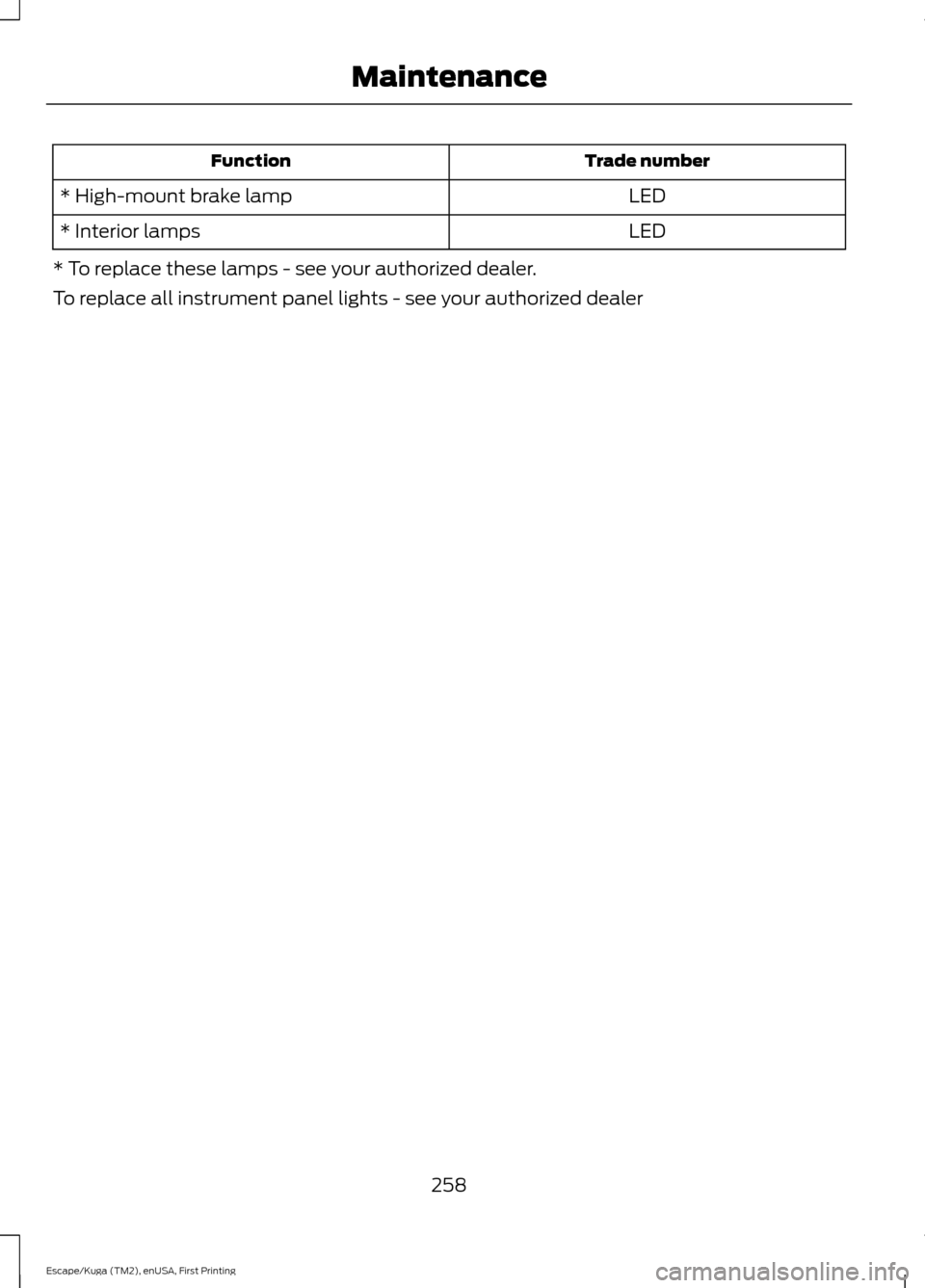
Trade number
Function
LED
* High-mount brake lamp
LED
* Interior lamps
* To replace these lamps - see your authorized dealer.
To replace all instrument panel lights - see your authorized dealer
258
Escape/Kuga (TM2), enUSA, First Printing Maintenance
Page 341 of 486
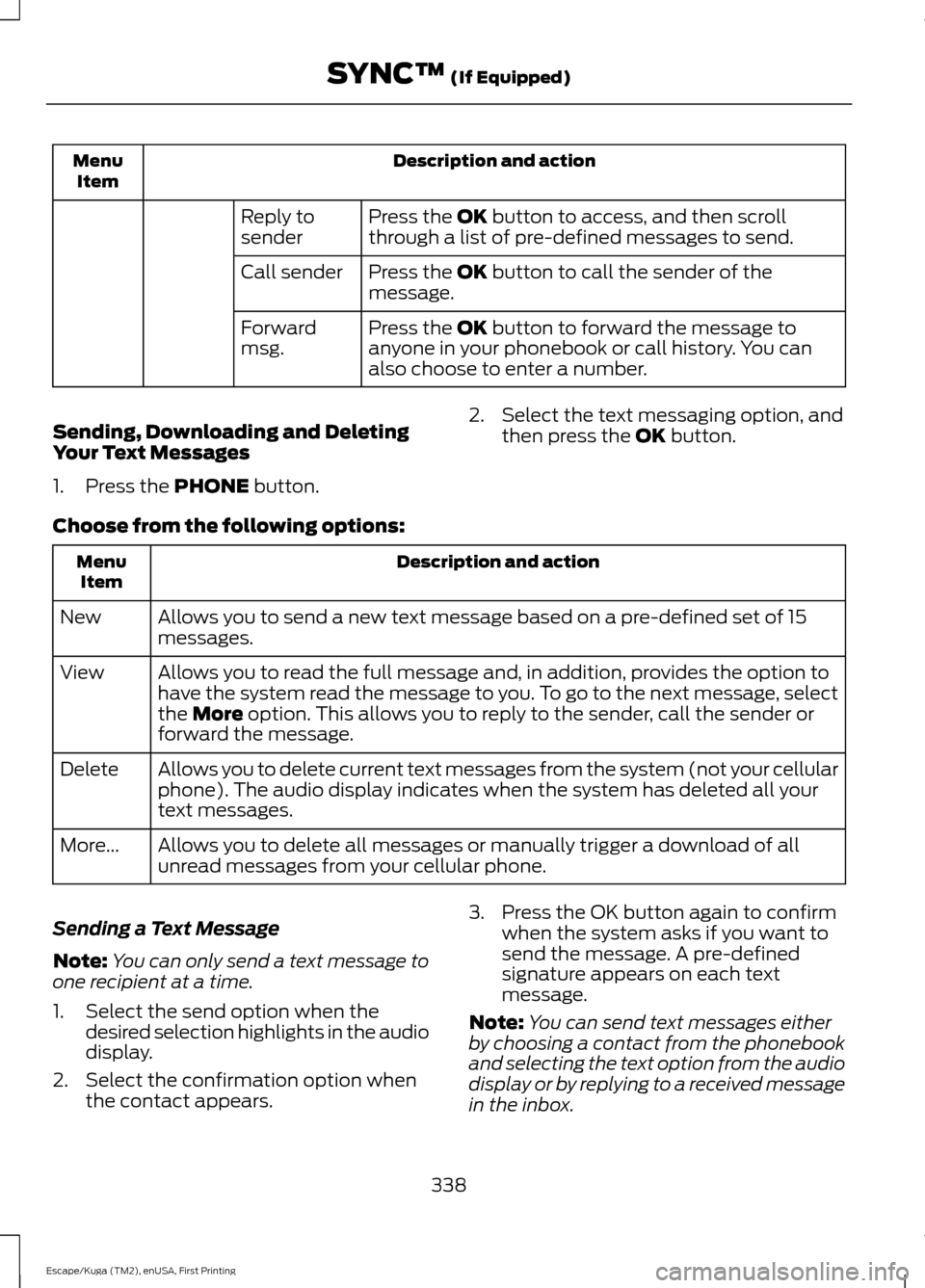
Description and action
Menu
Item
Press the OK button to access, and then scroll
through a list of pre-defined messages to send.
Reply to
sender
Press the
OK button to call the sender of the
message.
Call sender
Press the
OK button to forward the message to
anyone in your phonebook or call history. You can
also choose to enter a number.
Forward
msg.
Sending, Downloading and Deleting
Your Text Messages
1. Press the
PHONE button. 2. Select the text messaging option, and
then press the
OK button.
Choose from the following options: Description and action
Menu
Item
Allows you to send a new text message based on a pre-defined set of 15
messages.
New
Allows you to read the full message and, in addition, provides the option to
have the system read the message to you. To go to the next message, select
the
More option. This allows you to reply to the sender, call the sender or
forward the message.
View
Allows you to delete current text messages from the system (not your cellular
phone). The audio display indicates when the system has deleted all your
text messages.
Delete
Allows you to delete all messages or manually trigger a download of all
unread messages from your cellular phone.
More...
Sending a Text Message
Note: You can only send a text message to
one recipient at a time.
1. Select the send option when the desired selection highlights in the audio
display.
2. Select the confirmation option when the contact appears. 3. Press the OK button again to confirm
when the system asks if you want to
send the message. A pre-defined
signature appears on each text
message.
Note: You can send text messages either
by choosing a contact from the phonebook
and selecting the text option from the audio
display or by replying to a received message
in the inbox.
338
Escape/Kuga (TM2), enUSA, First Printing SYNC™
(If Equipped)
Page 402 of 486

Heading up (2D map) This
always shows the direction of
forward travel to be upward on
the screen. This view is available
for map scales up to
3 mi (5 km). North up (2D map)
always
shows the northern direction to
be upward on the screen. 3D map mode
provides an
elevated perspective of the map.
Adjust this viewing angle and
rotate the map 180 degrees by
touching the map twice, and
then dragging your finger along the shaded
bar with arrows at the bottom of the map. Re-center the map by pressing
this icon whenever you scroll the
map away from your vehicle
’s
current location. Points of Interest (POI)
grouping icon: You can choose
up to three POI icons to display
on the map. If the chosen POIs
are located close together or are
at the same location a box is used to
display a single category icon instead of repeating the same icon, in order to reduce
clutter. When you select the box on the
map, a pop-up appears indicating how
many POIs are in this location. Select the
pop up to see a list of the available POIs.
You can scroll through and select POIs
from this list.
If your vehicle is low on charge or fuel,
station icons automatically display on the
map.
If you have subscribed to SiriusXM Traffic
and Travel Link (where available), traffic
flow will be indicated on the map by green
(clear), yellow (slowing), and red
(stopped) road highlights. Traffic flow is
indicated where the information is
available and varies across the US.
You can choose to display traffic icons on
the map representing twelve different
types of incidents. See
Settings (page
408).
You can set a destination by hovering
above a location and selecting: Button
Start
Destination Mode
To set a destination, press: Description
Menu Item
Destination
Enter a navigation destination in any of the following formats: Street Address
Search
(number, street, city, state)
For example "12 Mainstreet Dearborn MI"
Partial Address
(number, street) if searching in current state
399
Escape/Kuga (TM2), enUSA, First Printing SYNC™ 3
(If Equipped)E207750 E207749 E207748 E207751 E207754
Page 442 of 486

Check every month
Engine oil level.
Function of all interior and exterior lights.
Tires (including spare) for wear and proper pressure. Windshield washer fluid level. Check every six months
Battery connections. Clean if necessary.
Body and door drain holes for obstructions. Clean if necessary. Cooling system fluid level and coolant strength.
Door weatherstrips for wear. Lubricate if necessary.
Hinges, latches and outside locks for proper operation. Lubricate if necessary. Parking brake for proper operation.
Safety belts and seat latches for wear and function.
Safety warning lamps (brake, ABS, airbag and safety belt) for operation.
Washer spray and wiper operation. Clean or replace blades as necessary.
Multi-Point Inspection
In order to keep your vehicle running right,
it is important to have the systems on your
vehicle checked regularly. This can help
identify potential issues and prevent major
problems. We recommend having the
following multi-point inspection performed
at every scheduled maintenance interval
to help make sure your vehicle keeps
running great.
439
Escape/Kuga (TM2), enUSA, First Printing Scheduled Maintenance
Page 478 of 486

Climate Control............................................104
Collision Warning System.........................192
PRINCIPLE OF OPERATION........................... 192
Coolant Check See: Engine Coolant Check............................ 243
Crash Sensors and Airbag Indicator........42
Creating a MyKey
...........................................50
Programming or Changing Configurable
Settings................................................................ 51
Cross Traffic Alert.........................................187 False Alerts........................................................... 190
Switching the System Off and On...............190
System Errors...................................................... 190
System Lights, Messages and Audible Alerts.................................................................. 189
System Limitations........................................... 190
Using the System................................................ 187
Cruise Control.................................................68 Principle of Operation....................................... 174
Type One................................................................. 68
Type Two................................................................. 68
Cruise control See: Using Cruise Control................................. 174
Customer Assistance
..................................218
D
Data Recording
..................................................9
Event Data Recording........................................... 9
Service Data Recording........................................ 9
Daytime Running Lamps.............................74 Type 1 - Conventional
(Non-Configurable)........................................ 74
Type 2 - Configurable.......................................... 74
Digital Radio
...................................................321
HD Radio Reception and Station
Troubleshooting............................................ 322
Direction Indicators
........................................76
Driver Alert......................................................180
Using Driver Alert............................................... 180
Driver and Passenger Airbags...................36 Children and Airbags.......................................... 36
Proper Driver and Front Passenger Seating Adjustment........................................................ 36
Driver Knee Airbag.........................................40
Driving Aids
.....................................................180
Driving Hints..................................................209
Driving Through Water................................210 DRL
See: Daytime Running Lamps......................... 74
E
Eco Mode
..........................................................191
Resetting Eco Mode............................................ 191
Type 1........................................................................\
191
Type 2 and 3.......................................................... 191
Economical Driving
.....................................209
Electric Parking Brake.................................154 Applying the Electric Parking brake.............154
Battery With No Charge................................... 156
Parking On a Hill (Vehicles With a Manual Transmission) ................................................ 154
Releasing the Electric Parking Brake...........155
Emission Control System...........................141 On-Board Diagnostics (OBD-II).................... 142
Readiness for Inspection and Maintenance (I/M) Testing.................................................... 142
End User License Agreement.................456 VEHICLE SOFTWARE END USER LICENSE
AGREEMENT (EULA) ................................ 456
Engine Block Heater.....................................131 Using the Engine Block Heater...................... 132
Engine Coolant Check................................243 Adding Coolant................................................... 243
Coolant Change................................................. 245
Engine Coolant Temperature Management.................................................. 246
Fail-Safe Cooling............................................... 245
Recycled Coolant............................................... 244
Severe Climates................................................. 245
Engine Immobilizer See: Passive Anti-Theft System..................... 63
Engine Oil Check
...........................................241
Adding Engine Oil............................................... 241
Engine Oil Dipstick - 1.5L EcoBoost™..................................................241
Engine Oil Dipstick - 2.0L EcoBoost™/ 2.5L..................................................................241
Engine Specifications - 1.5L EcoBoost™.................................................294
Drivebelt Routing............................................... 294
Engine Specifications - 2.0L EcoBoost™.................................................294
Drivebelt Routing............................................... 295
475
Escape/Kuga (TM2), enUSA, First Printing Index
Page 485 of 486

Universal Garage Door Opener...............120
HomeLink Wireless Control System...........120
USB Port
.........................................................326
Using Adaptive Cruise Control.................175 Automatic Braking.............................................. 176
Automatic Cancel............................................... 178
Changing the Set Speed................................... 177
Detection Beam Issues..................................... 176
Forward Alert Function..................................... 179
Setting a Speed.................................................... 177
Setting the Vehicle Gap.................................... 177
Standby Mode...................................................... 178
Switching the System Off................................ 178
Switching the System On................................. 177
Using the System................................................. 177
Using Cruise Control....................................174 Switching Cruise Control Off.......................... 174
Switching Cruise Control On........................... 174
Using Four-Wheel Drive
.............................148
Driving in Special Conditions With
Four-Wheel Drive.......................................... 148
Using MyKey With Remote Start Systems..........................................................52
Using Snow Chains
.....................................284
Using Stability Control...............................160
Using SYNC™ With Your Media Player............................................................348
Accessing Your USB Song Library...............352
Bluetooth Devices and System Settings............................................................ 354
Connecting Your Digital Media Player to the USB Port.......................................................... 348
Media Menu Features....................................... 352
Media Voice Commands................................ 349
USB 2...................................................................... 354
Voice Commands for Audio Sources.........355
Using SYNC™ With Your Phone.............331 Accessing Features through the Phone
Menu.................................................................. 336
Accessing Your Phone Settings................... 339
Bluetooth Devices............................................. 340
Making Calls........................................................ 334
Pairing a Phone for the First Time................331
Pairing Subsequent Phones.......................... 332
Phone Options during an Active Call.........335
Phone Voice Commands................................ 333
Receiving Calls.................................................... 335
System Settings.................................................. 341Text Messaging...................................................
337
Using Traction Control................................158 Switching the System Off............................... 158
System Indicator Lights and Messages.......................................................... 158
Using a Switch..................................................... 158
Using the Information Display Controls............................................................. 158
Using Voice Recognition
...........................329
Audio Voice Commands................................. 378
Initiating a Voice Session................................ 329
Mobile App Voice Commands....................... 381
Navigation Voice Commands....................... 380
Phone Voice Commands................................ 379
SiriusXM Traffic and Travel Link Voice Commands..................................................... 382
System Interaction and Feedback..............330
Voice Settings Commands............................ 382
Utilizing the Mediation/Arbitration Program (Canada Only)..........................221
V
Vehicle Care....................................................261 General Information.......................................... 261
Vehicle Certification Label
......................300
Vehicle Identification Number...............299
Vehicle Storage
............................................266
Battery.................................................................... 267
Body....................................................................... 266
Brakes..................................................................... 267
Cooling system................................................... 267
Engine.................................................................... 266
Fuel system.......................................................... 267
General.................................................................. 266
Miscellaneous...................................................... 267
Removing Vehicle From Storage.................. 267
Tires........................................................................\
. 267
Ventilation See: Climate Control......................................... 104
VIN See: Vehicle Identification Number............299
Voice Control
....................................................67
W
Warning Lamps and Indicators................85 Adaptive Cruise Control.................................... 85
482
Escape/Kuga (TM2), enUSA, First Printing Index