2017 FORD ESCAPE change time
[x] Cancel search: change timePage 180 of 486
Using the System
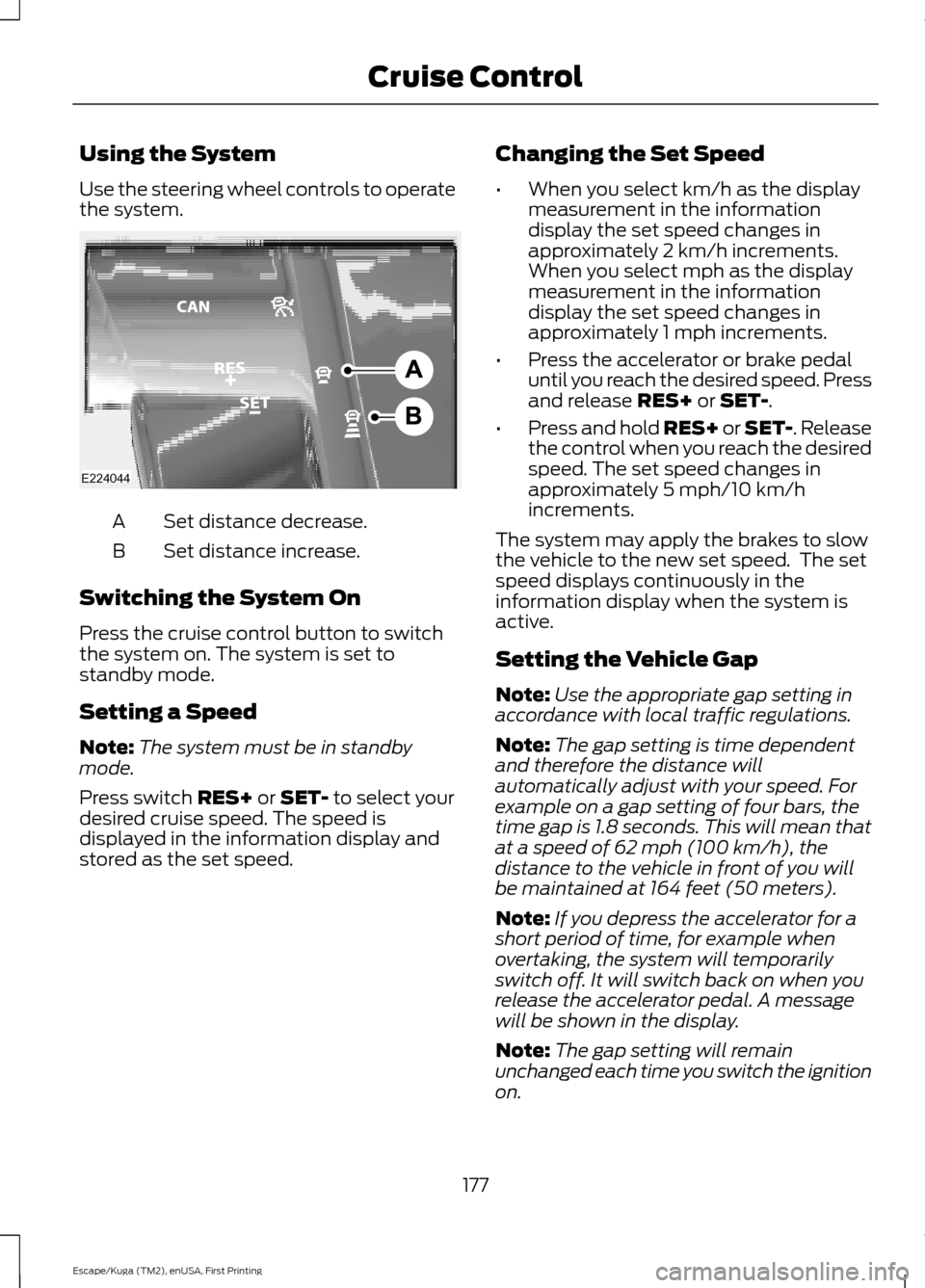
Use the steering wheel controls to operate
the system.
Set distance decrease.
A
Set distance increase.
B
Switching the System On
Press the cruise control button to switch
the system on. The system is set to
standby mode.
Setting a Speed
Note: The system must be in standby
mode.
Press switch RES+ or SET- to select your
desired cruise speed. The speed is
displayed in the information display and
stored as the set speed. Changing the Set Speed
•
When you select km/h as the display
measurement in the information
display the set speed changes in
approximately 2 km/h increments.
When you select mph as the display
measurement in the information
display the set speed changes in
approximately 1 mph increments.
• Press the accelerator or brake pedal
until you reach the desired speed. Press
and release
RES+ or SET-.
• Press and hold RES+ or SET-. Release
the control when you reach the desired
speed. The set speed changes in
approximately 5 mph/10 km/h
increments.
The system may apply the brakes to slow
the vehicle to the new set speed. The set
speed displays continuously in the
information display when the system is
active.
Setting the Vehicle Gap
Note: Use the appropriate gap setting in
accordance with local traffic regulations.
Note: The gap setting is time dependent
and therefore the distance will
automatically adjust with your speed. For
example on a gap setting of four bars, the
time gap is 1.8 seconds. This will mean that
at a speed of 62 mph (100 km/h), the
distance to the vehicle in front of you will
be maintained at 164 feet (50 meters).
Note: If you depress the accelerator for a
short period of time, for example when
overtaking, the system will temporarily
switch off. It will switch back on when you
release the accelerator pedal. A message
will be shown in the display.
Note: The gap setting will remain
unchanged each time you switch the ignition
on.
177
Escape/Kuga (TM2), enUSA, First Printing Cruise ControlE224044
Page 181 of 486

The distance between you and the vehicle
detected in front of you is maintained by
a variable setting. This setting is
represented by horizontal bars displayed
in the information display. Selecting one
bar gives the smallest gap and selecting
all bars gives the largest gap. These bars
are shown empty when in standby mode
and filled when the system is in use.
When the system does not detect a vehicle
in front of you, you will only see your
vehicle displayed in the information display
below the bars. The system will maintain
the set speed when conditions permit. The
system also maintains the set gap and
displays this in the information display.
When the system detects a vehicle in front
of you, it will be displayed above the
horizontal bars.
This is a follow mode. The system will
accelerate or decelerate as necessary to
maintain the set gap. The selected gap will
determine the acceleration behavior of the
system. Press switch A to decrease the gap or
switch B to increase the gap. The number
of bars in the information display
represents the set gap.
Note:
The recommended gap setting is
three bars.
Standby Mode
Note: You will cancel the system if you
move the transmission selector lever to
neutral or depress the clutch or accelerator
pedal for a long period of time.
Press the brake pedal or CAN to cancel
the system. The system will return to
standby mode allowing you full manual
control of your vehicle. The memory will
retain the set speed and gap setting.
Press
RES+ to resume. The system will
resume with the previously set speed and
gap setting if conditions permit.
Switching the System Off
Press the cruise control button to switch
the system off.
Note: This will not retain the stored speed.
Automatic Cancel
Note: A message will be shown in the
display if the engine speed drops too low. It
will advise you to change down a gear
(manual transmission only). If you do not
follow this recommendation then the
system will automatically cancel.
Note: The system will not operate when
traction control is off.
The system is dependent on various other
systems, for example anti-lock braking
system and electronic stability program.
When a safety system has a malfunction
or is reacting to an emergency, the system
will automatically cancel.
178
Escape/Kuga (TM2), enUSA, First Printing Cruise ControlE82311 E82312
Page 184 of 486

The status bar will travel from left to right
as the calculated alertness level
decreases. As the rest icon is approached
the color turns from green to yellow to red.
The yellow position indicates the first
warning is active and the red position
indicates the second warning is active.
Note:
If you have recently received a
warning; you should consider resting, even
if the current assessment is within the
typical range.
Note: If the camera sensor cannot track the
road lane markings or if your vehicle speed
drops below approximately 40 mph
(64 km/h), the alertness level will change
to grey for a short time and the information
display will inform you that the system is
unavailable.
Resetting the System
You can reset the system by either:
• Switching the ignition off and on.
• Stopping the vehicle and then opening
and closing the driver ’s door.
LANE KEEPING SYSTEM
(If
Equipped) WARNING
The system is designed to aid the
driver. It is not intended to replace
the driver
’s attention and judgment.
The driver is still responsible to drive with
due care and attention. Note:
The system works above 40 mph (64
km/h).
Note: The system works as long as the
camera can detect one lane marking.
Note: The system may not function if the
camera is blocked or there is damage to the
windshield. Note:
When Aid mode is on and the system
detects no steering activity for a short
period, the system will alert you to put your
hands on the steering wheel. The system
may detect a light grip or touch on the
steering wheel as hands off driving.
The system detects unintentional drifting
toward the outside of the lane and alerts
or aids you to stay in the lane through the
steering system and instrument cluster
display. The system automatically detects
and tracks the road lane markings using a
camera mounted behind the interior rear
view mirror.
Switching the System On and Off
Note: The system on or off setting is stored
until it is manually changed, unless a
MyKey® is detected. If the system detects
a MyKey®, it defaults to on and the mode
is set to alert.
Note: If a MyKey® is detected, pressing the
button will not affect the on or off status of
the system. You can only change the mode
and intensity settings. Press the button located on the
left steering wheel stalk to
switch the system on or off.
System Settings
The system has two optional setting
menus available. To view or adjust them,
select Settings > Driver Assist > Lane
Keeping Sys in the information display
using the OK button on the steering wheel.
The system stores the last known selection
for each of these settings. You do not need
to readjust your settings each time you turn
on the system.
Mode:
This setting allows you to select
which of the system features to enable.
181
Escape/Kuga (TM2), enUSA, First Printing Driving AidsE144813
Page 186 of 486

System Display
When you turn the system on, an overhead
graphic of a vehicle with lane markings will
display in the information display. If you
turn the system on and select aid mode,
arrows will display along with the lane
markings.
When you turn the system off, the lane
marking graphics will not display.
Note:
If adaptive cruise control is enabled
the overhead vehicle graphic may still be
displayed.
While the system is on, the color of the
lane markings will change to indicate the
system status.
Gray: Indicates that the system is
temporarily unable to provide a warning
or intervention on the indicated side(s).
This may be because: •
Your vehicle is under the activation
speed.
• Your turn indicator is active.
• Your vehicle is in a dynamic maneuver.
• The road has no or poor lane markings
in the camera field-of-view.
• The camera is obscured or unable to
detect the lane markings due to
environmental conditions (significant
sun angles, shadows, snow, heavy rain,
fog), traffic conditions (following a
large vehicle that is blocking or
shadowing the lane), or vehicle
conditions (poor headlamp
illumination).
See Troubleshooting for additional
information.
Green: Indicates that the system is
available or ready to provide a warning or
intervention, on the indicated side(s).
Yellow: Indicates that the system is
providing or has just provided a lane
keeping aid intervention.
Red: Indicates that the system is providing
or has just provided a lane keeping alert
warning.
You can temporarily disable the system at
any time by doing the following:
• Quick braking.
• Fast acceleration.
• Using the turn signal indicator.
• Evasive steering maneuver.
Troubleshooting Why is the feature not available (line markings are gray) when I can see the lane markings
on the road?
Vehicle speed is outside the operational range of the feature
Sun is shining directly into the camera lens
Quick intentional lane change
183
Escape/Kuga (TM2), enUSA, First Printing Driving AidsE151660
Page 212 of 486

BREAKING-IN
You need to break in new tires for
approximately 300 miles (480
kilometers). During this time, your vehicle
may exhibit some unusual driving
characteristics.
Avoid driving too fast during the first 1000
miles (1600 kilometers). Vary your speed
frequently and change up through the
gears early. Do not labor the engine.
Do not tow during the first 1000 miles
(1600 kilometers).
ECONOMICAL DRIVING
Your fuel economy is affected by several
things, such as how you drive, the
conditions you drive under, and how you
maintain your vehicle.
You may improve your fuel economy by
keeping these things in mind:
•
Accelerate and slow down in a smooth,
moderate fashion.
• Drive at steady speeds without
stopping.
• Anticipate stops; slowing down may
eliminate the need to stop.
• Combine errands and minimize
stop-and-go driving.
• Close the windows for high-speed
driving.
• Drive at reasonable speeds (traveling
at 55 mph [88 km/h] uses 15% less
fuel than traveling at 65 mph [105
km/h]).
• Keep the tires properly inflated and use
only the recommended size.
• Use the recommended engine oil.
• Perform all regularly scheduled
maintenance. Avoid these actions; they reduce your fuel
economy:
•
Sudden accelerations or hard
accelerations.
• Revving the engine before turning it off.
• Idle for periods longer than one minute.
• Warm up your vehicle on cold
mornings.
• Use the air conditioner or front
defroster.
• Use the speed control in hilly terrain.
• Rest your foot on the brake pedal while
driving.
• Drive a heavily loaded vehicle or tow a
trailer.
• Carry unnecessary weight
(approximately 1 mpg [0.4 km/L] is
lost for every 400 lb [180 kilogram] of
weight carried).
• Driving with the wheels out of
alignment.
Conditions
• Heavily loading a vehicle or towing a
trailer may reduce fuel economy at any
speed.
• Adding certain accessories to your
vehicle (for example bug deflectors,
rollbars, light bars, running boards, ski
racks or luggage racks) may reduce
fuel economy.
• To maximize the fuel economy, drive
with the tonneau cover installed (if
equipped).
• Using fuel blended with alcohol may
lower fuel economy.
• Fuel economy may decrease with lower
temperatures during the first 8– 10
miles (12 –16 kilometers) of driving.
• Driving on flat terrain offers improved
fuel economy as compared to driving
on hilly terrain.
209
Escape/Kuga (TM2), enUSA, First Printing Driving Hints
Page 223 of 486

You are required to submit your warranty
dispute to BBB AUTO LINE before asserting
in court any rights or remedies conferred
by California Civil Code Section 1793.22(b).
You are also required to use BBB AUTO
LINE before exercising rights or seeking
remedies created by the Federal
Magnuson-Moss Warranty Act, 15 U.S.C.
sec. 2301 et seq. If you choose to seek
redress by pursuing rights and remedies
not created by California Civil Code Section
1793.22(b) or the Magnuson-Moss
Warranty Act, resort to BBB AUTO LINE is
not required by those statutes.
THE BETTER BUSINESS
BUREAU (BBB) AUTO LINE
PROGRAM (U.S. ONLY)
Your satisfaction is important to Ford
Motor Company and to your dealer. If a
warranty concern has not been resolved
using the three-step procedure outlined
earlier in this chapter in the Getting the
Services you need section, you may be
eligible to participate in the BBB AUTO
LINE program.
The BBB AUTO LINE program consists of
two parts – mediation and arbitration.
During mediation, a representative of the
BBB will contact both you and Ford Motor
Company to explore options for settlement
of the claim. If an agreement is not reached
during mediation or you do not want to
participate in mediation, and if your claim
is eligible, you may participate in the
arbitration process. An arbitration hearing
will be scheduled so that you can present
your case in an informal setting before an
impartial person. The arbitrator will
consider the testimony provided and make
a decision after the hearing.
Disputes submitted to the BBB AUTO LINE
program are usually decided within forty
days after you file your claim with the BBB.
You are not bound by the decision, and
may reject the decision and proceed to
court where all findings of the BBB Auto
Line dispute, and decision, are admissible
in the court action. Should you choose to
accept the BBB AUTO LINE decision, Ford
is then bound by the decision, and must
comply with the decision within 30 days
of receipt of your acceptance letter.
BBB AUTO LINE Application: Using the
information provided below, please call or
write to request a program application.
You will be asked for your name and
address, general information about your
new vehicle, information about your
warranty concerns, and any steps you have
already taken to try to resolve them. A
Customer Claim Form will be mailed that
will need to be completed, signed and
returned to the BBB along with proof of
ownership. Upon receipt, the BBB will
review the claim for eligibility under the
Program Summary Guidelines.
You can get more information by
calling BBB AUTO LINE at
1-800-955-5100, or writing to:
BBB AUTO LINE
3033 Wilson Boulevard, Suite 600
Arlington, Virginia 22201
BBB AUTO LINE applications can also be
requested by calling the Ford Motor
Company Customer Relationship Center
at 1-800-392-3673.
Note:
Ford Motor Company reserves the
right to change eligibility limitations, modify
procedures, or to discontinue this process
at any time without notice and without
obligation.
220
Escape/Kuga (TM2), enUSA, First Printing Customer Assistance
Page 247 of 486

To top up the coolant level do the
following:
1. Unscrew the cap slowly. Any pressure
escapes as you unscrew the cap.
2. Add prediluted coolant approved to the correct specification. See
Capacities and Specifications (page
294).
3. Add enough prediluted coolant to reach the correct level.
4. Replace the coolant reservoir cap, turn
it clockwise until you feel a strong
resistance.
5. Check the coolant level in the coolant reservoir the next few times you drive
your vehicle. If necessary, add enough
prediluted engine coolant to bring the
coolant level to the correct level.
Note: If prediluted coolant is not available,
use the approved antifreeze concentrate
diluting it to 50/50 with distilled water. See
Capacities and Specifications (page 301).
Using water that has not been deionised
may contribute to deposit formation,
corrosion or plugging of the small cooling
system passageways.
If you have to add more than
1.1 qt (1 L) of
engine coolant per month, have your
vehicle checked as soon as possible.
Operating an engine with a low level of
coolant can result in engine overheating
and possible engine damage.
Note: During normal vehicle operation, the
coolant may change color from orange to
pink or light red. As long as the coolant is
clear and uncontaminated, this color change
does not indicate the coolant has degraded
nor does it require the coolant to be drained,
the system to be flushed, or the coolant to
be replaced. Note:
In case of emergency, you can add a
large amount of water without coolant in
order to reach a vehicle service location.
Water alone, without coolant, can cause
engine damage from corrosion, overheating
or freezing. When you reach a service
location, you must have the cooling system
drained, flushed and refilled using the
correct specification prediluted coolant or
antifreeze concentrate. See
Capacities and
Specifications (page 301).
Do not use the following as a coolant
substitute:
• Alcohol.
• Methanol.
• Brine.
• Any coolant mixed with alcohol or
methanol antifreeze.
Alcohol and other liquids can cause engine
damage from overheating or freezing.
Do not add extra inhibitors or additives to
the coolant. These can be harmful and
compromise the corrosion protection of
the coolant.
Recycled Coolant
We do not recommend the use of recycled
coolant as an approved recycling process
is not yet available.
Dispose of used engine coolant in an
appropriate manner. Follow your
community ’s regulations and standards
for recycling and disposing of automotive
fluids.
244
Escape/Kuga (TM2), enUSA, First Printing Maintenance
Page 255 of 486

4. On the wall or screen you will observe
a flat zone of high intensity light
located at the top of the right hand
portion of the beam pattern. If the top
edge of the high intensity light zone is
not at the horizontal reference line, the
headlamp will need to be adjusted. 5. Locate the vertical adjuster on each
headlamp. Using a Phillips #2
screwdriver, turn the adjuster either
clockwise or counterclockwise in order
to aim the headlamp. The horizontal
edge of the brighter light should touch
the horizontal reference line.
6. Close the hood and turn off the lamps. Vehicles With High Intensity Discharge
Headlamps
1. Park the vehicle directly in front of a
wall or screen on a level surface,
approximately 25 feet (7.6 meters)
away.
2. Measure the height of the headlamp bulb center from the ground and mark
an 8 foot (2.4 meter) horizontal
reference line on the vertical wall or
screen at this height.
Note: To see a clearer light pattern for
adjusting, you may want to block the light
from one headlamp while adjusting the
other.
3. Turn on the low beam headlamps to illuminate the wall or screen and open
the hood. 4.
There is a distinct cut-off (change from
light to dark) in the left portion of the
beam pattern. The top edge of this
cut-off should be positioned two
inches (5 centimeters) below the
horizontal reference line.
252
Escape/Kuga (TM2), enUSA, First Printing MaintenanceE142465 E142467 E142466