2017 FORD EDGE wipers
[x] Cancel search: wipersPage 5 of 544

Steering Wheel
Adjusting the Steering Wheel - Vehicles
With: Manual Adjustable Steering
Column...........................................................78
Adjusting the Steering Wheel - Vehicles With: Power Adjustable Steering
Column...........................................................78
Audio Control - Vehicles With: Voice Control............................................................79
Audio Control - Vehicles Without: Voice Control............................................................79
Voice Control...................................................80
Cruise Control.................................................80
Information Display Control........................81
Heated Steering Wheel
................................81
Wipers and Washers
Windshield Wipers
.........................................82
Autowipers.......................................................82
Windshield Washers
.....................................83
Rear Window Wiper and Washers..........84
Lighting
General Information
.....................................85
Lighting Control
..............................................85
Autolamps
........................................................86
Instrument Lighting Dimmer......................87
Headlamp Exit Delay....................................87
Daytime Running Lamps
.............................87
Automatic High Beam Control.................88
Direction Indicators
.......................................89
Interior Lamps.................................................89
Ambient Lighting
.............................................91
Windows and Mirrors
Power Windows
..............................................92
Global Opening
...............................................93
Exterior Mirrors
................................................93
Interior Mirror
...................................................95
Sun Visors.........................................................95
Moonroof..........................................................95 Instrument Cluster
Gauges................................................................97
Warning Lamps and Indicators..............100
Audible Warnings and Indicators...........103
Information Displays
General Information....................................104
Information Messages
.................................113
Climate Control
Manual Climate Control - Vehicles With: Electronic Manual Temperature
Control (EMTC).........................................128
Automatic Climate Control - Vehicles With: Dual Automatic Temperature
Control (DATC)/Premium AM/FM/
CD
...................................................................129
Automatic Climate Control - Vehicles With: Sony Audio System
.......................131
Hints on Controlling the Interior Climate.........................................................133
Heated Windows and Mirrors..................134
Cabin Air Filter................................................135
Remote Start
..................................................135
Seats
Sitting in the Correct Position..................136
Head Restraints
............................................136
Manual Seats
.................................................138
Power Seats
...................................................138
Memory Function.........................................140
Rear Seats
.......................................................142
Heated Seats
..................................................143
Climate Controlled Seats..........................144
Rear Seat Armrest........................................145
Universal Garage Door Opener
Universal Garage Door Opener...............146
2
Edge (CDQ) Canada/United States of America, enUSA, Edition date: 201608, First Printing Table of Contents
Page 19 of 544

INSTRUMENT PANEL OVERVIEW
Air vents.
A
Direction indicator lever. See Direction Indicators (page 89).
B
Information display controls. See
Information Display Control (page 81).
C
Instrument cluster. See
Instrument Cluster (page 97).
D
Information display controls. See
Information Display Control (page 81).
E
Wiper lever. See
Windshield Wipers (page 82).
F
Information and entertainment display.
G
Hazard flasher switch. See
Hazard Warning Flashers (page 242).
H
Audio unit. See
Audio System (page 353).
I
Climate control. See
Climate Control (page 128).
J
Heated seat switch. See
Climate Controlled Seats (page 144).
K
Parking aid switch. Auto-start-stop switch. See Parking Aids (page 188). See
Auto-Start-Stop
(page 160).
L
Parking brake. See
Electric Parking Brake (page 181).
M
16
Edge (CDQ) Canada/United States of America, enUSA, Edition date: 201608, First Printing At a GlanceE190407
Page 85 of 544

WINDSHIELD WIPERS
Note:
Fully defrost the windshield before
you switch the windshield wipers on.
Note: Make sure you switch the windshield
wipers off before entering a car wash.
Note: Clean the windshield and wiper
blades if they begin to leave streaks or
smears. If that does not resolve the issue,
install new wiper blades.
Note: Do not operate the wipers on a dry
windshield. This may scratch the glass,
damage the wiper blades or cause the wiper
motor to burn out. Always use the
windshield washers before wiping a dry
windshield. Single wipe
A
Intermittent wipe
B
Normal wipe
C
High speed wipe
D Intermittent Wipe Shortest wipe interval
A
Intermittent wipe
B
Longest wipe interval
C
Use the rotary control to adjust the
intermittent wipe interval.
Speed Dependent Wipers
When your vehicle speed increases, the
interval between wipes decreases.
AUTOWIPERS (If Equipped)
Note: Fully defrost the windshield before
you switch the windshield wipers on.
Note: Make sure you switch the windshield
wipers off before entering a car wash.
Note: If streaks or smears appear on the
windshield, clean the windshield and the
wiper blades. See
Checking the Wiper
Blades (page 282). If that does not resolve
the issue, install new wiper blades. See
Changing the Wiper Blades
(page 282).
Autowipers uses a rain sensor located in
the area around the interior mirror. The
rain sensor will continue to monitor the
amount of water on the windshield and
automatically adjust the speed of the
wipers.
82
Edge (CDQ) Canada/United States of America, enUSA, Edition date: 201608, First Printing Wipers and WashersD
C
B
E169313A C
BA
E169314
Page 86 of 544

High sensitivity
A
OnB
Low sensitivity
C
Use the rotary control to adjust the
sensitivity of the autowipers. When you
select low sensitivity, the wipers will
operate when the sensor detects a large
amount of water on the windshield. When
you select high sensitivity, the wipers will
operate when the sensor detects a small
amount of water on the windshield.
Keep the outside of the windshield clean.
The rain sensor is very sensitive and the
wipers may operate if dirt, mist or insects
hit the windshield.
Wet or winter driving conditions with ice,
snow or salty road mist can cause
inconsistent and unexpected wiping or
smearing.
In these conditions, you can do the
following:
• Lower the sensitivity of the autowipers
to reduce the amount of smearing on
the windshield.
• Switch to normal or high-speed wipe.
• Switch autowipers off.
Note: If you switch autolamps and
autowipers on, the headlamps will
automatically turn on when the windshield
wipers continuously operate. Autowipers Settings (If Equipped)
Autowipers default to on and remain on
until you switch it off in the information
display. With autowipers switched off, the
wipers operate in intermittent mode. See
General Information
(page 104).
WINDSHIELD WASHERS
Note: Do not operate the washers when
the washer reservoir is empty. This may
cause the washer pump to overheat. To operate the washers and spray the
windshield, pull the lever toward you.
A wipe will occur a few seconds after
washing to clear any remaining washer
fluid. This feature can be switched on or
off in the information display. See General
Information
(page 104).
Front Camera Washer
(If Equipped)
Operating the windshield washer will also
operate the front camera washer.
83
Edge (CDQ) Canada/United States of America, enUSA, Edition date: 201608, First Printing Wipers and WashersE197526 E169316
Page 87 of 544

REAR WINDOW WIPER AND
WASHERS
Rear Window Wiper
Note:
Make sure you switch the rear
window wiper and ignition off before using
an automatic car wash. Intermittent wipe.
A
Low speed wipe.
B
Off.C
Press the top of the button to switch
intermittent wipe on. Press the top of the
button again to switch low speed wipe on.
Press the bottom of the button to switch
the rear window wiper off.
When you switch on the front wipers and
move the gearshift lever to reverse (R),
rear intermittent wipe automatically turns
on. Rear Window Washer Push the lever away from you to operate
the rear window washer. When you release
the lever, wiping continues for a short
period of time.
84
Edge (CDQ) Canada/United States of America, enUSA, Edition date: 201608, First Printing Wipers and WashersE171615 E167407
Page 89 of 544

Headlamp Flasher
Pull the lever toward you slightly and
release it to flash the headlamps.
AUTOLAMPS (If Equipped)
WARNING
The autolamps switch position may
not activate the headlamps in all low
visibility conditions, such as daytime
fog. Always ensure that your headlamps
are switched to auto or on, as appropriate,
during all low visibility conditions. Failure
to do so may result in a collision. When the lighting control is in the
autolamps position, the headlamps
automatically turn on in low light situations
or when the wipers activate. If equipped, the following also activate
when the lighting control is in the
autolamps position and you switch them
on in the information display:
•
Configurable daytime running lamps.
• Automatic high beam control.
• Adaptive headlamp control.
The headlamps remain on for a period of
time after you switch the ignition off. Use
the information display controls to adjust
the period of time that the headlamps
remain on. See
Information Displays
(page 104).
Note: With the headlamps in the
autolamps position, you cannot switch the
high beam headlamps on until the
autolamps system turns the low beam
headlamps on.
Windshield Wiper Activated
Headlamps
The windshield wiper activated headlamps
turn on within 10 seconds when you switch
the windshield wipers on and the lighting
control is in the autolamps position. They
turn off approximately 60 seconds after
you switch the windshield wipers off.
The headlamps will not turn on by wiper
activation:
• During a mist wipe.
• When the wipers are on to clear washer
fluid during a wash condition.
• If the wipers are in intermittent mode.
Note: If you switch autolamps and
autowipers on, the headlamps will
automatically turn on when the windshield
wipers continuously operate.
86
Edge (CDQ) Canada/United States of America, enUSA, Edition date: 201608, First Printing LightingE162680 E142451
Page 111 of 544
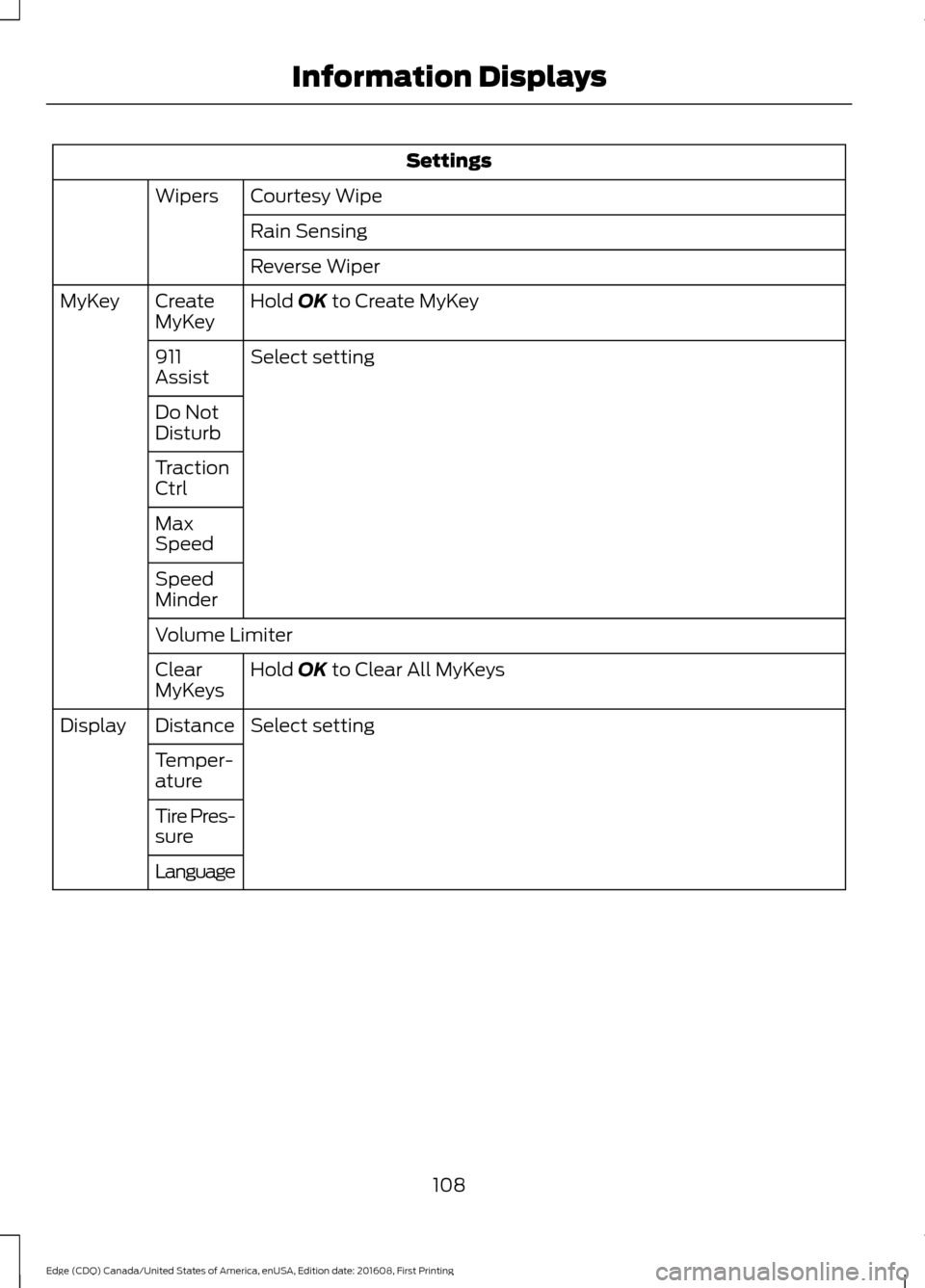
Settings
Courtesy Wipe
Wipers
Rain Sensing
Reverse Wiper
Hold OK to Create MyKey
Create
MyKey
MyKey
Select setting
911
Assist
Do Not
Disturb
Traction
Ctrl
Max
Speed
Speed
Minder
Volume Limiter
Hold
OK to Clear All MyKeys
Clear
MyKeys
Select setting
Distance
Display
Temper-
ature
Tire Pres-
sure
Language
108
Edge (CDQ) Canada/United States of America, enUSA, Edition date: 201608, First Printing Information Displays
Page 115 of 544

Settings
Select
setting
Traffic Set Up
Auto Highbeam Select setting
Autolamp Delay
Daytime Lights
Autolock
Locks
Autounlock
Relock
Mislock Select setting
Remote Unlock
Switch Inhibit
Autofold
Mirrors
XXX% - Hold OK to Reset
Oil Life
Reset
Select setting
Power
Liftgate
Select setting
Climate Control
Remote
Start
Seats or Seats and
Wheel
Duration
System
Seatbelts Remote Open
Windows
Remote Close
Courtesy Wipe
Wipers
Rain Sensing
Hold
OK to Create MyKey
Create
MyKey
MyKey
112
Edge (CDQ) Canada/United States of America, enUSA, Edition date: 201608, First Printing Information Displays