2017 FIAT PANDA Eco
[x] Cancel search: EcoPage 2 of 216

We really know your car because we invented, designed and built it: we r\
eally know every single detail. At Fiat Service authorised workshops you can find technicians directly trained by us,
offering quality and professionalism for all service operations.
Fiat workshops are always close to you for the regular servicing operati\
ons, season checks and practical recommendations by our experts.
With Original Parts distributed by MOPAR
®, you maintain the reliability, comfort
and performance features that you bought your new car for over time.
Always ask for Genuine Parts for the components used on our cars; we rec\
ommend them because
they come from our steady commitment in research and development of high\
ly innovative technologies. For all these reasons: rely on Genuine Parts, because they are the only ones designed
by FCA for your car.
SAFETY:
BRAKING SYSTEMENVIRONMENT: PARTICULATE FILTERS, CLIMATE CONTROL MAINTENANCECOMFORT: SUSPENSION
AND WINDSCREEN WIPERS PERFORMANCE: SPARK PLUGS, INJECTORS AND BATTERIESLINEACCESSORI
ROOF RACK BARS, WHEEL RIMS
WHY CHOOSING GENUINE PARTS
This Owner Handbook is intended to show the vehicle's operating conditio\
ns.
For the enthusiast user who wants to have insights, curiosities and deta\
iled information about the characteristics and function s
of the vehicle, Fiat gives the opportunity to consult a dedicated sectio\
n which is available in electronic format.
ONLINE VEHICLE OWNER HANDBOOK
The following symbol is reported within the text of the Owner Handbook, next to the subjects \
for which details are provided.
Go to the www.mopar.eu/owner
website and access your personal area.
The “Maintenance and care” page includes all the information about\
your vehicle and the link to access eLUM, where you will find
all the details of the Owner Handbook.
The eLUM website is free and will allow you, among many other things, to easily c\
onsult the on-board documents
of all the other vehicles of the Group.
Have a nice reading and happy motoring!
COP PANDA UM GB COMPAT QUAD 30/04/15 15:19 Pagina 2
Page 3 of 216

Dear Customer,
We would like to congratulate and thank you for choosing a Fiat Panda.
We have written this handbook to help you get to know all the features of your vehicle and use it in the best possible way.
Here you will find information, advice and important warnings regarding use of your vehicle and how to achieve the best performance
from the technical features of your Fiat Panda.
You are advised to read it right through before taking to the road for the first time, to become familiar with the controls and above all
with those concerning brakes, steering and gearbox; at the same time, you can understand the vehicle behaviour on different road
surfaces.
This document also provides a description of special features and tips, as well as essential information for the safe driving, care and
maintenance of your Fiat Panda over time.
After reading it, you are advised to keep the handbook inside the vehicle, for an easy reference and for making sure it remains on
board the vehicle should it be sold.
In the attached Warranty Booklet you will also find a description of the Services that Fiat offers to its customers, the Warranty
Certificate and the detail of the terms and conditions for maintaining its validity.
We are sure that these will help you to get in touch with and appreciate your new vehicle and the service provided by the people at
Fiat.
Enjoy reading. Happy motoring!
IMPORTANT
This Owner Handbook describes all versions of the Fiat Panda; please consider only the information relevant to your
vehicle’s trim level, engine and version. All data contained in this publication are purely indicative. FCA Italy S.p.A. can
modify the content of this publication at any time, for technical or commercial purposes. For further information, contact
a Fiat Dealership.
Page 10 of 216

DASHBOARD
The presence and position of controls, instruments and gauges may vary depending on the versions.
1. Adjustable air vents 2. Exterior light control stalk 3. Driver front airbag 4. Windscreen wiper/rear window wiper/trip computer control lever
5. Adjustable and directable central air vents 6. Passenger front airbag 7. Glove compartment (for versions/markets, where provided) 8. Radio (for
versions/markets, where applicable) 9. Control buttons 10. Gear lever 11. Heating/ventilation/climate control system controls 12. Ignition device
13. Instrument panel 14. Front electric windows 15. ECO/ASR OFF buttons (for versions/markets, where provided)
1F1D0131
8
KNOWING YOUR CAR
Page 11 of 216

THE KEYS
KEY WITHOUT REMOTE
CONTROL
The metal insert of the key activates:
the ignition device, the driver's side and
passenger's side door locks (for
versions/markets where provided) and
the luggage compartment lock.
KEY WITH REMOTE
CONTROL
(for versions/markets, where provided)
1)1)1)
Metal insert A fig. 2 of the key operates:
the ignition device;
the driver side door and, for
versions/markets where provided, the
passenger side door.
Press button B fig. 2 to open/close the
metal insert.Briefly press button
: unlocking of
doors and luggage compartment, timed
switching-on of internal lights and
double flashing of direction indicators
(for versions/markets, where provided).
Briefly press the
button: lock of
doors and luggage compartment with
roof lights off and single flash of
direction indicators (for versions/
markets, where provided).
Press the
button: remote
opening of the luggage compartment
and double flashing of the direction
indicators. The direction indicators will
flash twice to indicate that the luggage
compartment has been opened.
REQUEST FOR
ADDITIONAL KEYS
Should a new mechanical key or a new
key with remote control be necessary,
go to a FIAT Dealership, taking an ID
document and the vehicle ownership
documents. The system can recognise
up to 8 keys with incorporated remote
control.
WARNING
1)Press button B only with the key away
from your body, especially your eyes and
from objects which could get damaged
(e.g. your clothes). Do not leave the key
unattended, to prevent people, especially
children, from inadvertently pressing the
button.
WARNING
1)The electronic components inside the
key may be damaged if the key is
subjected to strong shocks. In order to
ensure complete efficiency of the
electronic devices inside the key, it should
never be exposed to direct sunlight.
WARNING
1)Used batteries must be disposed of, as
specified by law, in the special containers.
Otherwise take them to a Fiat Dealership,
which will deal with their disposal.
2F1D0005
9
Page 13 of 216

THE FIAT CODE
SYSTEM
This is an electronic engine locking
system which increases protection
against attempted thefts of the vehicle.
It is automatically activated when the
ignition key is removed.
OPERATION
Each time the vehicle is started by
turning the ignition key to MAR, the Fiat
CODE system control unit sends a
recognition code to the Powertrain
Control Module to deactivate the
immobiliser.
The code is sent only if the Fiat CODE
system control unit has acknowledged
the code received from the key.
Each time the ignition key is turned to
STOP, the Fiat CODE system
deactivates the functions of the
Powertrain Control Module. If, during
starting, the code is not correctly
recognised, the
warning light
switches on in the instrument panel. In
this case, turn the key to STOP and
then to MAR; if it is still locked, try again
with the other keys that come with the
vehicle. Contact a Fiat Dealership if
you still cannot start the engine.If the
warning light switches on, this
means that the system is running a
self-diagnosis (for example due to
a voltage drop). Should the fault persist,
contact a Fiat Dealership.DOORS
LOCKING/UNLOCKING
DOORS FROM THE
INSIDE
Push the control lever A fig. 4 towards
the door to lock the doors or pull it
to unlock them. With central door
locking system (for versions/markets,
where provided), operating the lever
A on the driver's side will lock/unlock all
the doors. Operating lever A on the
other doors locks/unlocks only the door
concerned. With mechanical lock,
locking/unlocking takes place operating
the single control levers.
IMPORTANT The locked door condition
is indicated by the red printing B fig.
4.
4F1D0029
11
Page 19 of 216

EXTERNAL LIGHTS
The left stalk fig. 16 controls the
operation of the headlights, side lights,
dipped beam headlights, parking lights,
main beam headlights, direction
indicators, and "Follow me home"
device.
The exterior lights can only be switched
on when the ignition key is at MAR.
The instrument panel and the various
dashboard controls will come on with
the external lights.
SIDE LIGHTS / DAYTIME
RUNNING LIGHTS (DRL)
"Daytime Running Lights"
(for versions/markets, where provided)
16) 17)With the ignition key in MAR position
and the ring nut A fig. 16 turned to
Oposition, the daytime lights switch on
automatically; the other lights and the
internal lighting remain off.SIDE LIGHTS / DIPPED
BEAM HEADLIGHTS
With the ignition key turned to MAR,
turn ring nut A fig. 16 to
. If dipped
beam headlights are activated, the
daytime running lights switch off and
the side lights and dipped headlights
switch on. The
warning light
switches on in the instrument panel.
PARKING LIGHTS
These lights can only be turned on with
ignition key in STOP position or
removed, by moving the ring nut A fig.
16 first to positionOand then to
position
.
The
warning light switches on in
the instrument panel.
MAIN BEAM HEADLIGHTS
To activate the main beam headlights,
with ring nut A fig. 16 at
, pull the
stalk towards the steering wheel
beyond the end of travel position. The
warning light switches on in the
instrument panel.
When the stalk is pulled towards the
steering wheel again, beyond the end
of travel position, the main beam
headlights deactivate, the dipped
headlights reactivate and the
warning light switches off.FLASHING
To do this, pull the stalk towards the
steering wheel (unstable position),
regardless of the position of ring nut A
fig. 16. The
warning light switches
on in the instrument panel.
DIRECTION INDICATORS
Bring the stalk to the (stable) position:
upwards:activates the right direction
indicator;
downwards:activates the left direction
indicator.
The
orwarning light will blink on
the instrument panel. The direction
indicators switch off automatically when
the steering wheel is straightened.
"Lane Change" function
If you wish to signal a lane change,
place the left stalk in the unstable
position for less than half a second. The
direction indicator on the side selected
will flash five times and then switch
off automatically.
"FOLLOW ME HOME"
DEVICE
This allows the space in front of the
vehicle to be lit for a set time.
16F1D0019
17
Page 20 of 216
Activation:with the ignition key on
STOP or removed, pull the stalk
towards the steering wheel within 2
minutes from when the engine is turned
off.
Each time the stalk is moved, the lights
stay on for an extra 30 seconds up to
a maximum of 210 seconds; then
the lights are switched off automatically.
Each time the stalk is operated, the
warning light on the instrument
panel switches on and the display also
shows a message and how long the
function will remain active.
The
warning light comes on when
the stalk is first moved and stays on
until the function is automatically
deactivated. Each time the stalk is
activated it increases the time that the
lights remain on.
Deactivation:keep the stalk pulled
towards the steering wheel for more
than two seconds.
REAR FOG LIGHTS
Press the
button, on the dashboard,
to switch on the rear fog lights.
With rear fog lights on, the
warning
light on the instrument panel will come
on at the same time.FRONT FOG
LIGHTS/REAR FOG
LIGHTS
(for versions/markets, where provided)
The fog lights can be activated only
when the dipped beam headlights are
on.
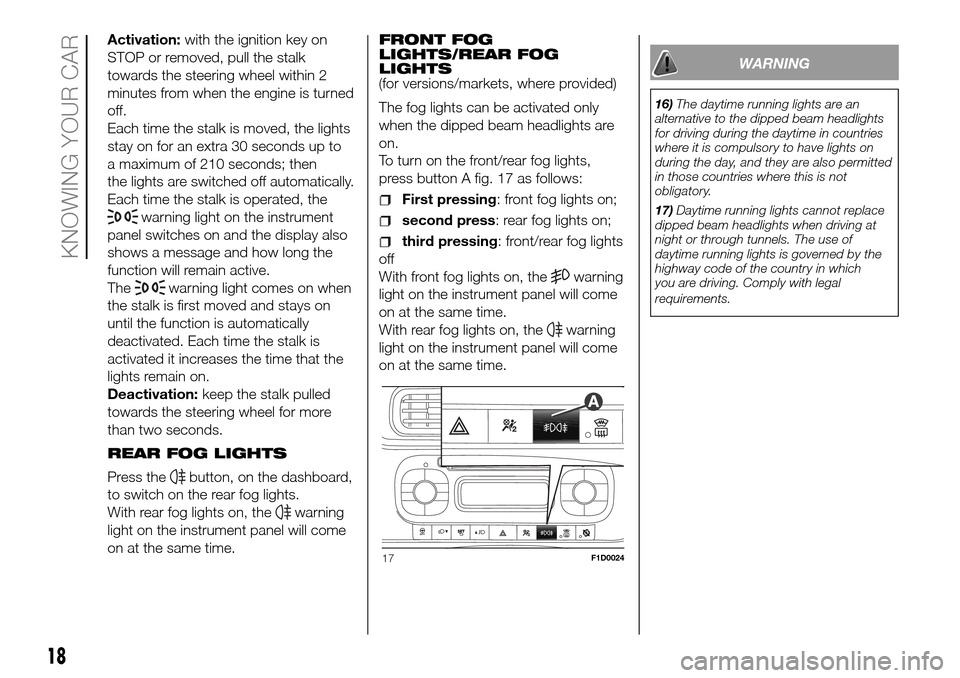
To turn on the front/rear fog lights,
press button A fig. 17 as follows:
First pressing: front fog lights on;
second press: rear fog lights on;
third pressing: front/rear fog lights
off
With front fog lights on, the
warning
light on the instrument panel will come
on at the same time.
With rear fog lights on, the
warning
light on the instrument panel will come
on at the same time.
WARNING
16)The daytime running lights are an
alternative to the dipped beam headlights
for driving during the daytime in countries
where it is compulsory to have lights on
during the day, and they are also permitted
in those countries where this is not
obligatory.
17)Daytime running lights cannot replace
dipped beam headlights when driving at
night or through tunnels. The use of
daytime running lights is governed by the
highway code of the country in which
you are driving. Comply with legal
requirements.
17F1D0024
18
KNOWING YOUR CAR
Page 22 of 216

WINDOW CLEANING
WINDSCREEN
WIPER/WASHER
4) 5) 6)This operates only with the ignition key
turned to MAR.
Ring nut A fig. 20 has four different
positions:
windscreen wiper off.
intermittent operation.
continuous slow operation.
continuous fast operation.
Move the stalk upwards (unstable
position) to limit operation to the time
for which the stalk is held in this
position. When released, the stalk will
return to its default position and the
windscreen wiper will be automatically
stopped.With ring nut A fig. 20 in
position,
the windscreen wiper will automatically
adapt its operating speed to the speed
of the vehicle.
With the windscreen wipers
operational, if reverse gear is engaged,
the rear window wiper is automatically
activated.
“Smart washing” function
Pull the stalk towards the steering
wheel (unstable position) to operate the
windscreen washer.
Keeping the stalk pulled for more than
half a second, with just one movement
it is possible to operate the washer
jet and the wiper at the same time.
The windscreen wiper stops working
three strokes after the stalk is released.
A further stroke after approximately 6
seconds completes the cycle.
REAR WINDOW
WIPER/WASHER
7)This operates only with the ignition key
turned to MAR.
Turn ring nut B fig. 20 from positionO
to position
to operate the rear
window wiper as follows:
in intermittent mode when the
windscreen wiper is not operating;
in synchronous mode (at half the
speed of the windscreen wiper) when
the windscreen wiper is operating;
in continuous mode with reverse
gear engaged and the control active.
With the windscreen wiper on and
reverse gear engaged, rear window
wiping will be continuous.
Pushing the stalk towards the
dashboard (unstable position) will
activate the rear window washer jet.
Keep the stalk pushed for more than
half a second to activate the rear
window wiper as well. Releasing the
stalk will activate the smart washing
function, as described for the
windscreen wiper.
The function stops when the stalk is
released.
WARNING
4)Do not use the windscreen wiper to
remove layers of snow or ice from the
windscreen. In such conditions, the
windscreen wiper may be subjected to
excessive stress and the motor cut-out
switch, which prevents operation for a few
seconds, may intervene. If operation is
not restored (even after turning the key and
restarting the engine), contact a Fiat
Dealership.
5)Do not operate the windscreen wiper
with the blades lifted from the windscreen.20F1D0020
20
KNOWING YOUR CAR