2017 FIAT PANDA warning
[x] Cancel search: warningPage 146 of 216

BODYWORK
PRESERVING THE
BODYWORK
Paint
70)
6)To correctly wash the car, proceed as
follows:
remove the aerial from the roof to
prevent damage to it if the car is
washed in an automatic system;
if high pressure jets or cleaners are
used to wash the vehicle, keep a
distance of at least 40 cm from the
bodywork to avoid damage or
alteration. It should be remembered
that the build up of water can damage
the car over a period of time;
wash the bodywork using a low
pressure jet of water;
wipe a sponge with a slightly soapy
solution over the bodywork, frequently
rinsing the sponge;
rinse well with water and dry with a
jet of air or a chamois.
Dry the less visible parts (e.g. door
frames, bonnet, headlight frames etc.)
with special care, as water may
stagnate more easily in these areas.
The car should not be taken to a closed
area immediately, but left outside so
that residual water can evaporate.Do not wash the car after it has been
left in the sun or with the bonnet hot:
this may alter the shine of the
paintwork.
Exterior plastic parts must be cleaned
in the same way as the rest of the
vehicle.
Avoid parking under trees; the resin
dropped by trees makes the paintwork
go opaque and increases the possibility
of corrosion.
IMPORTANT Bird droppings should be
washed off immediately and thoroughly
as the acid they contain is particularly
aggressive.
WARNING
70)In order to preserve the aesthetic
appearance of the paint, abrasive products
and/or polishes should not be used for
cleaning the vehicle.
WARNING
6)Detergents pollute the environment.
Only wash your vehicle in areas equipped
to collect and treat wastewater from this
type of activity.
INTERIOR
SEATS AND FABRIC
PARTS
Remove dust with a soft brush or a
vacuum cleaner.
Rub the seats with a sponge moistened
with a solution of water and neutral
detergent.
WARNING To avoid ruining the
upholstery, do not use acetone, acetic
alcohol, denatured ethyl alcohol or
any highly aggressive solvents or
detergents to clean the fabric parts.
Use spotting agents such as isopropyl
alcohol or dry stain removers.
144
SERVICING AND CARE
Page 159 of 216
WARNING
172)The maximum speed for snow tyres marked “Q” is 160 km/h, while it is 190 km/h for “T” tyres and 210 km/h for "H" tyres. The highway
code speed limits must however always be complied with.
173)185/55 R15 82T tyres cannot be fitted with chains.
174)175/65 R14 82T tyres can be fitted with reduced size snow chains: 9 mm.
175)175/65 R15 84T tyres can be fitted with reduced size snow chains: 7 mm.
176)Keep the vehicle's speed down when snow chains are fitted; never exceed 50 km/h. Avoid potholes, do not drive over steps or
pavements and do not drive long distances over roads without snow, to avoid damaging both your vehicle and the road surface.
177)DO NOT fit wheel hub caps when using integral hub caps fixed (with springs) to the steel rim and after sale tyres provided with Rim
Protector. Use of unsuitable tyres and wheel caps may cause sudden decrease of tyre pressure.
WARNING
71)With snow chains, use the accelerator with extreme care to prevent, or to limit as much as possible, slipping of the drive wheels that
could cause chain breakage, resulting in damage to the car body or mechanical components.
157
Page 171 of 216
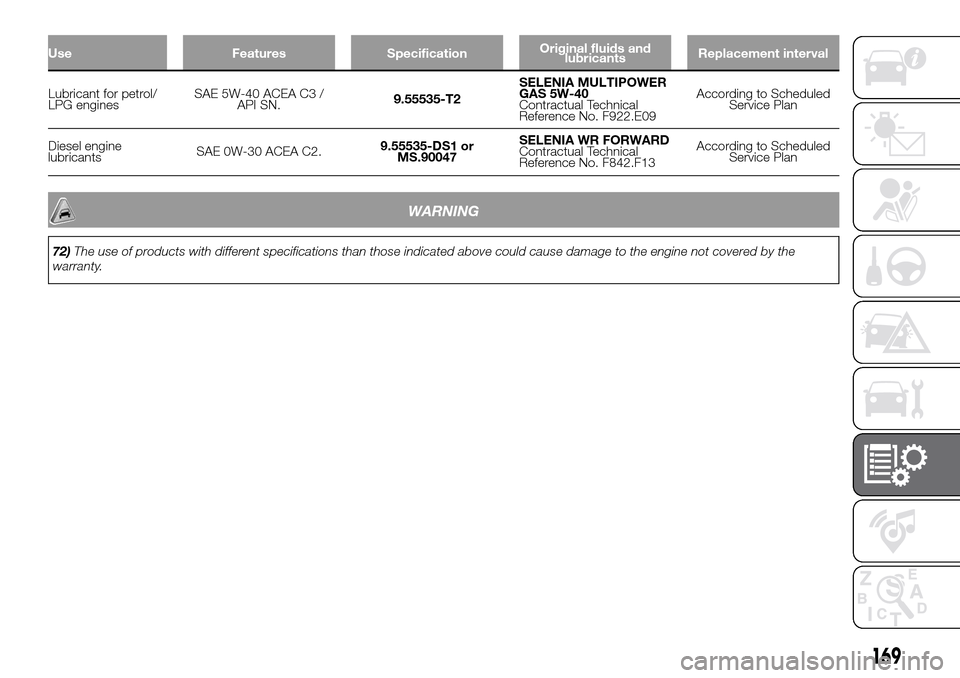
Use Features SpecificationOriginal fluids and
lubricantsReplacement interval
Lubricant for petrol/
LPG enginesSAE 5W-40 ACEA C3 /
API SN.9.55535-T2SELENIA MULTIPOWER
GAS 5W-40
Contractual Technical
Reference No. F922.E09According to Scheduled
Service Plan
Diesel engine
lubricantsSAE 0W-30 ACEA C2.9.55535-DS1 or
MS.90047SELENIA WR FORWARD
Contractual Technical
Reference No. F842.F13According to Scheduled
Service Plan
WARNING
72)The use of products with different specifications than those indicated above could cause damage to the engine not covered by the
warranty.
169
Page 187 of 216

"Pause" function
To pause the CD player, press the
button. The words "CD Pause" will
appear on the display.
To resume listening to the track, press
the
button again. If another audio
source is selected, the pause function
is deactivated.
CD MP3 PLAYER
In addition to playing normal audio
CDs, the car radio can also play
CD-ROMs on which MP3 format
compressed audio files are recorded.
The radio operates as described in the
"CD Player" chapter when an ordinary
audio CD is inserted.
Selecting next/previous folder
Press the
button to select one of the
next folders or press the
button to
select a previous folder.
The display will show the number and
the name of the folder (e.g. “DIR 2
XXXXXX”).
If no other folder/track is selected
during the next 2 seconds, the first
track contained in the new folder will be
played.
If the last track in the folder at that
moment selected is played, the next
folder will be played.
WARNING
178)If the volume is too loud this could be
dangerous for the driver and for
passengers when driving in traffic. Always
adjust the volume so that you can still
hear background noises.
179)Multimedia CDs include data tracks in
addition to the audio tracks. Playing this
type of CD can cause hissing at a volume
that may jeopardise road safety as well
as cause damage to the final stages and
the speakers.
180)Using some of the system functions
whilst driving can distract attention away
from the road, risking an accident or other
serious consequences; they should
therefore be used only when driving
conditions allow it and, if necessary, only
with the vehicle stationary.
181)WARNING: Looking at the system
when driving can divert attention from the
road, with the risk of accidents or other
serious consequences. Do not change the
system settings or load data while driving.
Stop the vehicle in a safe and legal manner
before carrying out these operations.
Adopting these precautions is important
since setting or changing some functions
may require the driver to be distracted from
the road and remove their hands from the
steering wheel.182)Looking at the display for a long time:
while driving, do not use any function
that requires looking at the display for a
long time. Pull over in a safe and legal
manner before attempting to access a
function of the system that requires
prolonged attention. Even occasional short
glances at the display may be hazardous
if your attention is diverted from driving at a
critical moment.
183)Setting the volume: do not turn the
volume up too high. Keep the volume at a
level where you can still hear outside traffic
and emergency signals while driving.
Driving while unable to hear these sounds
may cause an accident.
WARNING
73)Do not press the eject button
accidentally when inserting a CD.
185
Page 197 of 216

Use theorbuttons to scroll
through the menu functions. To change
the setting of the function selected
use the
orbuttons.
The current status of the selected
function appears on the display.
The functions managed by the Menu
are:
BASS: adjustment of bass tones;
TREBLE: adjustment of high tones;
BALANCE: right/left balance
adjustment;
FADER: front/back balance
adjustment;
LOUDNESS: activation/deactivation
of the increase of bass and high tones;
EQUALISER: activation and
selection of factory-set equaliser levels;
MY EQ: customised equaliser
setting.
MENU
MENU button functions
Press the button MENU briefly to
activate the Menu function.
Use the
orbuttons to scroll
through the menu functions. To change
the setting of the function selected
use the
orbuttons.
The functions managed by the Menu
are:
AF SWITCHING: automatic
activation/deactivation of the selection
of the station with the strongest signal
that transmits the same programme.
NoteFM following in DAB (where
provided; the radio switches
automatically to FM in case of low DAB
signal and back to DAB as soon as
the signal is available) is enabled by
enabling AF.
TRAFFIC INFORMATION: activation/
deactivation of traffic information.
NoteTraffic information is enabled only
if tuned to the station broadcasting
the announcement.
DAB INFO CATEGORIES (only
enabled for DAB sources): single
category enable/disable (Financial,
News flash, Program info, Spec event,
Sport report, Warning, Weather).
REGIONAL MODE: activation/
deactivation of regional programmes.
MP3 DISPLAY: MP3 display setting.
SPEED VOLUME: speed-dependent
automatic volume control.
RADIO ON VOLUME: maximum
radio volume limit activation/
deactivation.
RADIO OFF: off mode selection.
SYSTEM RESET: reset of factory
settings.Press the button MENU again to exit
the Menu function.
NoteThe AF SWITCHING, TRAFFIC
INFORMATION and REGIONAL MODE
adjustments are only possible in FM
mode.
RADIO (Tuner)
To select the Radio function while
listening to another audio source, briefly
press the RADIO button several times
to select the desired band, FM AM
or DAB (where present).
Once the Radio mode has been
activated, the display will show the
name (only RDS stations) and the
frequency of the selected radio station,
the frequency band selected (e.g.
FMA) and the preselect button number
(e.g. P1).
Each time the button is pressed, the
FM, AM and DAB bands (where
present) are selected cyclically.
Preset buttons
The buttons numbered from 1 to 6 are
used to set the following preset
stations:
18 in the FM band (6 in FM-A, 6 in
FM-B and 6 in FM-C);
18 in the AM band (6 in AM-A, 6 in
AM-B and 6 in AM-C).
195
Page 202 of 216

When it is connected via Blu-
etooth®, you can interact with the
radio through the screen of your smart-
phone. You can listen to you favourite
music by selecting the source, the track
or the radio station desired. You can
also view the phonebook, your car
handbook and, if necessary, call for
assistance.
When it is not connected, you can
have all the information about the state
of your car with my:Car and indications
about your driving style with eco:Drive.
You can also find your car easily if
you do not remember where you
parked it.
WARNING
184)If the volume is too loud this could be
dangerous for the driver and for
passengers when driving in traffic. Always
adjust the volume so that you can still
hear background noises.
185)The use of some of the system's
features whilst driving can divert attention
away from the road, with the risk of
causing accidents or other serious
consequences; therefore they must only be
used when the driving conditions allow
and, where necessary, only when the
vehicle is stationary.186)Read and follow these instructions:
before using your system, read and follow
all the safety information and instructions in
this manual. Failure to observe the
precautions found in this manual may lead
to an accident or other serious
consequences.
187)Keep the manual in the car: if it is kept
in the car, the manual will become
something quick and easy to consult for
those not familiar with the system. Ensure
that everyone has access to the manual
and reads the instructions and the safety
information carefully before using the
system for the first time.
188)Warning: looking at the system when
driving can divert attention from the road,
with the risk of accidents or other serious
consequences. Do not change system
settings or enter data non-verbally (using
the manual controls) while driving. Stop the
vehicle in a safe and legal manner before
carrying out these operations. Adopting
these precautions is important since setting
or changing some functions might require
the driver to be distracted away from
the road and remove his or her hands from
the steering wheel.
189)Voice commands: the system
functions can be carried out using only
voice commands. The use of voice
commands when driving allows you to
manage the system without taking your
hands off the steering wheel.190)Looking at the display for a long time:
while driving, do not use any function
that requires looking at the display for a
long time. Pull over in a safe and legal
manner before attempting to access a
function of the system that requires
prolonged attention. Even occasional quick
glances at the display can be dangerous
if the driver's attention is diverted at a
critical moment.
191)Setting the volume: do not turn the
volume up too high. When driving, keep the
volume at a level that allows you to hear
the traffic outside and emergency sirens.
Driving while unable to hear these sounds
may cause an accident.
192)Using the voice recognition: the voice
recognition software is based on a
statistical process that is subject to error. It
is your responsibility to monitor voice
recognition functions included in the
system and address any errors.
193)Danger of distraction: the functions
may require manual settings (not using
voice commands). Attempting to perform
such setup or insert data while driving
can seriously distract your attention and
could cause an accident or other serious
consequences. Stop the vehicle in a safe
and legal manner before carrying out these
operations.
200
MULTIMEDIA
Page 204 of 216

CONTROL PANEL AND ON-BOARD INSTRUMENTS
The instrument background colour and type may vary according to the versions.
The warning lights on the instrument panel may change according to the version/trim level (e.g. LPG, Cross etc.) of the vehicle.
Warning lights
andare available on diesel versions only. On diesel versions, the maximum engine speed (red range on
the rev counter) corresponds to 6000 rpm.
A. Speedometer (speed indicator) – B. Multifunction display – C. Rev counter
139F1D0692
202
MULTIMEDIA
Page 205 of 216

REPLACING FUSES
Fuse location
Fuse box on the dashboard
To access the fuses, remove the plastic
cover fig. 140. The fuses are in the
fuse box shown in fig. 141.
PARKING
Switch off the engine and engage the
parking brake. Engage a gear (first gear
if the car is parked facing uphill or
reverse if facing downhill) and leave the
wheels turned. If the vehicle is parked
on a steep slope, block the wheels with
a wedge or stone. Always remove the
ignition key when leaving the car.
PARKING BRAKE
To engage the handbrake, pull the lever
A fig. 142 upwards until the car cannot
be moved. To disengage the
handbrake, slightly raise lever A and
hold button B pressed, checking that
the
warning light switches off in the
instrument panel.
119) 120) 121)
WARNING
194)Never leave children unattended in
the car. Always remove the key from the
ignition when leaving the car and take
it with you.
195)The car should be braked after a few
clicks of the lever, if it is not, contact a
Fiat Dealership to have it adjusted.
196)In the case of parking manoeuvres on
roads on a gradient, the front wheels
must be steered towards the pavement
(when parking downhill), or in the opposite
direction if the vehicle is parked uphill.
Block the wheels with a wedge or a stone if
the car is parked on a steep slope.
140F0W0294
141F0W0295
142F0W0296
203