Page 145 of 350

“Trip B” can be used to display the figures relating to:
•Trip Distance B
• Average Fuel Consumption
• Average Speed B
• Travel Time B (Driving Time)
“Current Trip” can be used to display the figures
relating to:
• Range
• Instantaneous Fuel Consumption
NOTE: “Trip B” functions may be excluded (see “Trip
B Data”). “Range” and “Instantaneous Fuel Consump-
tion” cannot be reset.
Values Displayed
Range
This indicates the distance which may be traveled with
the fuel remaining in the tank, assuming that driving
conditions will not change. The message “----” will
appear on the display in the following cases:
• Distance less than 30 miles (or 50 km). •
The vehicle is parked for a long time with the engine
running.
NOTE: The range depends on several factors: driving
style, type of route (freeway, residential, mountain
roads, etc.), and conditions of use of the vehicle (load,
tire pressure, etc.). Trip planning must take into account
the above notes.
Distance Traveled
This value shows the distance covered since the last
reset.
Average Fuel Economy
This value shows the approximate average fuel con-
sumption since the last reset.
Instantaneous Fuel Economy
This indicates the fuel consumption. The value is con-
stantly updated. The message “----” will appear on the
display if the vehicle is parked with the engine running.
Average Speed
This value shows the vehicle’s average speed as a
function of the overall time elapsed since the last reset.
4
UNDERSTANDING YOUR INSTRUMENT PANEL 143
Page 146 of 350
Travel Time
This value shows the time elapsed since the last reset.
Submenu Personal Settings
Buzzer Volume (Adjusting The Failure/Warning
Buzzer Volume)
With this function the volume of the buzzer accompa-
nying any failure/warning indication can be adjusted
to Low, Medium, High.To adjust the volume proceed as follows:
1. Briefly push and release the
MENU
button. Push
and release the UP
orDOWNarrow button,
then highlight the Buzzer Volume. Push and re-
lease the MENU
button to enter the Buzzer
Volume MENU.
2. Push and release the UPorDOWNarrow
button for setting.
3. Briefly push and release the MENUbutton to go
back to the menu screen, or push and hold the
MENU
button (approximately one second) to
go back to the main screen without storing the
settings.
Buzzer Volume Submenu Settings:
• Off
• Low
• Medium
• High
• Return to MENU
Buzzer Volume Submenu Display
144 UNDERSTANDING YOUR INSTRUMENT PANEL
Page 147 of 350
Service – If Equipped
This function allows you to display the information
about mileage intervals for servicing your car.
To view this information, proceed as follows:
1. Briefly push and release theMENUbutton to enter
the Main MENU.
2. Push and release the UP
orDOWNarrow
button to select Service. Push and release the
MENU button, push and release the UP
or
DOWN
arrow button to reset.
NOTE: IMPORTANT The “Scheduled Servicing Plan”
includes car maintenance at fixed intervals.
This is displayed automatically, with ignition key at
MAR-ON, before servicing or, where provided, 30 days
before servicing.
Headlight Adjustment – If Equipped
When this function is activated the cluster will display
the headlight adjustment features.
Service Submenu Display
Headlight Adjustment Submenu Display
4
UNDERSTANDING YOUR INSTRUMENT PANEL 145
Page 161 of 350

SiriusXM Setup — If Equipped
After pressing the “SiriusXM Setup” button on the
touchscreen, the following settings will be available:
Setting NameSelectable Options
Tune Start OnOff
NOTE: “Tune Start” begins playing the current song from the beginning when you tune to a music channel us-
ing one of the twelve presets, so you can enjoy the complete song. This feature occurs the first time the preset
is selected during that current song. Tune Start works in the background, so you will not even realize it’s on,
except that you will miss the experience of joining your favorite song with only a few seconds left to play.
Channel Skip Channel Skip
NOTE: SiriusXM can be programmed to designate a group of channels that are the most desirable to listen to
or to exclude undesirable channels while scanning.
Subscription Information Subscription Info
NOTE:
•New vehicle purchasers or lessees will receive a free limited time subscription to SiriusXM Satellite Radio
with your radio. Following the expiration of the free services, it will be necessary to access the information
on the Subscription Information screen to re-subscribe.
•Write down the SIRIUS ID numbers for your receiver. To reactivate your service, either call the number listed
on the screen or visit the provider online.
NOTE: SiriusXM Travel Link is a separate subscription
and is available for U.S. residents only.
4
UNDERSTANDING YOUR INSTRUMENT PANEL 159
Page 162 of 350
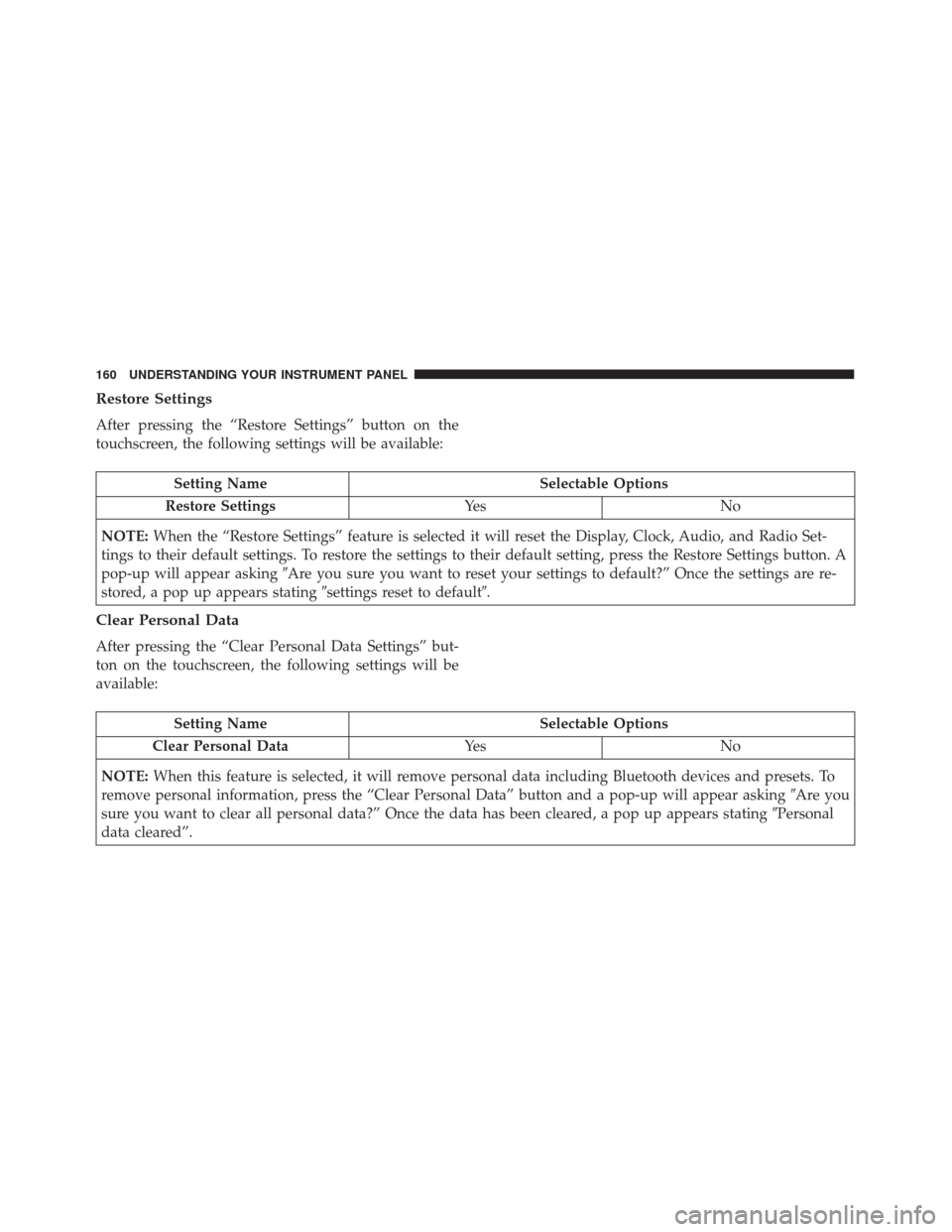
Restore Settings
After pressing the “Restore Settings” button on the
touchscreen, the following settings will be available:
Setting NameSelectable Options
Restore Settings Ye sN o
NOTE: When the “Restore Settings” feature is selected it will reset the Display, Clock, Audio, and Radio Set-
tings to their default settings. To restore the settings to their default setting, press the Restore Settings button. A
pop-up will appear asking �Are you sure you want to reset your settings to default?” Once the settings are re-
stored, a pop up appears stating �settings reset to default�.
Clear Personal Data
After pressing the “Clear Personal Data Settings” but-
ton on the touchscreen, the following settings will be
available:
Setting Name Selectable Options
Clear Personal Data Ye sN o
NOTE: When this feature is selected, it will remove personal data including Bluetooth devices and presets. To
remove personal information, press the “Clear Personal Data” button and a pop-up will appear asking �Are you
sure you want to clear all personal data?” Once the data has been cleared, a pop up appears stating �Personal
data cleared”.
160 UNDERSTANDING YOUR INSTRUMENT PANEL
Page 168 of 350

The right-hand control is a rocker-type switch with a
pushbutton in the center and controls the volume and
mode of the sound system. Pushing the top of the
rocker switch will increase the volume, and pushing the
bottom of the rocker switch will decrease the volume.Pushing the center button will make the radio switch
between the various modes available (AM/FM/SAT/
AUX/Media Player, etc.) and can also be used to
select/enter an item while scrolling through menu.
The left-hand control is a rocker-type switch with a
push-button in the center. The function of the left-hand
control is different depending on which mode you are
in.
The following describes the left-hand control operation
in each mode.
Radio Operation
Pushing the top of the switch will “Seek” up for the next
listenable station and pushing the bottom of the switch
will “Seek” down for the next listenable station.
The button located in the center of the left-hand control
will tune to the next preset station that you have
programmed in the radio preset button.
Remote Sound System Controls (Back View Of
Steering Wheel)
166 UNDERSTANDING YOUR INSTRUMENT PANEL
Page 197 of 350

If the transmission temperature exceeds normal operat-
ing limits, the transmission controller will expand the
range of torque converter clutch engagement. This is
done to prevent transmission damage due to overheat-
ing.
During cold temperatures, transmission operation may
be modified depending on engine coolant temperature.
Normal operation will resume once the engine tempera-
ture has risen to a suitable level.
Transmission Limp Home Mode
Transmission function is monitored electronically for
abnormal conditions. If a condition is detected that
could result in transmission damage, Transmission
Limp Home Mode is activated. In this mode, the
transmission remains in third gear regardless of which
forward gear is selected. PARK, REVERSE, and NEU-
TRAL will continue to operate. The Malfunction Indi-
cator Light (MIL) may be illuminated. Limp Home
Mode allows the vehicle to be driven to an authorized
dealer for service without damaging the transmission.In the event of a momentary problem, the transmission
can be reset to regain all forward gears by performing
the following steps:
1. Stop the vehicle.
2. Shift the transmission into PARK.
3. Turn the ignition to the OFF position.
4. Wait approximately 10 seconds.
5. Restart the engine.
6. Shift into the desired gear range. If the problem is no
longer detected, the transmission will return to nor-
mal operation.
NOTE: Even if the transmission can be reset, we rec-
ommend that you visit your authorized dealer at your
earliest possible convenience. Your authorized dealer
has diagnostic equipment to determine if the problem
could recur.
If the transmission cannot be reset, authorized dealer
service is required.
5
STARTING AND OPERATING 195
Page 205 of 350

BRAKE SYSTEM
Your vehicle is equipped with dual hydraulic brake
systems. If either of the two hydraulic systems loses
normal capability, the remaining system will still func-
tion. However, there will be some loss of overall brak-
ing effectiveness. You may notice increased pedal travel
during application, greater pedal force required to slow
or stop, and potential activation of the “Brake System
Warning Light”.
In the event power assist is lost for any reason (i.e.,
repeated brake applications with the engine off), the
brakes will still function. However, the effort required
to brake the vehicle will be much greater than that
required with the power system operating.
ELECTRONIC BRAKE CONTROL SYSTEM
Your vehicle is equipped with a advanced electronic
brake control system that includes the Anti-Lock Brake
System (ABS), Brake Assist System (BAS), Traction
Control System (TCS), Hill Start Assist (HSA), and
Electronic Stability Control (ESC). All systems work
together to enhance vehicle stability and control in
various driving conditions and are commonly referred
to as ESC.
Four-Wheel Anti-Lock Brake System (ABS)
The Four-Wheel ABS is designed to aid the driver in
maintaining vehicle control under adverse braking con-
ditions. The system operates with a separate computer
to modulate hydraulic pressure, to prevent wheel
lock-up and to help avoid skidding on slippery sur-
faces.
The system’s pump motor runs during an ABS stop to
provide regulated hydraulic pressure. The pump motor
makes a low humming noise during operation, which is
normal.
The ABS includes an amber ABS Warning Light. When
the light is illuminated, the ABS is not functioning. The
system reverts to standard non-anti-lock brakes. Turn-
ing the ignition Off and On again may reset the ABS if
the fault detected was only momentary.
5
STARTING AND OPERATING 203

