2017 FIAT 124 SPIDER warning lights
[x] Cancel search: warning lightsPage 30 of 300
Double Locking System
— If Equipped
The double locking system is designed
to prevent someone who has broken
into your vehicle from opening the door
from the inside. If you have any
problems with the double locking
system, contact an Authorized
Dealership.
System Activation
Proceed as follows:
1. Close both the windows and the
convertible top.
2. Place the ignition in the OFF position
and take the key fob with you.
3. Close both doors and trunk lid.
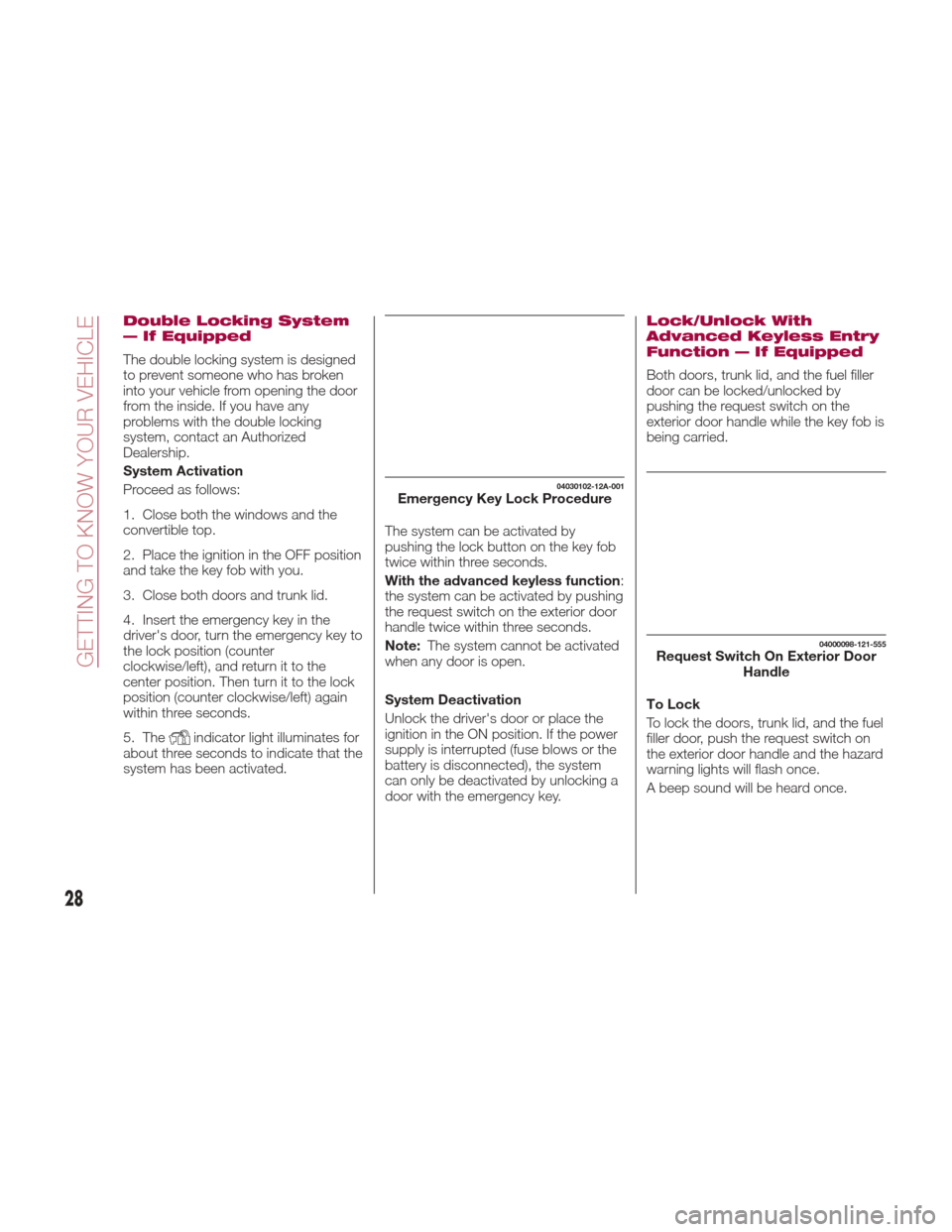
4. Insert the emergency key in the
driver's door, turn the emergency key to
the lock position (counter
clockwise/left), and return it to the
center position. Then turn it to the lock
position (counter clockwise/left) again
within three seconds.
5. The
indicator light illuminates for
about three seconds to indicate that the
system has been activated. The system can be activated by
pushing the lock button on the key fob
twice within three seconds.
With the advanced keyless function
:
the system can be activated by pushing
the request switch on the exterior door
handle twice within three seconds.
Note: The system cannot be activated
when any door is open.
System Deactivation
Unlock the driver's door or place the
ignition in the ON position. If the power
supply is interrupted (fuse blows or the
battery is disconnected), the system
can only be deactivated by unlocking a
door with the emergency key.
Lock/Unlock With
Advanced Keyless Entry
Function — If Equipped
Both doors, trunk lid, and the fuel filler
door can be locked/unlocked by
pushing the request switch on the
exterior door handle while the key fob is
being carried.
To Lock
To lock the doors, trunk lid, and the fuel
filler door, push the request switch on
the exterior door handle and the hazard
warning lights will flash once.
A beep sound will be heard once.
04030102-12A-001Emergency Key Lock Procedure
04000098-121-555Request Switch On Exterior Door Handle
28
GETTING TO KNOW YOUR VEHICLE
Page 31 of 300

To Unlock
Driver's door request switch located on
the exterior door handle.
To unlock the doors, trunk lid, and the
fuel filler door, push the request switch
on the exterior door handle and the
hazard warning lights will flash twice.
To unlock both doors and the fuel filler
door, push the request switch on the
exterior door handle again within three
seconds and two more beep sounds
will be heard.
Front Passenger Door Request
Switch:
To unlock both doors and the fuel filler
door, push the request switch on the
exterior door handle. A beep sound will
be heard twice and the hazard warning
lights will flash twice.
Note:
Confirm that both doors, and the
fuel filler door are securely locked.
Confirm that both doors, and the
fuel filler door are securely locked. For
the trunk lid, move it without pushing
the electric trunk lid opener to verify
that the trunk lid has not been left
open.
Both doors and the fuel filler door
cannot be locked when any door is
open.
It may require a few seconds for the
doors to unlock after the request
switch on the exterior door handle is
pushed.
A beep sound is heard for confirmation
when the doors, and fuel filler door are
locked/unlocked using the request
switch on the exterior door handle. If
you prefer, the beep sound can be
turned off.
The volume of the beep sound can also
be changed. Use the following
procedure to change the setting:
1. Place the ignition in the OFF position
and close both of the doors and the
trunk lid.
2. Open the driver's door.
3. Within 30 seconds of opening the
driver's door, push and hold the lock
button on the key fob for five
seconds or longer. The doors, and fuel
filler door will lock, an audible beep will
activate at the currently set volume (if
the beep sound is currently set to not
activate, it will not activate). The setting
changes each time the lock
button
on the key fob is pushed and the beep
sound activates at the set volume (if the
beep sound has been set to not
activate, it will not activate). 4. The setting change is completed by
doing any one of the following:
Place the ignition in the ACC or ON
position.
Closing the driver's door.
Opening the trunk lid.
Not operating the key fob for
10 seconds.
Pushing any button except the
lockbutton on the key fob.
pushing a request switch on the
exterior door handle.
With Vehicle Security Alarm System
The hazard warning lights flash when
the Vehicle Security Alarm System is
armed or disarmed (refer to “Vehicle
Security Alarm System” found in
“Getting To Know Your Vehicle”.
The setting can be changed so that the
doors and the fuel filler door are locked
automatically without pushing the
request switch on the exterior door
handle, (refer to “Personalization
Features” paragraph in “Knowing The
Instrument Panel” chapter).
29
Page 32 of 300
Auto-Lock Function
A beep sound is heard when both
doors are closed while the key is being
carried. Both doors, the trunk lid, and
fuel door are locked automatically after
about three seconds when the
Advanced Keyless Entry key fob is out
of the operational range.
The hazard warning lights will flash
once (even if the driver is in the
operational range, both doors, trunk lid,
and the fuel filler door are locked
automatically after about 30 seconds).
If you are out of the operational range
before the doors and the trunk lid are
completely closed or another key fob is
left in the vehicle, the auto-lock function
will not work.
Always make sure that both doors and
the trunk lid are closed and locked
before leaving the vehicle. The
auto-lock function does not close the
power windows.Auto Re-Lock Function
After unlocking with the request switch
on the exterior door handle, both doors,
and the fuel filler door will automatically
lock if any of the following operations
are not performed within about
60 seconds.
If your vehicle has a Vehicle Security
Alarm System, the hazard warning
lights will flash for confirmation.
The time required for the doors to lock
automatically can be changed (refer to
“Personalization Features” paragraph in
“Knowing the instrument panel”
chapter).
Opening a door or the trunk lid.
Placing the ignition in any position
other than the OFF position.
Locking/Unlocking With A Key Fob
Both doors, trunk lid, and the fuel filler
door can be locked/unlocked by
operating the keyless entry system key
fob: refer to “Keyless Entry System” in
“Keys” paragraph. Locking/Unlocking With Door-Lock
Switch
Both doors and the fuel filler door lock
automatically when the lock side is
pushed. They unlock when the unlock
side is pushed.
To lock both the doors and the fuel filler
door from an open door, push the lock
side of the door lock switch and then
close the door.
Note:
When locking the doors this
way, be careful not to leave the key fob
inside the vehicle.
30
GETTING TO KNOW YOUR VEHICLE
Page 38 of 300

MIRRORS
Outside Mirrors
Before driving, adjust the inside and
outside mirrors.
Mirror Type
Flat Type (Driver Side): flat surface
mirror.
Convex Type (Passenger Side): this
mirror has a slight curve.
Note:
The passenger side convex outside
mirror will give a much wider view to the
rear, and especially of the lane next to
your vehicle.
The outside mirrors may be equipped
with a heated mirror system. Refer to
“Climate Controls” for more information.
The perceived distance of objects in the
outer and inner regions of the wide
angle mirror is different.
Warning!
Vehicles and other objects seen in the
passenger side convex mirror will look
smaller and farther away than they really
are. Relying too much on your passenger
side mirror could cause you to collide with
another vehicle or other object. Use your
inside mirror when judging the size or
distance of a vehicle seen in the passenger
side mirror.
Inside Day / Night Mirror
Rear View Mirror Adjustment
Before driving, adjust the rear view
mirror to center on the view through the
rear window.
Note:For the manual mirror, perform
the adjustment with the lever in the day
position. Reducing Glare From Headlights
Push the lever forward for day driving
(A position).
Pull it back to reduce glare of headlights
from vehicles at the rear (B position).
04060102-ADJ-001Manual Mirror Adjustment
04060102-MAN-002Mirror Adjustment Lever
1 — Mirror Adjustment Lever
A — Day Driving Position
B — Reduced Glare Position
36
GETTING TO KNOW YOUR VEHICLE
Page 40 of 300
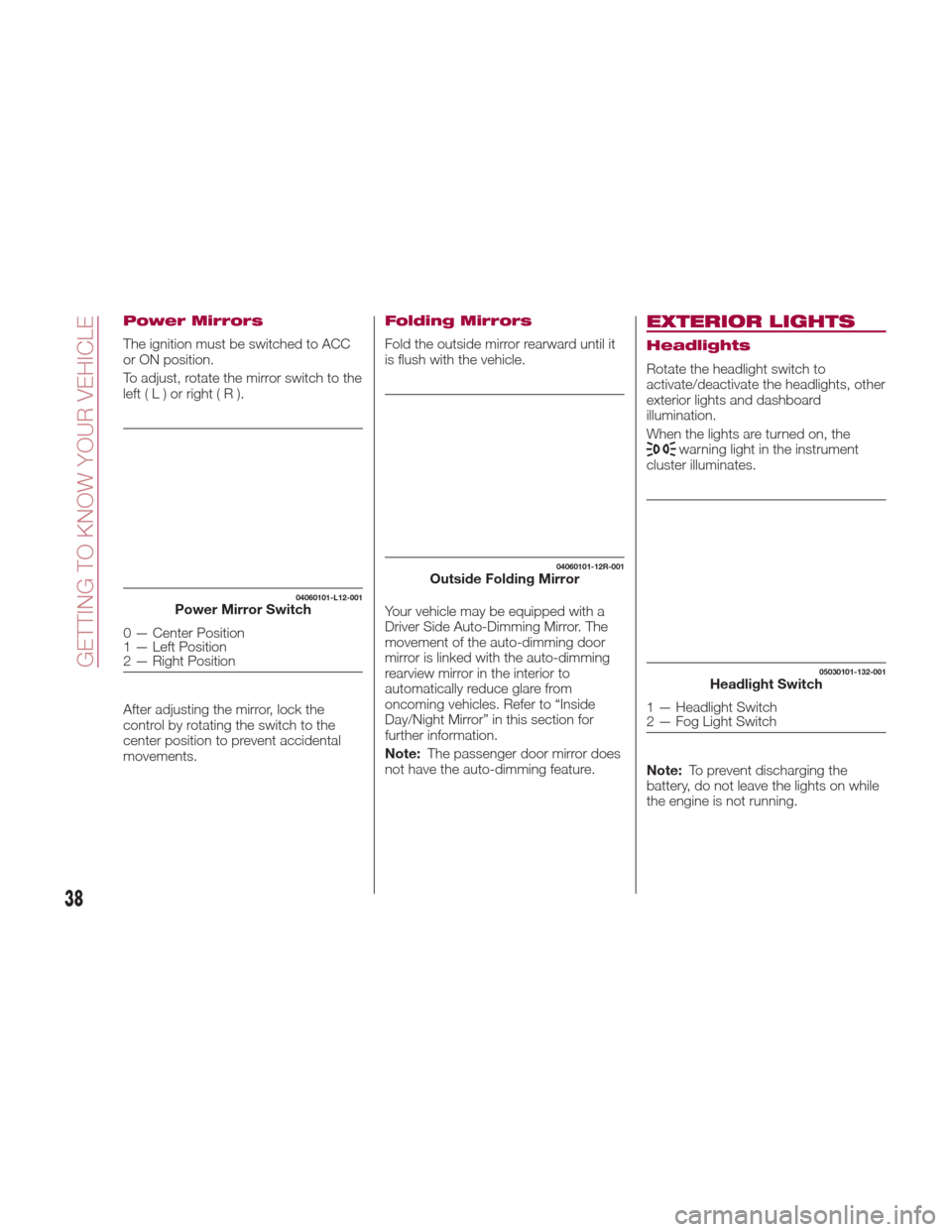
Power Mirrors
The ignition must be switched to ACC
or ON position.
To adjust, rotate the mirror switch to the
left(L)orright(R).
After adjusting the mirror, lock the
control by rotating the switch to the
center position to prevent accidental
movements.
Folding Mirrors
Fold the outside mirror rearward until it
is flush with the vehicle.
Your vehicle may be equipped with a
Driver Side Auto-Dimming Mirror. The
movement of the auto-dimming door
mirror is linked with the auto-dimming
rearview mirror in the interior to
automatically reduce glare from
oncoming vehicles. Refer to “Inside
Day/Night Mirror” in this section for
further information.
Note:The passenger door mirror does
not have the auto-dimming feature.
EXTERIOR LIGHTS
Headlights
Rotate the headlight switch to
activate/deactivate the headlights, other
exterior lights and dashboard
illumination.
When the lights are turned on, the
warning light in the instrument
cluster illuminates.
Note: To prevent discharging the
battery, do not leave the lights on while
the engine is not running.
04060101-L12-001Power Mirror Switch
0 — Center Position
1 — Left Position
2 — Right Position
04060101-12R-001Outside Folding Mirror
05030101-132-001Headlight Switch
1 — Headlight Switch
2 — Fog Light Switch
38
GETTING TO KNOW YOUR VEHICLE
Page 46 of 300

Because heavy ice and snow can jam
the wiper blades, the wiper motor is
protected from motor breakdown,
overheating and possible fire by a
circuit breaker. This mechanism will
automatically stop operation of the
blades, but only for about five minutes.
If this happens, turn off the wiper switch
and park off the road and remove the
snow and ice. After five minutes, turn
on the switch and the blades should
operate normally. If they do not resume
functioning, contact an Authorized
Dealer as soon as possible. Drive to the
side of the road and pull off the side of
the road to a safe location. Wait until
the weather clears before trying to drive
with the wipers inoperative.
Windshield Washer
Pull the lever toward you and hold it to
spray washer fluid.
With the wiper lever in theOFFor
intermittent position/ AUTOposition,
the wipers will operate continuously
until the lever is released.
Warning!
Sudden loss of visibility through the
windshield could lead to a collision. You
might not see other vehicles or other
obstacles. To avoid sudden icing of the
windshield during freezing weather, warm
the windshield with defroster before and
during windshield washer use.
If the fluid level is normal and the
washer does not work, contact an
Authorized Dealer.
With headlight washers
When the headlights are on, the
headlight washers operate
automatically once every fifth time the
windshield washer operates.
CLIMATE CONTROL
SYSTEM
Operating Tips
The air conditioning system will only
operate with the engine running.
To prevent the battery from being
discharged while the engine is off, do
not leave the fan control dial on for
extended periods of time.
To improve system efficiency, clear all
obstructions (leaves, snow and ice)
from the hood and the air inlet in the
grille.
Use the air conditioning system to
defog the windows and dehumidify the
air.
Recirculation mode should be used
when driving through tunnels, while in a
traffic jam, or when you would like to
quickly cool the interior by shutting off
the exterior vents.
Use the outside air position for
ventilation or windscreen defrosting.
If the vehicle has been parked in direct
sunlight during hot weather, open the
windows to let warm air escape, and
then run the air conditioning system.
To keep the internal parts lubricated
and the system running smoothly, run
the air conditioner about 10 minutes at
least once a month.
04110109-115-001Windshield Washer Nozzles
44
GETTING TO KNOW YOUR VEHICLE
Page 78 of 300
GETTING TO KNOW YOUR INSTRUMENT PANEL
ONBOARD DIAGNOSTIC
SYSTEM — OBD II...........77
CONTROL PANEL AND
INSTRUMENTS..............78
MAINTENANCE MONITOR —
IF EQUIPPED ...............85
FUEL ECONOMY MONITOR —
IF EQUIPPED ...............88
WARNING LIGHTS AND
MESSAGES ................90
PERSONALIZATION FEATURES . .108
76
GETTING TO KNOW YOUR INSTRUMENT PANEL
Page 81 of 300
Odometer / Trip
Computer
The display mode can be changed from
odometer to “Trip computer A” to “Trip
computer B” and then back to
odometer by pushing the selector while
one of them is displayed.
The selected mode will be displayed.
When the ignition is placed in the ACC
or OFF position, the odometer or trip
cannot be displayed. Pushing the
selector can switch the trip or reset it
for a ten-minute period in the following
cases:
After the ignition is cycled to OFF
from ON.
After the driver's door is opened. Odometer
The odometer records the total
distance the vehicle has been driven.
Trip Computer
The trip computer can record the total
distance of two trips. One is recorded in
“Trip A”, and the other is recorded in
“Trip B”.
For instance, “Trip A” can record the
distance from the point of origin, and
“Trip B” can record the distance from
where the fuel tank is filled.
When “Trip A” is selected, pushing the
selector again within one second will
change to “Trip B” mode. When “Trip A”
is selected, TRIP A will be displayed.
When “Trip B” is selected, TRIP B will
be displayed.
The trip computer records the total
distance the vehicle is driven until the
meter is again reset. Return it to “0.0”
by depressing and holding the selector
for one second or more.
Use this meter to measure trip
distances and to compute fuel
consumption.
Versions With Fiat Connect 7.0
:if
the fuel economy data is reset using the
fuel economy monitor or Trip A is reset
using the trip meter, the fuel economy
data and Trip A are reset simultaneously
when the fuel economy monitor with
the trip meter is on, .
Note: Only the trip records tenths of
miles (kilometers). Trip Computer Reset
The trip computer will be erased when:
The power supply is interrupted
(blown fuse or the battery is
disconnected).
The vehicle is driven over
9999.9 miles.
Speedometer
The speedometer indicates the speed
of the vehicle.
Instrument Panel
Illumination
When the position lights are turned on
with the ignition switched ON, the
brightness of the instrument panel
illumination is dimmed. When the
position lights are turned on,
the
warning light in the instrument
cluster turns on (see “Headlights” in
“Getting To Know Your Vehicle”
chapter).
Brightness Adjustment
The brightness of the instrument panel
and dashboard illuminations can be
adjusted by rotating the knob:
The brightness decreases by
rotating the knob to the left. A beep
sound will be heard when the knob has
been rotated to the maximum dim
position.
05020102-121-001Spider Instrument Cluster
1 — Trip Selector/Reset Button
79