2017 FIAT 124 SPIDER instrument cluster
[x] Cancel search: instrument clusterPage 81 of 300
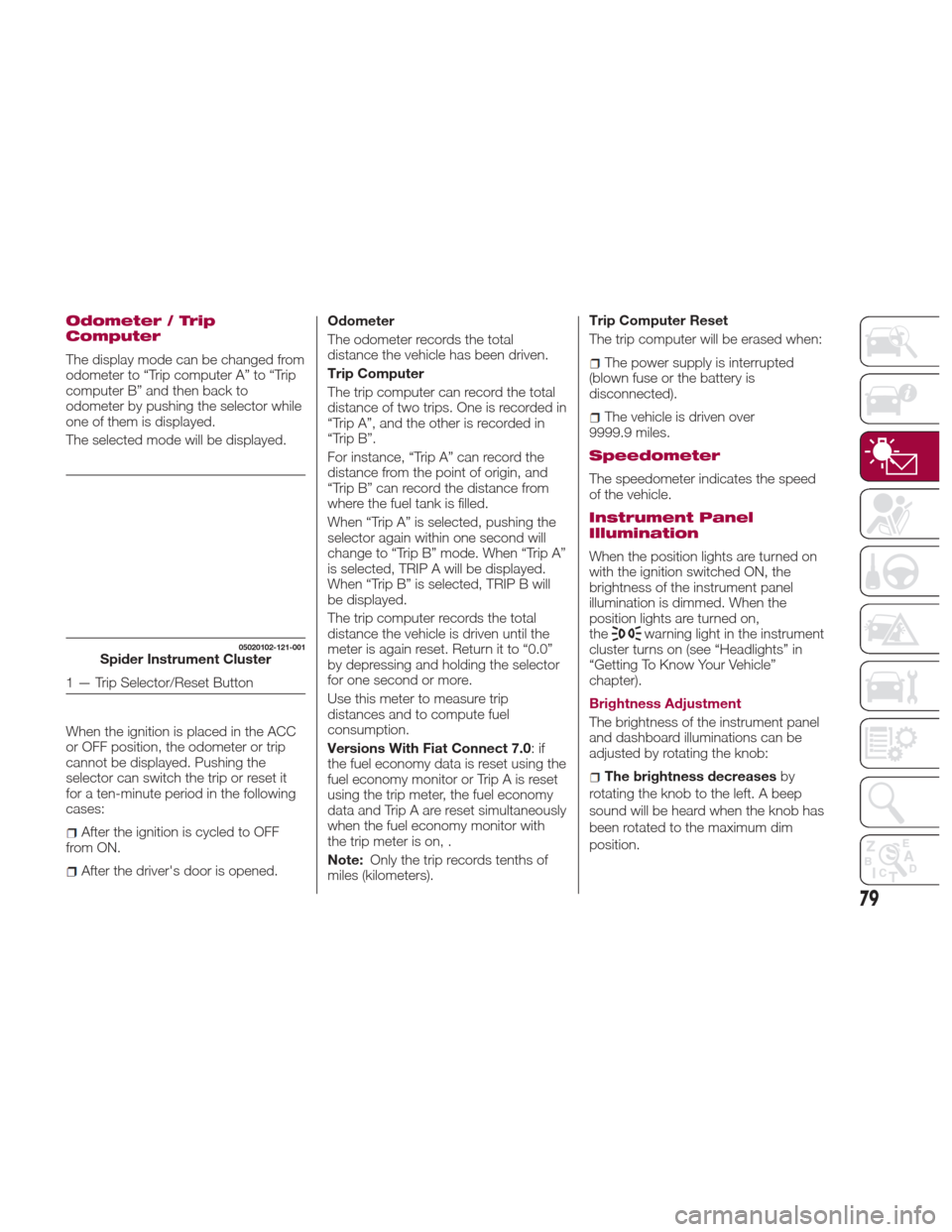
Odometer / Trip
Computer
The display mode can be changed from
odometer to “Trip computer A” to “Trip
computer B” and then back to
odometer by pushing the selector while
one of them is displayed.
The selected mode will be displayed.
When the ignition is placed in the ACC
or OFF position, the odometer or trip
cannot be displayed. Pushing the
selector can switch the trip or reset it
for a ten-minute period in the following
cases:
After the ignition is cycled to OFF
from ON.
After the driver's door is opened. Odometer
The odometer records the total
distance the vehicle has been driven.
Trip Computer
The trip computer can record the total
distance of two trips. One is recorded in
“Trip A”, and the other is recorded in
“Trip B”.
For instance, “Trip A” can record the
distance from the point of origin, and
“Trip B” can record the distance from
where the fuel tank is filled.
When “Trip A” is selected, pushing the
selector again within one second will
change to “Trip B” mode. When “Trip A”
is selected, TRIP A will be displayed.
When “Trip B” is selected, TRIP B will
be displayed.
The trip computer records the total
distance the vehicle is driven until the
meter is again reset. Return it to “0.0”
by depressing and holding the selector
for one second or more.
Use this meter to measure trip
distances and to compute fuel
consumption.
Versions With Fiat Connect 7.0
:if
the fuel economy data is reset using the
fuel economy monitor or Trip A is reset
using the trip meter, the fuel economy
data and Trip A are reset simultaneously
when the fuel economy monitor with
the trip meter is on, .
Note: Only the trip records tenths of
miles (kilometers). Trip Computer Reset
The trip computer will be erased when:
The power supply is interrupted
(blown fuse or the battery is
disconnected).
The vehicle is driven over
9999.9 miles.
Speedometer
The speedometer indicates the speed
of the vehicle.
Instrument Panel
Illumination
When the position lights are turned on
with the ignition switched ON, the
brightness of the instrument panel
illumination is dimmed. When the
position lights are turned on,
the
warning light in the instrument
cluster turns on (see “Headlights” in
“Getting To Know Your Vehicle”
chapter).
Brightness Adjustment
The brightness of the instrument panel
and dashboard illuminations can be
adjusted by rotating the knob:
The brightness decreases by
rotating the knob to the left. A beep
sound will be heard when the knob has
been rotated to the maximum dim
position.
05020102-121-001Spider Instrument Cluster
1 — Trip Selector/Reset Button
79
Page 82 of 300
The brightness increasesby
rotating the knob to the right.
Cancelling Illumination Dimmer
Rotate the knob to the right until a beep
is heard while the instrument cluster is
dimmed with the ignition switched ON.
If the instrument cluster's visibility is
reduced due to glare from surrounding
brightness, cancel the illumination
dimmer.
When the illumination dimmer is
canceled, the instrument cluster cannot
be dimmed even if the position lights
are turned on. When the illumination
dimmer is canceled, the screen in the
center display switches to constant
display of the daytime screen.Trip Computer And Info
Switch
The following information can be
selected by pushing the INFO switch
with the ignition in the ON position:
Distance-to-empty (approximate
distance you can travel on the available
fuel).
Average fuel economy.
Current fuel economy.
Average vehicle speed.
If you have any problems with your trip
computer, contact an Authorized
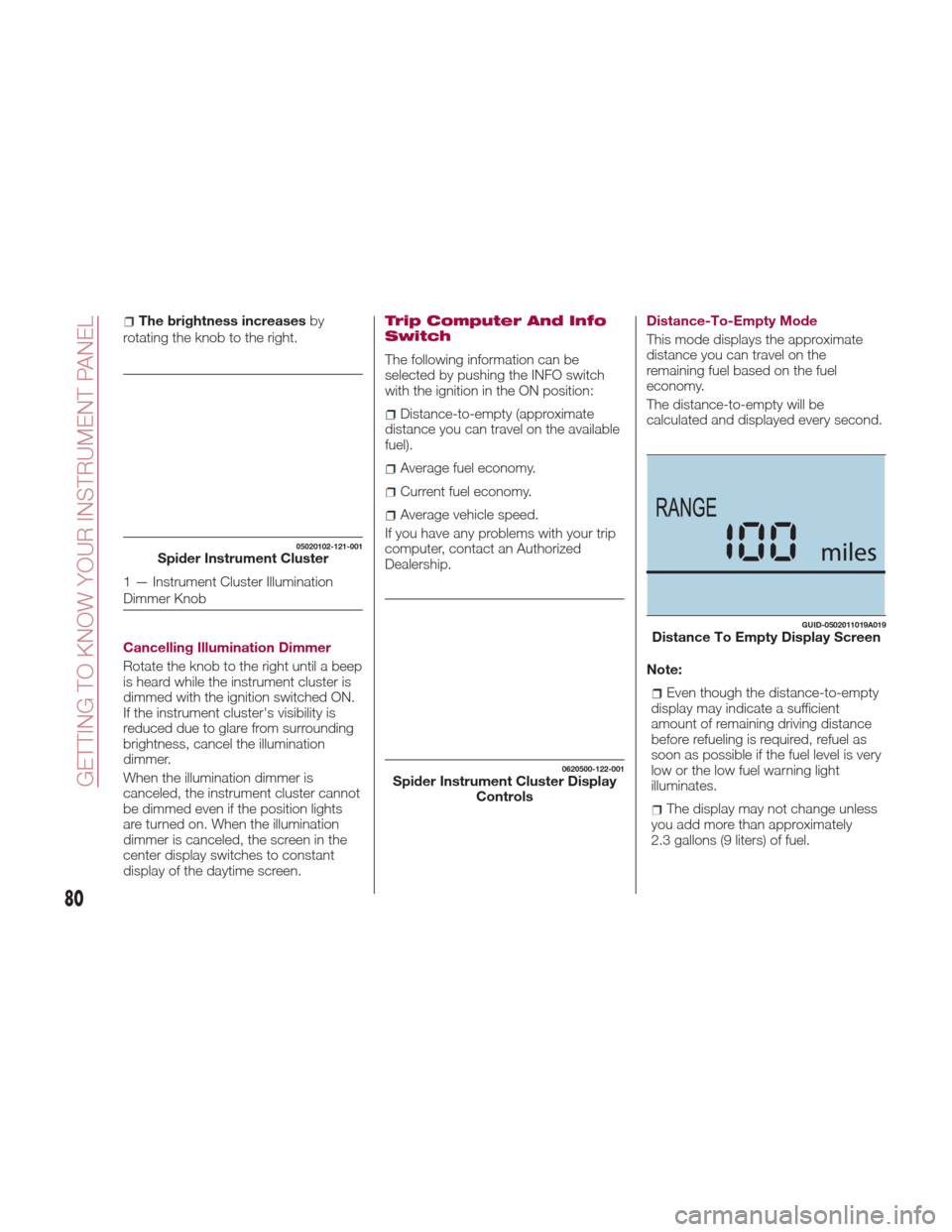
Dealership. Distance-To-Empty Mode
This mode displays the approximate
distance you can travel on the
remaining fuel based on the fuel
economy.
The distance-to-empty will be
calculated and displayed every second.
Note:
Even though the distance-to-empty
display may indicate a sufficient
amount of remaining driving distance
before refueling is required, refuel as
soon as possible if the fuel level is very
low or the low fuel warning light
illuminates.
The display may not change unless
you add more than approximately
2.3 gallons (9 liters) of fuel.
05020102-121-001Spider Instrument Cluster
1 — Instrument Cluster Illumination
Dimmer Knob
0620500-122-001Spider Instrument Cluster Display Controls
GUID-0502011019A019Distance To Empty Display Screen
80
GETTING TO KNOW YOUR INSTRUMENT PANEL
Page 86 of 300
Cruise Control Set
Vehicle Speed Display
The vehicle speed preset using the
cruise control is displayed.
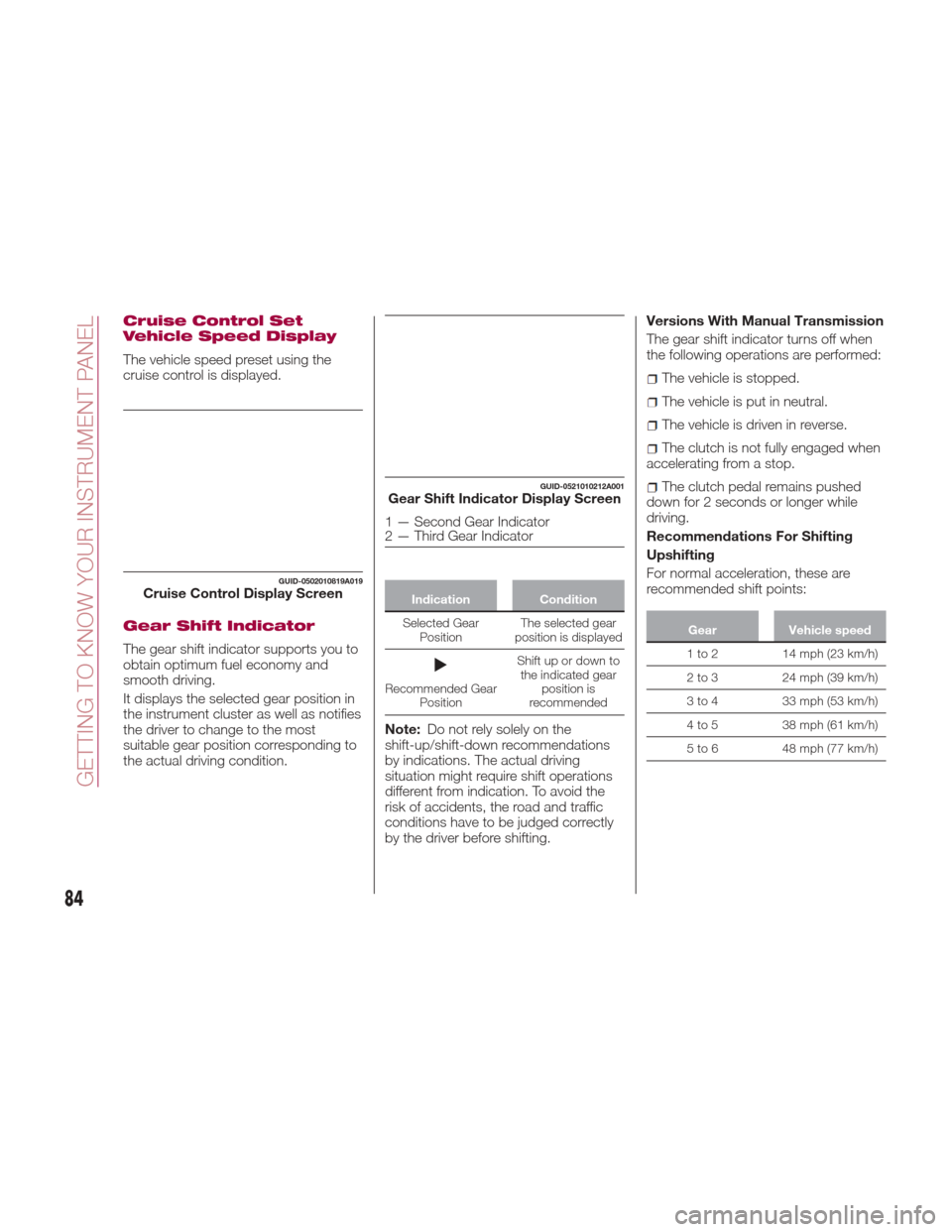
Gear Shift Indicator
The gear shift indicator supports you to
obtain optimum fuel economy and
smooth driving.
It displays the selected gear position in
the instrument cluster as well as notifies
the driver to change to the most
suitable gear position corresponding to
the actual driving condition.
IndicationCondition
Selected Gear Position The
selected gear
position is displayed
Recommended Gear Position Shift up or down to
the indicated gear position is
recommended
Note: Do not rely solely on the
shift-up/shift-down recommendations
by indications. The actual driving
situation might require shift operations
different from indication. To avoid the
risk of accidents, the road and traffic
conditions have to be judged correctly
by the driver before shifting. Versions With Manual Transmission
The gear shift indicator turns off when
the following operations are performed:
The vehicle is stopped.
The vehicle is put in neutral.
The vehicle is driven in reverse.
The clutch is not fully engaged when
accelerating from a stop.
The clutch pedal remains pushed
down for 2 seconds or longer while
driving.
Recommendations For Shifting
Upshifting
For normal acceleration, these are
recommended shift points:
Gear Vehicle speed
1 to 2 14 mph (23 km/h)
2
to 3 24 mph (39 km/h)
3 to 4 33 mph (53 km/h)
4 to 5 38 mph (61 km/h)
5 to 6 48 mph (77 km/h)
GUID-0502010819A019Cruise Control Display Screen
GUID-0521010212A001Gear Shift Indicator Display Screen
1 — Second Gear Indicator
2 — Third Gear Indicator
84
GETTING TO KNOW YOUR INSTRUMENT PANEL
Page 87 of 300
For cruising, these are recommended
shift points:
GearVehicle speed
1to2 7mph(11km/h)
2
to 3 19 mph (31 km/h)
3 to 4 26 mph (42 km/h)
4 to 5 34 mph (55 km/h)
5 to 6 41 mph (66 km/h)
Downshifting
When you must slow down in heavy
traffic or on a steep upgrade, downshift
before the engine starts to overwork.
This reduces the chance of stalling and
gives better acceleration when you
need more speed.
On a steep downgrade, downshifting
helps maintain safe speed and prolongs
brake life.
Manually Shifting Up (Automatic
Transmission)
Using selector lever: to shift up to a
higher gear, tap the selector lever back
+ once.
MAINTENANCE
MONITOR — IF
EQUIPPED
Oil Life Reset
Versions With Fiat Radio 3.0
“Oil Change” with flexible settings are
available. Consult an Authorized
Dealership for details.
Note:The engine oil flexible
maintenance setting is available (if
equipped). Based on the engine
operating conditions, the on-board
computer in your vehicle calculates the
remaining oil life. When the engine oil
flexible maintenance setting is selected,
the system must be reset whenever
replacing the engine oil regardless of
the wrench indicator light display.
When the engine oil flexible
maintenance setting is selected, the
wrench indicator light will illuminate in
the instrument cluster when remaining
oil life becomes less than 300 miles
(500 km) or remaining days are less
than 15 (whichever comes first).
Reset Method
Your vehicle is equipped with an engine
oil change indicator system. The “Oil
Change Required” message will flash in
the Instrument Cluster Display for
approximately 10 seconds after a single
chime has sounded to indicate the next
scheduled oil change interval. The
engine oil change indicator system is duty cycle based, which means the
engine oil change interval may fluctuate,
dependent upon your personal driving
style.
Unless reset, this message will continue
to display each time you turn the
ignition switch to the ON/RUN position.
To reset the oil change indicator system
(after performing the scheduled
maintenance), refer to the following
procedure
1. Place the ignition in the ON position.
(Do not start the engine.)
2. Fully push the accelerator pedal
slowly, three times within 10 seconds.
3. Place the ignition in the OFF/LOCK
position.
Note:
If the indicator message
illuminates when you start the vehicle,
the oil change indicator system did not
reset. If necessary, repeat this
procedure.
85
Page 88 of 300
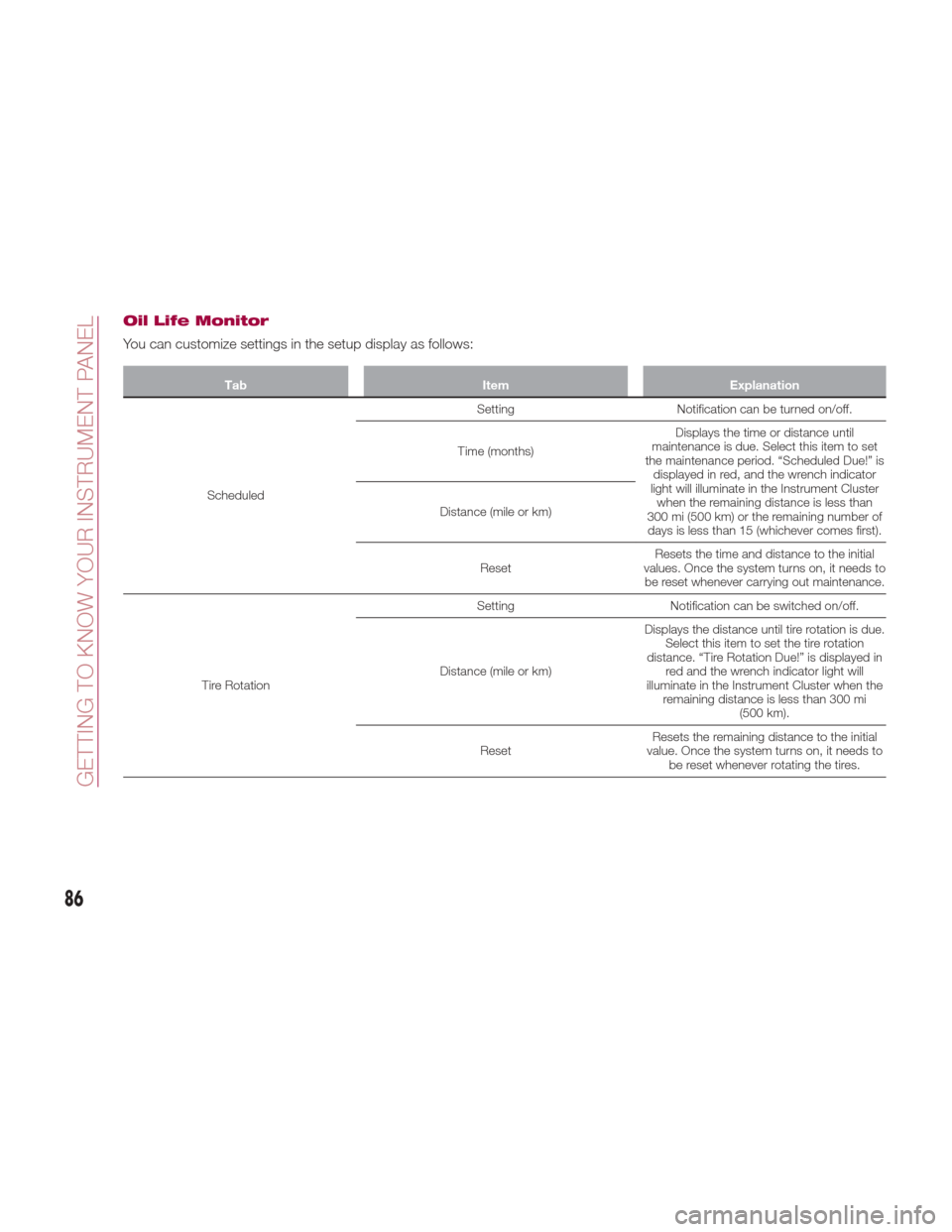
Oil Life Monitor
You can customize settings in the setup display as follows:
TabItemExplanation
Scheduled Setting
Notification can be turned on/off.
Time (months) Displays the time or distance until
maintenance is due. Select this item to set
the maintenance period. “Scheduled Due!” is displayed in red, and the wrench indicator
light will illuminate in the Instrument Cluster when the remaining distance is less than
300 mi (500 km) or the remaining number of days is less than 15 (whichever comes first).
Distance (mile or km)
Reset Resets the time and distance to the initial
values. Once the system turns on, it needs to be reset whenever carrying out maintenance.
Tire Rotation Setting
Notification can be switched on/off.
Distance (mile or km) Displays the distance until tire rotation is due.
Select this item to set the tire rotation
distance. “Tire Rotation Due!” is displayed in red and the wrench indicator light will
illuminate in the Instrument Cluster when the remaining distance is less than 300 mi (500 km).
Reset Resets the remaining distance to the initial
value. Once the system turns on, it needs to be reset whenever rotating the tires.
86
GETTING TO KNOW YOUR INSTRUMENT PANEL
Page 89 of 300
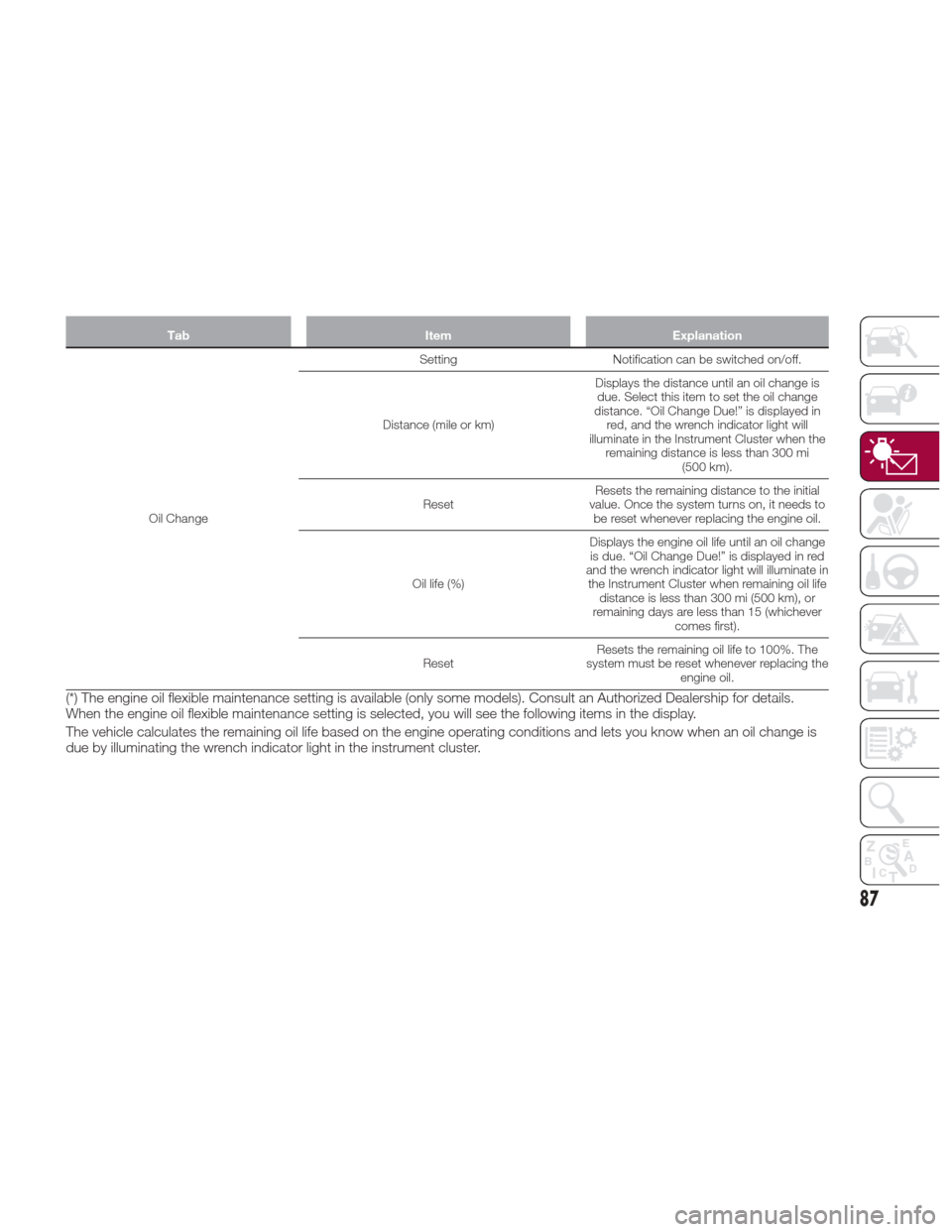
TabItemExplanation
Oil Change Setting
Notification can be switched on/off.
Distance (mile or km) Displays the distance until an oil change is
due. Select this item to set the oil change
distance. “Oil Change Due!” is displayed in red, and the wrench indicator light will
illuminate in the Instrument Cluster when the remaining distance is less than 300 mi (500 km).
Reset Resets the remaining distance to the initial
value. Once the system turns on, it needs to be reset whenever replacing the engine oil.
Oil life (%) Displays the engine oil life until an oil change
is due. “Oil Change Due!” is displayed in red
and the wrench indicator light will illuminate in the Instrument Cluster when remaining oil life distance is less than 300 mi (500 km), or
remaining days are less than 15 (whichever comes first).
Reset Resets the remaining oil life to 100%. The
system must be reset whenever replacing the engine oil.
(*) The engine oil flexible maintenance setting is available (only some models). Consult an Authorized Dealership for details.
When the engine oil flexible maintenance setting is selected, you will see the following items in the display.
The vehicle calculates the remaining oil life based on the engine operating conditions and lets you know when an oil change is
due by illuminating the wrench indicator light in the instrument cluster.
87
Page 101 of 300

Amber Warning Lights
Warning lightWhat it means
AUTOMATIC TRANSMISSION WARNING LIGHT (IF EQUIPPED)
The light illuminates when the transmission has a problem.
Note:If the automatic transmission warning light illuminates, the transmission has an electrical
problem. Continuing to drive your vehicle in this condition could cause damage to your
transmission. Contact an Authorized Dealership as soon as possible.
MASTER WARNING LIGHT
Versions Without Fiat Connect 7.0 System
The warning light turns on continuously if there is a malfunction in the battery management
system or there is a malfunction in the brake switch. Contact an Authorized Dealership as soon
as possible.
Versions With Fiat Connect 7.0 System
The warning light turns on when the system has a malfunction. Operate the center display and
verify the content. Refer to “Vehicles With Fiat Connect 7.0” paragraph in this chapter.
Cold Start Disable Indicator Light
When the ambient temperature is extremely low, the engine may not crank even when the
engine starting procedure is performed. At this time, the Cold Start Disable Indicator light in the
instrument cluster flashes. However, this does not indicate a problem.
Note:Place your vehicle in a warm garage until the temperature has risen to a sufficient level to enable
engine starting.
Electric Throttle Control Warning Light
This light informs you of a problem with the Electronic Throttle Control (ETC) system. If a
problem is detected while the engine is running, the light will either stay on or flash depending on
the nature of the problem. Cycle the ignition key when the vehicle is safely and completely
stopped and the transmission is placed in the PARK position. The light should turn off. If the light
remains on with the engine running, your vehicle will usually be drivable; however, see an
authorized dealer for service as soon as possible.
If the light continues to flash when the engine is running, immediate service is required and you
may experience reduced performance, an elevated/rough idle, or engine stall and your vehicle
may require towing. The light will come on when the ignition is first turned to ON/RUN and
remain on briefly as a bulb check. If the light does not come on during starting, have the system
checked by an authorized dealer.
99
Page 106 of 300

Warning Light (Red Color) On Dashboard Trim
Warning lightWhat it means
SEAT BELT WARNING LIGHT
The seat belt warning light turns on if the driver or passengers seat is occupied and the seat belt
is not fastened with the ignition placed in the ON position.
If the driver or passengers seat belt is unfastened (only when the passenger seat is occupied)
and the vehicle is driven at a speed faster than about 12 MPH (20 km/h), the warning light
flashes. After a short time, the LED stops flashing, but remains illuminated.
If a seat belt remains unfastened, the LED flashes again for a given period of time.
If the driver or passengers seat belt is unfastened after the LED turns on, and the vehicle speed
exceeds 12 MPH (20 km/h), the LED flashes again.
With Passenger Occupant Classification System: to allow the passenger occupant
classification sensor to function properly, do not place and sit on an additional seat cushion on
the passengers seat. The sensor may not function properly because the additional seat cushion
could cause sensor interference.
Without Passenger Occupant Classification System : placing heavy items on the
passengers seat may cause the passengers seat belt warning function to operate depending on
the weight of the item. To allow the passengers seat weight sensor to function properly, do not
place and sit on an additional seat cushion on the passengers seat. The sensor may not
function properly because the additional seat cushion could cause sensor interference. If a small
child is seated on the passengers seat, the warning light may not operate.
Fasten the seat belts.
Warning Light (Amber Color) On Instrument Cluster Trim
Warning light What it means
PASSENGER AIR BAG DEACTIVATION INDICATOR LIGHT
The light turns on when the ignition is switched on for an operation check, and turns off a few
seconds later or when the engine is started. If the light does not turn on or remains turned on,
contact an Authorized Dealership.
104
GETTING TO KNOW YOUR INSTRUMENT PANEL