Page 210 of 530

Speed Limit Warning Light — If Equipped
Red TelltaleLight What It Means
Speed Limit Warning Light
If the vehicle speed is greater than or equal to 120 km/h, the Speed Warning telltale will display
in the instrument cluster display, and a chime will sound with a pop up warning message.
Yellow Telltale Indicator Lights
Engine Check/Malfunction Indicator Light (MIL)
Yellow Telltale
Light What It Means
Engine Check/Malfunction Indicator Light (MIL)
The Engine Check/Malfunction Indicator Light (MIL) is a part of an Onboard Diagnostic System
called OBD II that monitors engine and automatic transmission control systems. The light will
illuminate when the ignition is in the ON/RUN position before engine start. If the bulb does not
come on when turning the key from OFF to ON/RUN, have the condition checked promptly.
Certain conditions, such as a loose or missing gas cap, poor quality fuel, etc., may illuminate the
light after engine start. The vehicle should be serviced if the light stays on through several typical
driving styles. In most situations, the vehicle will drive normally and will not require towing.
When the engine is running, the MIL may flash to alert serious conditions that could lead to im-
mediate loss of power or severe catalytic converter damage. The vehicle should be serviced as
soon as possible if this occurs.
208 UNDERSTANDING YOUR INSTRUMENT PANEL
Page 218 of 530
Adaptive Cruise Control Fault Indicator Light — If Equipped
Yellow TelltaleLight What It Means
Adaptive Cruise Control Fault Indicator Light
This light will turn on when the ACC is not operating and needs service. For further information,
refer to “Adaptive Cruise Control (ACC)” in “Understanding The Features Of Your Vehicle.”
Green Telltale Indicator Lights
Park/Headlight On Indicator Light
Green Telltale
Light What It Means
Park/Headlight On Indicator Light
This indicator will illuminate when the park lights or headlights are turned on.
Front Fog Indicator Light — If Equipped
Green Telltale
Light What It Means
Front Fog Indicator Light — If Equipped
This indicator will illuminate when the front fog lights are on.
216 UNDERSTANDING YOUR INSTRUMENT PANEL
Page 219 of 530
Turn Signal Indicator Lights
Green TelltaleLight What It Means
Turn Signal Indicator Lights
The instrument cluster directional arrow will flash independently for the left or right turn signal
as selected, as well as the exterior turn signal lamp(s) (front and rear) as selected when the multi-
function lever is moved down (left) or up (right).
NOTE:
•A continuous chime will sound if the vehicle is driven more than 1 mile (1.6 km) with either
turn signal on.
•Check for an inoperative outside light bulb if either indicator flashes at a rapid rate.
Speed Control SET Indicator Light
Green Telltale
Light What It Means
Speed Control SET Indicator Light
This light will turn on when the electronic speed control is set to the desired speed. Refer to
“Speed Control” in “Understanding The Features Of Your Vehicle” for further information.
4
UNDERSTANDING YOUR INSTRUMENT PANEL 217
Page 221 of 530
Sport Mode Indicator Light
Green TelltaleLight What It Means
Sport Mode Indicator Light
This light will turn on when Sport Mode is active.
Blue Telltale Indicator Lights
High Beam Indicator Light
Blue Telltale
Light What It Means
High Beam Indicator Light
This indicator shows that the high beam headlights are on. Push the multifunction control lever
away from you to switch the headlights to high beam. Pull the lever toward you to switch the
headlights back to low beam. Pull the lever toward you for a temporary high beam on,
�flash to
pass� scenario.
4
UNDERSTANDING YOUR INSTRUMENT PANEL 219
Page 222 of 530
White Telltale Indicator Lights
Cruise Control Ready Indicator Light
White TelltaleLight What It Means
Cruise Control Ready Indicator Light
This light will turn on when the speed control is on, but not set.
LaneSense Indicator Light — If Equipped
White Telltale
Light What It Means
LaneSense Indicator Light — If Equipped
When the LaneSense system is on, the LaneSense indicator is solid white when only the left lane
marking has been detected and the system is ready to provide visual warnings in the instrument
cluster display if an unintentional lane departure occurs. Refer to “LaneSense — If Equipped
�in
“Understanding The Features Of Your Vehicle” for further information.
220 UNDERSTANDING YOUR INSTRUMENT PANEL
Page 233 of 530

are larger than the capability of charging system. The
charging system is still functioning properly.
• Turning on all possible vehicle electrical loads (e.g.
HVAC to max settings, exterior and interior lights,
overloaded power outlets +12V, 115V AC, USB ports)
during certain driving conditions (city driving, towing,
frequent stopping).
• Installing options like additional lights, upfitter electri-
cal accessories, audio systems, alarms and similar de-
vices.
• Unusual driving cycles (short trips separated by long
parking periods).
• The vehicle was parked for an extended period of time
(weeks, months).
• The battery was recently replaced and was not charged
completely.
• The battery was discharged by an electrical load left on
when the vehicle was parked.
• The battery was used for an extended period with the
engine not running to supply radio, lights, chargers,
+12V portable appliances like vacuum cleaners, game
consoles and similar devices. What to do when an electrical load reduction action
message is present (“Battery Saver On” or “Battery Saver
Mode”)
During a trip:
•
Reduce power to unnecessary loads if possible:
– Turn off redundant lights (interior or exterior)
– Check what may be plugged in to power outlets +12V, 115V AC, USB ports
– Check HVAC settings (blower, temperature)
– Check the audio settings (volume)
After a trip:
• Check if any aftermarket equipment was installed (ad-
ditional lights, upfitter electrical accessories, audio sys-
tems, alarms) and review specifications if any (load and
Ignition Off Draw currents).
• Evaluate the latest driving cycles (distance, driving time
and parking time).
• The vehicle should have service performed if the mes-
sage is still present during consecutive trips and the
evaluation of the vehicle and driving pattern did not
help to identify the cause.
4
UNDERSTANDING YOUR INSTRUMENT PANEL 231
Page 236 of 530

Buttons On The Faceplate
Buttons on the faceplate are located below the Uconnect
system in the center of the instrument panel. In addition,
there is a Scroll/Enter control knob located on the right
side. Turn the control knob to scroll through menus and
change settings (i.e., 30, 60, 90), push the center of the
control knob one or more times to select or change a setting
(i.e., ON, OFF).Your Uconnect system may also have a power and back
buttons on the faceplate.
Push the power button on the faceplate to turn off the
Uconnect screen. Push the power button on the faceplate a
second time to turn the screen on.
Push the back button on the faceplate to exit out of a menu
or certain option on the Uconnect system.
Buttons On The Touchscreen
Buttons on the touchscreen are accessible on the Uconnect
touchscreen.
Customer Programmable Features — Uconnect 5.0
Settings
Push the MORE button on the faceplate and then press the
“Settings” button on the touchscreen to display the menu
setting screen. In this mode the Uconnect system allows
you to access programmable features that may be
equipped such as Display, Units, Voice, Clock, Safety/
Assistance, Lights, Doors & Locks, Auto-On Comfort,
Engine Off Options, Compass Settings, Audio, Phone/
Bluetooth, Restore Settings, Clear Personal Data and Sys-
tem Information.
Uconnect 8.4/8.4 NAV Buttons On Touchscreen And
Buttons On Faceplate
1 — Uconnect Buttons On The Touchscreen
2 — Uconnect Buttons On The Faceplate 234 UNDERSTANDING YOUR INSTRUMENT PANEL
Page 237 of 530
NOTE:Only one touchscreen area may be selected at a
time.
When making a selection, press the button on the touch-
screen to enter the desired mode. Once in the desired
mode, select the preferred setting option. Once the setting
is complete, either press the Back Arrow/Done button on
the touchscreen or the Back button on the faceplate to
return to the previous menu or press the “X” button on the
touchscreen to close out of the settings screen. Pressing the
Up or Down Arrow buttons on the right side of the screen
will allow you to toggle up or down through the available
settings.Display
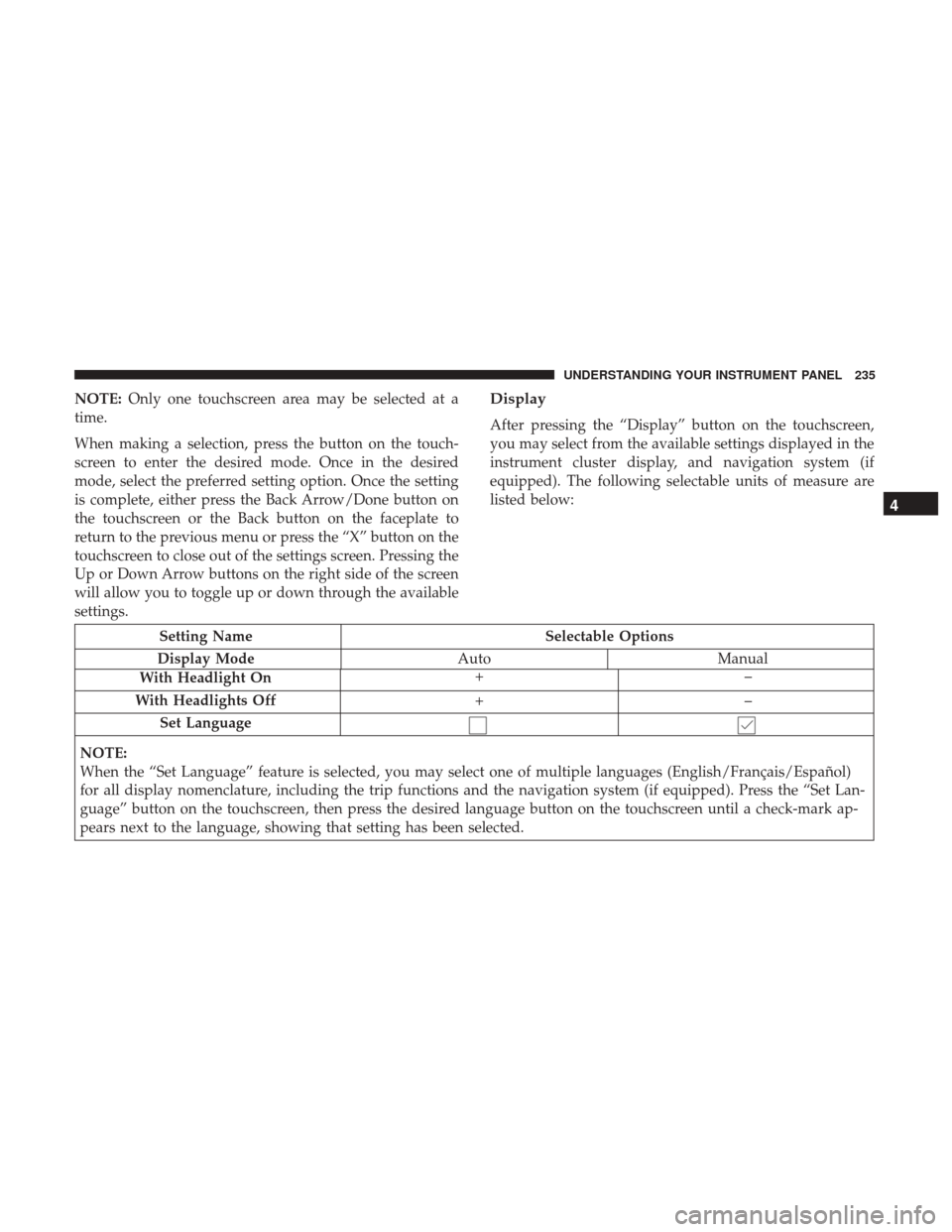
After pressing the “Display” button on the touchscreen,
you may select from the available settings displayed in the
instrument cluster display, and navigation system (if
equipped). The following selectable units of measure are
listed below:
Setting Name Selectable Options
Display Mode AutoManual
With Headlight On +–
With Headlights Off +–
Set Language
NOTE:
When the “Set Language” feature is selected, you may select one of multiple languages (English/Français/Español)
for all display nomenclature, including the trip functions and the navigation system (if equipped). Press the “Set Lan-
guage” button on the touchscreen, then press the desired language button on the touchscreen until a check-mark ap-
pears next to the language, showing that setting has been selected.
4
UNDERSTANDING YOUR INSTRUMENT PANEL 235


