Page 265 of 530
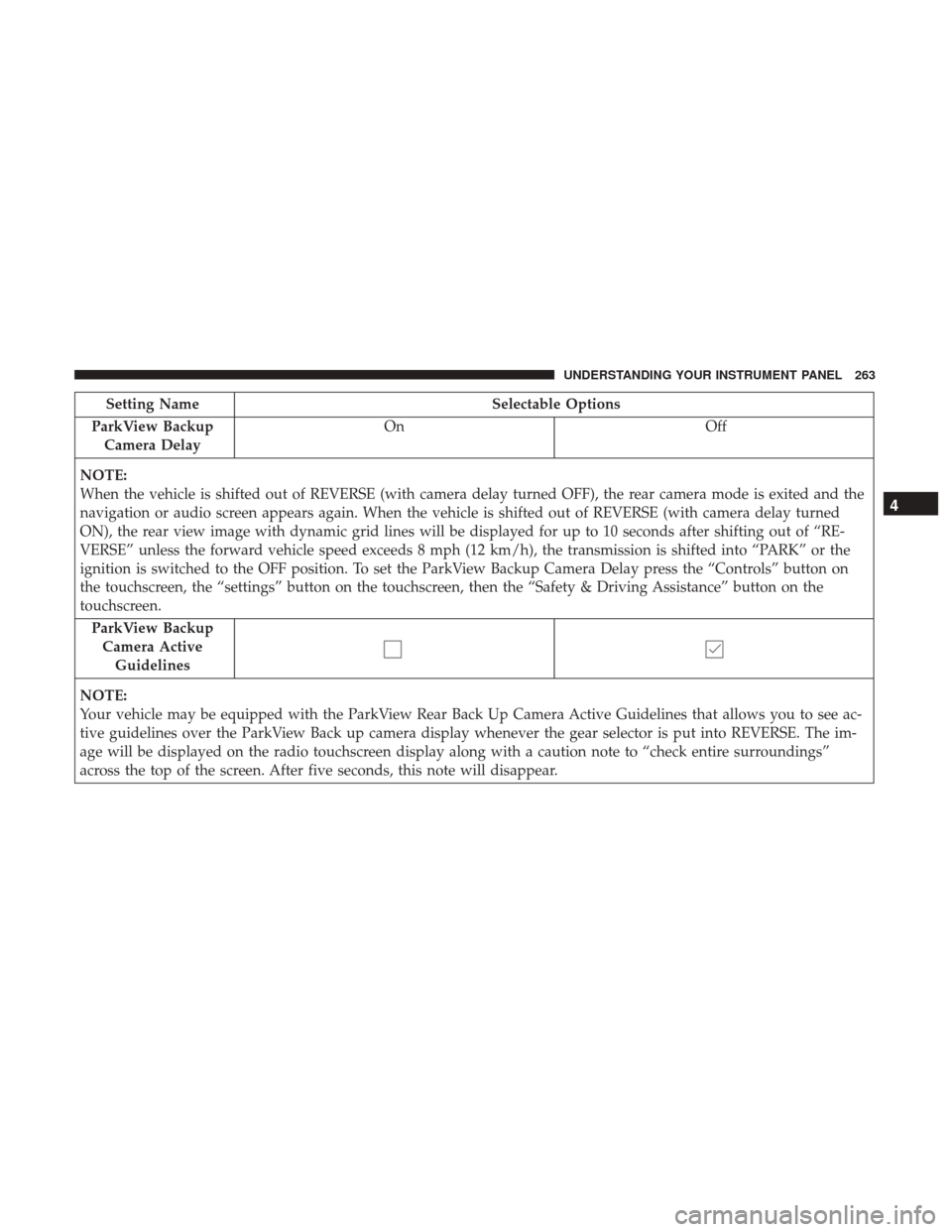
Setting NameSelectable Options
ParkView Backup Camera Delay On
Off
NOTE:
When the vehicle is shifted out of REVERSE (with camera delay turned OFF), the rear camera mode is exited and the
navigation or audio screen appears again. When the vehicle is shifted out of REVERSE (with camera delay turned
ON), the rear view image with dynamic grid lines will be displayed for up to 10 seconds after shifting out of “RE-
VERSE” unless the forward vehicle speed exceeds 8 mph (12 km/h), the transmission is shifted into “PARK” or the
ignition is switched to the OFF position. To set the ParkView Backup Camera Delay press the “Controls” button on
the touchscreen, the “settings” button on the touchscreen, then the “Safety & Driving Assistance” button on the
touchscreen. ParkView BackupCamera Active Guidelines
NOTE:
Your vehicle may be equipped with the ParkView Rear Back Up Camera Active Guidelines that allows you to see ac-
tive guidelines over the ParkView Back up camera display whenever the gear selector is put into REVERSE. The im-
age will be displayed on the radio touchscreen display along with a caution note to “check entire surroundings”
across the top of the screen. After five seconds, this note will disappear.
4
UNDERSTANDING YOUR INSTRUMENT PANEL 263
Page 272 of 530

Audio
After pressing the “Audio” button on the touchscreen, the
following settings will be available:
Setting NameSelectable Options
Balance/Fade “Speaker” Icon Arrow Buttons
NOTE:
The “Balance/Fade” feature allows you to adjust the Balance and Fade settings. Press and drag the speaker icon, use
the arrows to adjust, or tap the “Speaker” icon to readjust to the center. Equalizer +–
NOTE:
•The “Equalizer” feature allows you to adjust the Bass, Mid and Treble settings. Adjust the settings with the “+”
and “–” setting buttons on the touchscreen or by selecting any point on the scale between the “+” and “–” buttons
on the touchscreen.
•Bass/Mid/Treble allow you to simply slide your finger up or down to change the setting as well as press directly
on the desired setting.
Speed Adjusted Vol- ume Off 1 2 3
NOTE:
The “Speed Adjusted Volume” feature increases or decreases volume relative to vehicle speed. To change the Speed
Adjusted Volume press the “Off,” “1,” “2” or “3” button on the touchscreen.
270 UNDERSTANDING YOUR INSTRUMENT PANEL
Page 273 of 530
Setting NameSelectable Options
Surround Sound — If Equipped On
Off
NOTE:
The “Surround Sound” feature provides simulated surround sound mode. To make your selection, press the “Sur-
round Sound” button on the touchscreen, select “On” or “Off.” AUX Volume Offset — If Equipped -3
+3
NOTE:
The “AUX Volume Offset” feature provides the ability to tune the audio level for portable devices connected through
the AUX input. To make your selection, press the AUX Volume Match button on the touchscreen, choose a level from
–3 to +3. Auto Play On Off
NOTE: The Auto Play feature allows an media device to begin playing when the media device is plugged in. To
make your selection, press the On or Off buttons to activate or deactivate Auto Play.
4
UNDERSTANDING YOUR INSTRUMENT PANEL 271
Page 274 of 530
Phone Settings
After pressing the “Phone Settings” button on the touch-
screen, the following settings will be available:
Setting NameSelectable Options
Do Not Disturb List of Settings
NOTE:
Press “Do Not Disturb” to access the available settings. The following settings are: Auto Reply (both, text, call), Auto
Reply Message (custom, default) and Custom Auto Reply Message (create message). Paired Phones and Audio Sources List Of Paired Phones and Audio Sources
NOTE:
The “Paired Phones and Audio Sources” feature shows which phones and audio sources are paired to the Phone and
Audio Sources Settings system. For further information, refer to the Uconnect Owner ’s Manual Supplement.
SiriusXM Setup — If Equipped
After pressing the “SiriusXM Setup” button on the touch-
screen, the following settings will be available:
Setting Name Selectable Options
Tune Start
Channel Skip Name of Channel
272 UNDERSTANDING YOUR INSTRUMENT PANEL
Page 294 of 530

Located on the rear of the front center console are dual USB
“Charge Only” ports.
The USB “Charge Only” ports will recharge battery oper-
ated USB devices when connected.
STEERING WHEEL AUDIO CONTROLS — IF
EQUIPPED
The remote sound system controls are located on the rear
surface of the steering wheel. Reach behind the wheel to
access the switches.The right-hand control is a rocker-type switch with a
push-button in the center and controls the volume and
mode of the sound system. Pushing the top of the rocker
switch will increase the volume, and pushing the bottom of
the rocker switch will decrease the volume.
Pushing the center button will make the radio switch
between the various modes available (AM/FM/SAT/
AUX, etc.).
The left-hand control is a rocker-type switch with a push-
button in the center. The function of the left-hand control is
different depending on which mode you are in.
Rear USB Charging Ports
Remote Sound Controls (Back View Of Steering Wheel)
292 UNDERSTANDING YOUR INSTRUMENT PANEL
Page 525 of 530

Spare Tire..................... .376, 377, 378, 414
Spark Plugs ....................... .487, 488, 489
Specifications Fuel (Gasoline) ....................487, 488, 489
Oil ........................... .487, 488, 489
Speed Control Accel/Decel ........................ .134, 135
Accel/Decel (ACC Only) ...................144
Cancel ............................... .134
Set .................................. .134
Speed Control (Cruise Control) ..............133, 136
Starting .............................. .22, 331
Automatic Transmission ....................331
Cold Weather .......................... .333
Engine Fails To Start ..................... .333
Remote ................................22
Starting And Operating ..................... .331
Starting Procedures ........................ .331
Steering Column Controls ........................ .122
Column Lock .......................... .130
Power ............................... .349
Tilt Column ........................ .130, 131
Wheel, Heated ......................... .132
Wheel, Tilt ......................... .130, 131Steering Wheel Audio Controls
.................292
Steering Wheel Mounted Sound System Controls . . . .292
Storage ................................. .482
Storage, Vehicle ....................... .310, 482
Storing Your Vehicle ....................... .482
Stuck, Freeing ............................ .432
Sunglasses Storage ......................... .174
Sun Roof ............................... .181
Supplemental Restraint System - Air Bag ...........50
Synthetic Engine Oil ....................... .450
System, Remote Starting ......................22
Telescoping Steering Column ...............130, 131
Temperature Control, Automatic (ATC) ...........309
T
ilt Steering Column .....................130, 131
Time Delay, Headlight ...................... .120
Tire And Loading Information Placard ........367, 368
Tire Markings ............................ .362
Tires.......................... .81, 372, 376, 383
Aging (Life Of Tires) ..................... .380
Air Pressure ........................ .367, 372
Chains ............................... .381
Changing .......................... .414, 421
Compact Spare ......................... .377
Flat Changing .......................... .421
10
INDEX 523
Page:
< prev 1-8 9-16 17-24

