2017 CITROEN C4 PICASSO Back row
[x] Cancel search: Back rowPage 253 of 316
7
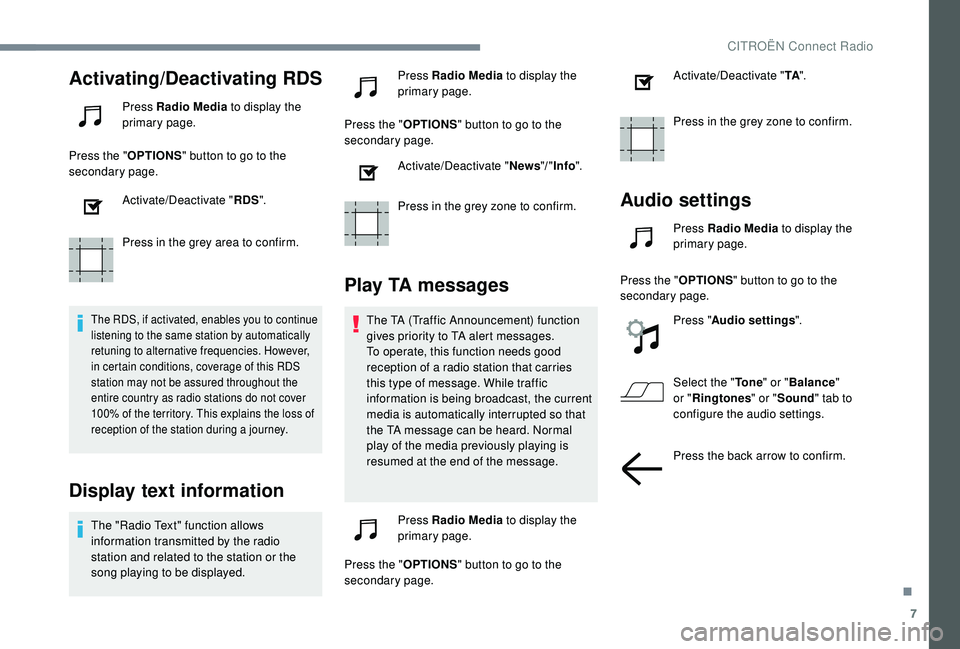
Activating/Deactivating RDS
Press Radio Media to display the
primary page.
Press the " OPTIONS" button to go to the
secondary page.
Activate/Deactivate " RDS".
Press in the grey area to confirm.
The RDS, if activated, enables you to continue
listening to the same station by automatically
retuning to alternative frequencies. However,
in certain conditions, coverage of this RDS
station may not be assured throughout the
entire country as radio stations do not cover
100% of the territory. This explains the loss of
reception of the station during a
journey.
Display text information
The "Radio Text" function allows
information transmitted by the radio
station and related to the station or the
song playing to be displayed. Press Radio Media
to display the
primary page.
Press the " OPTIONS" button to go to the
secondary page.
Activate/Deactivate " News"/" Info ".
Press in the grey zone to confirm.
Play TA messages
The TA (Traffic Announcement) function
gives priority to TA alert messages.
To operate, this function needs good
reception of a
radio station that carries
this type of message. While traffic
information is being broadcast, the current
media is automatically interrupted so that
the TA message can be heard. Normal
play of the media previously playing is
resumed at the end of the message.
Press Radio Media to display the
primary page.
Press the " OPTIONS" button to go to the
secondary page. Activate/Deactivate "
TA".
Press in the grey zone to confirm.
Audio settings
Press Radio Media to display the
primary page.
Press the " OPTIONS" button to go to the
secondary page.
Press "Audio settings ".
Select the " To n e" or "Balance "
or " Ringtones " or "Sound " tab to
configure the audio settings.
Press the back arrow to confirm.
.
CITROËN Connect Radio
Page 262 of 316

16
Press "Recent calls ".
Select the desired contact from the list offered.
It is always possible to make a
call directly
from the telephone; as a
safety measure,
first park the vehicle.
Setting the ringtone
Press Telephone to display the
primary page.
Press the " OPTIONS" button to go to the
secondary page.
Press "Ring volume " to display the
volume bar.
Press the arrows or move the cursor
to set the ring volume.
Settings
Profile settings
As a safety measure and because it
r equires the sustained attention of the
driver, changes to settings must only be
done with the vehicle stationary .
Press Settings to display the
primary page.
Press " Profiles ".
Select " Profile 1 " or "Profile 2 " or "Profile 3 "
or " Common profile ".
Press this button to enter a
name for
the profile using the virtual keypad.
Press " OK" to save.
Press the back arrow to confirm.
Press this button to activate the
profile. Press the back arrow again to
confirm.
Press this button to initialise the
profile selected.
Adjust brightness
Press Settings
to display the
primary page.
Press Brightness .
Move the cursor to adjust the
brightness of the screen and/or of
the instrument panel (depending on
ve r s i o n).
Press in the grey zone to confirm.
Modifying system settings
Press Settings to display the
primary page.
CITROËN Connect Radio
Page 263 of 316

17
Press "Configuration " to go to the
secondary page.
Press " System configuration ".
Select " Units" to change the units of distance,
fuel consumption and temperature.
Press " Factory settings " to return to the initial
settings.
Returning the system to factory settings
activates the English language by default
(depending on version).
Select " System info " to display the versions of
the different modules installed in the system.
Press the back arrow to confirm.
Press Settings to display the
primary page.
Press " Configuration " to go to the
secondary page. Press "
Screen configuration ".
Press " Brightness ".
Move the cursor to adjust the
brightness of the screen and/or of
the instrument panel (depending on
ve r s i o n).
Press " Animation ".
Activate or deactivate: " Automatic
scrolling ".
Select " Animated transitions ".
Press the back arrow to confirm.
Select the language
Press Settings to display the
primary page.
Press " Configuration " to go to the
secondary page.
Select " Language " to change the
language. Press the back arrow to confirm.
Setting the time
Press Settings
to display the
primary page.
Press " Configuration " to go to the
secondary page.
Press " Date and time ".
Select " Time".
Press this button to adjust the time
using the virtual keypad.
Press " OK" to save the time.
Press this button to define the time
zone.
Select the display format for the time
(12 h / 24 h).
.
CITROËN Connect Radio
Page 264 of 316

18
Activate or deactivate
synchronisation with GPS (UTC).
Press the back arrow to save the
settings.
The system does not automatically manage
the change between winter and summer
time (depending on the country of sale).
Setting the date
Press Settings to display the
primary page.
Press " Configuration " to go to the
secondary page.
Press " Date and time ".
Select " Date".
Press on this button to define the
date. Press the back arrow to save the
date.
Select the display format of the date.
Press the back arrow again to
confirm.
Adjustment of the time and date is only
available if "GPS Synchronisation" is
deactivated.
The change between winter and summer
time is done by changing the time zone.
Frequently asked questions
The following information groups together the
answers to the most frequently asked questions
concerning your audio system.
CITROËN Connect Radio
Page 307 of 316

305
ABS .......................................................103 -104
Accessories .................................................. 101
Accessory position
....................................... 131
Access to the 3rd row
..................................... 65
Active Safety Brake................. 21, 165 -166, 168
AdBlue
® ................................. 8, 20, 28, 204-205
Additive, Diesel ....................................... 18, 202
Adjusting head restraints
..........................59-60
Adjusting seats
............................... 57- 5 9, 6 2- 6 4
Adjusting the air distribution
................7 2 , 74 -75
Adjusting the air flow
............................ 7
2 , 74 -75
Adjusting the date
............................... 39, 18, 31
Adjusting the height and reach of the steering wheel
........................................ 68
A
djusting the seat belt height
....................... 10
6
Adjusting the temperature
...................72-73, 75
Adjusting the time
............................... 39, 17, 31
Advice on driving
................................... 126 -127
Airbags
............................... 2
2 - 2 3 , 1 0 9 , 111, 113
Airbags, curtain
...................................... 11 0 -111
Airbags, front ................................... 11 0 -111, 114
Airbags, lateral
....................................... 11 0 -111
Air conditioning
........................................... 6, 73
Air conditioning, automatic
..................71, 75 -76
Air conditioning, dual-zone automatic
............74
Air conditioning, manual
............................ 71
-72
Air intake
............................................. 72, 75 -76
Air vents
.......................................................... 70
Alarm
......................................................... 53-54
Anti-lock braking system (ABS)
............103 -104
Anti-pinch
........................................................ 89
A
nti-theft/Immobiliser
..................................... 44
Apple CarPlay connection
........................12, 16
Armrest, front
............................................ 62, 79
Anti-slip regulation (ASR)
.....................103 -104
Assistance, emergency braking
..................... 103 -104, 168
Assistance call
...............................
........102-103
Audio streaming (Bluetooth)
.......................9, 24Cable, audio
................................................9, 23
Cable, Jack
.................................................9, 23
Cap, fuel filler
...............................
.................19 0
Capacity, fuel tank
........................................19 0
Cartridge, fragrance
.................................. 7
7-78
CD
.........................................................9, 23 -24
CD, MP3
................................................9, 23 -24
AB
C
Battery ........................... 195, 202, 231, 233-234
Battery, charging ................................... 232-233
Battery, remote control
.............................45 - 47
Black panel ...................................................... 11
Black screen
................................................... 11
Blanking screen (snow shield)
..............193, 197
Blind, panoramic sunroof
................................89
Blinds, side
.......................................... 79-80, 84
Blind spot detection
................................2 4 , 174
BlueHDi
.......................................... 28, 204, 236
Bluetooth (hands-free)
................... 1
3 -14, 25 -2 6
Bluetooth (telephone)
..................... 1
3 -15, 25 -27
Bonnet
........................................................... 198
Boot
............................................................ 47- 4 8
Boot (fittings)
................................................... 86
Boot (opening)
...............................
..................40
Bottle holder
.................................................... 79
B
rake discs
............................................ 203-204
Brake lamps
...............................
...........223-225
Brakes
............................................. 13, 203-204
Braking, automatic emergency
...........21, 165 -166, 168
Braking, dynamic emergency
................131-13 4
Brightness
....................................................... 16
Bulbs (changing)
...........................220, 223-225 Central locking ....................................
4
0, 42- 43
Changing a
bulb ............................22
0, 223-225
Changing a
fuse
............................2
26-228, 230
Changing a
wheel
..................................21
1-216
Changing a
wiper blade
................1
0 0, 195 -19 6
Changing the remote control battery
........46 - 47
Checking the engine oil level
..........................27
Checking the levels
...............................19 9, 201
Checking tyre pressures (using the kit)
......................................208 -210
Checks
..........................................199, 202-204
Checks, routine
.....................................202-204
Child lock
.......................................................124
Children
..................................118, 120 -121, 123
Children (safety)
............................................124
Child seats
..............1
0 8 , 112 -113 , 117-11 8 , 12 4
Child seats, conventional
..............................117
Child seats, ISOFIX
.......................119 -121, 123
CITROËN Connect Nav
....................................1
CITROËN Connect Radio
................................. 1
C
losing the boot
.........................................4
7- 4 8
Closing the doors
................................40, 42- 43
Collision Risk Alert ................................. 165 -167
Configuration, vehicle
.................... 3
1-33, 35-36
Configurations, seats
......................................67
Connection, Bluetooth
............. 1
3 -15, 19, 25 -27
Connection, MirrorLink
........................11 -12 , 17
Connection, Wi-Fi network
.............................20
Control, back-up boot release
........................51
Control, back-up door release
..................45-46
Control, heated seats
......................................61
Control stalk, lighting
................................90, 92
Control stalk, wipers
.................................98
-99
Courtesy lamps
.........................................87- 8 8
Cruise control
.......................14 4, 14 6, 148 -15 0,
157-161, 163, 165
Cruise control, adaptive .................. 1 46, 151-15 4
15 6 -157, 159
Cruise control, adaptive with Stop function
................................ 146, 157-161, 163
.
Alphabetical index