2017 CITROEN C4 CACTUS Egr
[x] Cancel search: EgrPage 33 of 256

31
Remote control and key
The remote control can be used for the
following remote functions, depending on
version:
-
u
nlocking/locking/deadlocking the vehicle,
-
u
nlocking and partial opening of the boot,
-
o
pening the fuel tank cap (without
K
eyless
Entry and Starting),
-
l
ocking/unlocking the fuel filler flap (with
K
eyless Entry and Starting),
-
l
ocating the vehicle,
-
v
ehicle immobiliser.
The remote control includes a conventional key
that allows the central locking or unlocking of
the vehicle using the door lock, and starting
and switching off the engine.
Under normal operating conditions, it is
preferable to use the remote control.
Integral key
Ejecting the key
Version without K eyless Entr y and Star ting
F T o eject the key from the housing, press the
button.
F
P
ress the button before folding the key back
to avoid damaging the mechanism.
Version with
K
eyless Entr y and Star ting
F
T
o eject the key from the housing, pull and
hold the button.
F
P
ull and hold the button before returning the
key.
Emergency procedures allow the vehicle to
be locked or unlocked in the event of a failure
of the remote control, the central locking,
the battery, etc. For more information on
the Emergency procedures
, refer to the
corresponding section.
Remote control function
The key built into the remote control can be
used for the following functions, depending on
version:
-
u
nlocking/locking/deadlocking the vehicle,
-
t
urning the manual child lock on or off,
-
a
ctivating/deactivating the front passenger
airbag,
-
em
ergency door locking,
-
s
witching on the ignition and starting/
switching off the engine.
2
Access
Page 40 of 256

38
Version with Keyless Entr y and Star ting
Batter y type: CR2032/3 volts.
F
U
nclip the cover by inserting a small
screwdriver in the slot and raise the cover.
F
R
emove the flat battery from its housing.
F
I
nsert the new battery with the correct
polarity and clip the cover onto the housing.
F
R
einitialise the remote control.
For more information on Reinitialising the
remote control , refer to the corresponding
section.
Do not throw remote control batteries
away as they contain metals which are
harmful to the environment. Take them
to an approved collection point.Reinitialising the remote
control
Following replacement of the battery or in
the event of a remote control fault, it may be
necessary to reinitialise the remote control.
Version without K eyless Entry
and Starting
F Switch off the ignition.
F
T urn the key to position 2 (Ignition on) .
F
P
ress the closed padlock immediately for a
few seconds.
F
S
witch off the ignition and remove the key
from the ignition switch.
The remote control is fully operational again.
Version with K eyless Entry and
Starting
F With a manual gearbox, place the gear
lever in neutral then fully depress the clutch
pedal.
F
Wi
th an automatic gearbox, from mode P,
fully depress the brake pedal.
F
W
ith an electronic gearbox, from mode N ,
fully depress the brake pedal.
F
P
lace the mechanical key (integral with the
remote control) in the lock to unlock your
vehicle.
F
P
lace the electronic key against the back-up
reader under the parking brake lever and
hold it there until the ignition is switched on.
Access
Page 43 of 256

41
When the vehicle automatically locks itself
again (as happens if a door or boot is not
opened within 30 seconds of unlocking),
the monitoring system is automatically
reactivated.
Triggering of the alarm
This is indicated by sounding of the siren
and flashing of the direction indicators for
30 seconds.
The monitoring functions remain active until
the alarm has been triggered eleven times
consecutively.
When the vehicle is unlocked using the remote
control or the
K
eyless Entry and Starting
system, rapid flashing of the locking button
indicator lamp informs you that the alarm
was triggered during your absence. When
the ignition is switched on, this flashing stops
immediately.
Locking the vehicle without
activating the alarm
F Lock or deadlock the vehicle using the key (integral to the remote control) in the driver's
door lock.
Failure of the remote
control
To deactivate the monitoring functions:
F u nlock the vehicle using the key (integral to
the remote control) in the driver's door lock,
F
O
pen the door; this sets off the alarm.
F
U
pon switching on the ignition, the alarm
stops. The button indicator lamp goes off.
The monitoring system is
deactivated: the indicator lamp in
the button goes off and the direction
indicators flash for about 2 seconds.
If a door, boot, etc. is not properly closed,
the vehicle is not locked but the exterior
perimeter monitoring will be activated after
45 seconds.
Deactivation
F Press the unlocking button on
the remote control.
or
F
U
nlock the vehicle with the
K
eyless Entry
and Starting system.
The exterior perimeter monitoring is activated
after five seconds.
Malfunction
When the ignition is switched on, and for
10 seconds after wards, the flashing of the
locking button indicator lamp indicates a
system fault.
Have the system checked by a CITROËN
dealer or a qualified workshop.
Front electric window
controls
1.
Front left.
2. Front right.
Manual operation
To open or close the window, press or pull the
switch gently, without exceeding the resistance
point. The window stops as soon as the switch
is released.
2
Access
Page 65 of 256

63
Automatic illumination of
headlamps
As soon as the light returns to a sufficient level
or after the windscreen wipers are switched off,
the lamps are switched off automatically.
Switching on
Switching off
F Turn the ring to another position.
Deactivation of the function is accompanied by
the display of a message.
Malfunction
In the event of a malfunction of the
sunshine sensor, the lamps come
on, this warning lamp is displayed on
the instrument panel together with
an audible signal and/or a message.
Contact a CITROËN dealer or a
qualified workshop.
Do not cover the sunshine sensor,
integrated with the rain sensor and located
at the top centre of the windscreen behind
the rear view mirror; the associated
functions would no longer be controlled.
In fog or snow, the sunshine sensor may
detect sufficient light. In this case, the
lighting will not come on automatically.
Daytime running lamps/
Sidelamps (LEDs)
The LEDs are brighter when operating as
daytime running lamps.
F
T
urn the ring to the "
AUTO" position.
The activation of the function is accompanied
by the display of a message.
Three flashes
F Press briefly upwards or downwards, without going beyond the point of
resistance; the direction indicators will flash
3 times.
The light-emitting diodes (LEDs) come on
automatically when the engine is started.
They provide the following functions:
-
D
aytime running lamps (lighting control
stalk at position " 0" or " AUTO " with
adequate light level).
-
S
idelamps (lighting control stalk in position
" AUTO " with low light level or "Sidelamps
only" or "Main or dipped beam headlamps").
4
Lighting and visibility
Page 70 of 256
68
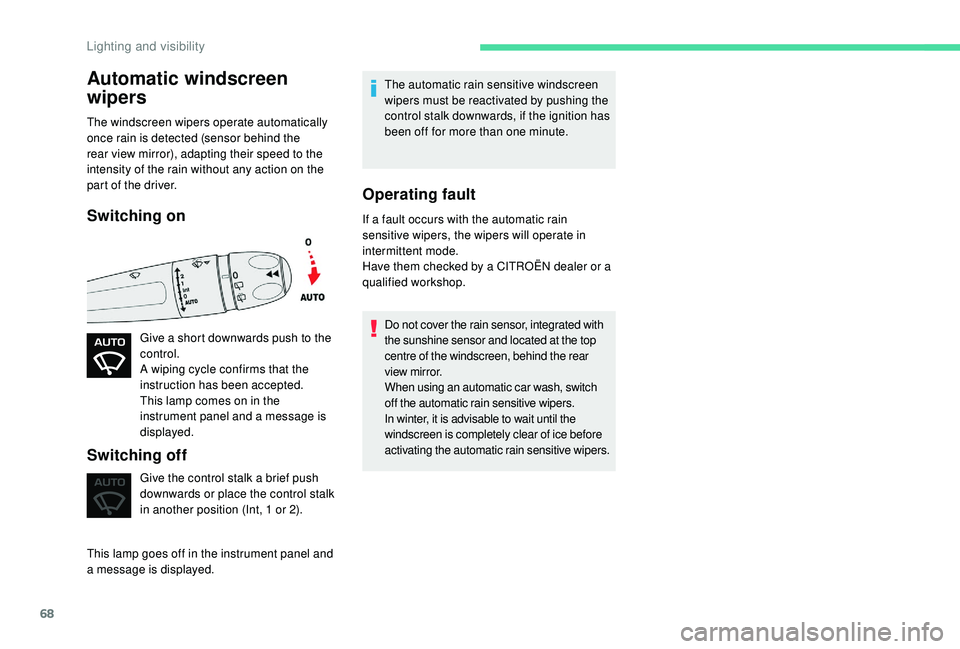
Automatic windscreen
wipers
The windscreen wipers operate automatically
once rain is detected (sensor behind the
rear view mirror), adapting their speed to the
intensity of the rain without any action on the
part of the driver.
Switching on
Give a short downwards push to the
control.
A wiping cycle confirms that the
instruction has been accepted.
This lamp comes on in the
instrument panel and a message is
displayed.
Switching off
Give the control stalk a brief push
downwards or place the control stalk
in another position (Int, 1 or 2).
This lamp goes off in the instrument panel and
a message is displayed. The automatic rain sensitive windscreen
wipers must be reactivated by pushing the
control stalk downwards, if the ignition has
been off for more than one minute.
Operating fault
If a fault occurs with the automatic rain
sensitive wipers, the wipers will operate in
intermittent mode.
Have them checked by a CITROËN dealer or a
qualified workshop.
Do not cover the rain sensor, integrated with
the sunshine sensor and located at the top
centre of the windscreen, behind the rear
view mirror.
When using an automatic car wash, switch
off the automatic rain sensitive wipers.
In winter, it is advisable to wait until the
windscreen is completely clear of ice before
activating the automatic rain sensitive wipers.
Lighting and visibility
Page 71 of 256

69
General safety
recommendations
Labels are attached in different places on
your vehicle. They include safety warnings
as well as identification information for
your vehicle. Do not remove them: they
are an integral part of your vehicle.
For any work on your vehicle, use a
qualified workshop that has the technical
information, skills and equipment required,
all of which a CITROËN dealer is able to
provide.We draw your attention to the following
points:
-
T
he fitting of electrical equipment
or accessories not approved by
CITROËN may cause excessive
current consumption and faults and
failures with the electrical system of
your vehicle. Contact a CITROËN
dealer for information on the range of
recommended accessories.
-
A
s a safety measure, access to
the diagnostic socket, used for the
vehicle's electronic systems, is
reser ved strictly for CITROËN dealers
or qualified workshops, equipped
with the special tools required (risk
of malfunctions of the vehicle's
electronic systems that could cause
breakdowns or serious accidents).
The manufacturer cannot be held
responsible if this advice is not
followed.
-
A
ny modification or adaptation not
intended or authorised by CITROËN
or carried out without meeting the
technical requirements defined by
the manufacturer will result in the
suspension of the legal and contractual
warranties. Installation of accessory radio
communication transmitters
Before installing a radio communication
transmitter, you must contact a CITROËN
dealer for the specification of transmitters
which can be fitted (frequency, maximum
power, aerial position, specific installation
requirements), in line with the Vehicle
Electromagnetic Compatibility Directive
(2004/104/EC).
Depending on country regulations, some
safety equipment may be compulsory:
high visibility safety vests, warning
triangles, breathalysers, spare bulbs,
spare fuses, fire extinguisher, first aid kit,
mud flaps at the rear of the vehicle, etc.
5
Safety
Page 74 of 256

72
Electronic stability control
(ESC)
Electronic stability control integrating the
following systems:
-
a
nti-lock braking system (ABS) and
electronic brake force distribution (EBFD),
-
em
ergency braking assistance (EBA),
-
w
heel anti-slip regulation (ASR) or traction
control,
-
d
ynamic stability control (DSC).
Definitions
Anti-lock braking system (ABS)
and electronic brake force
distribution (EBFD)
This system improves the stability and
manoeuvrability of your vehicle when braking and
contributes towards improved control on corners, in
particular on poor or slippery road sur faces.
The ABS prevents wheel lock in the event of
emergency braking.
The electronic brake force distribution system (EBFD)
manages the braking pressure wheel by wheel.
Emergency braking assistance
(EBA)
In an emergency, this system permits the
optimum braking pressure to be reached
more quickly, therefore reducing the stopping
distance.
It is triggered in relation to the speed at which
the brake pedal is pressed. The effect of this is
a reduction in the resistance of the pedal and
an increase in braking efficiency.
Anti-slip regulation (ASR)
The ASR system (also known as Traction
Control) optimises traction in order to limit
wheel slip by acting on the brakes of the driving
wheels and on the engine. It also improves
the directional stability of the vehicle on
acceleration.
Dynamic stability control (DSC)
If there is a difference between the path
followed by the vehicle and that required by
the driver, the DSC monitors each wheel and
automatically acts on the brake of one or more
wheels and on the engine to return the vehicle
to the required path, within the limits of the laws
of physics.
If you benefit from the Citroën Connect
Box offer with the SOS and assistance
pack included, there are additional
ser vices available to you in your personal
space, via the website for your country.
Anti-lock braking system
(ABS) and electronic brake
force distribution (EBFD)
The fixed illumination of this warning
lamp indicates that there is a fault
with the ABS.
If this warning lamp comes on, in
conjunction with the STOP
and
ABS warning lamps, an audible
signal and a message, this indicates
that the electronic brake force
distribution (EBFD) is faulty.
You must stop as soon as it is
safe to do so.
In both cases, have the system
checked by a CITROËN dealer or
a qualified workshop as soon as
possible.
When changing wheels (tyres and rims),
ensure that these are approved for your
vehicle.
Normal operation of the ABS may make
itself felt by slight vibration of the brake
pedal.
If you need to brake in an emergency,
press the brake pedal ver y firmly and
keep the pressure applied.
Safety
Page 95 of 256

93
Manual child lock
LockingUnlocking
F Using the ignition key or the integral key,
depending on version, turn the red control
as far as it will go:
-
t
o the left on the left-hand rear door,
-
t
o the right on the right-hand rear door.
Do not confuse the child lock control,
which is red, with the back-up locking
control, which is black.
Electric child lock
Activation/Deactivation
Any other state of the indicator lamp
indicates a fault with the electric child lock.
Have it checked by a CITROËN dealer or
a qualified workshop.
This system is independent and in no
circumstances does it take the place of
the central locking control.
Check the status of the child locks each
time you switch on the ignition.
Always remove the key from the ignition
when leaving the vehicle, even for a short
time.
Mechanical system to prevent opening of a rear
door using its interior control.
The control is located on the edge of each rear
d o o r.
F
U
sing the ignition key or the integral key,
depending on version, turn the red control
as far as it will go:
-
t
o the right on the left-hand rear door,
-
t
o the left on the right-hand rear door. Remotely operated system to prevent opening
of the rear doors using their interior controls. With the ignition on:
F
p
ress this button; its indicator lamp comes
on, accompanied by a message to confirm
the activation,
F
p
ress this button again; its indicator lamp
goes off, accompanied by a message to
confirm the deactivation.
The indicator lamp remains on for as long as
the child lock is activated. Opening the doors
from the outside remains possible.
The indicator lamp remains off for as long as
the child lock is deactivated.
5
Safety