2017 Citroen C3 RHD service
[x] Cancel search: servicePage 247 of 442

245
Charging the battery using a battery charger
For optimum service life of the battery, it is
essential to maintain an adequate state of
charge.
In some circumstances it may be necessary to
charge the battery:
-
i
f you use your vehicle essentially for short
journeys,
-
i
f the vehicle is to be taken off the road for
several weeks.
Contact a CITROËN dealer or a qualified
workshop. It is not necessary to disconnect the
battery.
Never try to charge a frozen battery.
If the battery has been frozen, have
it checked by a CITROËN dealer or a
qualified workshop, who will check that
the internal components have not been
damaged and the casing is not cracked,
which could cause a leak of toxic and
corrosive acid.
If you envisage charging your vehicle's
battery yourself, use only a charger
compatible with lead-acid batteries of a
nominal voltage of 12 V.
If this label is present, it is essential
to use only a 12 V charger, to avoid
causing irreversible damage to the
electrical components related to the
Stop & Start system. Follow the instructions for use provided
by the manufacturer of the charger.
Never reverse polarities.
F
S
witch off the ignition.
F
S
witch off all electrical consumers (audio
system, lighting, wipers,
...).
F
S
witch off the charger B before connecting
the cables to the battery, so as to avoid any
dangerous sparks.
F
E
nsure that the charger cables are in good
condition.
F
R
aise the plastic cover, if your vehicle has
one, on the (+) terminal.
F
C
onnect the charger B cables as follows:
-
t
he positive (+) red cable to the (+)
terminal of the battery A ,
-
t
he negative (-) black cable to the earth
point C on the vehicle.
F
A
t the end of the charging operation, switch
off the charger B before disconnecting the
cables from the battery A .
8
In the event of a breakdown
Page 248 of 442

246
Do not force the lever as locking will
not be possible if the clamp is not
positioned correctly; start the procedure
again.
Quick-release terminal clamp
Disconnecting the (+) terminal
F Ra ise the lever A fully to release the
clamp
B .
F
R
emove the clamp B by lifting it off. The Stop & Start system may not be
operational during the trip following the
first engine start.
In this case, the system will only be
available again after a continuous
period of immobilisation of the vehicle,
a period which depends on the exterior
temperature and the state of charge of
the battery (up to about 8 hours).
In order to maintain an adequate state
of charge for starting the engine, it is
recommended that the battery be disconnected
if the vehicle is taken out of service for a long
period.
Before disconnecting the battery:
F
c
lose all openings (doors, boot, windows),
F
s
witch off all electrical consumers (audio
system, wipers, lighting, etc.),
F
s
witch off the ignition and wait for
four
m
inutes.
At the battery, it is only necessary to
disconnect the (+) terminal.
Disconnecting the battery
After reconnecting the battery, switch on the
ignition and wait 1 minute before starting to
allow initialisation of the electronic systems.
However, if minor problems persist following
this operation, contact a CITROËN dealer or a
qualified workshop.
Referring to the corresponding section, you
must yourself initialise or reset certain systems,
such as:
-
t
he remote control or electronic key
(depending on version),
-
t
he electric windows,
-
t
he date and time,
-
t
he radio preset stations.
Following reconnection of the battery
Reconnecting the (+) terminal
F Ra ise the lever A fully.
F
R
efit the open clamp B on the (+) terminal.
F
P
ush the clamp B fully down.
F
L
ower the lever A to lock the clamp B .
In the event of a breakdown
Page 249 of 442
247
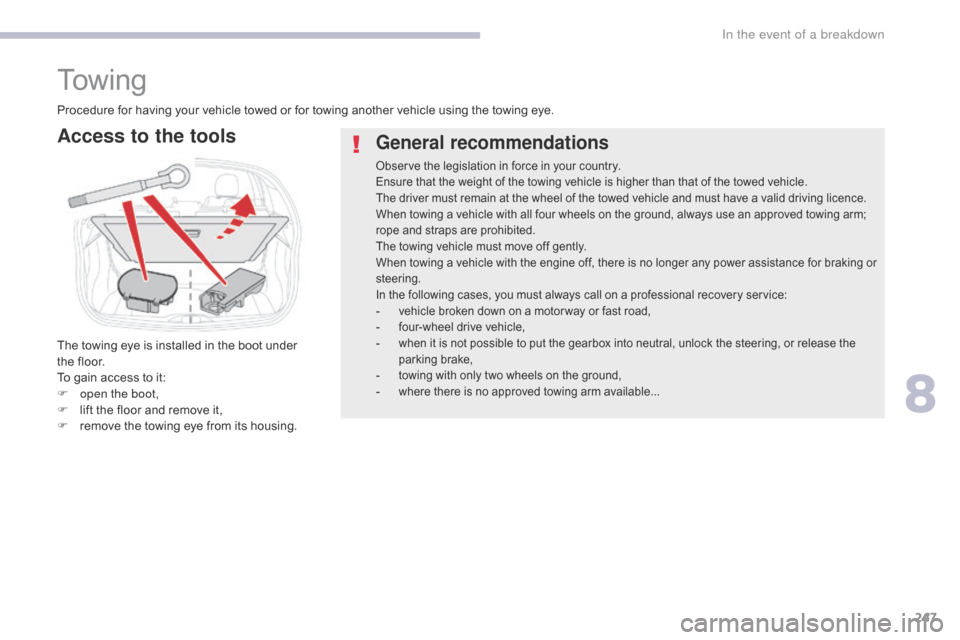
To w i n g
General recommendations
Observe the legislation in force in your country.
Ensure that the weight of the towing vehicle is higher than that of the towed vehicle.
The driver must remain at the wheel of the towed vehicle and must have a valid driving licence.
When towing a vehicle with all four wheels on the ground, always use an approved towing arm;
rope and straps are prohibited.
The towing vehicle must move off gently.
When towing a vehicle with the engine off, there is no longer any power assistance for braking or
steering.
In the following cases, you must always call on a professional recovery service:
- vehicle broken down on a motor way or fast road,- four-wheel drive vehicle,- when it is not possible to put the gearbox into neutral, unlock the steering, or release the
parking brake,
- towing with only two wheels on the ground,- where there is no approved towing arm available...
Procedure for having your vehicle towed or for towing another vehicle using the towing eye.
Access to the tools
The towing eye is installed in the boot under
the floor.
To gain access to it:
F
o
pen the boot,
F
l
ift the floor and remove it,
F
r
emove the towing eye from its housing.
8
In the event of a breakdown
Page 259 of 442

257
Safety, children ......... 1 26, 130 -132, 137, 139 -141, 143
Screen, monochrome
..................................... 38 U
nder floor storage
.........................................
97
U
nder-inflation (detection)
............................
18
6
Unlocking
..............................
....................54, 56
Unlocking from the inside
...............................
67
U
pdating the date
............................................
51
U
pdating the time ...................................... 5 1, 52
S
U
Tables of fuses ..............................2
36, 238, 241
Tank, fuel ............................... ................192, 19 4
Temperature, coolant
...................................... 28
T
hird brake lamp
........................................... 23
4
Three flashes (direction indicators)
..............10
4
Time (setting)
..............................
........ 38, 51, 52
To o l s
................
...................................... 221, 222
Total distance recorder
...................................36
T
ouch screen ............................................. 41, 43
To w b a r
................
................................... 148, 197
Towing another vehicle
.................................2
47
Towing eye
...................................................... 97
T
raction control (ASR)
.................... 2
0, 119, 121
Tr a i l e r
...............
..................................... 148, 197
Triangle, warning ..................................... 97, 215
Trip computer
............................................. 4
7- 4 9
Trip distance recorder
..................................... 36
T
y r e s
..........................................................9
, 253
Tyre under-inflation detection
...............
................ 27, 186, 188, 220
Range, AdBlue
...............................
...........23, 33
Rear screen, demisting ................................... 89
R
echarging the battery
................................. 24
5
Recirculation, air
...............................
........82, 84
Reduction of electrical load
.......................... 19
8
Regeneration of the particle filter
................. 20
8
Reinitialisation of the under-inflation detection system
................................. 1
87, 188
Reinitialising the remote control
..................... 64
R
eminder, key in ignition
............................... 1
51
Reminder, lighting on
.................................... 10
4
Remote control
........................5
3, 54, 56 -58, 60
Removing a wheel
..............................
.......... 224
Removing the mat
...............................
............ 95
Replacing bulbs
..............................
..... 229, 233
Replacing fuses
..............................
..... 236, 238
Replacing the air filter
................................... 20
8
Replacing the oil filter
................................... 20
8
Replacing the passenger
compartment filter
...................................... 20
8
Reservoir, screenwash
................................. 20
6
Resetting the service indicator
....................... 31
R
esetting the trip recorder
.............................. 36
R
eversing camera
...............................
.......... 185
Reversing lamp
............................................. 23
3
Roof bars
....................................................... 20
0
Running out of fuel (Diesel)
.......................... 2
15RTScreenwash, front ......................................... 11 0
Screenwash, rear ............................... ...........11 0
SCR (Selective Catalytic Reduction)
............................................ 2
4, 210
Seat belts
....................................... 12
2-124, 13 6
Seats, front
...............................
.......................73
Seats, rear
....................................................... 75
Sel
ector, gear
................................................ 15
7
Serial number, vehicle
..................................25
3
Service indicator
....................................... 2
9, 31
Servicing
...............................
............................ 9
Settings, equipment
...................... 3
7, 38, 41, 43
Sidelamps
.................... 1
01, 106, 229, 230, 233
Side repeater
..............................
..................232
Snow chains
..........................................1
86, 196
Socket, 12 V accessory
............................9
2, 93
Socket, auxiliary
...............................
...............94
Sockets, audio
................................................ 94
Spe
ed limiter
...............................
.. 166, 169, 171
Speed limit recognition
................................. 16
7
Stability control (ESC) ...................................11 9
Starting the engine
....................... 1
49, 152, 157
Starting using another battery
..............1
54, 244
Stay, bonnet
...............................
...................201
Steering wheel, adjustment
............................78
St
op
...............
.................................................. 18
Stopping the vehicle
..................... 1
49, 152, 157
Stop & Start
..................................1
6, 49, 80, 88,
163, 192, 201, 208, 246
Stop (warning lamp)
........................................ 18
St
orage
................
............................................ 93
Sun visor
...................................................9
2, 93
Switching off the engine
...............................14
9
Synchronising the remote control
...................64
.
Alphabetical index
Page 260 of 442

258
V
W
Ventilation .......................................9, 79, 80, 82
Warning and indicator lamps
........ 1
3, 14, 17, 18
Warning lamp, braking system
.......................20
W
arning lamp, Diesel engine pre-heater
.......15
W
arning lamp, driver's seat belt not
fastened
...............
....................................... 123
Warning lamp, low fuel level
...........................25
W
arning lamps
................................................ 18
W
arning lamp, seat belts
..............................12
3
Warning lamp, Service.................................... 19
Warning lamp, Stop
........................................ 18
We
ights
...............
.................................. 24 9 - 2 51
Wheel, spare
.................................2
21, 222, 253
Window controls
............................................. 71
W
iper blades (changing)
....................... 1
12, 199
Wiper, rear ..................................................... 11 0
Wipers
................................................... 1
0 9 , 111
Wipers, automatic rain sensitive
...........1
0 9 , 111
Alphabetical index
Page 266 of 442

Transversal-Citroen_en_Chap00_debut
On-line handbook
If the "MyCITROËN" function is not available on the CITROËN public\
website for your country, you can fi nd your handbook at the following address:
http://service.citroen.com/ddb/
Find your handbook and the audio and telematic systems on the CITROËN website, under "MyCITROËN". Find your handbook and the audio and telematic systems on the CITROËN website, under "MyCITROËN". Find your handbook and the audio and telematic systems on the
Select:
Select one of the following means of access to view your handbook on-line...
the language,
the vehicle, its body style,
the print edition of your handbook appropriate for the date of registration of your vehicle.
Referring to the handbook on-line also gives you access to the latest information available, easily identifi ed by the bookmark, associated with this symbol:
Page 269 of 442

3
.
12:13
18,5 21,5
23 °C
Audio and Telematics
Select the audio source (depending on version): - FM / DAB * / AM * radio stations. - USB memory stick. - CD player. - Media player connected via the auxiliary socket (Jack, cable not supplied). - Telephone connected by Bluetooth * using
Bluetooth * audio streaming.
* Depending on equipment.
Certain information is displayed permanently in the upper band of the touch screen: - Reminder of the air conditioning information and direct access to the corresponding menu. - Go directly to the selection of the audio source, to the list of radio stations (or list of titles depending on the source).
- Go to the message notifications, emails, map updates and, depending on the services, the navigation notifications. - Go to the settings for the touch screen and the digital instrument panel.
In very hot conditions, the volume may be limited to protect the system. It may go into standby (screen and sound off) for at least 5 minutes.
The return to normal takes place when the temperature in the passenger compartment has dropped.
In the "Settings" menu you can create a profile for just one person or a group of people with common points, with the possibility of entering a multitude of settings (radio presets, audio settings, navigation history, contact favourites, ...); these settings are taken into account automatically.
Page 272 of 442

6
12:13
18,5 21,5
23 °C
21,518,5
12:1323 °C12:13
18,5 21,5
23 °C
12:13
18,5 21,5
23 °C
Audio and Telematics
Connected navigation
Driving
Applications
Enter navigation settings and choose a destination. Use services available in real time, depending on equipment.
Activate, deactivate and configure certain vehicle functions.
Operate certain applications on a smartphone connected via CarPlay ® or MirrorLink ® or MirrorLink ®TM . Check the state of the Bluetooth ® and Wi-Fi ® and Wi-Fi ®
connections.
Menus
Air conditioning
Manage the various temperature and air flow settings.
A c c o r d i n g t o v e r s i o n