2017 Citroen C3 RHD USB
[x] Cancel search: USBPage 389 of 442

123
.
1
Audio and Telematics
Transversal-Citroen_en_Chap02_RCC-2-2-0_ed01-2016
As a safety measure and because it requires the sustained attention of the driver, using a smartphone when driving is prohibited. Operation must be with the vehicle stationary . stationary . stationary
The synchronisation of a smartphone allows applications on a smartphone that are adapted to the MirrorLink TM technology to be displayed in the vehicle's screen. The principles and standards are constantly evolving. For the communication process between the smartphone and the system to work correctly, the smartphone must be unlocked; update the operating system of your smar tphone as well as the date and time in the smartphone and the system. For the list of eligible smartphones, connect to the Brand's internet website in your country.
T h e " M i r r o r L i n k TM " function requires a compatible smartphone and
applications.
There may be a wait for the availability of applications, depending on the quality of your network.
When connecting a smartphone to the system, it is recommended that "Bluetooth" ®
be started on the smartphone
Depending on the smartphone, it may be necessary to activate the " MirrorLinkTM " function.
During the procedure, several screen pages relating to certain functions are displayed. Accept to start and end the connection.
Connect the USB cable. The smartphone charges when connected by a USB cable.
Press " MirrorLinkTM" to start the application in the system.
Once connection is established, a page is displayed with the applications already downloaded to your smartphone and adapted to the MirrorLink TM t e c h n o l o g y .
Access to the different audio sources remains accessible in the margin of the MirrorLink TM
display, using touch buttons in the upper bar. Access to the menus for the system is possible at any time using the dedicated buttons
Telephone not connected by Bluetooth ®Bluetooth ®Bluetooth
Telephone connected by Bluetooth ® Telephone connected by Bluetooth ® Telephone connected by Bluetooth
From the system, press " Telephone " to display the primary page.
From the system, press " Telephone " to display the primary page.
As a safety measure, applications can only be viewed with the vehicle stationary; display is interrupted once the vehicle is moving.
Press the " PHONE " button to display the secondary page.
Press " MirrorLinkTM " to start the application in the system.
Page 393 of 442

127
.
1
Audio and Telematics
Transversal-Citroen_en_Chap02_RCC-2-2-0_ed01-2016
As a safety measure and because it requires the sustained attention of the driver, using a smartphone when driving is prohibited. Operation must be with the vehicle stationary . stationary . stationary
The synchronisation of a smartphone allows applications on a smartphone that are adapted to the CarPlay ® technology to be displayed ® technology to be displayed ®
in the vehicle's screen, having first activated the CarPlay ® function in the ® function in the ®
smartphone. As the principles and standards are constantly changing, it is recommended that you keep your smar tphone's operating system updated . For the list of eligible smartphones, go to the Brand's internet website in your c o unt r y.
Connect the USB cable. The smartphone charges when connected by a USB cable.
Connect the USB cable. The smartphone charges when connected by a USB cable.
From the system, press Telephoneto display the Carplay ® inter face. ® inter face. ®
Press " CarPlay " to display the CarPlay ® inter face. ® inter face. ®
On connecting the USB cable, the CarPlay ® function deactivates the ® function deactivates the ®
system's Bluetooth ® mode. ® mode. ®
From the system, press Telephoneto display the primary page.
Press the " PHONE " button to go to the secondary page.
Or
If the smartphone is already connected by Bluetooth ® .
You can go to the CarPlay ®
navigation at any time by pressing the system's Navigation button.
Page 410 of 442

144
Audio and Telematics
Transversal-Citroen_en_Chap02_RCC-2-2-0_ed01-2016
Media
QUESTIONANSWERSOLUTION
Playback of my USB memory stick starts only after a very long wait (around 2 to 3 minutes).
Some files supplied with the memory stick may greatly slow down access to reading the memory stick (multiplication by 10 of the catalogue time).
Delete the files supplied with the memory stick and limit the number of sub-folders in the file structure on the memory stick.
Some characters in the media information are not displayed correctly while playing.
The audio system does not display some types of characters. Use standard characters to name tracks and folders.
Playing of streaming files does not start. The peripheral device connected does not support automatic play. Start the playback from the device.
The names of tracks and the track length are not displayed on the screen when streaming audio.
The Bluetooth profile does not allow the transfer of this information.
Page 414 of 442
148
Audio and Telematics
First steps
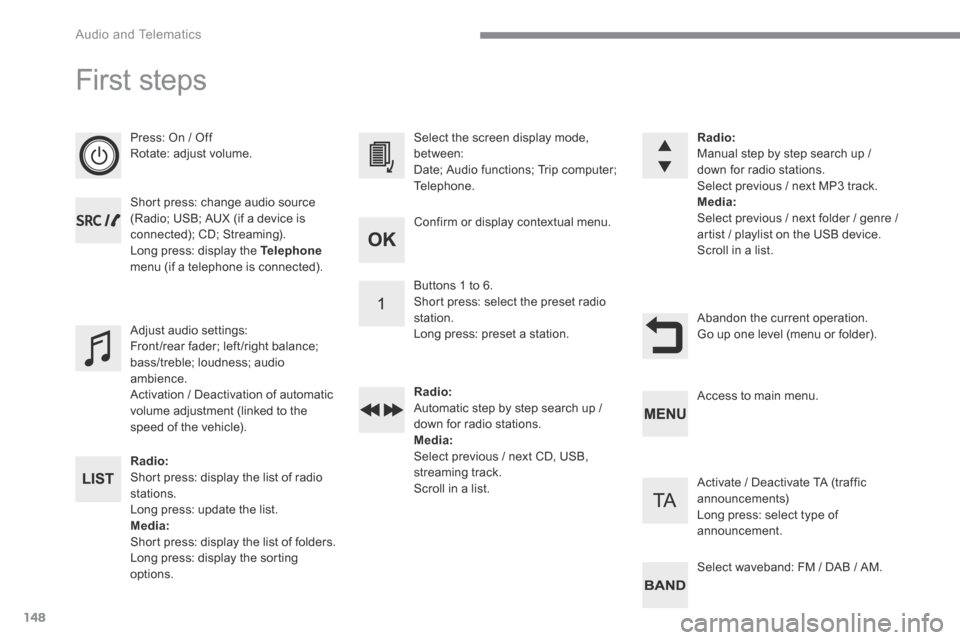
Press: On / Off Rotate: adjust volume.
Short press: change audio source (Radio; USB; AUX (if a device is connected); CD; Streaming). Long press: display the Telephonemenu (if a telephone is connected).
Radio: Short press: display the list of radio stations. Long press: update the list. Media: Short press: display the list of folders. Long press: display the sorting options.
Select the screen display mode, between: Date; Audio functions; Trip computer; Telephone.
Adjust audio settings: Front /rear fader; left /right balance; bass/treble; loudness; audio ambience. Activation / Deactivation of automatic volume adjustment (linked to the speed of the vehicle).
Radio: Manual step by step search up / down for radio stations. Select previous / next MP3 track. Media: Select previous / next folder / genre / artist / playlist on the USB device. Scroll in a list.
Abandon the current operation. Go up one level (menu or folder).
Confirm or display contextual menu.
Buttons 1 to 6. Short press: select the preset radio station. Long press: preset a station.
Radio: Automatic step by step search up / down for radio stations. Media: Select previous / next CD, USB, streaming track. Scroll in a list.
Access to main menu.
Activate / Deactivate TA (traffic announcements) Long press: select type of announcement.
Select waveband: FM / DAB / AM.
Page 415 of 442

149
.
Audio and Telematics
Transversal-Citroen_en_Chap03_RD6_ed01-2016
Steering mounted controls - Type 1
Radio : Short press: display the list of radio stations. Long press: update the list. Media : Short press: display the list of folders. Long press: display the sorting options.
Decrease volume.
Radio : Select the previous / next preset radio station. Select the previous / next item in a menu or a list. Media: Select of the previous / next track. Select the previous / next item in a menu or a list. Mute / Restore sound by simultaneously pressing the increase and decrease volume buttons.
Other than telephone calls : Short press: change audio source (Radio; USB; AUX (if a device is connected); CD; Streaming), confirm if the " Telephone " menu is open. Long press: open the " Telephone " menu. In the event of a telephone call : Short press: accept the call. Long press: reject the call. During a telephone call: Short press: open the contextual telephone menu. Long press: end the call.
Confirm a selection.
Increase volume.
Page 416 of 442

150
Audio and Telematics
Steering mounted controls - Type 2
Decrease volume.
Mute / Restore sound.
Other than telephone call: Short press: change audio source (Radio; USB; AUX (if a device is connected); CD; Streaming), confirm if the " Telephone " menu is open. Long press: open the " Telephone " menu. In the event of a telephone call: Short press: accept the call. Long press: reject the call. During a telephone call: Short press: open the contextual telephone menu. Long press: end the call.
Increase volume.
Access to the main menu.
Start voice recognition of your smartphone via the system.
Radio: Short press: display the list of radio stations. Long press: update the list. Media: Short press: display the list of folders. Long press: display the sorting options.
Radio: Select the previous / next preset radio station. Select the previous / next item in a menu or a list. Media: Select the previous / next track. Select the previous / next item in a
menu or a list.
Press the thumbwheel: confirm.
Page 419 of 442

153
.
Audio and Telematics
Transversal-Citroen_en_Chap03_RD6_ed01-2016
Receiving TA messages
Press the TA button to activate or deactivate traffic messages.
The TA (Traffic Announcement) function gives priority to TA alert messages. To operate, this function needs good reception of a radio station transmitting this type of message.
When a traffic report is transmitted, the current audio source (Radio, CD, ...) is interrupted automatically to play the TA message. Normal playback of the audio source resumes at the end of the transmission of the message.
Take care when increasing the volume while listening to TA messages. The volume may prove too high on return to the original audio source.
Select " RadioText (TXT) display " and confirm OK to save.
Select or deselect categories.
With the radio displayed on the screen, press OK to display the contextual menu.
Make a long press on this button to display the list of categories.
Receiving INFO messages
The INFO function gives priority to TA traffic announcements. To be active, this function needs good reception of a radio station that transmits this type of message. When a message is transmitted, the current audio source (Radio, CD, USB, ...) is interrupted automatically to receive the INFO message. Normal play resumes at the end of the message transmission.
Radio text is information transmitted by the radio station related to the current programme or song.
Display RADIO TEXT
Activate or deactivate the reception of the corresponding messages.
Page 422 of 442

156
Audio and Telematics
Media
USB port
This unit consists of a USB port and an auxiliary Jack socket, depending on version.
Insert a USB memory stick into the USB port or connect a USB peripheral device to the USB port using a suitable cable (not supplied). The system changes automatically to "USB" source. The system creates playlists (temporary memory), which can take from a few seconds to several minutes on the first connection. Reducing the number of non-music files and the number of folders reduces this waiting time. Playlists are updated every time a new USB memory stick is connected.
Press this button to display the
contextual menu for the Media function.
Press this button to select the play mode.
Press this button to confirm.
Play mode
The play modes available are: - Normal : the tracks are played in order, depending on the classification of the selected files. - Random : the tracks in an album or folder are played in a random order. - Random on all media : all of the tracks saved in the media are played in random o r d e r. - Repeat : the tracks played are only those from the current album or folder.
The choice made is displayed at the top of the screen.
While connected by USB, the portable device may be charged automatically.
To protect the system, do not use a USB hub.
Any additional equipment connected to the system must conform to the standard of the product or standard IEC 60950 -1.