Page 36 of 442

34
Remaining range between 350 and 1 500 miles (600 and 2 400 km)Remaining range between 0 and 350 miles (0 and 600 km)
To be able to start the engine, it is
essential to add at least 4 litres of
AdBlue
® to the tank.
When switching on the ignition, the AdBlue
warning lamp comes on, accompanied by an
audible signal and the temporary display in
the instrument panel of "NO START IN" and
a distance, indicating the remaining range
expressed in miles or kilometres before
engine starting is prevented (e.g. "NO START
IN 900
miles" means that starting will be
prevented in 900 miles).
When driving, the message is displayed every
190 miles (300 km) until the AdBlue tank has
been topped up.
The reserve level has been reached; it is
recommended that the tank be topped up as
soon as possible.
It is recommended that no more than 10 litres
of AdBlue
® are added.
For more information on AdBlue® and the
SCR system , and in particular on topping up,
refer to the corresponding section. When switching on the ignition, the SERVICE
warning lamp comes on and the AdBlue
warning lamp flashes, accompanied by an
audible signal and the temporary display in
the instrument panel of "NO START IN" and
a distance, indicating the remaining range
expressed in miles or kilometres before
engine starting is prevented (e.g. "NO START
IN 180
miles" means that starting will be
prevented in 180 miles).
When driving, the message is displayed every
30 seconds until the AdBlue tank has been
topped up.
It is essential to top up the tank as soon
as possible before it is completely empty;
other wise, the engine may no longer start.
For more information on AdBlue
® and the SCR
system, and in particular on topping up, refer
to the corresponding section. When switching on the ignition, the SERVICE
warning lamp comes on and the AdBlue
warning lamp flashes, accompanied by an
audible signal and the temporary display in the
instrument panel of "NO START IN" and 0 km
or miles ("NO START IN 0 miles" means that
starting is prevented).
The AdBlue tank is empty: the system required
by regulations prevents engine starting. Breakdown related to a lack of AdBlue
®
For more information on
AdBlue® and the SCR
system, and in particular on topping up, refer
to the corresponding section.
Instruments
Page 37 of 442

35
In the event of detection of a fault with the SCR emissions control system
In the event of detection of a faultDuring an authorised driving phase (between 650 miles and 0 miles) (1 100 km and 0 km)
A system that prevents engine starting is activated automatically 650 miles (1 100 km) after confirmation of a fault with the SCR emissions
control system. Have the system checked by a CITROËN dealer or a qualified workshop as soon as possible.
If it is a temporary fault, the alert
disappears during the next journey,
after a self-diagnostics test of the SCR
emissions control system.
The AdBlue, SERVICE and engine self-
diagnostics warning lamps come on,
accompanied by an audible signal and the
display of the message "Emissions fault".
The alert is triggered when driving, when
the fault is detected for the first time, then
when switching on the ignition for subsequent
journeys, while the fault persists.
If a fault with the SCR system is confirmed (after
30 miles (50 km) covered with the permanent
display of the message signalling a fault), the
SERVICE and engine self-diagnostics warning
lamps come on and the AdBlue warning lamp
flashes, accompanied by an audible signal and
the temporary display in the instrument panel
of "NO START IN" and a distance, indicating
the remaining range expressed in miles or
kilometres before engine starting is prevented
(e.g. "NO START IN 350
miles" means that
starting will be prevented in 350 miles).
While driving, this display appears every 30 seconds
while the fault with the SCR system persists.
The alert is repeated when switching on the
ignition.
You should go to a CITROËN dealer or a
qualified workshop as soon as possible.
Other wise, you will not be able to restart your
engine. Starting prevented
To be able to start the engine, you must call on
a CITROËN dealer or a qualified workshop.
You have exceeded the authorised
driving limit: the starting prevention
system inhibits engine starting.
Every time the ignition is switched on, the
SERVICE and engine self-diagnostics warning
lamps come on and the AdBlue warning lamp
flashes, accompanied by an audible signal and
the temporary display of "NO START IN" and
0 miles or kilometres ("NO START IN 0 miles"
means that starting is prevented).
1
Instruments
Page 39 of 442
37
If your vehicle is not fitted with an audio system or a touch screen, you can still configure certain
equipment using the Text LCD instrument panel.
Configuration of the equipment on vehicles without a screen
Control buttons
A brief press on this button gives
access to the configuration menu, a
brief press confirms.
Display menus
- LIGHTING:
● D AYTIME LAMPS (Daytime running
lamps),
●
G
UIDE LAMPS (Guide-me-home
lighting),
●
W
ELCOME LAMPS (Welcome lighting).
-
D
RIVE ASSIST:
●
C
HK PRESSURES|REINITIALISE
(Reinitialisation of the tyre under-
inflation detection system),
●
V
IGILANCE ALT (Fatigue detection),
●
A
DVISED SPEED (Speed limit
recognition),
●
P
ARKING (Parking sensors).
For more information on one of these functions,
refer to the corresponding section.
A press on one of these buttons
scrolls through a menu, a list;
changes a value.
A press on this button goes back a
level or abandons the operation in
progress.
1
Instruments
Page 40 of 442
38
Monochrome screen C
This displays the following information:
- t ime,
-
d
ate,
-
e
xterior temperature (this flashes if there is
a risk of ice),
-
g
raphic parking sensor information,
-
c
urrent audio source,
-
t
elephone or hands-free kit system
information,
-
a
lert messages,
-
s
ettings menus for the screen and the
vehicle equipment.
Displays in the screen
From the control panel of your audio system,
press:
F
the "MENU" button for access to the main
menu ,
F
t
he "5" or " 6" buttons to scroll through the
items on the screen,
F
t
he "7" or " 8" buttons to change a setting
value,
F
the "OK" button to confirm,
or
F
the "Back" button to abandon the
operation in progress.
Controls
F Press the "MENU" button for access to the
main menu :
-
"
Multimedia",
-
"
Telephone",
-
"
Trip computer",
-
"
Connections",
-
"
Personalisation-configuration",
F
P
ress the " 7" or " 8" buttons to select the
menu required, then confirm by pressing
the "OK" button.
Main menu
Instruments
Page 52 of 442
50
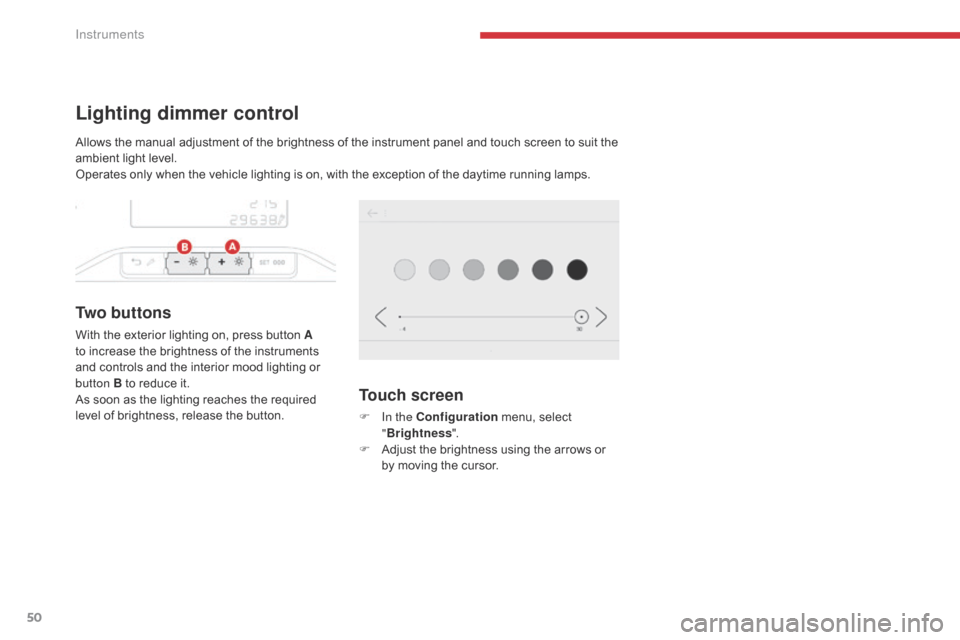
Lighting dimmer control
Tw o b u t t o n s
With the exterior lighting on, press button A
to increase the brightness of the instruments
and controls and the interior mood lighting or
button B to reduce it.
As soon as the lighting reaches the required
level of brightness, release the button.
Touch screen
F In the Configuration menu, select
" Brightness ".
F
A
djust the brightness using the arrows or
by moving the cursor.
Allows the manual adjustment of the brightness of the instrument panel and touch screen to suit the
ambient light level.
Operates only when the vehicle lighting is on, with the exception of the daytime running lamps.
Instruments
Page 53 of 442

51
Setting the date and time
With audio system
Without audio system
F Press the MENU button for access to the
main menu.
F
P
ress the " 7" or " 8" button to select the
"Personalisation-configuration" menu, then
the "OK" button.
F
P
ress the " 5" or " 6" button to select the
"Display configuration" menu, then the
"OK" button.
F
P
ress the " 5" or " 6" button to select the
"Date and time adjustment" line, then the
"OK" button.
F
P
ress the " 7" or " 8" button to select the
setting to change. Confirm by pressing the
"OK" button.
F
A
djust the settings one by one, confirming
by pressing the "OK" button.
F
P
ress the " 5" or " 6" button, then the "OK"
button to select the "OK" box and confirm
or press the "Back" button to cancel.
With CITROËN Connect
Radio
F Select the Settings menu.
F
Sel
ect " System configuration ".
You can set the date and time from the
instrument panel display. F
Sel
ect " Date " or "Time ".
F
C
hoose the display formats.
F
C
hange the date and/or the time using the
numeric keypad. F
Sel
ect "Date and time ".
F
P
ress this button to confirm.
F
P
ress and hold this button.
F
P
ress this button briefly to
confirm.
F
P
ress one of these buttons to
select the setting to change.
F
P
ress one of these buttons to
change the setting and confirm
again to save the change.
1
Instruments
Page 65 of 442
63
Changing the battery
A message appears in the instrument panel screen when replacement of the battery is needed.
Version without Keyless Entr y and
Starting
Batter y type: CR1620 / 3 volts.
F
U
nclip the cover using a small screwdriver
at the cut-out.
F
L
ift off the cover.
F
R
emove the discharged battery from its
housing. Version with Keyless Entr y and
Starting
Batter y type: CR2032 / 3 volts.
The remote control must be reinitialised after
replacing the battery.
For more information on reinitialising the
remote control, refer to the corresponding
section. F
F
it the new battery into its housing
observing the polarity.
F
C
lip the cover onto the casing.
2
Access
Page 70 of 442

68
Anti-intrusion security
This system allows automatic simultaneous locking of the doors and boot as soon as the speed of
the vehicle exceeds 6 mph (10 km/h).
Operation
If one of the doors or the boot is open, the
automatic central locking does not take place.
Activation / Deactivation
You can activate or deactivate this function
permanently.
F
W
ith the ignition on, press this button
until an audible signal starts and a
corresponding message is displayed.
The state of the system stays in memory when
switching off the ignition.
This is signalled by the sound of
the locks rebounding, accompanied
by illumination of this symbol in the
instrument panel, an audible signal
and the display of an alert message.
Carrying long or
voluminous objects
If you want to drive with the boot open,
you should press the central locking
button to lock the doors. Other wise,
every time the speed of the vehicle
exceeds 6 mph (10 km/h), the locks
will rebound and the alerts mentioned
above will appear.
Pressing the central locking button
unlocks the vehicle.
Above 6 mph (10 km/h), this unlocking
is temporary.
Driving with the doors locked may
render access for the emergency
services difficult in an emergency.
Access