Page 367 of 450

93
.
Audio and Telematics
QUESTIONANSWERSOLUTION
Some contacts are duplicated in the list. The options for synchronizing contacts are synchronizing the contacts on the SIM card, the contacts on the telephone, or both. When both synchronizations are selected, some contacts may be duplicated.
Select "Display SIM card contacts" or "Display telephone contacts".
Contacts are not shown in alphabetical order. Some telephones offer display options. Depending on the settings chosen, contacts can be transferred in a specific order. Modify the display setting in the telephone di r e c to r y.
The system does not receive SMS text messages. The Bluetooth mode does not permit sending SMS text messages to the system.
QUESTIONANSWERSOLUTION
In changing the setting of treble and bass the equalizer setting is deselected.
The selection of an equalizer setting imposes the settings for treble and bass and vice-versa. Modify the treble and bass or equalizer settings to obtain the desired musical ambience.
In changing the equalizer setting, treble and bass return to zero.
When changing the balance settings, the distribution setting is deselected.
The selection of a distribution setting imposes the balance settings and vice-versa. Modify the balance or distribution settings to obtain the desired musical ambience.
When changing an distribution setting, the balance setting is deselected.
Settings
Page 387 of 450
113
.
5
5
5
Audio and Telematics
Transversal-Citroen_en_Chap02_RCC-2-2-0_ed01-2016
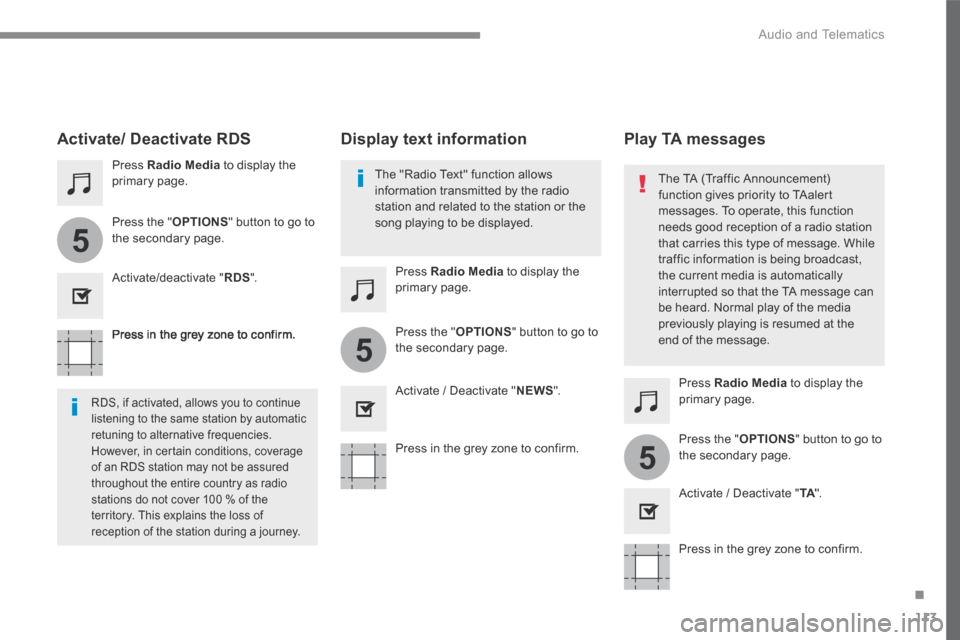
Press in the grey zone to confirm.
Press in the grey zone to confirm.
Press in the grey zone to confirm.
Press Radio Media to display the primary page.
Press Radio Media to display the primary page.
Press Radio Media to display the primary page.
Press the " OPTIONS " button to go to the secondary page.
Press the " OPTIONS " button to go to the secondary page.
Press the " OPTIONS " button to go to the secondary page.
Activate/deactivate " RDS ".
Activate / Deactivate " NEWS ".
Activate / Deactivate " TA ". TA ". TA
Activate/ Deactivate RDS
RDS, if activated, allows you to continue listening to the same station by automatic
retuning to alternative frequencies. However, in certain conditions, coverage of an RDS station may not be assured throughout the entire country as radio stations do not cover 100 % of the territory. This explains the loss of reception of the station during a journey.
The "Radio Text" function allows information transmitted by the radio station and related to the station or the song playing to be displayed.
Display text information Play TA messages
The TA (Traffic Announcement) function gives priority to TAalert messages. To operate, this function
needs good reception of a radio station that carries this type of message. While traffic information is being broadcast, the current media is automatically interrupted so that the TA message can be heard. Normal play of the media previously playing is resumed at the end of the message.
Page 402 of 450

128
Audio and Telematics
Transversal-Citroen_en_Chap02_RCC-2-2-0_ed01-2016
Pairing a Bluetooth ®Pairing a Bluetooth ®Pairing a Bluetooth telephone ® telephone ®
As a safety measure and because it requires sustained attention by the driver, the pairing of a Bluetooth mobile telephone with the Bluetooth hands-free system of your audio system must
be done with the vehicle stationaryand the ignition on.
Procedure from the telephone
Select the name of the system in the list of devices detected.
In the system, accept the connection request from the telephone.
Procedure from the system
Press Telephone to display the primary page.
Press " Bluetooth search ".
The list of telephones detected is displayed.
If the pairing procedure fails, it is recommended that you deactivate and then reactivate the Bluetooth function in your telephone.
Depending on the type of telephone, you may be asked to accept or not the transfer of your contacts and messages.
Select the name of the chosen telephone in the list. Activate the Bluetooth function on the telephone and ensure that it is "visible to all" (telephone configuration).
To complete the pairing, whichever procedure used (from the telephone or from the system), ensure that the code is the same in the system and in the telephone.
Page 427 of 450

153
.
Audio and Telematics
Transversal-Citroen_en_Chap03_RD6_ed01-2016
Receiving TA messages
Press the TA button to activate or deactivate traffic messages.
The TA (Traffic Announcement) function gives priority to TA alert messages. To operate, this function needs good reception of a radio station transmitting this type of message.
When a traffic report is transmitted, the current audio source (Radio, CD, ...) is interrupted automatically to play the TA message. Normal playback of the audio source resumes at the end of the transmission of the message.
Take care when increasing the volume while listening to TA messages. The volume may prove too high on return to the original audio source.
Select " RadioText (TXT) display " and confirm OK to save.
Select or deselect categories.
With the radio displayed on the screen, press OK to display the contextual menu.
Make a long press on this button to display the list of categories.
Receiving INFO messages
The INFO function gives priority to TA traffic announcements. To be active, this function needs good reception of a radio station that transmits this type of message. When a message is transmitted, the current audio source (Radio, CD, USB, ...) is interrupted automatically to receive the INFO message. Normal play resumes at the end of the message transmission.
Radio text is information transmitted by the radio station related to the current programme or song.
Display RADIO TEXT
Activate or deactivate the reception of the corresponding messages.
Page:
< prev 1-8 9-16 17-24