2017 Citroen C3 connected
[x] Cancel search: connectedPage 253 of 450

251
B618_en_Chap08_En-cas-de-panne_ed01-2016
Do not force the lever as locking will
not be possible if the clamp is not
positioned correctly; start the procedure
again.
Quick-release terminal clamp
Disconnecting the (+) terminal
F Ra ise the lever A fully to release the
clamp
B .
F
R
emove the clamp B by lifting it off. The Stop & Start system may not be
operational during the trip following the
first engine start.
In this case, the system will only be
available again after a continuous
period of immobilisation of the vehicle,
a period which depends on the exterior
temperature and the state of charge of
the battery (up to about 8 hours).
In order to maintain an adequate state
of charge for starting the engine, it is
recommended that the battery be disconnected
if the vehicle is taken out of service for a long
period.
Before disconnecting the battery:
F
c
lose all openings (doors, boot, windows),
F
s
witch off all electrical consumers (audio
system, wipers, lighting, etc.),
F
s
witch off the ignition and wait for
four
m
inutes.
At the battery, it is only necessary to
disconnect the (+) terminal.
Disconnecting the battery
After reconnecting the battery, switch on the
ignition and wait 1 minute before starting to
allow initialisation of the electronic systems.
However, if minor problems persist following
this operation, contact a CITROËN dealer or a
qualified workshop.
Referring to the corresponding section, you
must yourself initialise or reset certain systems,
such as:
-
t
he remote control or electronic key
(depending on version),
-
t
he electric windows,
-
t
he date and time,
-
t
he radio preset stations.
Following reconnection of the battery
Reconnecting the (+) terminal
F Ra ise the lever A fully.
F
R
efit the open clamp B on the (+) terminal.
F
P
ush the clamp B fully down.
F
L
ower the lever A to lock the clamp B .
8
In the event of a breakdown
Page 262 of 450

260
B618_en_Chap11_index-alpha_ed01-2016
Accessories ...........................................117, 157
AdBlue® ............................... ......26, 36, 215, 216
Adjusting headlamps .................................... 11
2
Adjusting head restraints
................................ 77
A
djusting seat
................................................. 76
A
djusting the air distribution
.....................8
5, 88
Adjusting the air flow
.................................8
5, 88
Adjusting the date
..................................... 4
1, 54
Adjusting the height and reach of the steering wheel
...............................
.........82
Adjusting the temperature
........................8
5, 88
Adjusting the time
............................... 4
1, 54, 55
Advice on driving
..............................
....151, 152
Airbags
...............
............................. 29, 129, 137
Airbags, curtain
..................................... 13
2, 13 3
Airbags, front......................................... 13 0, 13 3
Airbags, lateral
...................................... 13
1, 13 3
AIRBUMP
® .................................................... 2 19
Air conditioning ............................... ............ 9, 87
Air conditioning, automatic
.......................8
4, 88
Air conditioning, manual
........................... 8
4, 86
Air intake
...............
.................................... 86, 88
Air vents
..............................
............................ 83
Alarm
............................................................... 72
A
nti-lock braking system (ABS)
....................12
3
Anti-slip regulation (ASR)
............................. 12
3
Anti-theft
..............................
.........................153
Armrest, front
............................................9
6, 98
Assistance call
...............................
....... 119, 121
Assistance, emergency braking
................... 12
3
Audio system
...............................
....................41
Auxiliary socket
............................................... 98
ABChild seats, ISOFIX .......................14 3 -145, 147
C ITROËN C onnect Box ....................... 1 19, 121
C
ITROËN
L
ocalised Emergency Call... 119, 121
Closing the boot
...............................
......... 57, 69
Closing the doors
.......................... 5
7, 60, 61, 68
Coat hanger
..............................
......................99
Configuration, vehicle
......................... 4
1, 44, 46
ConnectedCAM C
ITROËN
™
.......................19
3
Control, electric windows
................................ 74
C
ontrol, emergency boot release
...................69
C
ontrol, emergency door
................................ 64
C
ontrol, heated seats
...................................... 78
C
ontrol stalk, lighting
.............. 1
6, 105, 106, 110
Control stalk, wipers
..............................11
3 -115
Courtesy lamp
...............................
..........94, 240
Cruise control
................................ 1
70, 173, 178
Cruise control by speed limit recognition
.....17
3
Cup holder
...............................
........................96
Capacity, fuel tank
..............................
.......... 19 6
Cap, fuel filler
................................................ 19
6
Central locking
.................................... 6
0, 61, 70
Changing a bulb
........................... 2
34, 238, 240
Changing a fuse
............................ 2
41, 243, 246
Changing a wheel
...............................
. 226, 227
Changing a wiper blade
........................ 11
6 , 2 0 4
Changing the remote control battery
.............. 66
C
hecking the engine oil level
.......................... 35
C
hecking the levels
............................... 2
0 9 -212
Checking tyre pressures (using the kit)
........ 2
21
Checks
...............
................... 207, 208, 213, 214
Child lock
...............................
........................ 150
Children
...............................
... 141, 143 -145, 147
Children (safety)
...............................
............. 150
Child seats
............ 1
28, 134-136, 140, 141, 149
Child seats, conventional
...................... 14
0, 141
Child seats, i-Size
...............................
.......... 147 Date (setting)
...............................
.............. 41, 54
Daytime running lamps
.........1
06, 110, 234, 235
Deactivating the passenger airbag
....... 13
0, 137
Deadlocking
...............................
............... 57, 62
Demisting - defrosting
...............................9
2, 93
Dimensions
..............................
.....................257
Dipstick
................
....................................35, 209
Direction indicators
...... 1
08, 110, 234, 235, 238
Display screen, instrument panel
.................16
5
Doors
..............................................................
.68
Driving economically ......................................... 9
Driving time warning
..................................... 18
2
Dynamic stability control (DSC)
...... 2
2, 123, 125
C
D
Battery ................................... 203, 213, 248 -251
Battery, charging ............................... ............250
Battery, remote control
.............................6
3, 66
Blanking screen (snow shield)
......................2
01
Blind, panoramic roof
...................................... 95
B
lind spot monitoring system
........................18
4
Blind spot sensors
.................................. 18
, 18 4
BlueHDi
...............................
......32, 36, 215, 220
Bonnet
...............
............................................ 206
Boot
........
.......................................... 69, 95, 100
Brake discs
.................................................... 2
14
Brake lamps
...............................
...................238
Brakes
..................................................... 2
2, 214
Bulbs (changing)
...............................
... 234, 238
Alphabetical index
Page 275 of 450
1
.
Audio and Telematics
CITROËN Connect Nav
GPS satellite navigation - Applications - Multimedia audio - Bluetooth ® GPS satellite navigation - Applications - Multimedia audio - Bluetooth ® GPS satellite navigation - Applications - Multimedia audio - Bluetooth telephone ® telephone ®
Contents First steps 2
Steering mounted controls 5
Menus 6
Voice commands 8
Navigation 14
Connected navigation 30
Applications 40
Radio Media 54
Telephone 66
Settings 78
Frequently asked questions 88
The system is protected in such a way that it will only operate in your vehicle. Displaying of the Energy Economy Mode message signals that a change to standby is imminent.
The different functions and settings described vary according to the version and configuration of your vehicle.
The link below gives access to OSS (Open Source Software) codes for the system. http://www.psa-peugeot-citroen.com/oss
As a safety measure and because it requires sustained attention by the driver, the pairing of a Bluetooth mobile telephone with the Bluetooth hands-free system of your audio system must be done with the vehicle stationaryand the ignition on.
Page 277 of 450
3
.
12:13
18,5 21,5
23 °C
Audio and Telematics
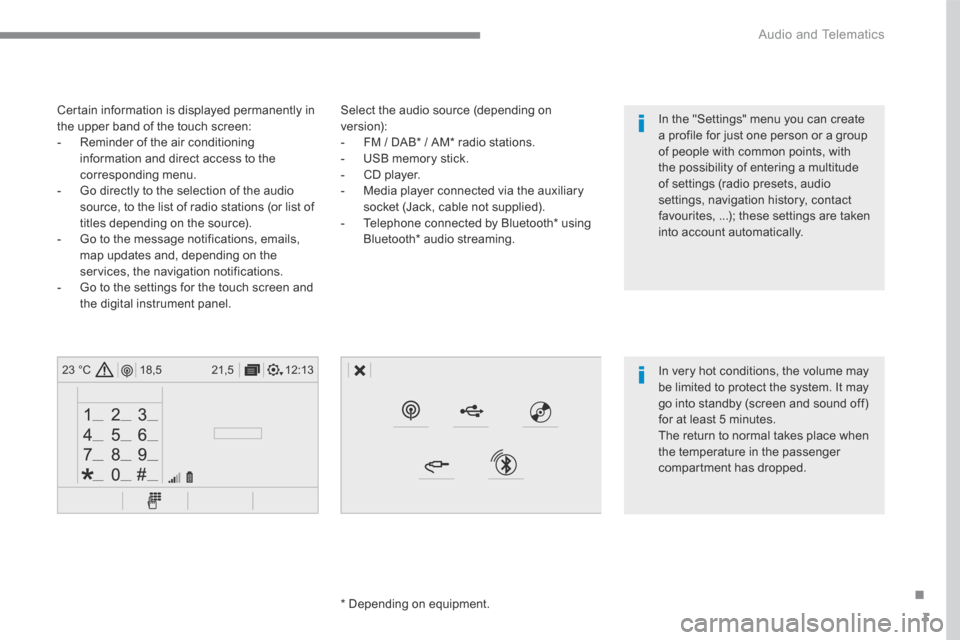
Select the audio source (depending on version): - FM / DAB * / AM * radio stations. - USB memory stick. - CD player. - Media player connected via the auxiliary socket (Jack, cable not supplied). - Telephone connected by Bluetooth * using
Bluetooth * audio streaming.
* Depending on equipment.
Certain information is displayed permanently in the upper band of the touch screen: - Reminder of the air conditioning information and direct access to the corresponding menu. - Go directly to the selection of the audio source, to the list of radio stations (or list of titles depending on the source).
- Go to the message notifications, emails, map updates and, depending on the services, the navigation notifications. - Go to the settings for the touch screen and the digital instrument panel.
In very hot conditions, the volume may be limited to protect the system. It may go into standby (screen and sound off) for at least 5 minutes.
The return to normal takes place when the temperature in the passenger compartment has dropped.
In the "Settings" menu you can create a profile for just one person or a group of people with common points, with the possibility of entering a multitude of settings (radio presets, audio settings, navigation history, contact favourites, ...); these settings are taken into account automatically.
Page 280 of 450

6
12:13
18,5 21,5
23 °C
21,518,5
12:1323 °C12:13
18,5 21,5
23 °C
12:13
18,5 21,5
23 °C
Audio and Telematics
Connected navigation
Driving
Applications
Enter navigation settings and choose a destination. Use services available in real time, depending on equipment.
Activate, deactivate and configure certain vehicle functions.
Operate certain applications on a smartphone connected via CarPlay ® or MirrorLink ® or MirrorLink ®TM . Check the state of the Bluetooth ® and Wi-Fi ® and Wi-Fi ®
connections.
Menus
Air conditioning
Manage the various temperature and air flow settings.
A c c o r d i n g t o v e r s i o n
Page 286 of 450
12
Audio and Telematics
"Voice command"Help message
Call contact <...> *
To make a phone call, say "call" followed by the contact name, for example: "Call David M iller ". You can also include the phone type, for example: "Call David Miller at home". To make a call by number, say "dial" followed by the phone number, for example, "Dial 107776 835 417". You can check your voicemail by saying "call voicemail". To send a text, say "send quick message to", followed by the contact, and then the name of the quick message you'd like to send. For example, "send quick message to David Miller, I'll be late". To display the list of calls, say "display calls". For more information on SMS, you can say "help with texting".
Dial <...> *
Display contacts *
Display calls *
Call (message box | voicemail) *
* This function is available only if the telephone connected to the system supports downloading of contacts and recent calls and if the download has
been done.
"Telephone" voice commands
If a telephone is connected to the system, these voice commands can be issued from any main screen page after pressing the "Telephone" button on the steering wheel, as long as there is no telephone call in progress. If there is no telephone connected by Bluetooth, a voice message announces: "Please first connect a telephone" and the voice session will be closed.
Page 287 of 450
13
.
Audio and Telematics
"Voice command"Help message
Send text to <...>
To hear your messages, you can say "listen to most recent message". When you want to send a text, there's a set of quick messages ready for you to use. Just use the quick message name and say something like "send quick message to Bill Carter, I'll be late". Check the phone menu for the names of the supported messages.
Please say "call" or "send quick message to", and then select a line from the list. To move around a list shown on the display, you can say "go to start", "go to end", "next page" or "previous page". To undo your selection, say "undo". To cancel the current action and start again, say "cancel". Listen to most recent message *
"Test message" voice commands
If a telephone is connected to the system these voice commands can be issued from any main screen page after pressing the "Telephone" button on the steering wheel, as long as there is no telephone call in progress. If no telephone has been connected by Bluetooth, a voice message announces: "Please first connect a telephone" and the voice session will be closed.
* This function is only available if the telephone connected to the system supports downloading of contacts and recent calls and if the download has
been done.
The system only sends pre-recorded "Quick messages".
Page 291 of 450

17
.
7
2
3
4
5
6
Audio and Telematics
Level 1Level 2Level 3Comments
Navigation
Stations
Activate or deactivate the content available (stations, car parks, risk areas and danger areas). Car park
Danger area
Map color Select day or night mode for display of the map.
POI on map
Travel
Select the POIs available.
Active life
Commercial
Public
Geographic
Select all Select or deselect all.
Save your choice or selection.
View map
Modify city Select or modify a city.
Weather
Display on the map the content available in non-connected mode.
Petrol Station
Car park
Tr a f f i c
Danger area
Select POI Select from the POIs available.
Zoom out / zoom in using the touch buttons or
with two fingers on the screen.