2017 CITROEN C3 AIRCROSS lighting
[x] Cancel search: lightingPage 88 of 308
86
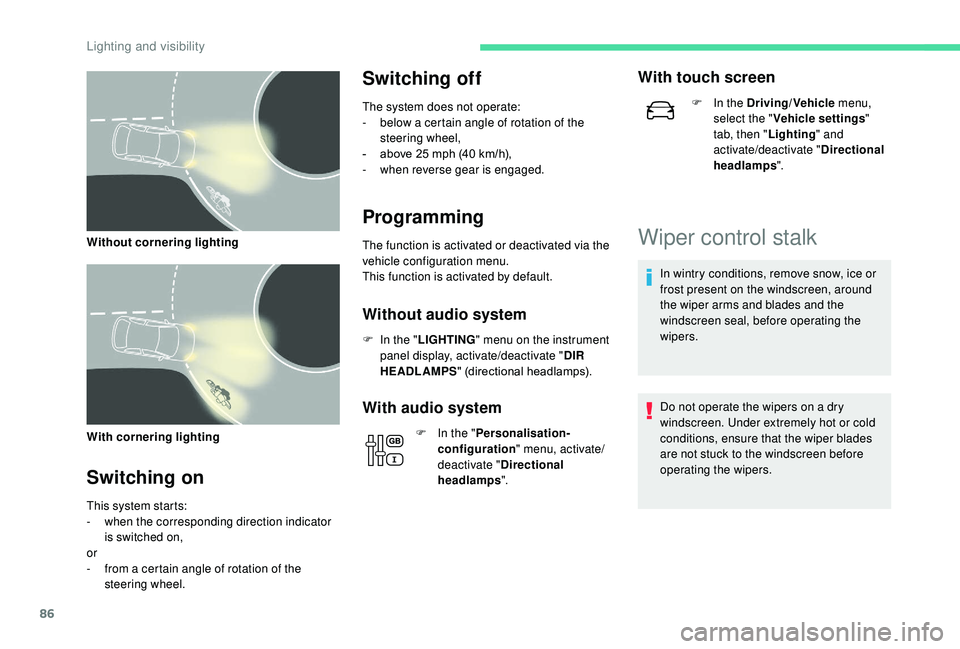
With cornering lighting
Switching on
This system starts:
- w hen the corresponding direction indicator
is switched on,
or
-
f
rom a certain angle of rotation of the
steering wheel.
Switching off
The system does not operate:
- b elow a certain angle of rotation of the
steering wheel,
-
a
bove 25 mph (40 km/h),
-
w
hen reverse gear is engaged.
Programming
The function is activated or deactivated via the
vehicle configuration menu.
This function is activated by default.
Without audio system
F In the " LIGHTING " menu on the instrument
panel display, activate/deactivate " DIR
HEADLAMPS " (directional headlamps).
With audio system
F In the "Personalisation-
configuration " menu, activate/
deactivate " Directional
headlamps ".
With touch screen
F In the Driving/Vehicle menu,
select the " Vehicle settings "
tab, then " Lighting" and
activate/deactivate " Directional
headlamps ".
Wiper control stalk
In wintry conditions, remove snow, ice or
frost present on the windscreen, around
the wiper arms and blades and the
windscreen seal, before operating the
wipers.
Do not operate the wipers on a dry
windscreen. Under extremely hot or cold
conditions, ensure that the wiper blades
are not stuck to the windscreen before
operating the wipers.
Without cornering lighting
Lighting and visibility
Page 89 of 308

87
Manual controls
The windscreen wipers are controlled directly
by the driver.
With manual wiping
With AUTO wiping
Windscreen wipers
Wiping speed control stalk: raise or lower the
stalk to the desired position.Normal wiping (moderate rain).
Intermittent wiping (proportional to
the speed of the vehicle).
Of f.
Single wipe (press downwards or
pull the stalk briefly towards you,
then release).
Automatic wiping (press down,
then release) or single wipe (pull
the stalk briefly towards you).
Rear wiper
Rear wiper selection ring: Of f.
Intermittent wiping (proportional to
the speed of the vehicle). Wash-wipe (set duration).
Reverse gear
When reverse gear is engaged, the rear wiper
will come into operation automatically if the
windscreen wipers are operating.
Activation/Deactivation
The function is activated or deactivated via the
vehicle configuration menu.
This function is activated by default.
If a significant accumulation of snow or ice
is present, or when using a bicycle carrier
on the boot, deactivate the automatic rear
w i p e r.
Without audio system
F In the " COMFORT " menu on the instrument
panel display, activate/deactivate " REAR
WIPE REV " (automatic wiping in reverse).
Fast wiping (heavy rain). or
4
Lighting and visibility
Page 90 of 308

88
With audio system
In the "Personalisation-
configuration " menu, activate/
deactivate " Rear wipe in reverse
gear ".
With touch screen
F In the Driving/Vehicle menu,
select the " Vehicle settings "
tab, then " Comfort" and
activate/deactivate " Rear wiper
in reverse ".
Front windscreen wash
Pull the windscreen wash control towards you.
The windscreen wash and then the wipers
come on for a preset time. The height of the screen wash jets can be
adjusted. If you want to change them from
the factory setting, insert a needle into
each of the jets and position them.
Special position of the
windscreen wipers
This position permits release of the windscreen
wiper blades.
It is used for cleaning or replacement of the
wiper blades. It can also be useful, in winter, to
release the wiper blades from the windscreen.
F
I
n the minute following ignition switch-off,
any operation of the wiper control stalk will
position the wiper blades vertically.
F
T
o park the wiper blades again, switch on
the ignition and operate the wiper stalk.
To maintain the effectiveness of the wiper
blades, it is advisable to:
- h andle them with care,
- c lean them regularly using soapy
water,
-
a
void using them to retain cardboard
on the windscreen,
-
r
eplace them at the first signs of wear.
Automatic windscreen
wipers
The windscreen wipers operate automatically
once rain is detected (sensor behind the
rear view mirror), adapting their speed to the
intensity of the rain without any action on the
part of the driver.
Lighting and visibility
Page 91 of 308

89
Switching on
Briefly push the control stalk downwards.
A wiping cycle confirms that the instruction has
been accepted.Depending on version, this symbol
appears on the display screen or
this indicator lamp comes on in the
instrument panel and a message is
displayed.
Switching off
Depending on version, this symbol
disappears from the display screen
or this indicator lamp goes off in the
instrument panel and a message is
displayed.
The automatic rain sensitive windscreen
wipers must be reactivated by pushing the
control stalk downwards, if the ignition has
been off for more than one minute.
Malfunction
If a fault occurs with the automatic rain
sensitive wipers, the wipers will operate in
intermittent mode.
Have the system checked by a CITROËN
dealer or a qualified workshop.
Do not cover the rain sensor, integrated with
the sunshine sensor and located at the top
centre of the windscreen, behind the rear
view mirror.
When using an automatic car wash, switch off
the automatic rain sensitive wipers.
In winter, it is advisable to wait until the
windscreen is completely clear of ice before
activating the automatic rain sensitive wipers.
Briefly push the control stalk downwards again
or shift the control stalk to a different position
(Int, 1 or 2).
4
Lighting and visibility
Page 121 of 308

119
In case of towing
Driving with a trailer places greater
demands on the towing vehicle and
requires extra care from the driver.
Side wind
F Take into account the increased sensitivity to wind.
Cooling
Towing a trailer on a slope increases the
temperature of the coolant.
As the fan is electrically controlled, its cooling
capacity is not dependent on the engine speed.
F
T
o lower the engine speed, reduce your
speed.
The maximum towable load on an incline
depends on the gradient and the exterior
temperature.
In all cases, keep a check on the coolant
temperature.
Braking
Towing a trailer increases the braking distance.
To avoid overheating of the brakes, the use of
engine braking is recommended.
Ty r e s
F Check the tyre pressures of the towing vehicle and of the trailer, observing the
recommended pressures.
Lighting
F Check the electrical lighting and signalling on the trailer and the headlamp beam height
of your vehicle. If the exterior temperature is high, it is
recommended that the engine be allowed
to idle for 1 to 2
minutes after the vehicle
comes to a stop, to facilitate its cooling.
F
I
f this warning lamp and the
STOP warning lamp come on,
stop the vehicle and switch off
the engine as soon as possible. New vehicle
Do not pull a trailer before having driven at
least 600
miles (1,000 kilometres).
For more information on Headlamp
adjustment , refer to the corresponding
section.
The rear parking sensors will be
deactivated automatically to avoid the
audible signal if a genuine CITROËN
towbar is used.
Anti-theft protection
Electronic immobiliser
The keys contain an electronic chip which has
a secret code. When the ignition is switched
on, this code must be recognised in order for
starting to be possible.
A few seconds after switching off the ignition,
this system locks the engine control system,
therefore preventing the engine from being
started in the event of a break-in.
If the system fails, as reported by a message,
the engine will not start.
Contact a CITROËN dealer.
For safety and theft protection reasons,
never leave your electronic key in the
vehicle, even when you are close to it.
It is recommended that you keep it with
you.
6
Driving
Page 125 of 308

123
Switching the ignition on
(without starting)
F Press the "START/STOP" button, the
instrument panel comes on but the engine
does not start.
F
P
ress the button again to switch off the
ignition and allow the vehicle to be locked.
With the
K
eyless Entry and Starting electronic
key inside the vehicle, pressing the "START/
STOP" button, without pressing any of the
pedals , allows the ignition to be switched on.
This also allows the accessories to be used
(e.g. car radio, lighting, etc.).
With the ignition on, the system
automatically goes into energy economy
mode to maintain an adequate state of
charge in the battery.
Key not detected
Back-up starting
A back-up reader is fitted to the steering
column to allow the engine to be started if
the system does not detect the key in the
recognition zone, or when the battery in the
electronic key is discharged.
F
W
ith a manual gearbox, place the gear
lever in neutral, then fully depress the clutch
pedal.
F
W
ith an automatic gearbox , select mode
P, then fully depress the brake pedal.
F
P
ress the " START/STOP " button.
The engine starts. F
P
lace and hold the remote control against
the reader.
Back-up switching off
Emergency switching off
In the event of an emergency only, the engine can be
switched off without conditions (even when driving).
Press the " START/STOP " button for about three
seconds.
In this case, the steering column locks as soon as the
vehicle stops.
When the electronic key is not detected or is
no longer in the recognition zone, a message
appears in the instrument panel when closing a
door or trying to switch off the engine.
F
T
o confirm the instruction to switch off the
engine, press the " START/STOP" button for
about three seconds.
In the event of a fault with the electronic key,
contact a CITROËN dealer or a qualified
workshop.
6
Driving
Page 130 of 308

128
Malfunction
When the ignition is on, the lighting
of this warning lamp, accompanied
by an audible signal and a message
in the screen, indicates a gearbox
fault.
In this case, the gearbox switches to back-up
mode and is locked in 3
rd gear. You may feel
a substantial knock when changing from P
to R and from N to R. This will not cause any
damage to the gearbox.
Do not exceed 60
mph (100 km/h), local speed
restrictions permitting.
Contact a CITROËN dealer or a qualified
workshop as soon as possible.
There is a risk of damage to the gearbox:
-
i
f you press the accelerator and brake
pedals at the same time,
-
i
f you force the movement of the
selector from position P to another
position when the battery is flat.
To reduce fuel consumption when at
a prolonged standstill with the engine
running (traffic jam, etc.), put the
selector in position N and apply the
parking brake. If your vehicle has an automatic gearbox,
never try to start the engine by pushing
the vehicle.
Gear efficiency indicator
System which reduces fuel consumption by
recommending the most appropriate gear.
Operation
Depending on the driving situation and your
vehicle's equipment, the system may advise
you to skip one (or more) gear(s). You can
follow this instruction without engaging the
intermediate gears.
Gear shift recommendations should not be
considered obligatory. The configuration of the
road, the amount of traffic and safety remain
determining factors when choosing the best
gear. The driver thus remains responsible
for deciding whether to follow or ignore the
system's instructions.
This function cannot be deactivated.
With an automatic gearbox, the system is
only active in manual mode. On BlueHDi Diesel versions with manual
gearbox, in certain driving conditions the
system may suggest changing into neutral so
that the engine can go into standby (STOP
mode of Stop & Start). In this case, N is
displayed in the instrument panel.
Example:
-
Y
ou are in 3
rd g e a r.
-
Y
ou press the accelerator pedal.
-
T
he system may suggest that you engage a
higher gear.
The system adapts its gear change
recommendations according to the
driving conditions (slope, load, etc.)
and the demands of the driver (power,
acceleration, braking, etc.).
The system never suggests:
-
e
ngaging first gear,
-
enga
ging reverse gear,
-
enga
ging a lower gear.
The information appears in the instrument
panel in the form of an arrow.
Driving
Page 138 of 308

136
Operating limits
The legislation on speed limits is specific to
each country.
The system does not take account of reduced
speed limits in the following cases:
-
p
oor weather (rain, snow),
-
a
tmospheric pollution,
-
t
railer, caravan,
-
d
riving with a space-saver type spare wheel
or snow chains fitted,
-
p
uncture repair using the temporary repair
kit,
-
y
oung drivers, etc.
F
O
r, depending on equipment, press the
thumbwheel on the steering wheel .
The following situations may inter fere with the
operation of the system or prevent it working:
-
p
oor visibility (inadequate street lighting,
falling snow, rain, fog),
-
w
indscreen area located in front of the
camera dirty, misted, frost-covered, snow-
covered, damaged or covered by a sticker,
Memorising the speed
setting
This memorisation is in addition to the display
of Speed limit recognition .
For more information on the Speed
limiter or Cruise control , refer to the
corresponding sections.
Steering mounted controls
Display in the instrument panel
Head-up display
The driver can choose to adapt the speed
setting to the speed limit suggested, by
pressing the memorisation button for the speed
limiter and the cruise control.
This speed setting then replaces the previous
speed setting for the speed limiter and/or cruise
control. 1.
Select speed limiter/cruise control mode.
2. Memorise a speed setting.
-
f
ault with the camera,
-
o
bsolete or incorrect mapping,
-
h
idden road signs (other vehicles,
vegetation, snow),
-
s
peed limit signs that do not conform to the
standard, are damaged or distorted.
Driving