Page 152 of 328
150
Berlingo-2-VU_en_Chap08_Aide rapide_ed01-2015Berlingo-2-VU_en_Chap08_Aide rapide_ed01-2015
3. Direction indicators
Type B, PY21W - 21W (amber)
-
Remove the cover by pullin
g the
flexible rubber tab.
-
T
urn the bulb holder a quarter turn
anticlockwise.
-
Remove the bulb by pressing it
lightly while turning it anticlockwise.
-
Change the bulb.
-
Ensure that the cover is refitted
correctly all round to assure correct
sealing. 4. Front foglamps
T
ype C, H1 - 55W
-
Remove the three clips and the
screw securing the wheel arch liner
,
located below the bumper.
-
Move the wheel arch liner upwards.
-
Disconnect the bulb holder
connector by pressing the tab at
the top.-
Remove the bulb holder by
squeezing the two clips (at top and
bottom) using a finger and thumb.
-
Replace the module (bulb holder
and bulb.
-
Carry out the operations in reverse
order to fit the module and refit the
wheel arch liner
.
Changing a bulb
Page 153 of 328
151
Berlingo-2-VU_en_Chap08_Aide rapide_ed01-2015Berlingo-2-VU_en_Chap08_Aide rapide_ed01-2015
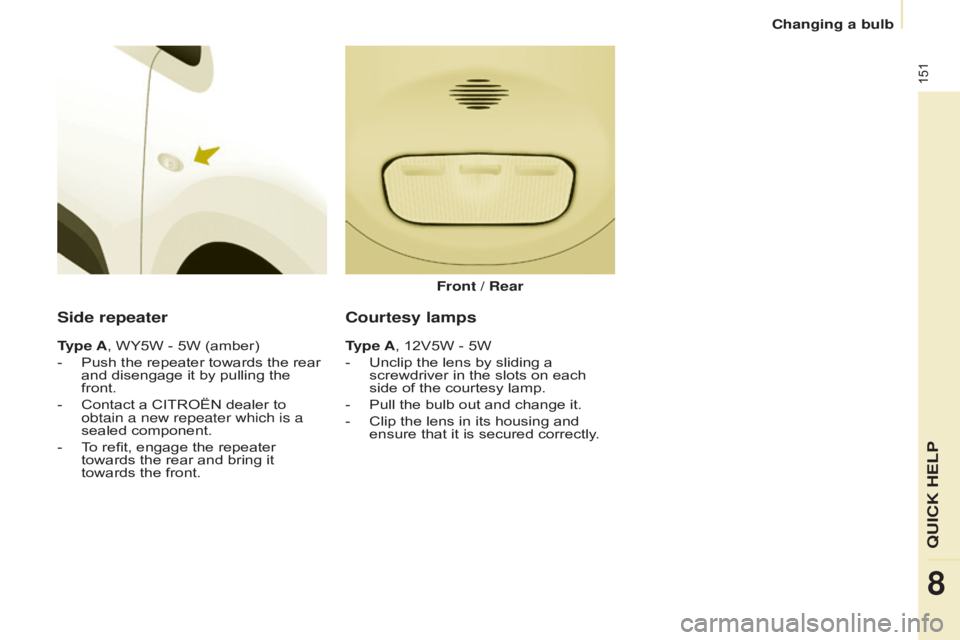
Side repeater
Type A, WY5W - 5W (amber)
-
Push the repeater towards the rear
and disengage it by pullin
g the
front.
-
Contact a CITROËN dealer to
obtain a new repeater which is a
sealed component.
-
T
o refit, engage the repeater
towards the rear and bring it
towards the front. Front / Rear
Courtesy lamps
Type A, 12V5W - 5W
-
Unclip the lens by sliding a
screwdriver in the slots on each
side of the courtesy lamp.
-
Pull the bulb out and change it.
-
Clip the lens in its housing and
ensure that it is secured correctly
.
QUICK HELP
8
Changing a bulb
Page 215 of 328
213
Berlingo-2-VU_en_Chap10a_SMEGplus_ed01-2015
Level 1Level 2 Level 3 Comments
Internet
Secondary page Bluetooth
Connection Search
Start the search for a device to connect.
Connect / Disconnect Start or end the Bluetooth connection to the
selected device.
Update Import contacts from the selected telephone to
save them in the audio system.
Delete Delete the selected telephone.
Validate Save the settings.
Internet
Secondary page Transfer rate Reset
Reset the consumption monitor, them confirm.
Validate
Internet
Secondary page WiFi connection All
Display all Wi-Fi networks.
Secure Display secure Wi-Fi networks.
Stored Memorise the selected Wi-Fi network(s).
Add Add a new Wi-Fi network.
Activate / Deactivate Activate or deactivate a Wi-Fi network.
Connect Select a Wi-Fi network found by the system and
connect to it.
Audio and Telematics
TECHnOLOGY on BOARD
10
Page 275 of 328

17
CHARGING THE TRACTION BATTERY
Do not touch the metal end of
the normal charging socket, nor
of the charging cable. Risk of
electrocution and/or malfunctions.
Use the cord supplied to hook the
control unit, so that it does not
weigh down on the power point
(risk of damage to the charging cable
or power point).
Never connect or disconnect the
the cable or charging plug with
wet hands
(risk of electrocution).
The charge may be interrupted
at any time by withdrawing the
charging plug.
If exceptionally you have
to interrupt the charge by
disconnecting the charging cable
from the power point, it is essential to
fi rst press the Manual Stop
button on
the controller.
It has four indicator lamps:
- STOP
: on red.
It indicates that charging has
been interrupted by pressing the
Manual Stop
button. This action is
recommended before disconnecting
the charging cable from the domestic
power point during a charging
operation.
- POWER
: on green.
It indicates that the power supply is
established. If it does not come on
check that all connections are correct.
if the problem persists, contact a
franchised dealer or a qualifi ed
workshop.
- CHARGING
: on green.
It indicates that charging is in
progress. If it does not come on check
that all connections are correct. if the
problem persists, contact a franchised
dealer or a qualifi ed workshop.
- FAULT
: on red.
It indicates the presence of a fault.
Check that the connections are
corrects. If this lamp does not go
off, contact a franchised dealer or a
qualifi ed workshop.
Control unit
This type of control unit is equipped
with a power supply recognition system
(depending on the country). It detects
the current rating of your domestic
power supply and is able to support
and choose the most suitable rating for
a secure recharge:
- 14 A
(FAST): if your electrical
installation supports it.
- 8 A
(NORMAL): for a standard
electrical installation.
Page 283 of 328
25
ANCILLARIES BATTERY
ANCILLARIES BATTERY
All of the other electrical components
on your vehicle are powered by the
ancillaries battery.
It is located in the front compartment
under the bonnet and is charged by
the traction battery, during phases
of operation ("Ready" lamp in in the
instrument panel) and charging.
If the ancillaries battery is
discharged, the electric motor
cannot be started and charging
of the traction battery is no longer
possible.
It is recommended that the
ancillaries battery be disconnected
if the vehicle is not to be used for
more than a month. Before doing anything:
- put the vehicle in position P
,
switch off the ignition, check that
the central display screen is off,
and ensure that the vehicle is not
connected to a power point,
- open the bonnet using the interior
release lever and then the exterior
safety catch,
- secure the bonnet stay,
- remove the protective cover from
the battery for access to the two
terminals.
Access to the battery
Page 311 of 328
17
CHARGING THE TRACTION BATTERY
Do not touch the metal end of
the normal charging socket, nor
of the charging cable. Risk of
electrocution and/or malfunctions.
Use the cord supplied to hook the
control unit, so that it does not
weigh down on the power point
(risk of damage to the charging cable
or power point).
Never connect or disconnect the
the cable or charging plug with
wet hands
(risk of electrocution).
The charge may be interrupted
at any time by withdrawing the
charging plug.
If exceptionally you have
to interrupt the charge by
disconnecting the charging cable
from the power point, it is essential to
fi rst press the Manual Stop
button on
the controller.
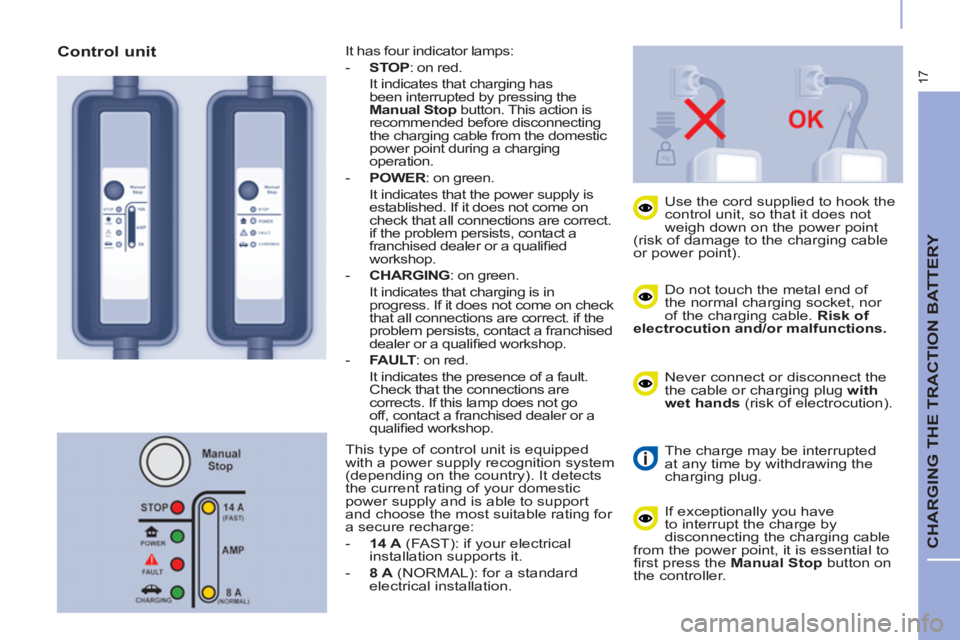
It has four indicator lamps:
- STOP
: on red.
It indicates that charging has
been interrupted by pressing the
Manual Stop
button. This action is
recommended before disconnecting
the charging cable from the domestic
power point during a charging
operation.
- POWER
: on green.
It indicates that the power supply is
established. If it does not come on
check that all connections are correct.
if the problem persists, contact a
franchised dealer or a qualifi ed
workshop.
- CHARGING
: on green.
It indicates that charging is in
progress. If it does not come on check
that all connections are correct. if the
problem persists, contact a franchised
dealer or a qualifi ed workshop.
- FAULT
: on red.
It indicates the presence of a fault.
Check that the connections are
corrects. If this lamp does not go
off, contact a franchised dealer or a
qualifi ed workshop.
Control unit
This type of control unit is equipped
with a power supply recognition system
(depending on the country). It detects
the current rating of your domestic
power supply and is able to support
and choose the most suitable rating for
a secure recharge:
- 14 A
(FAST): if your electrical
installation supports it.
- 8 A
(NORMAL): for a standard
electrical installation.
Page 319 of 328
25
ANCILLARIES BATTERY
ANCILLARIES BATTERY
All of the other electrical components
on your vehicle are powered by the
ancillaries battery.
It is located in the front compartment
under the bonnet and is charged by
the traction battery, during phases
of operation ("Ready" lamp in in the
instrument panel) and charging.
If the ancillaries battery is
discharged, the electric motor
cannot be started and charging
of the traction battery is no longer
possible.
It is recommended that the
ancillaries battery be disconnected
if the vehicle is not to be used for
more than a month. Before doing anything:
- put the vehicle in position P
,
switch off the ignition, check that
the central display screen is off,
and ensure that the vehicle is not
connected to a power point,
- open the bonnet using the interior
release lever and then the exterior
safety catch,
- secure the bonnet stay,
- remove the protective cover from
the battery for access to the two
terminals.
Access to the battery