Page 216 of 328
214
Berlingo-2-VU_en_Chap10a_SMEGplus_ed01-2015
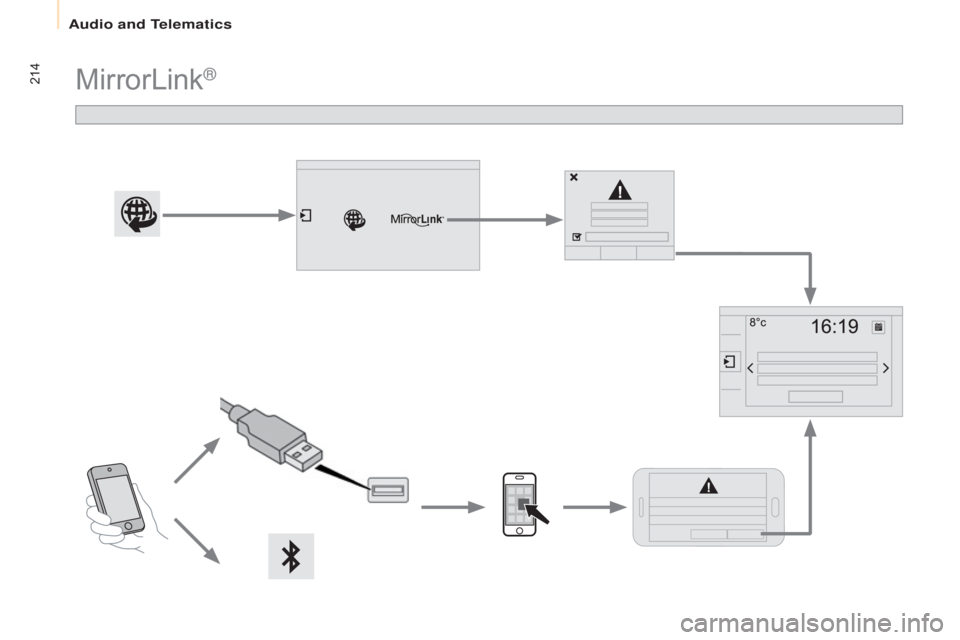
MirrorLink®
audio and Telematics
Page 217 of 328

215
Berlingo-2-VU_en_Chap10a_SMEGplus_ed01-2015
As a safety measure and because it
requires sustained attention by the
driver, using a smartphone when
driving is prohibited.
All operations must be done with the
vehicle stationary.
The synchronisation of a personal
smartphone allows applications on a
smartphone that are adapted to the
MirrorLink
® technology to be displayed
i
n the vehicle's screen.
The principles and standards are
constantly evolving; for information
on supported smartphones, go to the
CITROËN website for your country.
Select MyCITROËN if present. Please note:
-
i
f your mobile is supported, to make
it "MirrorLink
®" compatible, some
phone manufacturers nevertheless
invite you to first download a
dedicated application.
-
i
Phone
® is not supported yet; an apple® application, "CarPlay®", is
being developed.
When connecting a smartphone to
the system, it is recommended that
b
luetooth
® be started on the smartphone
Start the application on the
smartphone.
Go to the home page to return to the
" MirrorLink
®" display.
During the procedure, a page
showing the conditions for use is
displayed.
Accept to start and end the
connection.
a USB cable is connected. The
smartphone charges when
connected by a USB cable. Press "
MirrorLink
®" to start
the application in the system.
The " Audio source " and "Telephone "
functions remain available in the margin of the
MirrorLink
® display.
MirrorLink® smartphone
connection
Press the end of the lighting control stalk to
start voice recognition of your smartphone via
the system.
Voice recognition requires a compatible
telephone connected to the vehicle by
Bluetooth.
Voice recognition
As a safety measure, applications
can only be viewed with the vehicle
stationary; display is interrupted once
the vehicle is moving.
and From the system, press " Internet" to
display the primary page.
Audio and Telematics
TECHnOLOGY on BOARD
10
Page 286 of 328
28
FUSES
The fusebox is located in the lower
dashboard on the left hand side
The designations provided are for the
fuses that can be replaced by the user.
For any other work, go to a franchised
dealer or a qualifi ed workshop.
Fuse N°
Rating
Functions
1 15 A Rear wiper.
3 5 A Airbags.
4 10 A Diagnostic socket, mirror control, headlamp
beams.
5 30 A Electric windows.
6 30 A Side-hinged door lock.
7 5 A Interior lamps: rear, roof, glove box.
8 20 A Audio system, screen, alarm and siren.
11 15 A Immobiliser.
12 15 A Air conditioning control panel, front and rear parking
sensors.
13 5 A Instrument panel.
14 15 A Rain and sunshine sensor, airbags.
15 5 A Other locks.
17 40 A Heated rear screen/mirrors.
Page 322 of 328
28
FUSES
The fusebox is located in the lower
dashboard on the left hand side
The designations provided are for the
fuses that can be replaced by the user.
For any other work, go to a franchised
dealer or a qualifi ed workshop.
Fuse N°
Rating
Functions
1 15 A Rear wiper.
3 5 A Airbags.
4 10 A Diagnostic socket, mirror control, headlamp
beams.
5 30 A Electric windows.
6 30 A Side-hinged door lock.
7 5 A Interior lamps: rear, roof, glove box.
8 20 A Audio system, screen, alarm and siren.
11 15 A Immobiliser.
12 15 A Air conditioning control panel, front and rear parking
sensors.
13 5 A Instrument panel.
14 15 A Rain and sunshine sensor, airbags.
15 5 A Other locks.
17 40 A Heated rear screen/mirrors.