Page 640 of 828

fluid specifications. It is important to maintain the trans-
mission fluid at the correct level using the recommended
fluid.
NOTE:No chemical flushes should be used in any
transmission; only the approved lubricant should be
used.
CAUTION!
Using a transmission fluid other than the manufac-
turer ’s recommended fluid may cause deterioration
in transmission shift quality and/or torque converter
shudder. Refer to “Fluids And Lubricants” in “Tech-
nical Data” for fluid specifications.
Special Additives
The manufacturer strongly recommends against using
any special additives in the transmission. Automatic
Transmission Fluid (ATF) is an engineered product and its performance may be impaired by supplemental addi-
tives. Therefore, do not add any fluid additives to the
transmission. Avoid using transmission sealers as they
may adversely affect seals.
CAUTION!
Do not use chemical flushes in your transmission as
the chemicals can damage your transmission compo-
nents. Such damage is not covered by the New
Vehicle Limited Warranty.
Fluid Level Check
The fluid level is preset at the factory and does not
require adjustment under normal operating conditions.
Routine fluid level checks are not required, therefore the
transmission has no dipstick. Your authorized dealer can
check your transmission fluid level using special service
638 MAINTAINING AND CARING FOR YOUR VEHICLE
Page 675 of 828
TECHNICAL DATA
CONTENTS
�IDENTIFICATION DATA .................675
▫ Vehicle Identification Number ............675
� WHEEL AND TIRE TORQUE
SPECIFICATIONS ..................... .676
▫ Torque Specifications ..................676
� FUEL REQUIREMENTS ..................677
▫ Reformulated Gasoline .................678
▫ Materials Added To Fuel ................678
▫ Gasoline/Oxygenate Blends ..............679
▫ CNG And LP Fuel System Modifications .....679▫
MMT In Gasoline .....................680
▫ Fuel System Cautions ...................680
▫ Carbon Monoxide Warnings .............681
� FLEXIBLE FUEL — IF EQUIPPED ...........682
▫ E-85 General Information ...............682
▫ Ethanol Fuel (E-85) ....................682
▫ Fuel Requirements ....................683
▫ Selection Of Engine Oil For Flexible Fuel Vehicles
(E-85) And Gasoline Vehicles .............684
▫ Starting ........................... .684
9
Page 678 of 828
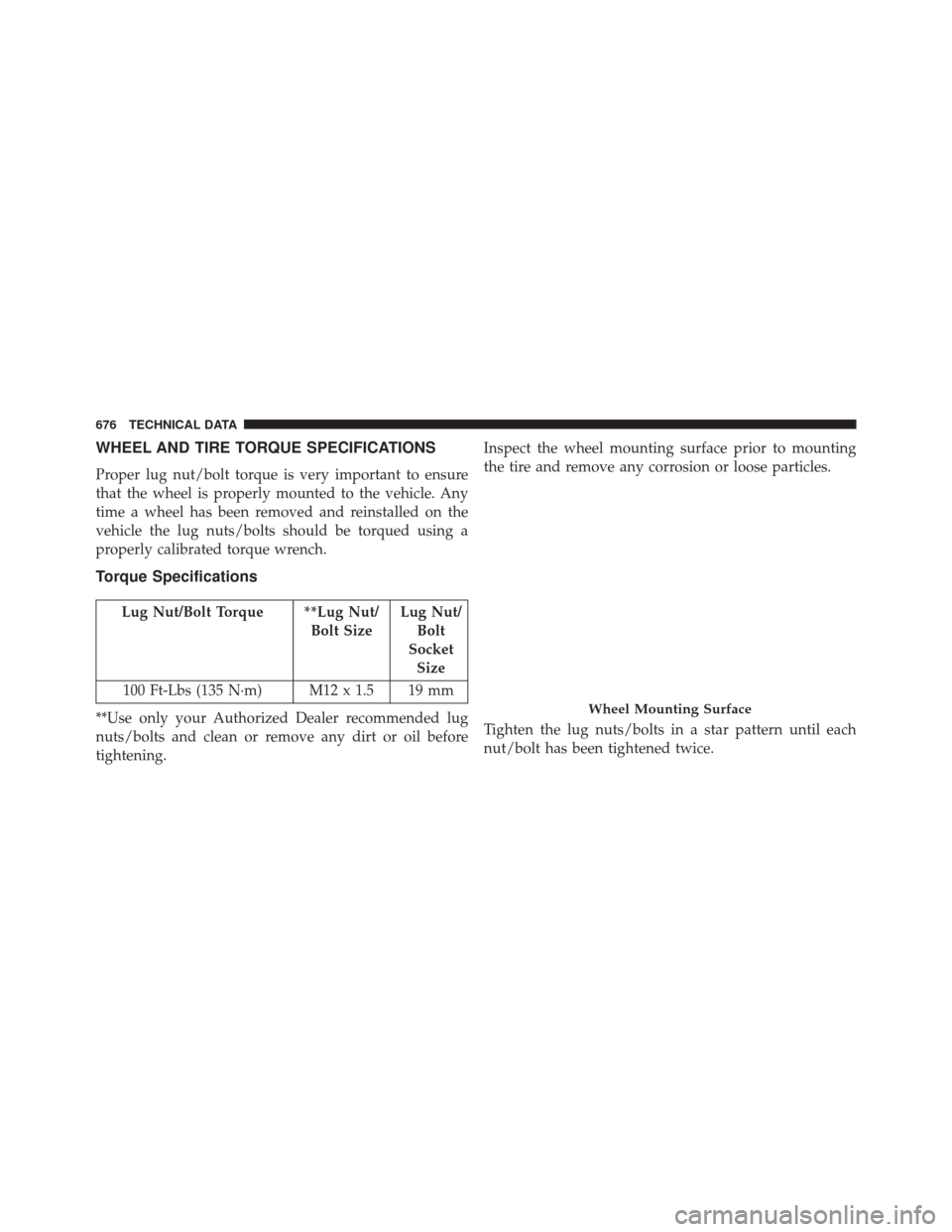
WHEEL AND TIRE TORQUE SPECIFICATIONS
Proper lug nut/bolt torque is very important to ensure
that the wheel is properly mounted to the vehicle. Any
time a wheel has been removed and reinstalled on the
vehicle the lug nuts/bolts should be torqued using a
properly calibrated torque wrench.
Torque Specifications
Lug Nut/Bolt Torque **Lug Nut/Bolt SizeLug Nut/
Bolt
Socket Size
100 Ft-Lbs (135 N·m) M12 x 1.5 19 mm
**Use only your Authorized Dealer recommended lug
nuts/bolts and clean or remove any dirt or oil before
tightening. Inspect the wheel mounting surface prior to mounting
the tire and remove any corrosion or loose particles.
Tighten the lug nuts/bolts in a star pattern until each
nut/bolt has been tightened twice.
Wheel Mounting Surface
676 TECHNICAL DATA
Page 679 of 828
After 25 miles (40 km) check the lug nut/bolt torque to be
sure that all the lug nuts/bolts are properly seated
against the wheel.
WARNING!
To avoid the risk of forcing the vehicle off the jack,
do not tighten the lug nuts fully until the vehicle has
been lowered. Failure to follow this warning may
result in personal injury.
FUEL REQUIREMENTS
These engines are designed to meet all
emissions regulations and provide opti-
mum fuel economy and performance
when using high quality unleaded “Regu-
lar” gasoline having a posted octane num-
ber of 87 as specified by the (R+M)/2 method. The use of
higher octane “Premium” gasoline is not required, as it
will not provide any benefit over “Regular” gasoline in
these engines.
Torque Patterns
9
TECHNICAL DATA 677
Page 708 of 828

•LaneSense Warning — If Equipped
When this feature is selected, it sets the distance at which
the steering wheel will provide feedback for potential
lane departures. The LDW sensitivity can be set to
provide either an “early,” “medium,” or “late” warning
zone start point. The default setting is “Medium”.
• LaneSense Strength — If Equipped
When this feature is selected, it sets the strength of the
steering wheel feedback for potential lane departures.
The amount of directional torque the steering system can
apply to the steering wheel to correct for vehicle lane
departure can be set at “Low,” “Medium” or “High.” The
default setting is “Medium”.
• Blind Spot Alert — If Equipped
When this feature is selected, the Blind Spot Alert feature
can be set to Off, Lights or Lights and Chime. The Blind
Spot Alert feature can be activated in Lights mode. When this mode is selected, the Blind Spot Monitor (BSM)
system is activated and will only show a visual alert in
the outside mirrors. When Lights & Chime mode is
activated, the Blind Spot Monitor (BSM) will show a
visual alert in the outside mirrors as well as an audible
alert when the turn signal is on. When Off is selected, the
Blind Spot Monitor (BSM) system is deactivated. To
change the Blind Spot Alert status, press the “Off,”
“Lights” or “Lights & Chime” button on the touchscreen.
Then press the back arrow button on the touchscreen.
The default setting is “Lights”
NOTE:
If your vehicle has experienced any damage in
the area where the sensor is located, even if the fascia is
not damaged, the sensor may have become misaligned.
Take your vehicle to an authorized dealer to verify sensor
alignment. A sensor that is misaligned will result in the
BSM not operating to specification.
706 MULTIMEDIA
Page 729 of 828

•Forward Collision Warning — If Equipped
The Front Collision Warning (FCW) feature provides an
audible and/or visual warning to potential forward
collisions. The feature can be can be set to Far, Med or
Near. The default status of FCW is the Far setting. This
means the system will warn you of a possible collision
with the vehicle in front of you when you are farther
away. This gives you the most reaction time. To change
the setting for more dynamic driving, select the Near
setting. This warns you of a possible collision when you
are much closer to the vehicle in front of you. To change
the FCW status, press and release the “Near” or “Far”
button.
• Forward Collision Warning (FCW) — Active Braking
The FCW system includes Advanced Brake Assist (ABA).
When this feature is selected, the ABA applies additional
brake pressure when the driver requests insufficient
brake pressure to avoid a potential frontal collision. The ABA system becomes active at 5 mph (8 km/h). To make
your selection, press the “Forward Collision Warning
Active Braking” button on the touchscreen, until a check-
mark appears next to setting, indicating that the setting
had been selected.
•
LaneSense Warning — If Equipped
When this feature is selected, it sets the distance at which
the steering wheel will provide feedback for potential
lane departures. The LDW sensitivity can be set to
provide either an “Early,” “Medium,” or “Late” warning
zone start point.
• LaneSense Strength — If Equipped
When this feature is selected, it sets the strength of the
steering wheel feedback for potential lane departures.
The amount of directional torque the steering system can
apply to the steering wheel to correct for vehicle lane
departure can be set at “Low,” “Medium” or “High.”
10
MULTIMEDIA 727
Page:
< prev 1-8 9-16 17-24