Page 428 of 828

•Do not remove any screws from the sensor. Doing so
could cause an ACC system malfunction or failure and
require a sensor realignment.
• If the sensor or front end of the vehicle is damaged due
to a collision, see your authorized dealer for service.
• Do not attach or install any accessories near the sensor,
including transparent material or aftermarket grilles.
Doing so could cause an ACC system failure or
malfunction.
When the condition that deactivated the system is no
longer present, the system will return to the “Adaptive
Cruise Control Off” state and will resume function by
simply reactivating it. NOTE:
If the “ACC/FCW Unavailable Wipe Front Ra-
dar Sensor” message occurs frequently (e.g. more than
once on every trip) without any snow, rain, mud, or other
obstruction, have the radar sensor realigned at your
authorized dealer.
“Clean Front Windshield” Warning
The “ACC/FCW Limited Functionality Clean Front
Windshield” warning will display and also a chime will
indicate when conditions temporarily limit system per-
formance. This most often occurs at times of poor visibil-
ity, such as in snow or heavy rain and fog. The ACC
system may also become temporarily blinded due to
obstructions, such as mud, dirt, or ice on windshield,
driving directly into the sun and fog on the inside of
glass. In these cases, the EVIC/DID will display “ACC/
FCW Limited Functionality Clean Front Windshield” and
the system will have degraded performance.
426 STARTING AND OPERATING
Page 429 of 828

The “ACC/FCW Limited Functionality Clean Front
Windshield” message can sometimes be displayed while
driving in adverse weather conditions. The ACC/FCW
system will recover after the vehicle has left these areas.
Under rare conditions, when the camera is not tracking
any vehicles or objects in its path this warning may
temporarily occur.
If weather conditions are not a factor, the driver should
examine the windshield and the camera located on the
back side of the inside rear view mirror. They may
require cleaning or removal of an obstruction.
When the condition that created limited functionality is
no longer present, the system will return to full function-
ality.NOTE:
If the “ACC/FCW Limited Functionality Clean
Front Windshield” message occurs frequently (e.g. more
than once on every trip) without any snow, rain, mud, or
other obstruction, have the windshield and forward
facing camera inspected at your authorized dealer.
Service ACC/FCW Warning
If the system turns off, and the EVIC/DID displays
“ACC/FCW Unavailable Service Required” or “Cruise/
FCW Unavailable Service Required”, there may be an
internal system fault or a temporary malfunction that
limits ACC functionality. Although the vehicle is still
drivable under normal conditions, ACC will be tempo-
rarily unavailable. If this occurs, try activating ACC again
later, following an ignition cycle. If the problem persists,
see your authorized dealer.
6
STARTING AND OPERATING 427
Page 435 of 828

WARNING!
In the normal Cruise Control mode, the system will
not react to vehicles ahead. In addition, the proximity
warning does not activate and no alarm will sound
even if you are too close to the vehicle ahead since
neither the presence of the vehicle ahead nor the
vehicle-to vehicle distance is detected. Be sure to
maintain a safe distance between your vehicle and
the vehicle ahead. Always be aware which mode is
selected.
To Set A Desired Speed
Turn the Normal (Fixed Speed) Electronic
Speed Control ON. When the vehicle has
reached the desired speed, push the SET (+) orSET (-) button and release. Release the accelerator and the
vehicle will operate at the selected speed. Once a speed
has been set a message (CRUISE CONTROL SET TO
MPH/KM) will appear indicating what speed was set.
This light will turn on when the system is turned on via
the On/Off control. It turns green when the electronic
speed control is SET.
To Vary The Speed Setting
To Increase Speed
When the Normal (Fixed Speed) Electronic Speed Con-
trol is set, you can increase speed by pushing the SET
+
button.6
STARTING AND OPERATING 433
Page 439 of 828

•The automatic braking function may not be applied
fast enough for moving obstacles that approach the
rear of the vehicle from the left and / or right sides.
• The automatic braking function can be enabled/
disabled from the Customer-Programmable Features
section of the Uconnect System.
• ParkSense will retain its last known configuration state
for the automatic braking function through ignition
cycles.
The automatic braking function is intended to assist the
driver in avoiding possible collisions with detected ob-
stacles when backing up in REVERSE gear.
NOTE:
• The driver is always responsible for controlling the
vehicle. •
The system is provided to assist the driver and not to
substitute the driver.
• The driver must stay in full control of the vehicle’s
acceleration and braking and is responsible for the
vehicle’s movements.
Refer to “ParkSense System Usage Precautions” for limi-
tations of this system and recommendations.
ParkSense will retain the last system state (enabled or
disabled) from the last ignition cycle when the ignition is
changed to the ON/RUN position.
ParkSense can be active only when the gear selector is in
REVERSE. If ParkSense is enabled at this gear selector
position, the system will remain active until the vehicle
speed is increased to approximately 7 mph (11 km/h) or
above. When in REVERSE and above the system’s oper-
ating speed, a warning will appear within the Electronic
Vehicle Information Center (EVIC) or Driver Information
6
STARTING AND OPERATING 437
Page 440 of 828

Display (DID) indicating the vehicle speed is too fast. The
system will become active again if the vehicle speed is
decreased to speeds less than approximately 6 mph
(9 km/h).
ParkSense Sensors
The four ParkSense sensors, located in the rear fascia/
bumper, monitor the area behind the vehicle that is
within the sensors’ field of view. The sensors can detect
obstacles from approximately 12 in (30 cm) up to 79 in
(200 cm) from the rear fascia/bumper in the horizontal
direction, depending on the location, type and orienta-
tion of the obstacle.
ParkSense Visual Alert
The ParkSense Warning screen will only be displayed if
Sound and Display is selected from the Customer -
Programmable Features section of the Uconnect System.
Refer to�Uconnect Settings” in “Multimedia” for further
information. The ParkSense Warning screen is located within the
EVIC/DID. It provides visual warnings to indicate the
distance between the rear fascia/bumper and the de-
tected obstacle. Refer to “Display” in “Getting To Know
Your Instrument Panel” for further information.
ParkSense Display
When the vehicle is in REVERSE and an obstacle has
been detected, the warning display will turn ON indicat-
ing the system status.
The system will indicate a detected obstacle by showing
a single arc in one or more regions based on the obstacle’s
distance and location relative to the vehicle.
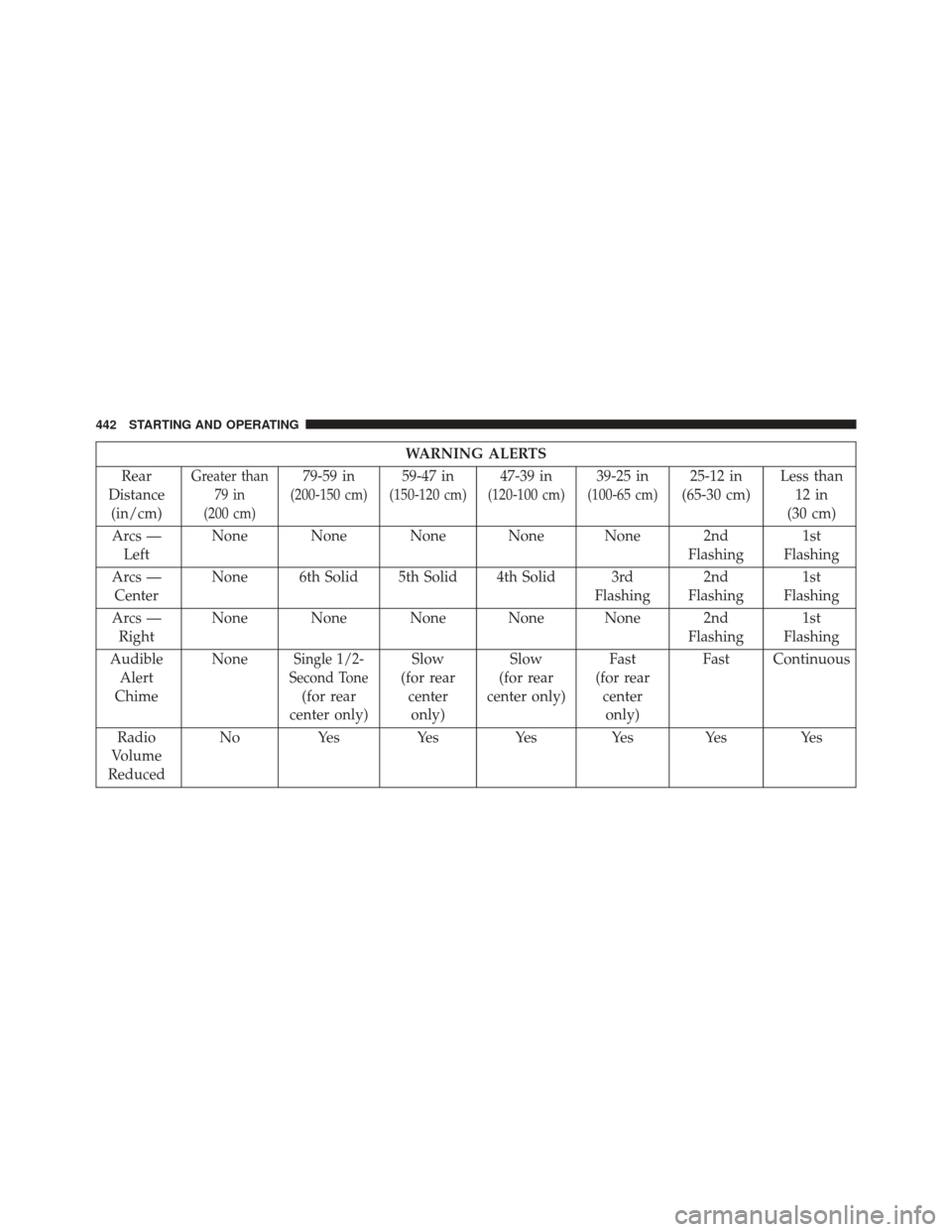
If an obstacle is detected in the center rear region, the
display will show a single solid arc in the center rear
region and will produce a one-half second tone. As the
vehicle moves closer to the obstacle, the display will
show the single arc moving closer to the vehicle and the
sound tone will change from slow, to fast, to continuous.
438 STARTING AND OPERATING
Page 443 of 828
The vehicle is close to the obstacle when the warning
display shows one flashing arc and sounds a continuous
tone. The following chart shows the warning alert opera-
tion when the system is detecting an obstacle:
Fast Tone/Flashing ArcContinuous Tone/Flashing Arc
6
STARTING AND OPERATING 441
Page 444 of 828
WARNING ALERTS
Rear
Distance (in/cm)
Greater than 79 in
(200 cm)79-59 in
(200-150 cm)
59-47 in
(150-120 cm)
47-39 in
(120-100 cm)
39-25 in
(100-65 cm)
25-12 in
(65-30 cm) Less than
12 in
(30 cm)
Arcs — Left None None None None None 2nd
Flashing1st
Flashing
Arcs — Center None 6th Solid 5th Solid 4th Solid 3rd
Flashing2nd
Flashing 1st
Flashing
Arcs — Right None None None None None 2nd
Flashing1st
Flashing
Audible Alert
Chime None
Single 1/2-
Second Tone
(for rear
center only) Slow
(for rear centeronly) Slow
(for rear
center only) Fast
(for rear centeronly) Fast Continuous
Radio
Volume
Reduced No Yes Yes Yes Yes Yes Yes
442 STARTING AND OPERATING
Page 448 of 828

•ParkSense should be disabled when the liftgate is in
the open position.
• Use the ParkSense switch to turn the ParkSense system
OFF if objects such as bicycle carriers, trailer hitches,
etc. are placed within 12 in (30 cm) from the rear
fascia/bumper. Failure to do so can result in the
system misinterpreting a close object as a sensor
problem, causing the “PARKSENSE UNAVAILABLE
SERVICE REQUIRED” message to be displayed in the
EVIC/DID.
CAUTION!
• ParkSense is only a parking aid and it is unable to
recognize every obstacle, including small obstacles.
Parking curbs might be temporarily detected or not
detected at all. Obstacles located above or below
the sensors will not be detected when they are in
close proximity.
(Continued)
CAUTION! (Continued)
•The vehicle must be driven slowly when using
ParkSense in order to be able to stop in time when
an obstacle is detected. It is recommended that the
driver looks over his/her shoulder when using
ParkSense.
WARNING!
• Drivers must be careful when backing up even
when using ParkSense. Always check carefully
behind your vehicle, look behind you, and be sure
to check for pedestrians, animals, other vehicles,
obstructions, and blind spots before backing up.
You are responsible for safety and must continue to
pay attention to your surroundings. Failure to do so
can result in serious injury or death.
(Continued)
446 STARTING AND OPERATING