Page 494 of 828
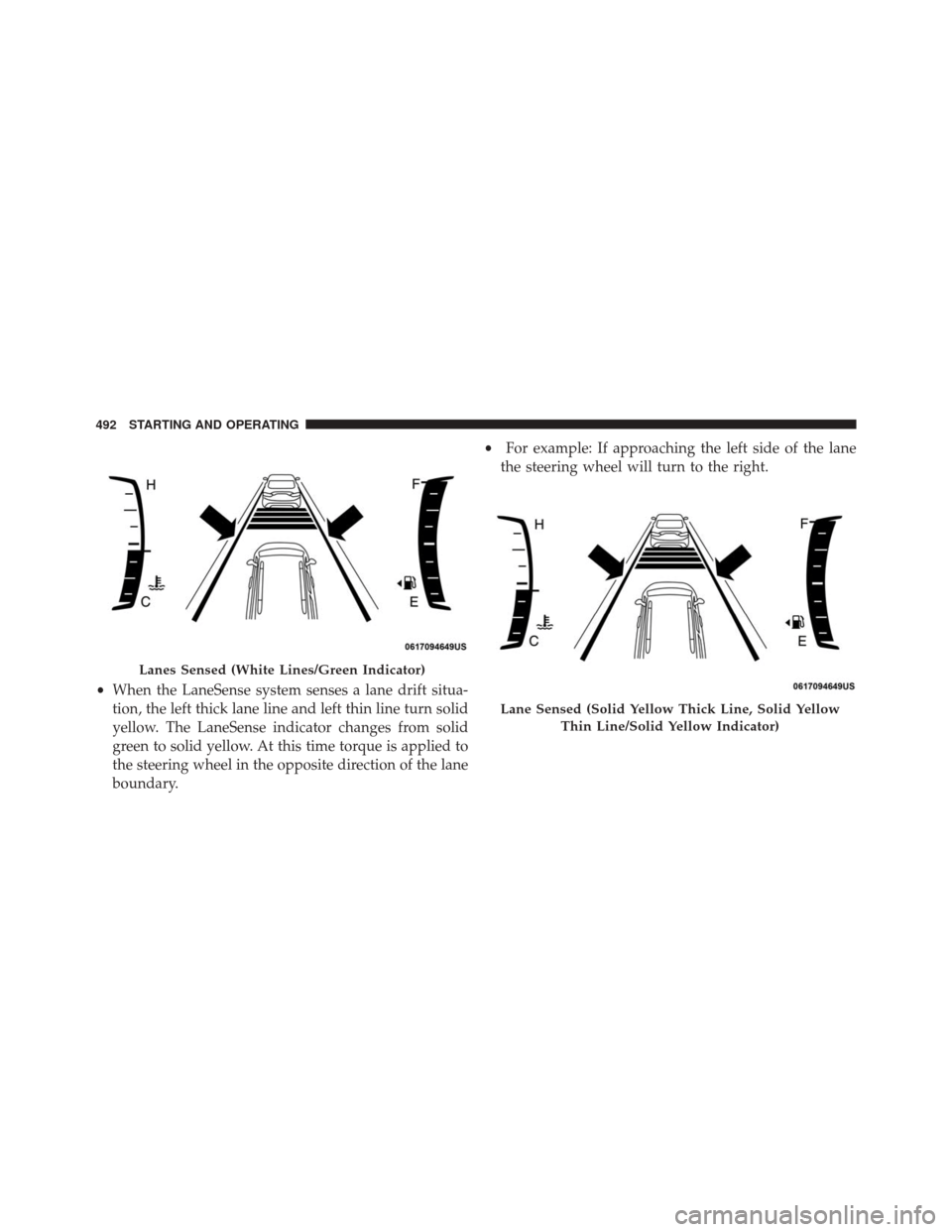
•When the LaneSense system senses a lane drift situa-
tion, the left thick lane line and left thin line turn solid
yellow. The LaneSense indicator changes from solid
green to solid yellow. At this time torque is applied to
the steering wheel in the opposite direction of the lane
boundary. •
For example: If approaching the left side of the lane
the steering wheel will turn to the right.
Lanes Sensed (White Lines/Green Indicator)
Lane Sensed (Solid Yellow Thick Line, Solid Yellow
Thin Line/Solid Yellow Indicator)
492 STARTING AND OPERATING
Page 495 of 828
•When the LaneSense system senses the lane has been
approached and is in a lane departure situation, the
left thick lane line flashes yellow (on/off) and the left
thin line remains solid yellow. The LaneSense indicator
changes from solid yellow to flashing yellow. At this
time torque is applied to the steering wheel in the
opposite direction of the lane boundary.
• For example: If approaching the left side of the lane
the steering wheel will turn to the right.
NOTE:The LaneSense system operates with the similar
behavior for a right lane departure.
Lane Approached (Flashing Yellow Thick Line, Solid
Yellow Thin Line/Flashing Yellow Indicator)
6
STARTING AND OPERATING 493
Page 561 of 828
CavityBlade Fuse Description
F91 5 Amp Tan Fog Lamp Front Left
F92 5 Amp Tan Fog Lamp Front Right
F93 10 Amp Red Low Beam Right
JACKING AND TIRE CHANGING — IF EQUIPPED
WARNING!
•Do not attempt to change a tire on the side of the
vehicle close to moving traffic. Pull far enough off
the road to avoid the danger of being hit when
operating the jack or changing the wheel.
(Continued)
WARNING! (Continued)
•Being under a jacked-up vehicle is dangerous. The
vehicle could slip off the jack and fall on you. You
could be crushed. Never put any part of your body
under a vehicle that is on a jack. If you need to get
under a raised vehicle, take it to a service center
where it can be raised on a lift.
• The jack is designed to be used as a tool for
changing tires only. The jack should not be used to
lift the vehicle for service purposes. The vehicle
should be jacked on a firm level surface only.
Avoid ice or slippery areas.
7
IN CASE OF EMERGENCY 559
Page 564 of 828
Preparations For Jacking
1. Park the vehicle on a firm, level surface. Avoid ice orslippery areas.
WARNING!
Do not attempt to change a tire on the side of the
vehicle close to moving traffic, pull far enough off
the road to avoid being hit when operating the jack
or changing the wheel.
2. Turn on the Hazard Warning flasher.
3. Set the parking brake.
4. Place the gear selector into PARK.
5. Turn OFF the ignition. 6. Block both the front and rear of the wheel diagonally
opposite of the jacking position. For example, if chang-
ing the right front tire, block the left rear wheel.
NOTE:Passengers should not remain in the
vehicle when the vehicle is being jacked.
Jacking Instructions
WARNING!
Carefully follow these tire changing warnings to
help prevent personal injury or damage to your
vehicle:
• Always park on a firm, level surface as far from the
edge of the roadway as possible before raising the
vehicle.
(Continued)
562 IN CASE OF EMERGENCY
Page 565 of 828
WARNING!(Continued)
•Turn on the Hazard Warning flasher.
• Block the wheel diagonally opposite the wheel to
be raised.
• Set the parking brake firmly and set the transmis-
sion in PARK.
• Do not let any passenger sit in the vehicle when it
is on a jack.
• Do not get under the vehicle when it is on a jack. If
you need to get under a raised vehicle, take it to a
service center where it can be raised on a lift.
• Only use the jack in the positions indicated and for
lifting this vehicle during a tire change.
• If working on or near a roadway, be extremely
careful of motor traffic.
CAUTION!
Do not attempt to raise the vehicle by jacking on
locations other than those indicated in the Jacking
Instructions for this vehicle.
NOTE: Refer to the “Spare Tire” section of “Tires” in
“Maintaining And Caring For Your Vehicle” for informa-
tion about the inflatable spare tire, its use, and operation.
Jack Warning Label
7
IN CASE OF EMERGENCY 563
Page 588 of 828

WARNING!(Continued)
•Do not use Tire Service Kit or drive the vehicle
under the following circumstances:
– If the puncture in the tire tread is approximately 1/4 inch (6 mm) or larger.
– If the tire has any sidewall damage.
– If the tire has any damage from driving with extremely low tire pressure.
– If the tire has any damage from driving on a flat tire.
– If the wheel has any damage.
– If you are unsure of the condition of the tire or the wheel.
• Keep Tire Service Kit away from open flames or
heat source.
• A loose Tire Service Kit thrown forward in a
collision or hard stop could endanger the occupants
(Continued)
WARNING! (Continued)
of the vehicle. Always stow the Tire Service Kit in
the place provided. Failure to follow these warn-
ings can result in injuries that are serious or fatal to
you, your passengers, and others around you.
• Take care not to allow the contents of Tire Service
Kit to come in contact with hair, eyes, or clothing.
Tire Service Kit sealant is harmful if inhaled,
swallowed, or absorbed through the skin. It causes
skin, eye, and respiratory irritation. Flush immedi-
ately with plenty of water if there is any contact
with eyes or skin. Change clothing as soon as
possible, if there is any contact with clothing.
• Tire Service Kit Sealant solution contains latex. In
case of an allergic reaction or rash, consult a phy-
sician immediately. Keep Tire Service Kit out of
(Continued)
586 IN CASE OF EMERGENCY
Page 658 of 828

wear and correct cold tire inflation pressures. The manu-
facturer strongly recommends that you use tires equiva-
lent to the originals in size, quality and performance
when replacement is needed. Refer to the paragraph on
“Tread Wear Indicator”. Refer to the Tire and Loading
Information placard or the Vehicle Certification Label for
the size designation of your tire. The Load Index and
Speed Symbol for your tire will be found on the original
equipment tire sidewall. See the Tire Sizing Chart ex-
ample found in the “Tire Safety Information” section of
this manual for more information relating to the Load
Index and Speed Symbol of a tire.
It is recommended to replace the two front tires or two
rear tires as a pair. Replacing just one tire can seriously
affect your vehicle’s handling. If you ever replace a
wheel, make sure that the wheel’s specifications match
those of the original wheels.It is recommended you contact your authorized tire
dealer or original equipment dealer with any questions
you may have on tire specifications or capability. Failure
to use equivalent replacement tires may adversely affect
the safety, handling, and ride of your vehicle.
WARNING!
•
Do not use a tire, wheel size, load rating, or speed
rating other than that specified for your vehicle.
Some combinations of unapproved tires and
wheels may change suspension dimensions and
performance characteristics, resulting in changes to
steering, handling, and braking of your vehicle.
This can cause unpredictable handling and stress
to steering and suspension components. You could
(Continued)
656 MAINTAINING AND CARING FOR YOUR VEHICLE
Page 706 of 828

8 mph (13 km/h), the transmission is shifted into PARK
or the ignition is switched to the OFF position.
•ParkView Backup Camera Delay — If Equipped
Press the “Parkview Backup camera Delay” button
on the touchscreen to turn the ParkView Delay ON or
OFF.
• ParkView Backup Camera Active Guide Lines — If
Equipped When this feature is enabled, active (dynamic) grid
lines are overlaid on the Rear Backup Camera image
to illustrate the width of the vehicle and its projected
back up path based on the steering wheel position. A
dashed center line overlay indicates the center of the
vehicle to assist with parking or aligning to a hitch/
receiver.
• Forward Collision Warning On/Off — If Equipped
The default status of FCW is “On”, this allows the system
to warn you of a possible collision with the vehicle in front of you. The forward collision button is located in
the Uconnect display in the controls settings. To turn the
FCW system OFF, push the forward collision button once
to turn the system OFF. To turn the FCW system back
ON, push the forward collision button again to turn the
system ON. Changing the FCW status to “OFF” prevents
the system from warning you of a possible collision with
the vehicle in front of you.
•
Forward Collision Warning-Plus (FCW+) — If
Equipped
The Front Collision Warning (FCW+) feature can be can
be set to Far, Med or Near. The default status of FCW+ is
the Med setting. This means the system will warn you of
a possible collision with the vehicle in front of you when
you are a relatively medium distance away. This gives
you the medium reaction time. To change the setting for
a more dynamic driving experience, select the Near
setting. This warns you of a possible collision when you
704 MULTIMEDIA