Page 746 of 828
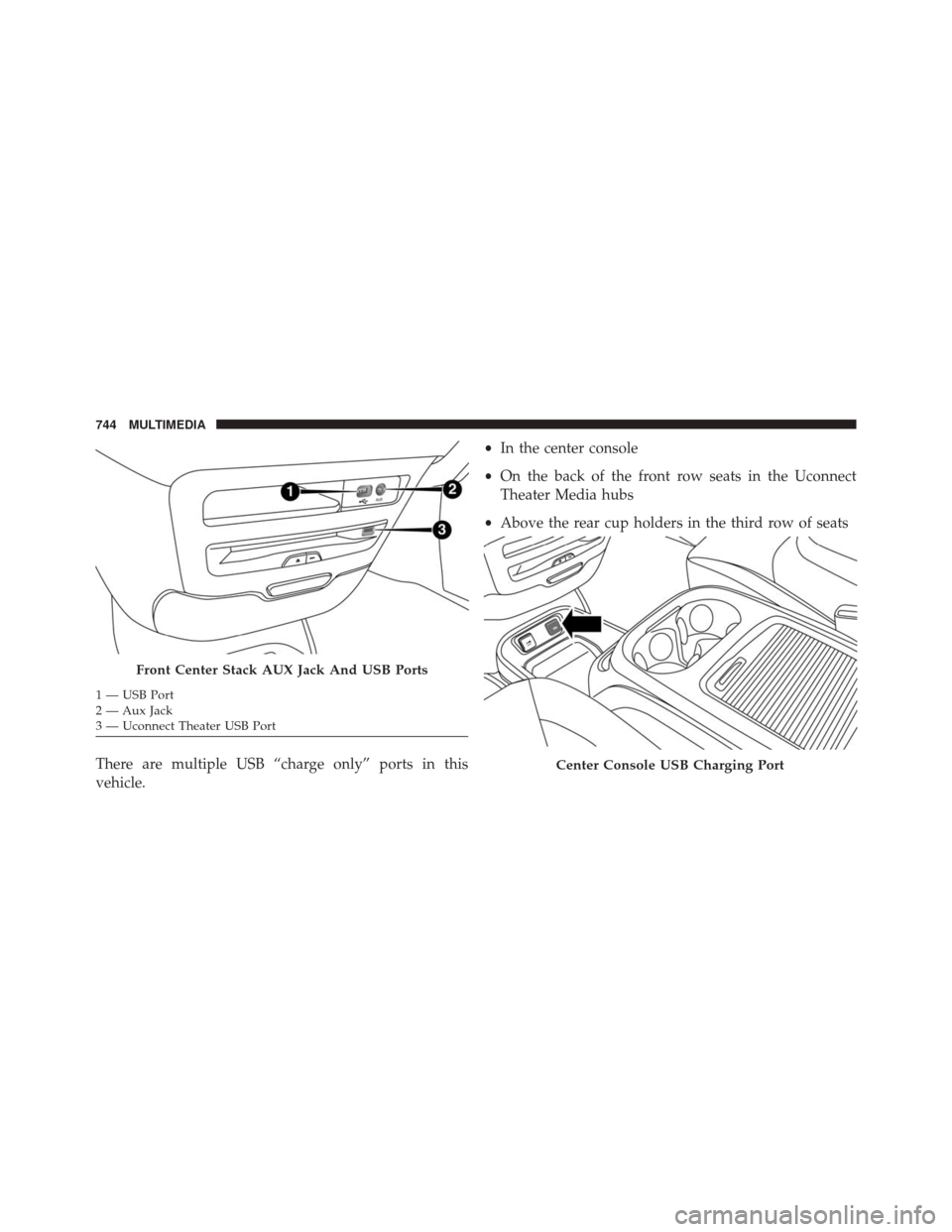
There are multiple USB “charge only” ports in this
vehicle.•
In the center console
• On the back of the front row seats in the Uconnect
Theater Media hubs
• Above the rear cup holders in the third row of seats
Front Center Stack AUX Jack And USB Ports
1 — USB Port
2 — Aux Jack
3 — Uconnect Theater USB Port
Center Console USB Charging Port
744 MULTIMEDIA
Page 747 of 828
NOTE:The USB “Charge Only” ports will recharge
battery operated USB devices when connected.
UCONNECT THEATER — IF EQUIPPED
Your Uconnect Theater is designed to give your family
years of enjoyment.
There are multiple ways to interact with your Uconnect
Theater system.
• Play your favorite CDs, DVDs or Blu-ray Discs
• Plug and play a variety of standard video games or
devices into the HDMI port
• Listen to audio over the wireless headphones
• Plug and play a variety of devices into the Video USB
port
• Plug in standard headphones to listen to audio
Please review this Owner’s Manual to become familiar
with its features and operation.
Rear USB Charging Ports
10
MULTIMEDIA 745
Page 758 of 828

NOTE:
•Source card order can be changed by pressing the
Settings button on the touchscreen and scrolling down
to �Source Card Order�.
• Use the “View Screen” function to pull content from
one screen to the other. Doing this however will
disable and gray out certain player controls.
General Settings
To change source card order, select “Source Card Reor-
der”, then press and hold source card on the touchscreen,
and drag and drop in desired order.
You can also adjust the following below and more.
• Brightness
• Media port lighting on and off
• Clock on and off NOTE:
System information can also be displayed under
General Settings.
Remote Settings
Under this setting, you can access the following:
• Manage Remotes
• Remote sensitivity (This adjusts the speed and sensi-
tivity of cursor on screen when using gesture pad)
Play A DVD/Blu-ray Or USB Media File From
Uconnect Radio
1. Insert a Blu-ray disc or DVD disc into the disc player with the label facing up. Or insert a USB drive into
rear Video USB port.
NOTE: The DVD/Blu-ray Disc player is located under
the radio controls in the instrument panel.
756 MULTIMEDIA
Page 759 of 828
2. Press the “Uconnect Theater” button on the touch-screen. Refer to “Accessing The System From The
Uconnect Radio” in this section for further informa-
tion.
3. Select Disc or USB from the source controls on the desired screen (1 or 2).
NOTE: To play a DVD/Blu-ray disc on both screens
simultaneously, select disc from both screen drop downs.
4. Press “Play” button on the touchscreen.
DVD Blu-ray Disc Player
1 — Disc Player (Rear)
2 — Rear Video USB Port
10
MULTIMEDIA 757
Page 765 of 828
Using The Rear Video USB Port
Plug in a jump drive, iPhone, iPod or mass storage device
and play your favorite music or movies.NOTE:
To view USB media on the rear theater screens,
insert a USB jump drive into the port on the DVD/Blu-
ray disc player. The USB jump drive port is located under
the radio controls in the instrument panel.
Use the search feature to find your music faster.
Rear Video USB Port
Search Screen
10
MULTIMEDIA 763
Page 766 of 828
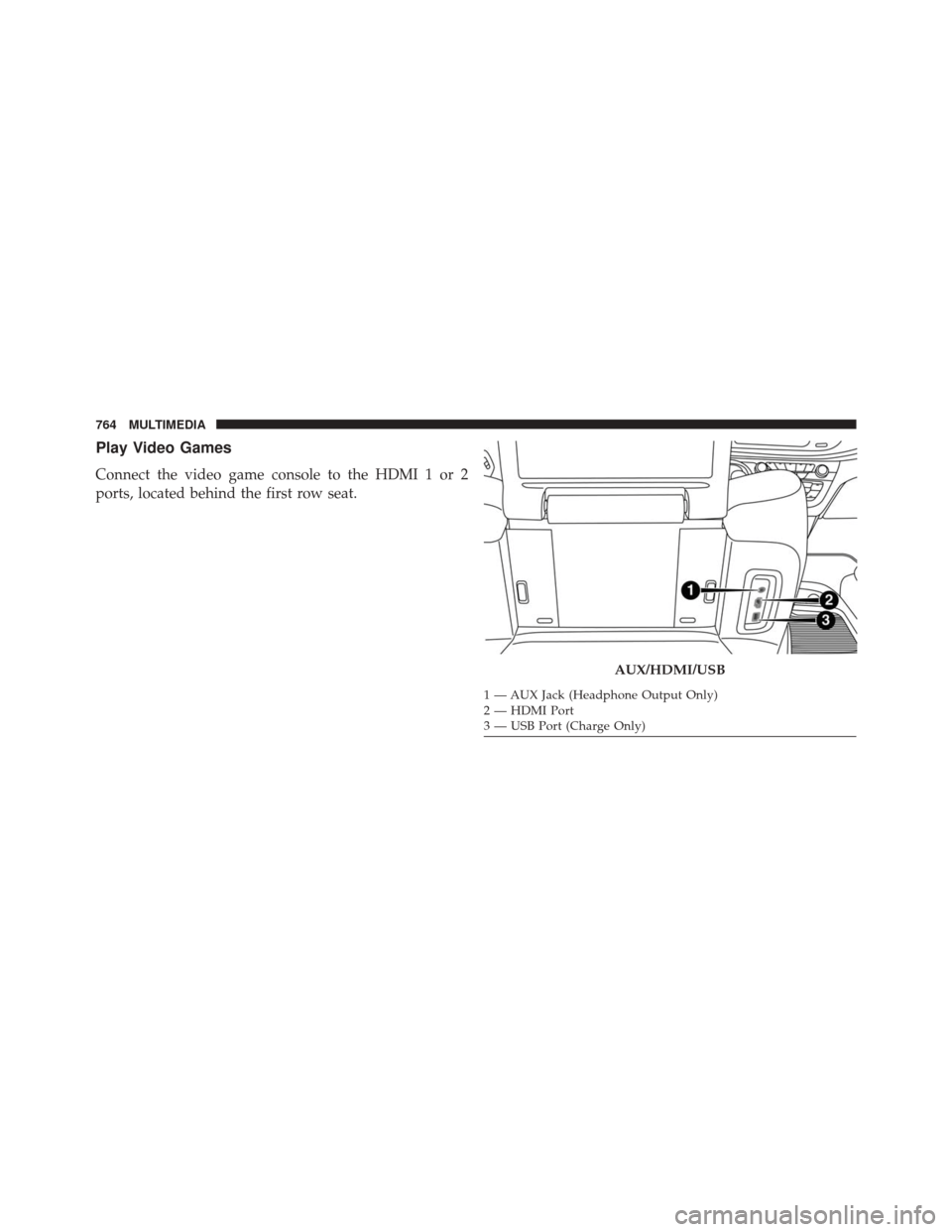
Play Video Games
Connect the video game console to the HDMI 1 or 2
ports, located behind the first row seat.
AUX/HDMI/USB
1 — AUX Jack (Headphone Output Only)
2 — HDMI Port
3 — USB Port (Charge Only)
764 MULTIMEDIA
Page 780 of 828
Media
Uconnect offers connections via USB, SD, Bluetooth and
auxiliary ports (If Equipped). Voice operation is only
available for connected USB and AUX devices. (Remote
CD player optional and not available on all vehicles.)
Push the VR button
. After the beep, say one of the
following commands and follow the prompts to
switch your media source or choose an artist.
• Change source to Bluetooth
• Change source to AUX
• Change source to USB
• Play artist Beethoven; Play album Greatest Hits; Play
song Moonlight Sonata; Play genreClassical TIP:
Press the “Browse” button on the touchscreen to see
all of the music on your AUX or USB device. Your Voice
Command must match exactlyhow the artist, album,
song and genre information is displayed.
Uconnect 5.0 Media
778 MULTIMEDIA