Page 465 of 592

Tires — General Information
Tire Pressure
Proper tire inflation pressure is essential to the safe and
satisfactory operation of your vehicle. Four primary areas
are affected by improper tire pressure:
•Safety and Vehicle Stability
• Economy
• Tread Wear
• Ride Comfort
Safety
WARNING!
• Improperly inflated tires are dangerous and can
cause collisions.
• Underinflation increases tire flexing and can result
in overheating and tire failure.
• Overinflation reduces a tire’s ability to cushion
shock. Objects on the road and chuckholes can cause
damage that result in tire failure.
(Continued)
WARNING! (Continued)
•Overinflated or underinflated tires can affect vehicle
handling and can fail suddenly, resulting in loss of
vehicle control.
• Unequal tire pressures can cause steering problems.
You could lose control of your vehicle.
• Unequal tire pressures from one side of the vehicle
to the other can cause the vehicle to drift to the right
or left.
• Always drive with each tire inflated to the recom-
mended cold tire inflation pressure.
Both under-inflation and over-inflation affect the stability
of the vehicle and can produce a feeling of sluggish
response or over responsiveness in the steering.
NOTE:
• Unequal tire pressures from side to side may cause
erratic and unpredictable steering response.
• Unequal tire pressure from side to side may cause the
vehicle to drift left or right.
Fuel Economy
Underinflated tires will increase tire rolling resistance
resulting in higher fuel consumption.
8
SERVICING AND MAINTENANCE 463
Page 470 of 592

Keep dismounted tires in a cool, dry place with as little
exposure to light as possible. Protect tires from contact with
oil, grease, and gasoline.
Replacement Tires
The tires on your new vehicle provide a balance of many
characteristics. They should be inspected regularly for
wear and correct cold tire inflation pressures. The manu-
facturer strongly recommends that you use tires equivalent
to the originals in size, quality and performance when
replacement is needed. Refer to the paragraph on “Tread
Wear Indicators” in this section. Refer to the Tire and
Loading Information placard or the Vehicle Certification
Label for the size designation of your tire. The Load Index
and Speed Symbol for your tire will be found on the
original equipment tire sidewall.
See the Tire Sizing Chart example found in the “Tire Safety
Information” section of this manual for more information
relating to the Load Index and Speed Symbol of a tire.
It is recommended to replace the two front tires or two rear
tires as a pair. Replacing just one tire can seriously affect
your vehicle’s handling. If you ever replace a wheel, make
sure that the wheel’s specifications match those of the
original wheels.It is recommended you contact your authorized tire dealer
or original equipment dealer with any questions you may
have on tire specifications or capability. Failure to use
equivalent replacement tires may adversely affect the
safety, handling, and ride of your vehicle.
WARNING!
•
Do not use a tire, wheel size, load rating, or speed
rating other than that specified for your vehicle.
Some combinations of unapproved tires and wheels
may change suspension dimensions and perfor-
mance characteristics, resulting in changes to steer-
ing, handling, and braking of your vehicle. This can
cause unpredictable handling and stress to steering
and suspension components. You could lose control
and have a collision resulting in serious injury or
death. Use only the tire and wheel sizes with load
ratings approved for your vehicle.
• Never use a tire with a smaller load index or capacity,
other than what was originally equipped on your
vehicle. Using a tire with a smaller load index could
result in tire overloading and failure. You could lose
control and have a collision.
(Continued)
468 SERVICING AND MAINTENANCE
Page 477 of 592

CAUTION!(Continued)
•Observe the traction device manufacturer ’s instruc-
tions on the method of installation, operating speed,
and conditions for use. Always use the suggested
operating speed of the device manufacturer ’s if it is
less than 30 mph (48 km/h).
• Do not use traction devices on a compact spare tire.
Tire Rotation Recommendations
The tires on the front and rear of your vehicle operate at
different loads and perform different steering, driving, and
braking functions. For these reasons, they wear at unequal
rates.
These effects can be reduced by timely rotation of tires. The
benefits of rotation are especially worthwhile with aggres-
sive tread designs such as those on all season type tires.
Rotation will increase tread life, help to maintain mud,
snow and wet traction levels, and contribute to a smooth,
quiet ride.
Refer to the “Scheduled Servicing” for the proper mainte-
nance intervals. The reasons for any rapid or unusual wear
should be corrected prior to rotation being performed. The suggested rotation method is the “forward cross”
shown in the following diagram. This rotation pattern does
not apply to some directional tires that must not be
reversed.
DEPARTMENT OF TRANSPORTATION UNIFORM
TIRE QUALITY GRADES
The following tire grading categories were established
by the National Highway Traffic Safety Administration.
The specific grade rating assigned by the tire’s manu-
facturer in each category is shown on the sidewall of the
tires on your vehicle.
Tire Rotation
8
SERVICING AND MAINTENANCE 475
Page 495 of 592

MULTIMEDIA
CONTENTS
�UCONNECT RADIOS ....................495
� PERSONALIZED MENU BAR ...............495
� CYBERSECURITY ....................... .495
� UCONNECT SETTINGS ...................497
▫ Customer Programmable Features — Uconnect 8.4
Settings ............................. .497
� STEERING WHEEL AUDIO CONTROLS .......520
▫ Radio Operation ....................... .521
� AUX/USB/MP3 CONTROL ................521
� UCONNECT THEATER — IF EQUIPPED ......523
▫ Uconnect Theater Overview ...............523
▫ Getting Started ....................... .523
▫ Accessing The System From The Uconnect
Radio .............................. .524
▫ Uconnect Theater Controls ................525 ▫
Accessing The System From The Uconnect Theater
Rear Screens ......................... .526
▫ Pairing The Remote .....................527
▫ Unpairing The Remote ...................528
▫ Media Sources ........................ .528
▫ Uconnect Theater Remote Control ...........529
▫ Uconnect Theater Home Screen And Controls . . .530
▫ Play A DVD/Blu-ray Or USB Media File From
Uconnect System ...................... .532
▫ Blu-ray Controls – Disc Specific Functions .....534
▫ Uconnect Theater Apps ...................535
▫ Using The Rear Video USB Port .............537
▫ Play Video Games ..................... .538
▫ Headphones Operation .................. .538
▫ Disc
Menu ........................... .541
10
Page 507 of 592
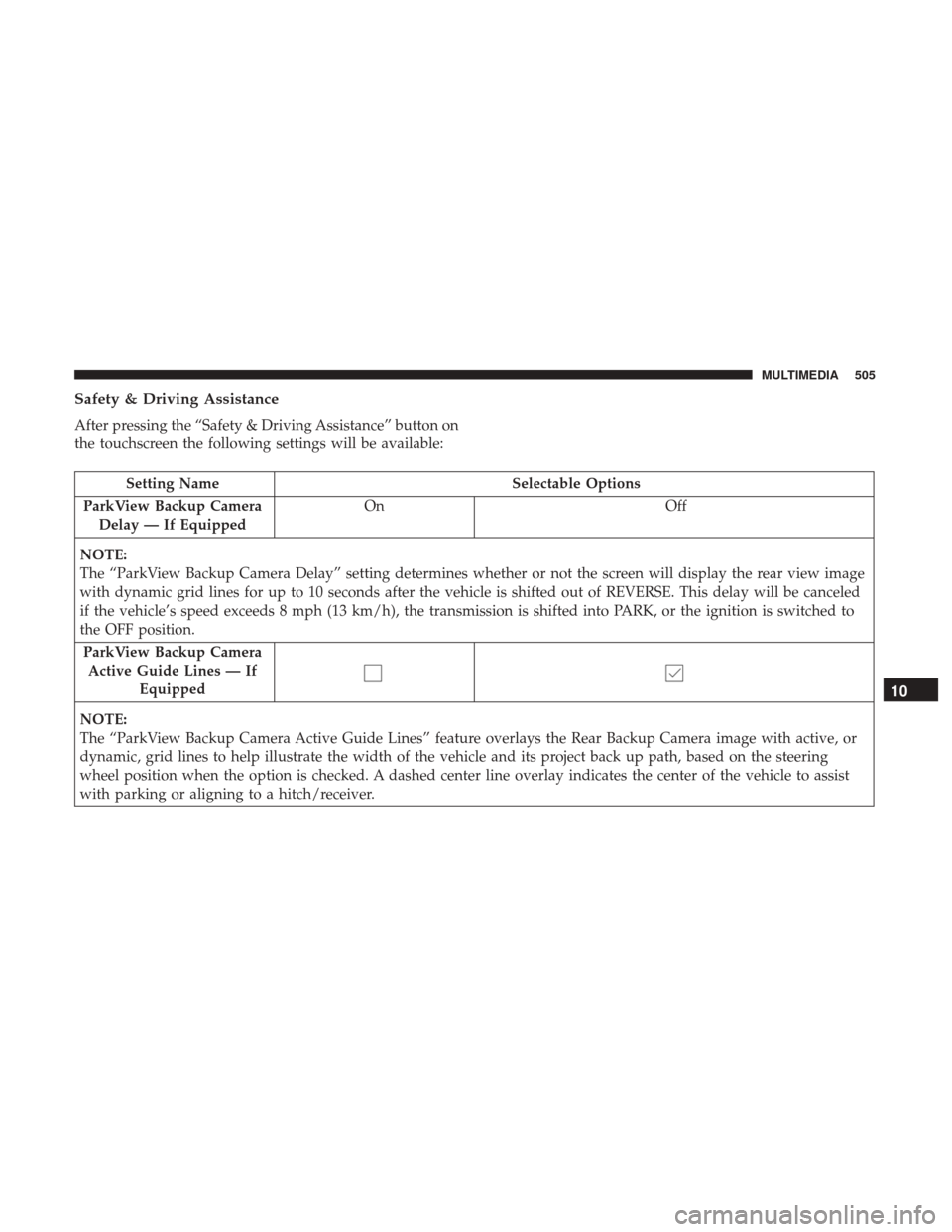
Safety & Driving Assistance
After pressing the “Safety & Driving Assistance” button on
the touchscreen the following settings will be available:
Setting NameSelectable Options
ParkView Backup Camera Delay — If Equipped On
Off
NOTE:
The “ParkView Backup Camera Delay” setting determines whether or not the screen will display the rear view image
with dynamic grid lines for up to 10 seconds after the vehicle is shifted out of REVERSE. This delay will be canceled
if the vehicle’s speed exceeds 8 mph (13 km/h), the transmission is shifted into PARK, or the ignition is switched to
the OFF position. ParkView Backup Camera Active Guide Lines — If Equipped
NOTE:
The “ParkView Backup Camera Active Guide Lines” feature overlays the Rear Backup Camera image with active, or
dynamic, grid lines to help illustrate the width of the vehicle and its project back up path, based on the steering
wheel position when the option is checked. A dashed center line overlay indicates the center of the vehicle to assist
with parking or aligning to a hitch/receiver.
10
MULTIMEDIA 505
Page 510 of 592
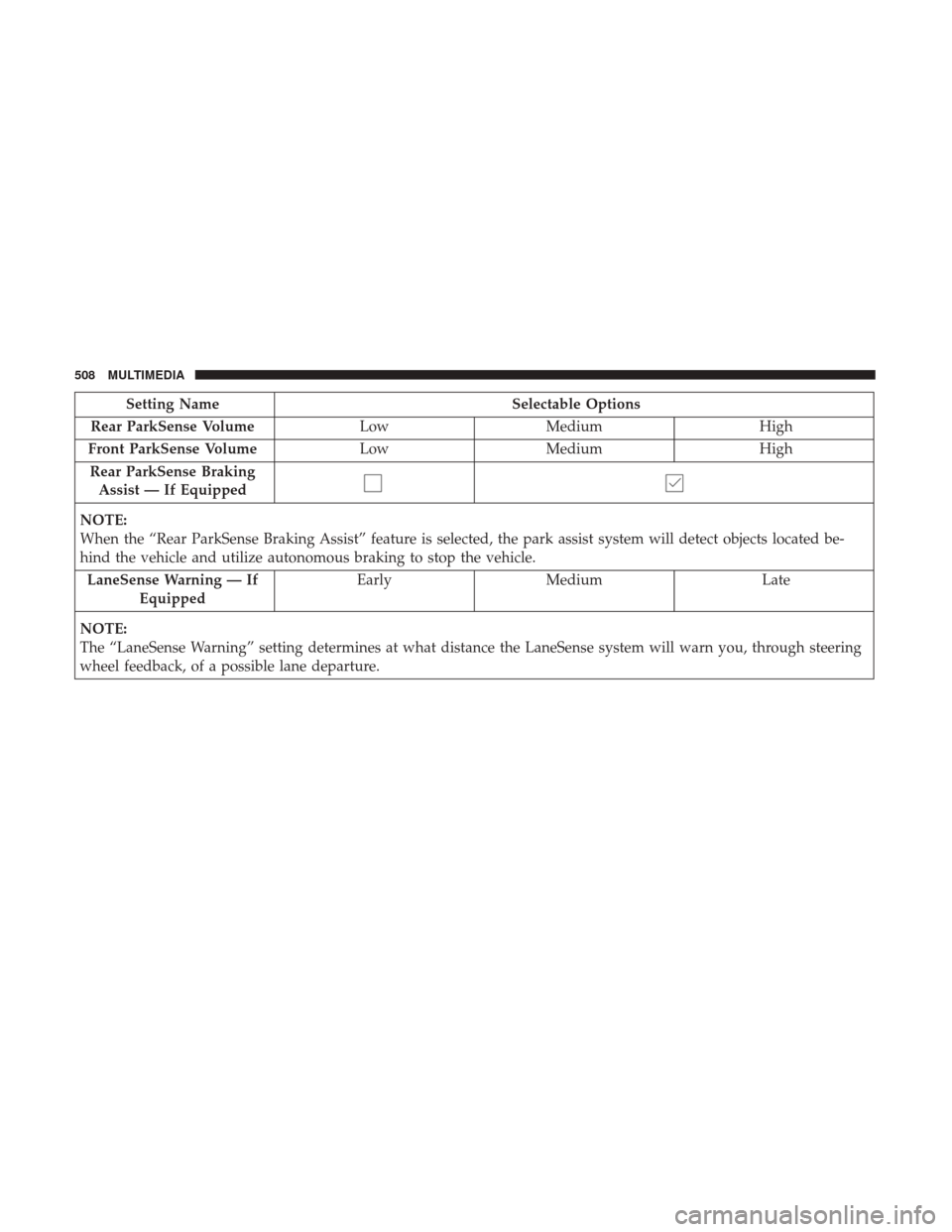
Setting NameSelectable Options
Rear ParkSense Volume LowMedium High
Front ParkSense Volume LowMedium High
Rear ParkSense Braking Assist — If Equipped
NOTE:
When the “Rear ParkSense Braking Assist” feature is selected, the park assist system will detect objects located be-
hind the vehicle and utilize autonomous braking to stop the vehicle. LaneSense Warning — If Equipped Early
Medium Late
NOTE:
The “LaneSense Warning” setting determines at what distance the LaneSense system will warn you, through steering
wheel feedback, of a possible lane departure.
508 MULTIMEDIA
Page 514 of 592
Setting NameSelectable Options
Personal Settings Linked to Key Fob — If Equipped On
Off
NOTE:
The “Personal Seetings Linked to Key Fob” feature provides automatic recall of all settings stored to a memory loca-
tion (driver ’s seat, exterior mirrors, steering column position and radio station pre-sets) to enhance driver mobility
when entering and exiting the vehicle.
The seat will return to the memorized seat location, if the settings is set to “On,” when the key fob is used to unlock
the door. Power Liftgate Alert On Off
NOTE:
When the “Power Liftgate Alert” feature is selected, an alert plays when the power liftgate is raising or lowering. Sliding Door Alert On Off
NOTE:
When the “Sliding Door Alert” feature is selected, a chime plays when the sliding door reverses or an obstacle is
sensed.
512 MULTIMEDIA
Page 516 of 592
Auto Comfort Systems — If Equipped
After pressing the “Auto-On Comfort” button on the
touchscreen the following settings will be available:
Setting NameSelectable Options
Auto-On Driver Heated/
Ventilated Seat & Steering Wheel With Vehicle Start — If Equipped Off
Remote Start All Starts
NOTE:
When this feature is selected the driver ’s heated seat and heated steering wheel will automatically turn on when tem-
peratures are below 40° F (4.4° C). When temperatures are above 80° F (26.7° C) the driver vented seat will turn on.
Vehicle Off Options
After pressing the “Engine Off Options” button on the
touchscreen the following settings will be available:
Setting Name Selectable Options
Vehicle Off Power Delay — IfEquipped 0 sec
45 sec 5 min10 min
514 MULTIMEDIA