Page 283 of 539

SettingsTranslation
Message Submenu
7 Rear ParksenseVolume Rear
Parksense Vol Low, Med, High
8 Rear ParksenseBraking Parksense
Braking On/Off
9 Blind Spot Alert Blind Spot
Alert Off, Lights Only,
Lights & Chime
10 Lanesense Warning Lanesense
Alert Early, Med, Late
11 Lanesense Strength Lanesense
Force Low, Med, High
12 Hill Start Assist Hill Start Asst On, Off
13 Auto Lock Doors Auto Lock
Doors On, Off
14 Auto Unlock Doors Auto Unlock
Doors On, Off
15 Passive Entry Passive Entry On, OffSettings
Translation
Message Submenu
16 Remote Unlock
Sequence Remote
Unlock Driver Door, All
Doors
17 Key Fob Linked ToMemory Key In
Memory On, Off
18 Remote Start ComfortSystem Rmt Start
Comfort Off, Remote
Starts Only, All Starts
19 Sound Horn With
Remote Start Horn W/Rmt
Start On, Off
20 Sound Horn With
Remote Lock Horn W/Rmt
Lock Off, 1st Press,
2nd Press
21 Flash Lights With Lock Lights
W/Lock On, Off
22 Daytime RunningLights Daytime
Lights On, Off
4
UNDERSTANDING YOUR INSTRUMENT PANEL 281
Page 284 of 539

SettingsTranslation
Message Submenu
23 Automatic Highbeams Auto
Highbeams On, Off
24 Headlights On WithWipers Lights
W/Wipers On, Off
25 Rain Sensing Wipers Auto Wipers On, Off
26 Headlights Off Delay Lights Off
Delay 0 Seconds,
30 Seconds,
60 Seconds, 90 Seconds
27 Key-Off Power Delay Power Off
Delay Off, 45 Seconds,
5 Minutes,
10 Minutes
28 Illuminated Approach Lights
W/Unlock 0 Seconds,
30 Seconds,
60 Seconds, 90 Seconds
29 Easy Exit Seat Easy Exit Seat On, OffSettings
Translation
Message Submenu
30 Tilt Mirror In Reverse Tilt Mirror
In R On, Off
31 Compass Variance Compass Var See Owner ’S
Manual, XIncrement
32 Calibrate Compass Compass Cal Push > To
Calibrate TheCompass
33 Brake Service Brake Service Brake Service
Unavailable
Accelerator Pedal Pressed
34 Auto Park Brake Auto Park
Brake On, Off
CYBERSECURITY
Your vehicle may be a connected vehicle and may be
equipped with both wired and wireless networks. These
networks allow your vehicle to send and receive informa-
tion. This information allows systems and features in your
vehicle to function properly.
282 UNDERSTANDING YOUR INSTRUMENT PANEL
Page 288 of 539

Uconnect system allows you to access programmable fea-
tures that may be equipped such as Display, Voice, Clock,
Safety & Driving Assistance (if equipped), Lights, Doors &
Locks, Auto-On Comfort (if equipped), Engine Off Op-
tions, Audio, Phone/Bluetooth, SiriusXM Setup, Restore
Settings, Clear Personal Data (if equipped).
NOTE:Only one category may be selected at a time.
To adjust the setting of a programmable feature, press the
desired setting option. Once in the desired setting option,
press and release the preferred setting until a check-mark
appears next to the setting, showing that the setting has been selected. Once the setting is complete, either press the
back arrow button on the touchscreen or the Back button
on the faceplate to return to the previous menu or press the
“X” button on the touchscreen to close out of the settings
screen. Pressing the Up or Down Arrow buttons on the
right side of the screen will allow you to toggle up or down
through the list of available settings.
Display
After pressing the “Display” button on the touchscreen, the
following settings will be available:
Setting Name
Selectable Options
Display Mode Manual Auto
Display Brightness With Headlights ON +-
NOTE:
To make changes to the �Display Brightness with Headlights ON� setting, the headlights must be on and the interior
dimmer switch must not be in the �party�or�parade� positions.
286 UNDERSTANDING YOUR INSTRUMENT PANEL
Page 290 of 539
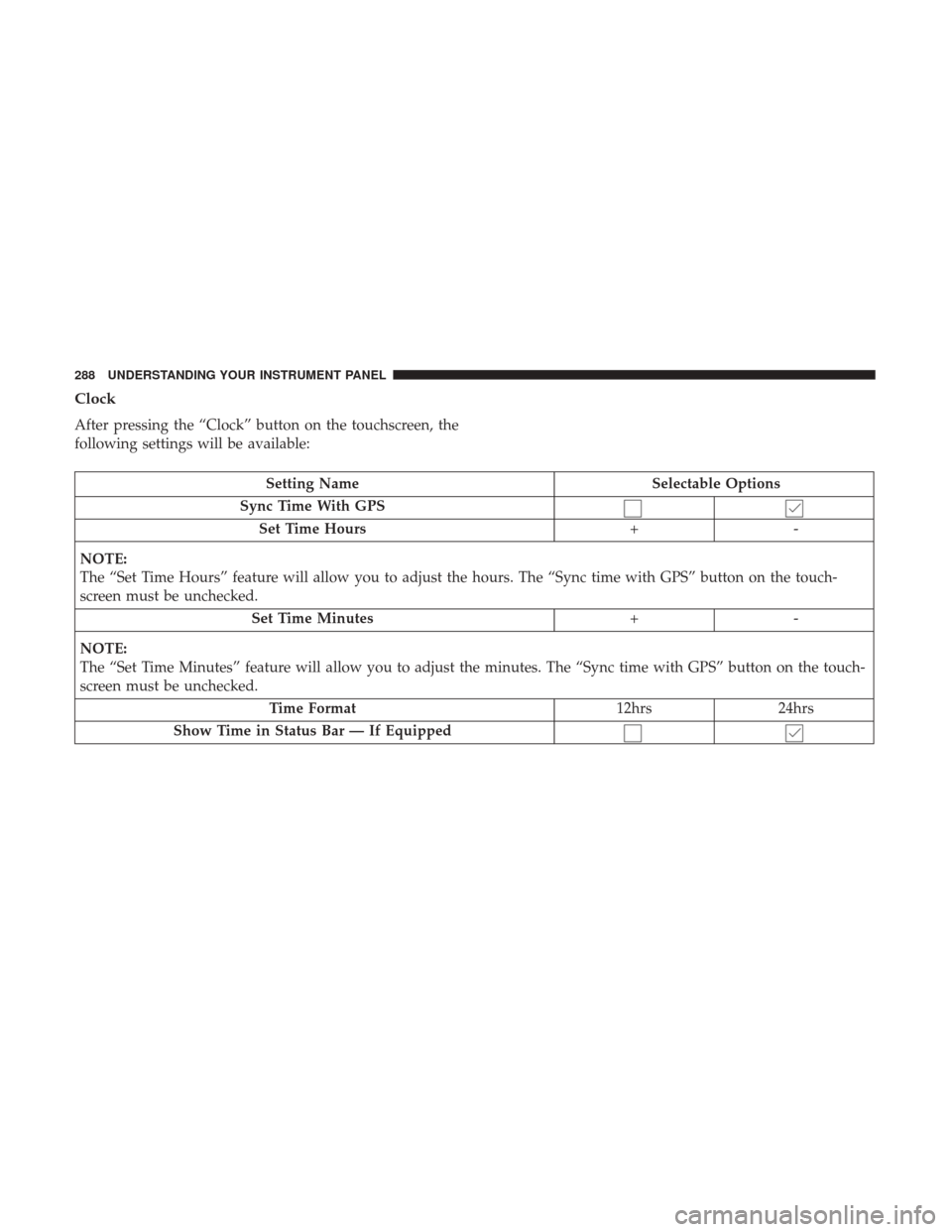
Clock
After pressing the “Clock” button on the touchscreen, the
following settings will be available:
Setting NameSelectable Options
Sync Time With GPS Set Time Hours +-
NOTE:
The “Set Time Hours” feature will allow you to adjust the hours. The “Sync time with GPS” button on the touch-
screen must be unchecked. Set Time Minutes +-
NOTE:
The “Set Time Minutes” feature will allow you to adjust the minutes. The “Sync time with GPS” button on the touch-
screen must be unchecked. Time Format 12hrs24hrs
Show Time in Status Bar — If Equipped
288 UNDERSTANDING YOUR INSTRUMENT PANEL
Page 295 of 539
Setting NameSelectable Options
Auto Park Brake
NOTE:
Auto Park Brake will set the park brake once the vehicle is set in park (or at key off for a manual transmission).
Lights
After pressing the “Lights” button on the touchscreen the
following settings will be available.
Setting Name Selectable Options
Headlight Off Delay 0 sec30 sec 60 sec 90 sec
NOTE:
When the “Headlight Off Delay” feature is selected, it allows the adjustment of the amount of time the headlights
remain on after the engine is shut off. Headlights WithWipers — IfEquipped
Headlight Illumi-
nated On Approach 0 sec
30 sec 60 sec 90 sec
NOTE:
When the “Headlight Illumination On Approach” feature is selected, it allows the adjustment of the amount of time
the headlights remain on after the doors are unlocked with the key fob.
4
UNDERSTANDING YOUR INSTRUMENT PANEL 293
Page 296 of 539
Setting NameSelectable Options
Auto Dim High Beams— IfEquipped On
Off
NOTE:
When the “Auto Dim High Beams” feature is selected, the high beam headlights will activate/deactivate automati-
cally under certain conditions. Daytime Running Lights — IfEquipped Ye s
N o
Flash Lights With Lock On
Off
Doors & Locks
After pressing the “Doors & Locks” button on the touch-
screen, the following settings will be available:
Setting Name Selectable Options
Auto Door Locks OnOff
NOTE:
When the “Auto Door Locks” feature is selected, all doors will lock automatically when the vehicle reaches a speed of
12 mph (20 km/h).
294 UNDERSTANDING YOUR INSTRUMENT PANEL
Page 297 of 539

Setting NameSelectable Options
Auto Unlock On Exit
NOTE:
When the “Auto Unlock On Exit” feature is selected, all doors will unlock when the vehicle is stopped, the transmis-
sion is in the PARK or NEUTRAL position and the driver’s door is opened. Flash Lights With Lock
Sound Horn With Lock Off1st Press 2nd Press
Sound Horn With Remote Start 1st Press Of Key Fob Unlocks Driver DoorAll Doors
NOTE:
When �Driver Door� is selected with 1st Press Of Key Fob Unlocks, only the driver’s door will unlock with the first press of
the key fob UNLOCK button. You must press the key fob UNLOCK button twice to unlock the passenger’s doors. When
�All Doors� is selected for 1st Press Of Key Fob Unlocks, all doors will unlock on the first press of the key fob UNLOCK
button. If the vehicle is programmed 1st Press Of Key Fob Unlocks “All Doors,” all doors will unlock no matter which Pas-
sive Entry equipped door handle is grasped. If 1st Press Of Key Fob Unlocks “Driver Door” is programmed, only the driv-
er ’s door will unlock when the driver ’s door is grasped. With Passive Entry, if 1st Press Of Key Fob Unlocks “Driver Door”
is programmed, touching the handle more than once will result in only the driver ’s door opening. If “Driver Door” is se-
lected, once the driver door is opened, the interior door lock/unlock switch can be used to unlock all doors (or use key fob).
Passive Entry — If Equipped
NOTE:
The “Passive Entry” feature allows you to lock and unlock the vehicles door(s) without having to push the key fob
LOCK or UNLOCK buttons.
4
UNDERSTANDING YOUR INSTRUMENT PANEL 295
Page 310 of 539

IconDescription
Blower Control Knob
Blower Control is used to regulate the amount of air forced through the climate system. There
are seven blower speeds available. The speeds can be selected using the blower control knob on
the faceplate. The blower speed increases as you turn the blower control knob clockwise from
the lowest blower setting. The blower speed decreases as you turn the blower control knob
counterclockwise.
Temperature Control Knob
Temperature Control is used to regulate the temperature of the air forced through the climate
system. The temperature can be selected using the temperature control knob on the faceplate.
The temperature increases as you turn the temperature control knob clockwise. The temperature
decreases as you turn the temperature control knob counterclockwise.
Faceplate Mode Control Knob
Panel Mode
Mode Control Knob
Mode Control is used to regulate the direction of the air forced through the climate system. The
mode can be selected using the mode control knob on the faceplate. The mode can be changed
between the following settings by rotating the knob clockwise or counterclockwise:
• Panel Mode
Air comes from the outlets in the instrument panel. Each of these outlets can be individually
adjusted to direct the flow of air. The air vanes of the center outlets and outboard outlets can
be moved up and down or side to side to regulate airflow direction. There is a shut off
wheel located below the air vanes to shut off or adjust the amount of airflow from these
outlets.
308 UNDERSTANDING YOUR INSTRUMENT PANEL