Page 151 of 539

Vehicle Indicator” icon, and the system will adjust the
vehicle speed automatically to maintain the distance set-
ting, regardless of the set speed.
The vehicle will then maintain the set distance until:
•The vehicle ahead accelerates to a speed above the set
speed.
• The vehicle ahead moves out of your lane or view of the
sensor.
• The distance setting is changed.
• The system disengages. (Refer to the information on
ACC Activation).
The maximum braking applied by ACC is limited; how-
ever, the driver can always apply the brakes manually, if
necessary.
NOTE: The brake lights will illuminate whenever the ACC
system applies the brakes.
A Proximity Warning will alert the driver if ACC predicts
that its maximum braking level is not sufficient to maintain
the set distance. If this occurs, a visual alert “BRAKE” will
flash in the Instrument Cluster Display and a chime will
sound while ACC continues to apply its maximum braking
capacity. NOTE:
The “Brake!” Screen in the Instrument Cluster
Display is a warning for the driver to take action and does
not necessarily mean that the Forward Collision Warning
system is applying the brakes autonomously.
Overtake Aid
When driving with ACC engaged and following a vehicle,
the system will provide an additional acceleration up to the
ACC set speed to assist in passing the vehicle. This
additional acceleration is triggered when the driver utilizes
the left turn signal and will only be active when passing on
the left hand side.
Brake Alert
3
UNDERSTANDING THE FEATURES OF YOUR VEHICLE 149
Page 212 of 539
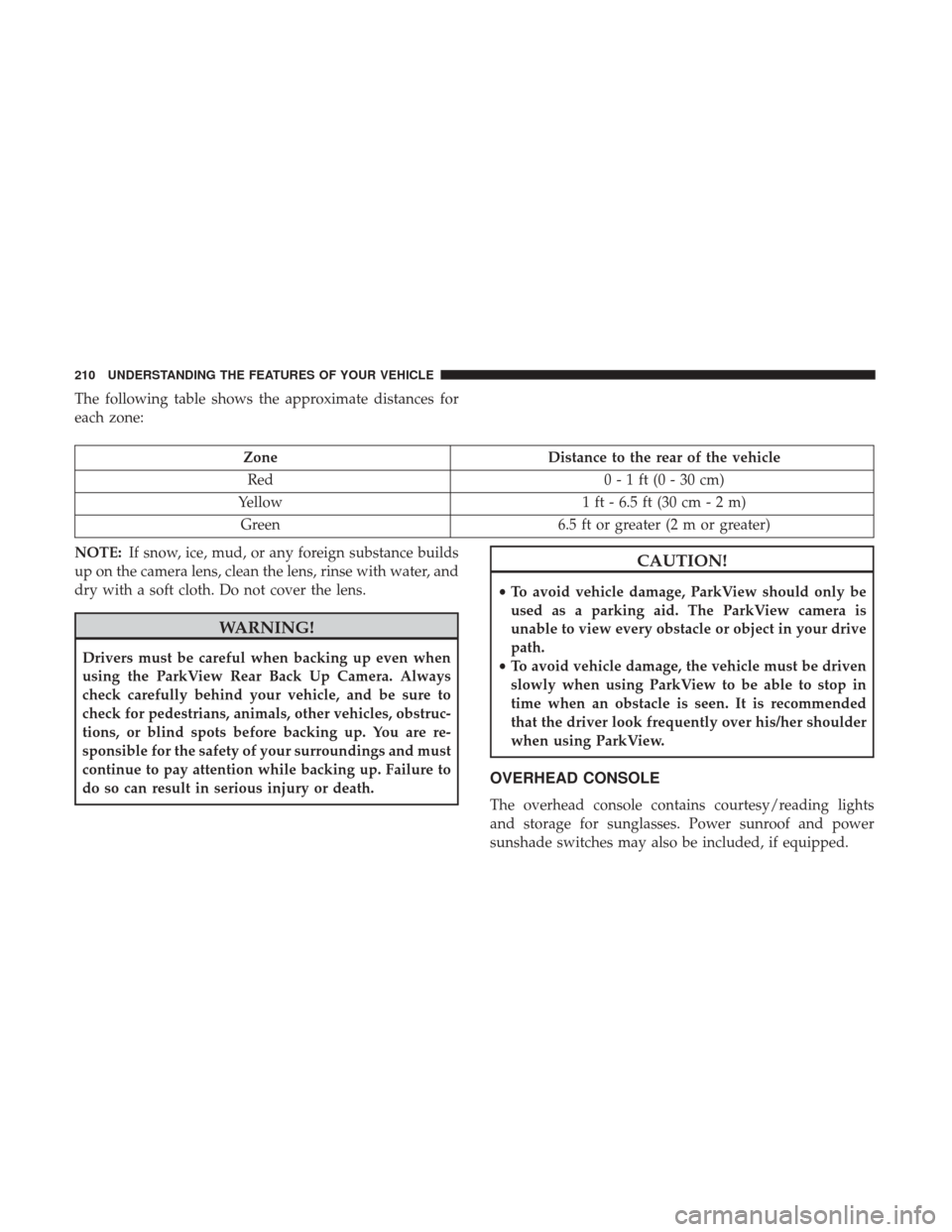
The following table shows the approximate distances for
each zone:
ZoneDistance to the rear of the vehicle
Red 0 - 1 ft (0 - 30 cm)
Yellow 1 ft - 6.5 ft (30 cm - 2 m)
Green 6.5 ft or greater (2 m or greater)
NOTE: If snow, ice, mud, or any foreign substance builds
up on the camera lens, clean the lens, rinse with water, and
dry with a soft cloth. Do not cover the lens.
WARNING!
Drivers must be careful when backing up even when
using the ParkView Rear Back Up Camera. Always
check carefully behind your vehicle, and be sure to
check for pedestrians, animals, other vehicles, obstruc-
tions, or blind spots before backing up. You are re-
sponsible for the safety of your surroundings and must
continue to pay attention while backing up. Failure to
do so can result in serious injury or death.
CAUTION!
• To avoid vehicle damage, ParkView should only be
used as a parking aid. The ParkView camera is
unable to view every obstacle or object in your drive
path.
• To avoid vehicle damage, the vehicle must be driven
slowly when using ParkView to be able to stop in
time when an obstacle is seen. It is recommended
that the driver look frequently over his/her shoulder
when using ParkView.
OVERHEAD CONSOLE
The overhead console contains courtesy/reading lights
and storage for sunglasses. Power sunroof and power
sunshade switches may also be included, if equipped.
210 UNDERSTANDING THE FEATURES OF YOUR VEHICLE
Page 243 of 539

UNDERSTANDING YOUR INSTRUMENT PANEL
CONTENTS
�INSTRUMENT PANEL FEATURES ...........243
� INSTRUMENT CLUSTER ..................244
� WARNING AND INDICATOR LIGHTS ........247
▫ Red Telltale Indicator Lights ...............247
▫ Yellow Telltale Indicator Lights .............256
▫ Green Telltale Indicator Lights ..............265
▫ White Telltale Indicator Lights ..............268
▫ Blue Telltale Indicator Lights ...............270
� INSTRUMENT CLUSTER DISPLAY ...........271
▫ Instrument Cluster Display Location
and Controls ......................... .271
▫ Oil Change Reset ..................... .273
▫ Instrument Cluster Display Messages ........274
▫ Instrument Cluster Display Menu Items .......276�
CYBERSECURITY ....................... .282
� UCONNECT SETTINGS ...................284
▫ Buttons On The Faceplate .................285
▫ Buttons On The Touchscreen ...............285
▫ Customer Programmable Features/
Personal Settings —
Uconnect 5.0/8.4/8.4 NAV Settings ..........285
� UCONNECT RADIOS — IF EQUIPPED ........303
� USB PORT AND AUX JACK — IF EQUIPPED . . . .303
� STEERING WHEEL AUDIO CONTROLS — IF
EQUIPPED ........................... .304
▫ Radio Operation ....................... .304
▫ Media Mode ......................... .304
� RADIO OPERATION AND MOBILE DEVICES . . .305
▫ Regulatory And Safety Information ..........3054
Page 249 of 539

WARNING AND INDICATOR LIGHTS
IMPORTANT:The warning / indicator lights switch on in
the instrument panel together with a dedicated message
and/or acoustic signal when applicable. These indications
are indicative and precautionary and as such must not be
considered as exhaustive and/or alternative to the
information contained in the Owner ’s Manual, which you
are advised to read carefully in all cases. Always refer to
the information in this chapter in the event of a failure
indication. All active telltales will display first if applicable. The
system check menu may appear different based upon
equipment options and current vehicle status. Some tell-
tales are optional and may not appear.
Red Telltale Indicator Lights
Seat Belt Reminder Warning Light
Red Telltale
Light What It Means
Seat Belt Reminder Warning Light
When the ignition is first placed in the ON/RUN position, if the driver ’s seat belt is unbuckled, a
chime will sound and the light will turn on. When driving, if the driver or front passenger seat
belt remains unbuckled, the Seat Belt Reminder Light will flash or remain on continuously and a
chime will sound. Refer to “Occupant Restraints” in “Things To Know Before Starting Your Ve-
hicle” for further information.
4
UNDERSTANDING YOUR INSTRUMENT PANEL 247
Page 258 of 539

Yellow Telltale Indicator Lights
Engine Check/Malfunction Indicator Light (MIL)
Yellow TelltaleLight What It Means
Engine Check/Malfunction Indicator Light (MIL)
The Engine Check/Malfunction Indicator Light (MIL) is a part of an Onboard Diagnostic System
called OBD II that monitors engine and automatic transmission control systems. The light will
illuminate when the ignition is in the ON/RUN position before engine start. If the bulb does not
come on when turning the key from OFF to ON/RUN, have the condition checked promptly.
Certain conditions, such as a loose or missing gas cap, poor quality fuel, etc., may illuminate the
light after engine start. The vehicle should be serviced if the light stays on through several typical
driving styles. In most situations, the vehicle will drive normally and will not require towing.
When the engine is running, the MIL may flash to alert serious conditions that could lead to im-
mediate loss of power or severe catalytic converter damage. The vehicle should be serviced as
soon as possible if this occurs.
WARNING!
A malfunctioning catalytic converter, as referenced
above, can reach higher temperatures than in normal
operating conditions. This can cause a fire if you drive
(Continued)
WARNING!
(Continued)
slowly or park over flammable substances such as dry
plants, wood, cardboard, etc. This could result in death
or serious injury to the driver, occupants or others.
256 UNDERSTANDING YOUR INSTRUMENT PANEL
Page 277 of 539

•Tire Pressure Screen With Low Tire(s) “Inflate Tire to
XX”
• Service Tire Pressure System
• Parking Brake Engaged
• Brake Fluid Low
• Service Electronic Braking System
• Engine Temperature Hot
• Battery Voltage Low
• Service Electronic Throttle Control
• Lights On
• Right Turn Signal Light Out
• Left Turn Signal Light Out
• Turn Signal On
• Vehicle Not in Park
• Key in Ignition
• Key in Ignition Lights On
• Remote Start Active Key to Run •
Remote Start Active Push Start Button
• Remote Start Aborted Fuel Low
• Remote Start Aborted Too Cold
• Remote Start Aborted Door Open
• Remote Start Aborted Hood Open
• Remote Start Aborted Trunk Open
• Remote Start Aborted Time Expired
• Remote Start Disabled Start to Reset
• Service Airbag Warning Light
• Door Open
• Doors Open
• Gear Not Available
• Shift Not Allowed
• Shift to Neutral then Drive or Reverse
• Transmission Getting Hot Push Brake
• Trans. Hot Stop Safely Shift to Park Wait to Cool
• Service Transmission
4
UNDERSTANDING YOUR INSTRUMENT PANEL 275
Page 283 of 539

SettingsTranslation
Message Submenu
7 Rear ParksenseVolume Rear
Parksense Vol Low, Med, High
8 Rear ParksenseBraking Parksense
Braking On/Off
9 Blind Spot Alert Blind Spot
Alert Off, Lights Only,
Lights & Chime
10 Lanesense Warning Lanesense
Alert Early, Med, Late
11 Lanesense Strength Lanesense
Force Low, Med, High
12 Hill Start Assist Hill Start Asst On, Off
13 Auto Lock Doors Auto Lock
Doors On, Off
14 Auto Unlock Doors Auto Unlock
Doors On, Off
15 Passive Entry Passive Entry On, OffSettings
Translation
Message Submenu
16 Remote Unlock
Sequence Remote
Unlock Driver Door, All
Doors
17 Key Fob Linked ToMemory Key In
Memory On, Off
18 Remote Start ComfortSystem Rmt Start
Comfort Off, Remote
Starts Only, All Starts
19 Sound Horn With
Remote Start Horn W/Rmt
Start On, Off
20 Sound Horn With
Remote Lock Horn W/Rmt
Lock Off, 1st Press,
2nd Press
21 Flash Lights With Lock Lights
W/Lock On, Off
22 Daytime RunningLights Daytime
Lights On, Off
4
UNDERSTANDING YOUR INSTRUMENT PANEL 281
Page 333 of 539

Uconnect Access (8.4/8.4 NAV)
WARNING!
ALWAYS obey traffic laws and pay attention to the
road. Some Uconnect Access services, including 9-1-1
and Assist, will NOT work without an operable
1X(voice/data) or 3G(data) network connection.
NOTE: Your vehicle may be transmitting data as autho-
rized by the subscriber.
An included trial and/or subscription is required to take
advantage of the Uconnect Access services in the next
section of this guide. To register with Uconnect Access,
press the Apps button on the 8.4-inch touchscreen to get
started. Detailed registration instructions can be found on
the next page. NOTE:
Uconnect Access is available only on equipped
vehicles purchased within the continental United States,
Alaska and Hawaii. Services can only be used where
coverage is available; see coverage map for details.9-1-1 Call
Security Alarm Notification
Remote Door Lock/Unlock
Stolen Vehicle Assistance
Remote Vehicle Start**
Remote Horn and Lights
Yelp Search
Voice Texting
Roadside Assistance Call
3G Wi-Fi Hotspot***
**If vehicle is equipped.
***Extra charges apply.
4
UNDERSTANDING YOUR INSTRUMENT PANEL 331