2017 CHEVROLET VOLT vehicle personalization
[x] Cancel search: vehicle personalizationPage 41 of 376

Chevrolet VOLT Owner Manual (GMNA-Localizing-U.S./Canada/Mexico-
9807421) - 2017 - CRC - 11/18/15
40 Keys, Doors, and Windows
Key Cylinder Access
To access the key cylinder:1. Pull the door handle to the open position.
2. Insert the key into the slot on the bottom of the cap and pry
outward.
3. Move the cap rearward and remove.
Replace the cap by snapping on
the tabs.
Power Door Locks
K: Press to unlock the doors.
Q: Press to lock the doors.
Delayed Locking
This feature delays the locking of
the doors until five seconds after all
doors are closed.
When
Qis pressed on the power
door lock switch while the door is
open, a chime will sound three
times indicating delayed locking is
active. The doors will lock automatically
five seconds after all doors are
closed. If a door is reopened before
that time, the five-second timer will
reset when all doors are closed
again.
Press
Qon the door lock switch
again or press
Qon the RKE
transmitter to lock the doors
immediately.
This feature can also be
programmed. See Vehicle
Personalization 0141.
Automatic Door Locks
The doors will lock automatically
when all doors are closed, the
ignition is on, and the shift lever is
moved out of P (Park).
To unlock the doors:
.
Press
Kon a door.
. Move the shift lever into
P (Park).
Page 42 of 376

Chevrolet VOLT Owner Manual (GMNA-Localizing-U.S./Canada/Mexico-
9807421) - 2017 - CRC - 11/18/15
Keys, Doors, and Windows 41
Automatic door unlocking can be
programmed through the Driver
Information Center (DIC). See
Vehicle Personalization0141.
Lockout Protection
If the vehicle is in ACC/
ACCESSORY or ON/RUN and the
power door lock switch is pressed
with the driver door open, all the
doors will lock and only the driver
door will unlock.
If the vehicle is off and locking is
requested while a door is open,
when all doors are closed the
vehicle will check for RKE
transmitters inside. If an RKE
transmitter is detected and the
number of RKE transmitters inside
has not reduced, the driver door will
unlock and the horn will chirp three
times.
Lockout Protection can be manually
overridden with the driver door open
by pressing and holding
Qon the
power door lock switch. Unlocked Door Anti-Lockout
If Unlocked Door Anti-Lockout is
turned on and the vehicle is off, the
driver door is open, and locking is
requested, all the doors will lock and
only the driver door will unlock. The
Unlocked Door Anti-Lockout feature
can be turned on or off using the
vehicle personalization menus. See
Vehicle Personalization
0141.
Safety Locks
The rear door safety locks prevent
passengers from opening the rear
doors from inside the vehicle.
Manual Safety Locks
The safety lock is on the inside
edge of the rear doors. To use the
safety lock:
1. Move the lever down to the lock position.
2. Close the door.
3. Do the same for the other rear door.
Page 45 of 376

Chevrolet VOLT Owner Manual (GMNA-Localizing-U.S./Canada/Mexico-
9807421) - 2017 - CRC - 11/18/15
44 Keys, Doors, and Windows
The vehicle alarm system will not
arm if the doors are locked with
the key.
If the driver door is opened without
first unlocking with the RKE
transmitter, the horn will chirp and
the lights will flash to indicate
pre-alarm. If the vehicle is not
started, or the door is not unlocked
by pressing
Kon the RKE
transmitter during the 10-second
pre-alarm, the alarm will be
activated.
The alarm will also be activated if
there is an attempt to remove the
charge cord, or if a passenger door,
the hatch, or the hood is opened,
without first disarming the system.
When the alarm is activated, the
turn signals flash and the horn
sounds for about 30 seconds. The
alarm system will then re-arm to
monitor for the next unauthorized
event.
The charge cord theft alert feature
may be disabled through the vehicle
personalization. See “Charge Cord
Theft Alert” underVehicle
Personalization 0141.
Disarming the Alarm System
To disarm the alarm system, or turn
off the alarm if it has been activated,
do one of the following:
.
Press
Kon the RKE transmitter.
. Unlock the vehicle using the
Keyless Access system.
. Start the vehicle.
To avoid setting off the alarm by
accident:
. Lock the vehicle after all
occupants have exited.
. Always unlock a door with the
RKE transmitter or use the
Keyless Access system.
Unlocking the driver door with the
key will not disarm the system or
turn off the alarm.
How to Detect a Tamper
Condition
IfKis pressed on the transmitter
and the horn chirps and the lights
flash three times, a previous alarm
occurred while the system was
armed. If the alarm has been activated, a
message will appear on the DIC.
See
Security Messages 0139.
Immobilizer
See Radio Frequency
Statement 0351.
Immobilizer Operation
This vehicle has a passive
theft-deterrent system. The system
does not have to be manually
armed or disarmed.
The vehicle is automatically
immobilized when the vehicle is
turned off.
The system is automatically
disarmed when the vehicle is
started with a valid RKE transmitter
in the vehicle. The RKE transmitter
uses electronic coding that matches
an immobilizer control unit in the
vehicle and automatically disarms
the system. Only a correct
transmitter can be used to turn the
vehicle on.
Page 49 of 376

Chevrolet VOLT Owner Manual (GMNA-Localizing-U.S./Canada/Mexico-
9807421) - 2017 - CRC - 12/1/15
48 Keys, Doors, and Windows
Window Lockout
This feature stops the rear door
passenger window switches from
working.
Press
2to engage the rear
window lockout feature. The
indicator light is on when engaged.
Press
2again to disengage.
Window Express Movement
Express-down/up allows the
windows to be opened or closed
without holding the window switch.
Press the window switch fully down
or pull it up, and quickly release it to engage. Briefly press or pull the
same switch to stop window
movement.
Express Window Obstacle
Detection
The express-up feature will reverse
window movement if it comes in
contact with an object. Extreme cold
or ice could cause the window to
auto-reverse. The window will
operate as normal after the object or
condition is removed.
Obstacle Detection Override
{Warning
If obstacle detection override is
activated, the window will not
reverse automatically. You or
others could be injured and the
window could be damaged.
Before you use obstacle detection
override, make sure that all
people and obstructions are clear
of the window path.
The window can be closed by
holding the window switch in the up
position if conditions prevent it from
express closing.
Programming the Power
Windows
Programming may be necessary if
the vehicle's battery has been
disconnected or discharged. If the
window will not express-up follow
these steps to program the window:
1. Close all doors.
2. Place the ignition in ACC/ ACCESSORY or ON/RUN.
3. Partially open the window to be programmed, then close it and
continue to pull the switch
briefly after the window has
fully closed.
4. Press the power window switch until the window is fully open
and briefly hold.
Remote Window Operation
If equipped, this feature allows the
windows to be opened remotely.
If enabled in vehicle personalization,
Page 50 of 376

Chevrolet VOLT Owner Manual (GMNA-Localizing-U.S./Canada/Mexico-
9807421) - 2017 - CRC - 11/18/15
Keys, Doors, and Windows 49
press and holdKon the RKE
transmitter. See Vehicle
Personalization 0141.
Sun Visors
Pull the sun visor down to block
glare. Detach the sun visor from the
center mount to pivot to the side
window or, if equipped, extend
along the rod.
Page 56 of 376

Chevrolet VOLT Owner Manual (GMNA-Localizing-U.S./Canada/Mexico-
9807421) - 2017 - CRC - 11/18/15
Seats and Restraints 55
Auto Heated Seats
If equipped, the controls can be
accessed while the vehicle is on by
pressing
LorMon the center
stack.
When the vehicle is on, this feature
will automatically activate the
heated seats at the level required by
the vehicle's interior temperature.
The active high, medium, low, or off
heated seat level will be indicated
by the manual heated seat button
lights on the center stack. Use the
manual heated seat buttons on the
center stack to turn auto heated
seats off.
If the passenger seat is unoccupied,
the auto heated seats feature will
not activate that seat.
The auto heated seats feature can
be programmed to always be
enabled when the vehicle is on. See
Vehicle Personalization 0141. Remote Start Auto Heated Seats
When it is cold outside, the heated
seats turn on automatically during a
remote vehicle start. If the vehicle
has auto heated seats, the seat
heating level will automatically
change to the level required by the
vehicle's interior temperature when
the vehicle is turned on.
The indicator lights on the heated
seat buttons do not turn on during a
remote start.
The temperature performance of an
unoccupied seat may be reduced.
This is normal.
The heated seats will not turn on
during a remote start unless the
heated seats feature is enabled in
the vehicle personalization menu.
See
Vehicle Personalization 0141.
Rear Seats
Folding the Seatback
{Warning
If either seatback is not locked, it
could move forward in a sudden
stop or crash. That could cause
injury to the person sitting there.
Always push and pull on the
seatbacks to be sure they are
locked.
{Warning
A safety belt that is improperly
routed, not properly attached,
or twisted will not provide the
protection needed in a crash. The
person wearing the belt could be
seriously injured. After raising the
rear seatback, always check to be
sure that the safety belts are
properly routed and attached, and
are not twisted.
Page 97 of 376
Chevrolet VOLT Owner Manual (GMNA-Localizing-U.S./Canada/Mexico-
9807421) - 2017 - CRC - 11/18/15
96 Instruments and Controls
Propulsion PowerMessages . . . . . . . . . . . . . . . . . . . 138
Ride Control System Messages . . . . . . . . . . . . . . . . . . . 138
Airbag System Messages . . . . 139
Security Messages . . . . . . . . . . . 139
Service Vehicle Messages . . . . 139
Starting the Vehicle
Messages . . . . . . . . . . . . . . . . . . . 140
Tire Messages . . . . . . . . . . . . . . . . 140
Vehicle Reminder Messages . . . . . . . . . . . . . . . . . . . 140
Vehicle Speed Messages . . . . . 140
Vehicle Personalization
Vehicle Personalization . . . . . . . 141
Controls
Steering Wheel
Adjustment
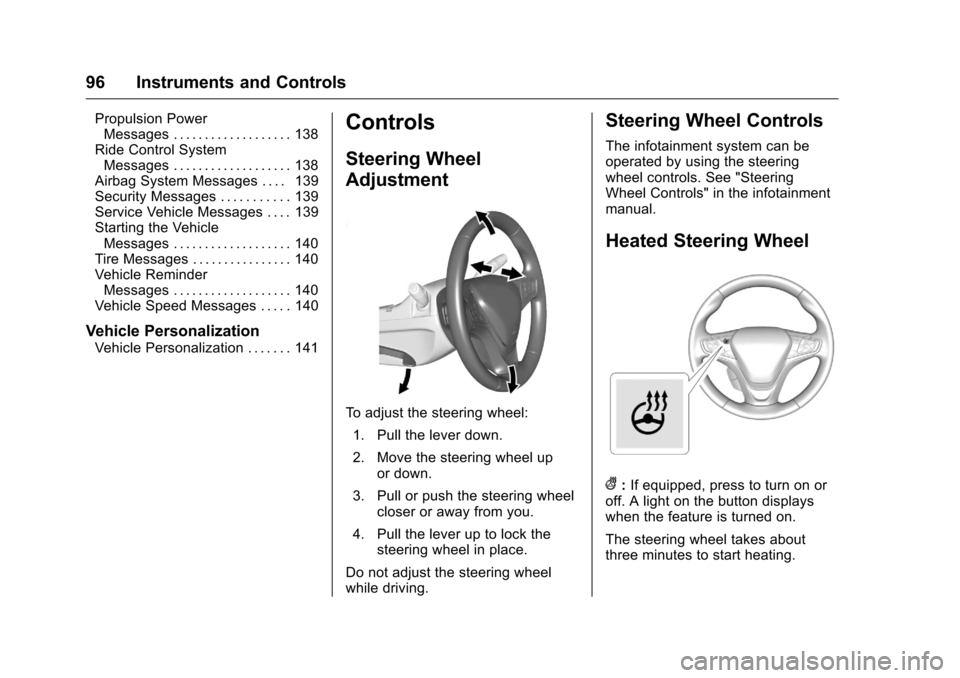
To adjust the steering wheel:
1. Pull the lever down.
2. Move the steering wheel up or down.
3. Pull or push the steering wheel closer or away from you.
4. Pull the lever up to lock the steering wheel in place.
Do not adjust the steering wheel
while driving.
Steering Wheel Controls
The infotainment system can be
operated by using the steering
wheel controls. See "Steering
Wheel Controls" in the infotainment
manual.
Heated Steering Wheel
(: If equipped, press to turn on or
off. A light on the button displays
when the feature is turned on.
The steering wheel takes about
three minutes to start heating.
Page 130 of 376

Chevrolet VOLT Owner Manual (GMNA-Localizing-U.S./Canada/Mexico-
9807421) - 2017 - CRC - 11/18/15
Instruments and Controls 129
The electric equivalent to fuel
economy is MPGe. Touch MPG on
the screen to view. When dashes
are displayed, the maximum limits to
some values have been reached.
The circle graph displays
the percentage of distance traveled
using Electric Mode versus
Extended Range Mode. The
Lifetime fuel economy is a total over
the life of the vehicle and can only
be reset by the dealer. The Energy
Usage information will also appear
automatically on power off when
Retained Accessory Power is
active. This pop-up can be disabled.
See“Energy Summary Pop-up”
under Vehicle
Personalization 0141. Energy Usage Score
The Energy Usage Score screen
provides an estimate of the factors
that influence energy usage since
the last full charge of the high
voltage battery. A positive score is
desired to reach the vehicle’s
electric and fuel economy rating.
.
Technique includes accelerating
and braking.
. Terrain includes road conditions,
such as hills, rain, and snow and
may be affected by wind and tire
pressure.
. Climate Settings includes how
the heating and air conditioning
are used. .
Outside Temperature includes
the effect that hot or cold air has
on vehicle aerodynamics.
. Score is the sum of the
individual scores.
The individual scores provide an
understanding of how electric and
fuel economy are different from
day-to-day, even when traveling the
same route.
All values are reset after a complete
charge and may not be stable until
approximately 10 miles have been
driven.
Energy Details
The Energy Details screen displays
how energy is being used since the
last time the high voltage battery
was fully charged. It includes