2017 CHEVROLET VOLT horn
[x] Cancel search: hornPage 147 of 376

Chevrolet VOLT Owner Manual (GMNA-Localizing-U.S./Canada/Mexico-
9807421) - 2017 - CRC - 11/18/15
146 Instruments and Controls
Remote Lock Feedback
This allows selection of what type of
feedback is given when locking the
vehicle with the RKE transmitter.
Select Off, Lights and Horn, Lights
Only, or Horn Only.
Remote Door Unlock
This allows selection of which doors
will unlock when pressing
Kon the
RKE transmitter.
Select All Doors or Driver Door.
Remote Start Auto Heat Seats
If equipped and turned on, this
feature will turn the heated seats on
when using remote start on
cold days.
Select Off or On.
Remote Window Operation
This allows the window to be
opened when pressing and
holding
Kon the RKE transmitter.
See Remote Keyless Entry (RKE)
System Operation 030.
Select Off or On. Passive Door Unlock
This allows the selection of what
doors will unlock when using the
door handle touch pad button on the
driver door to unlock the vehicle.
Select All Doors or Driver Door.
Passive Door Lock
This allows passive locking to be
turned on or off and selects
feedback. See
“Passive Locking” in
Remote Keyless Entry (RKE)
System Operation 030.
Select Off, On with Horn
Chirp, or On.
Remote Left in Vehicle Alert
This feature sounds an alert when
the RKE transmitter is left in the
vehicle.
Select Off or On.
Bluetooth
Select and the following may
display:
. Pair New Device
. Device Management
. Ringtones .
Voice Mail Numbers
. Text Message
Pair New Device
Select to pair a new device. See
“Pairing” in“Infotainment Controls”
under “Bluetooth” in the infotainment
manual.
Device Management
Select to connect to a different
phone source, disconnect a phone,
or delete a phone.
Ringtones
Select to change the ring tone for
the specific phone. The phone does
not need to be connected to change
the ring tone.
Voice Mail Numbers
This feature displays the voice mail
number for all connected phones.
To change the voice mail number,
select EDIT and type in a new
number, then select SAVE.
Page 222 of 376

Chevrolet VOLT Owner Manual (GMNA-Localizing-U.S./Canada/Mexico-
9807421) - 2017 - CRC - 11/18/15
Driving and Operating 221
Charging StatusIndicator Sound Action/Reason
None Repeated audible beeps To disable this feature, see “Charge Power
Loss Alert” inVehicle Person-
alization 0141.
To stop this alert, do one of the following:
. Unplug the charge cord.
. Press
Kon the RKE transmitter.
. Press and hold
7on the RKE
transmitter, then press again to stop the
panic alarm.
. Press the horn pad. Electricity has been interrupted before
charging was complete. Repeated beeps
will stop if power is restored within
90 seconds.
None Three audible beeps Charge port door is open.
Page 266 of 376
Chevrolet VOLT Owner Manual (GMNA-Localizing-U.S./Canada/Mexico-
9807421) - 2017 - CRC - 11/18/15
Vehicle Care 265
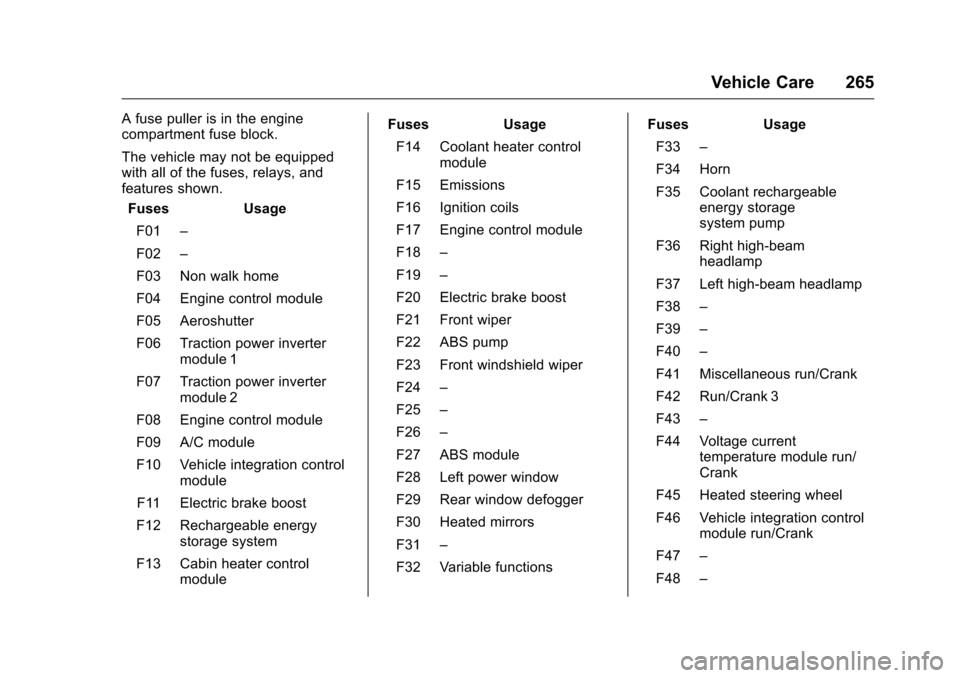
A fuse puller is in the engine
compartment fuse block.
The vehicle may not be equipped
with all of the fuses, relays, and
features shown.Fuses Usage
F01 –
F02 –
F03 Non walk home
F04 Engine control module
F05 Aeroshutter
F06 Traction power inverter module 1
F07 Traction power inverter module 2
F08 Engine control module
F09 A/C module
F10 Vehicle integration control module
F11 Electric brake boost
F12 Rechargeable energy storage system
F13 Cabin heater control module Fuses Usage
F14 Coolant heater control module
F15 Emissions
F16 Ignition coils
F17 Engine control module
F18 –
F19 –
F20 Electric brake boost
F21 Front wiper
F22 ABS pump
F23 Front windshield wiper
F24 –
F25 –
F26 –
F27 ABS module
F28 Left power window
F29 Rear window defogger
F30 Heated mirrors
F31 –
F32 Variable functions Fuses Usage
F33 –
F34 Horn
F35 Coolant rechargeable energy storage
system pump
F36 Right high-beam headlamp
F37 Left high-beam headlamp
F38 –
F39 –
F40 –
F41 Miscellaneous run/Crank
F42 Run/Crank 3
F43 –
F44 Voltage current temperature module run/
Crank
F45 Heated steering wheel
F46 Vehicle integration control module run/Crank
F47 –
F48 –
Page 267 of 376

Chevrolet VOLT Owner Manual (GMNA-Localizing-U.S./Canada/Mexico-
9807421) - 2017 - CRC - 11/18/15
266 Vehicle Care
FusesUsage
F49 –
F50 –
F51 –
F52 Engine control module/ Traction power inverter
module
F53 Left cooling fan
F54 Right cooling fan
F55 Electric pump
F56 –
F57 –
Relays Usage
K01 –
K02 –
K03 Engine control module
K04 –
K05 –
K06 –
K07 – Relays
Usage
K08 –
K09 –
K10 –
K11 –
K12 High-beam headlamps
K13 –
K14 Run/Crank
K15 Rear window defogger
K16 Horn PCB relay
K17 –
K18 –
K19 Coolant pump PCB relay
K20 –
K21 –
K22 Front washer
K23 –Instrument Panel Fuse
Block
The instrument panel fuse block is
on the left side of the instrument
panel. To access the fuses, open
the fuse panel door by pulling out.
To reinstall the door, insert the top
tab first, then push the door back
into its original location.
Page 284 of 376

Chevrolet VOLT Owner Manual (GMNA-Localizing-U.S./Canada/Mexico-
9807421) - 2017 - CRC - 11/18/15
Vehicle Care 283
TPMS Sensor Matching
Process
Each TPMS sensor has a unique
identification code. The identification
code needs to be matched to a new
tire/wheel position after rotating the
vehicle’s tires or replacing one or
more of the TPMS sensors. The
TPMS sensor matching process
should also be performed after
replacing a spare tire with a road
tire containing the TPMS sensor.
The malfunction light and the DIC
message should go off at the next
ignition cycle. The sensors are
matched to the tire/wheel positions,
using a TPMS relearn tool, in the
following order: driver side front tire,
passenger side front tire, passenger
side rear tire, and driver side rear.
See your dealer for service or to
purchase a relearn tool. A TPMS
relearn tool can also be purchased.
See Tire Pressure Monitor
Sensor Activation Tool at
www.gmtoolsandequipment.com or
call 1-800-GM TOOLS
(1-800-468-6657).There are two minutes to match the
first tire/wheel position, and
five minutes overall to match all four
tire/wheel positions. If it takes
longer, the matching process stops
and must be restarted.
The TPMS sensor matching
process is:
1. Set the parking brake.
2. Place the vehicle in ON/RUN. See Power Button 0175.
3. Make sure the Tire Pressure info page option is turned on.
The info pages on the DIC can
be turned on and off through
the Settings menu. See Driver
Information Center (DIC) 0130.
4. Use the DIC controls on the right side of the steering wheel
to scroll to the Tire Pressure
screen under the DIC
info page.
5. Press and hold the
V(Set/
Reset) button located in the
center of the DIC controls. The horn sounds twice to
signal the receiver is in relearn
mode and the TIRE
LEARNING ACTIVE message
displays on the DIC screen.
6. Start with the driver side front tire.
7. Place the relearn tool against the tire sidewall, near the valve
stem. Then press the button to
activate the TPMS sensor.
A horn chirp confirms that the
sensor identification code has
been matched to this tire and
wheel position.
8. Proceed to the passenger side front tire, and repeat the
procedure in Step 7.
9. Proceed to the passenger side rear tire, and repeat the
procedure in Step 7.
10. Proceed to the driver side rear tire, and repeat the procedure
in Step 7. The horn sounds two
times to indicate the sensor
identification code has been
matched to the driver side rear
tire, and the TPMS sensor
Page 359 of 376

Chevrolet VOLT Owner Manual (GMNA-Localizing-U.S./Canada/Mexico-
9807421) - 2017 - CRC - 11/18/15
358 OnStar
from each other and use a
combination of letters, numbers,
and symbols to increase the
security.
. Change the default name of the
SSID (Service Set Identifier).
This is your network’s name that
is visible to other wireless
devices. Choose a unique name
and avoid family names or
vehicle descriptions.
OnStar Wi-Fi
®Hotspot (If
Equipped)
The vehicle may have a built-in
Wi-Fi hotspot that provides access
to the Internet and web content at
4G LTE speed. Up to seven mobile
devices can be connected. A data
plan is required. Use the in-vehicle
controls only when it is safe to
do so.
1. To retrieve Wi-Fi hotspot information, press
=, wait for
the prompt, then say “Wi-Fi
settings.” On some vehicles,
touch Wi-Fi Settings on the
screen. 2. The Wi-Fi settings will display
the Wi-Fi hotspot name (SSID),
password, and on some
vehicles, the connection type
(no Internet connection, 3G,
4G, 4G LTE), and signal quality
(poor, good, excellent).
3. To change the SSID or password, press
Qor call
1-888-4ONSTAR to connect
with an Advisor.
After initial set-up, your vehicle’s
Wi-Fi hotspot will connect
automatically to your mobile
devices. Manage data usage by
turning Wi-Fi on or off on your
mobile device, using the
RemoteLink mobile app, or by
contacting an OnStar Advisor.
OnStar RemoteLink
®Mobile App
(If Equipped)
Download the OnStar RemoteLink
mobile app to select Apple
®
iOS, Android™, BlackBerry®,
or Windows®mobile devices. OnStar Subscribers can access the
following services from a mobile
device:
.
Remotely start/stop the vehicle,
if factory-equipped.
. Lock/unlock doors, if equipped
with automatic locks.
. Activate the horn and lamps.
. Check the vehicle’s fuel level, oil
life, or tire pressure,
if factory-equipped with the Tire
Pressure Monitor System.
. Send directions to the vehicle.
. Locate the vehicle on a map
(U.S. market only).
. Turn the vehicle's Wi-Fi hotspot
on/off, manage settings, and
monitor data consumption,
if equipped.
For OnStar RemoteLink information
and compatibility, see
www.onstar.com (U.S.) or
www.onstar.ca (Canada).
Page 360 of 376

Chevrolet VOLT Owner Manual (GMNA-Localizing-U.S./Canada/Mexico-
9807421) - 2017 - CRC - 11/18/15
OnStar 359
Remote Services
Contact an OnStar Advisor to
unlock the doors or sound the horn
and flash the lamps.
OnStar AtYourService
OnStar Advisors can provide offers
from restaurants and retailers on
your route, help locate hotels,
or book a room. These services
vary by market.
OnStar Hands-Free Calling
Make and receive calls with the
built-in wireless calling service,
which requires available minutes.
Make a Call1. Press
=. System responds:
“OnStar ready.”
2. Say “Call.”System responds:
“Call. Please say the name or
number to call.”
3. Say the entire number without pausing, including a “1”and the
area code. System responds:
“OK, calling.”
Calling 911 Emergency
1. Press=. System responds:
“OnStar ready.”
2. Say “Call.”System responds:
“Call. Please say the name or
number to call.”
3. Say “911”without pausing.
System responds: “911.”
4. Say “Call.”System responds:
“OK, dialing 911.”
Retrieve My Number
1. Press=. System responds:
“OnStar ready.”
2. Say “My number.” System
responds: “Your OnStar
Hands-Free Calling number is,”
then says the number.
End a Call
Press=. System responds: “Call
ended.”
Verify Minutes and Expiration
Press=and say “Minutes” then
“Verify” to check how many minutes
remain and their expiration date.
Diagnostics
Advanced Diagnostics provides a
status of the vehicle’ s key systems
with a monthly e-mail or by pressing
Q. The Proactive Alerts feature (if
available) can help predict and alert
of potential upcoming maintenance
issues with select components on
the vehicle, before they become a
problem.
OnStar can also monitor and report
tire pressure, if the vehicle is
equipped with a Tire Pressure
Monitoring System.
Page 370 of 376

Chevrolet VOLT Owner Manual (GMNA-Localizing-U.S./Canada/Mexico-
9807421) - 2017 - CRC - 11/18/15
Index 369
Fuses (cont'd)Rear Compartment Fuse
Block . . . . . . . . . . . . . . . . . . . . . . . . 269
G
GaugesBattery . . . . . . . . . . . . . . . . . . . . . . . 105
Driver Efficiency . . . . . . . . . . . . . . 106
Fuel . . . . . . . . . . . . . . . . . . . . . . . . . . 105
Odometer . . . . . . . . . . . . . . . . . . . . . 105
Power Indicator . . . . . . . . . . . . . . . 107
Speedometer . . . . . . . . . . . . . . . . . 105
Trip Odometer . . . . . . . . . . . . . . . . 105
Warning Lights andIndicators . . . . . . . . . . . . . . . . . . . 101
General Information Service and Maintenance . . . . . 324
Towing . . . . . . . . . . . . . . . . . . . . . . . . 234
Vehicle Care . . . . . . . . . . . . . . . . . . 236
Glove Box . . . . . . . . . . . . . . . . . . . . . . . 93
GM Mobility Reimbursement Program . . . . . . . . . . . . . . . . . . . . . . . 345
H
Halogen Bulbs . . . . . . . . . . . . . . . . . . 260
Hatch . . . . . . . . . . . . . . . . . . . . . . . . . . . . 42
Hazard Warning Flashers . . . . . . . 152
Head Restraints . . . . . . . . . . . . . . . . . 51
Headlamps . . . . . . . . . . . . . . . . . . . . . 260 Headlamps (cont'd)
Aiming . . . . . . . . . . . . . . . . . . . . . . . . 259
Automatic . . . . . . . . . . . . . . . . . . . . . 151
Bulb Replacement . . . . . . . . . . . . 260
Daytime Running
Lamps (DRL) . . . . . . . . . . . . . . . . 151
Flash-to-Pass . . . . . . . . . . . . . . . . . 151
High-Beam On Light . . . . . . . . . . .116
High/Low Beam Changer . . . . . 151
Lamps On Reminder . . . . . . . . . .117
Heated Rear Seats . . . . . . . . . . . . . . . . . . . . . 57
Steering Wheel . . . . . . . . . . . . . . . . . 96
Heated Front Seats . . . . . . . . . . . . . . 54
Heated Mirrors . . . . . . . . . . . . . . . . . . . 46
Heating and Air Conditioning . . . 157
High Voltage Battery Gauge . . . . 105
High Voltage Devices and
Wiring . . . . . . . . . . . . . . . . . . . . . . . . . 262
High-Beam On Light . . . . . . . . . . . . 116
Hill and Mountain Roads . . . . . . . . 169
Hill Start Assist (HSA) . . . . . . . . . . 190
Hold Mode Light . . . . . . . . . . . . . . . . 113
Hood . . . . . . . . . . . . . . . . . . . . . . . . . . . 240
Horn . . . . . . . . . . . . . . . . . . . . . . . . . . . . . 97
How to Wear Safety Belts Properly . . . . . . . . . . . . . . . . . . . . . . . . 58
I
Immobilizer . . . . . . . . . . . . . . . . . . . . . . 44
IndicatorVehicle Ahead . . . . . . . . . . . . . . . . .113
Infants and Young Children,
Restraints . . . . . . . . . . . . . . . . . . . . . . 77
Information Energy . . . . . . . . . . . . . . . . . . . . . . . 128
Infotainment . . . . . . . . . . . . . . . . . . . . 156
Infotainment System . . . . . . . . . . . . 354
Instrument Cluster . . . . . . . . . . . . . . 101
Interior Rearview Mirrors . . . . . . . . . 46
Introduction . . . . . . . . . . . . . . . . . . . . . . . 2
J
Jump Starting - North America . . . . . . . . . . . . . . . . . . . . . . . 305
K
Key and Lock Messages . . . . . . . . 135
Keyless EntryRemote (RKE) System . . . . . . . . . 30
Keys . . . . . . . . . . . . . . . . . . . . . . . . . . . . . 29
L
Labeling, Tire Sidewall . . . . . . . . . . 273
Lamps Daytime Running (DRL) . . . . . . 151
Dome . . . . . . . . . . . . . . . . . . . . . . . . . 154
Exterior Controls . . . . . . . . . . . . . . 149