2017 CHEVROLET TRAX controls
[x] Cancel search: controlsPage 2 of 373

Chevrolet TRAX Owner Manual (GMNA-Localizing-U.S./Canada/Mexico-
10122735) - 2017 - crc - 7/12/16
ContentsIntroduction . . . . . . . . . . . . . . . . . . . . . . 2
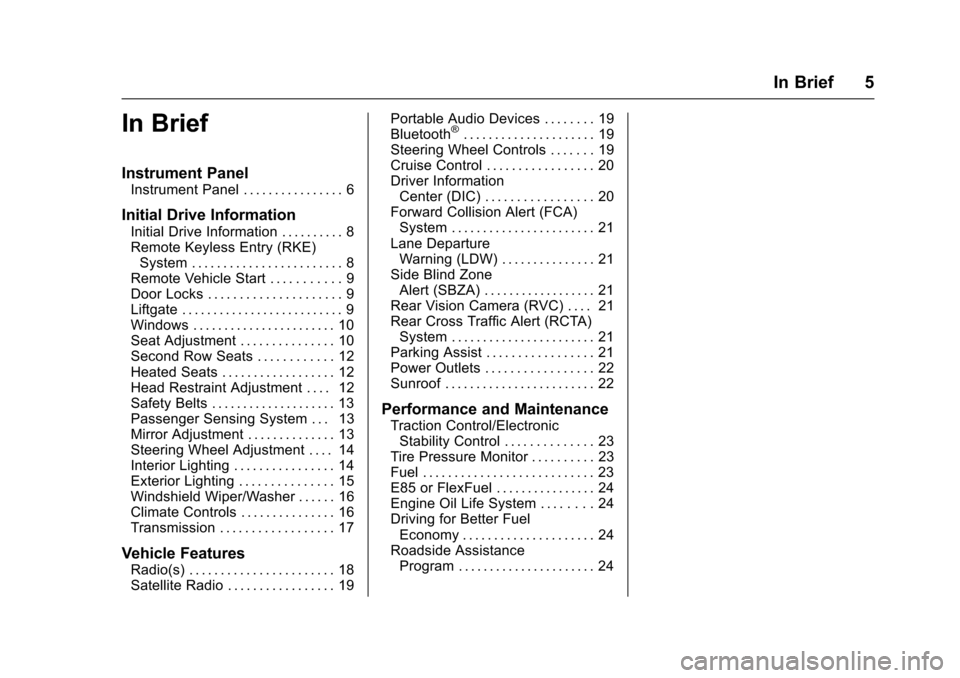
In Brief . . . . . . . . . . . . . . . . . . . . . . . . . . . 5
Keys, Doors, and Windows . . . . . 25
Seats and Restraints . . . . . . . . . . . 51
Storage . . . . . . . . . . . . . . . . . . . . . . . . . 99
Instruments and Controls . . . . . . 103
Lighting . . . . . . . . . . . . . . . . . . . . . . . 146
Infotainment System . . . . . . . . . . 152
Climate Controls . . . . . . . . . . . . . . 186
Driving and Operating . . . . . . . . . 191
Vehicle Care . . . . . . . . . . . . . . . . . . 238
Service and Maintenance . . . . . 320
Technical Data . . . . . . . . . . . . . . . . 333
Customer Information . . . . . . . . . 337
Reporting Safety Defects . . . . . . 347
OnStar . . . . . . . . . . . . . . . . . . . . . . . . 351
Index . . . . . . . . . . . . . . . . . . . . 361
Page 4 of 373

Chevrolet TRAX Owner Manual (GMNA-Localizing-U.S./Canada/Mexico-
10122735) - 2017 - crc - 7/12/16
Introduction 3
Danger, Warning, and
Caution
Warning messages found on vehicle
labels and in this manual describe
hazards and what to do to avoid or
reduce them.
{Danger
Danger indicates a hazard with a
high level of risk which will result
in serious injury or death.
{Warning
Warning indicates a hazard that
could result in injury or death.
Caution
Caution indicates a hazard that
could result in property or vehicle
damage.
A circle with a slash through it is a
safety symbol which means“Do
Not,” “Do not do this,” or“Do not let
this happen.”
Symbols
The vehicle has components and
labels that use symbols instead of
text. Symbols are shown along with
the text describing the operation or
information relating to a specific
component, control, message,
gauge, or indicator.
M: Shown when the owner
manual has additional instructions
or information.
*: Shown when the service
manual has additional instructions
or information.
0: Shown when there is more
information on another page —
“see page.” Vehicle Symbol Chart
Here are some additional symbols
that may be found on the vehicle
and what they mean. For more
information on the symbol, refer to
the Index.
9:
Airbag Readiness Light
#:Air Conditioning
!:Antilock Brake System (ABS)
%:Audio Steering Wheel Controls
or OnStar®(if equipped)
$: Brake System Warning Light
":Charging System
I: Cruise Control
`:Do Not Puncture
^:Do Not Service
B:Engine Coolant Temperature
O:Exterior Lamps
_: Flame/Fire Prohibited
#:Fog Lamps
.:Fuel Gauge
+: Fuses
Page 6 of 373
Chevrolet TRAX Owner Manual (GMNA-Localizing-U.S./Canada/Mexico-
10122735) - 2017 - crc - 7/12/16
In Brief 5
In Brief
Instrument Panel
Instrument Panel . . . . . . . . . . . . . . . . 6
Initial Drive Information
Initial Drive Information . . . . . . . . . . 8
Remote Keyless Entry (RKE)System . . . . . . . . . . . . . . . . . . . . . . . . 8
Remote Vehicle Start . . . . . . . . . . . 9
Door Locks . . . . . . . . . . . . . . . . . . . . . 9
Liftgate . . . . . . . . . . . . . . . . . . . . . . . . . . 9
Windows . . . . . . . . . . . . . . . . . . . . . . . 10
Seat Adjustment . . . . . . . . . . . . . . . 10
Second Row Seats . . . . . . . . . . . . 12
Heated Seats . . . . . . . . . . . . . . . . . . 12
Head Restraint Adjustment . . . . 12
Safety Belts . . . . . . . . . . . . . . . . . . . . 13
Passenger Sensing System . . . 13
Mirror Adjustment . . . . . . . . . . . . . . 13
Steering Wheel Adjustment . . . . 14
Interior Lighting . . . . . . . . . . . . . . . . 14
Exterior Lighting . . . . . . . . . . . . . . . 15
Windshield Wiper/Washer . . . . . . 16
Climate Controls . . . . . . . . . . . . . . . 16
Transmission . . . . . . . . . . . . . . . . . . 17
Vehicle Features
Radio(s) . . . . . . . . . . . . . . . . . . . . . . . 18
Satellite Radio . . . . . . . . . . . . . . . . . 19 Portable Audio Devices . . . . . . . . 19
Bluetooth
®. . . . . . . . . . . . . . . . . . . . . 19
Steering Wheel Controls . . . . . . . 19
Cruise Control . . . . . . . . . . . . . . . . . 20
Driver Information Center (DIC) . . . . . . . . . . . . . . . . . 20
Forward Collision Alert (FCA) System . . . . . . . . . . . . . . . . . . . . . . . 21
Lane Departure Warning (LDW) . . . . . . . . . . . . . . . 21
Side Blind Zone Alert (SBZA) . . . . . . . . . . . . . . . . . . 21
Rear Vision Camera (RVC) . . . . 21
Rear Cross Traffic Alert (RCTA) System . . . . . . . . . . . . . . . . . . . . . . . 21
Parking Assist . . . . . . . . . . . . . . . . . 21
Power Outlets . . . . . . . . . . . . . . . . . 22
Sunroof . . . . . . . . . . . . . . . . . . . . . . . . 22
Performance and Maintenance
Traction Control/Electronic Stability Control . . . . . . . . . . . . . . 23
Tire Pressure Monitor . . . . . . . . . . 23
Fuel . . . . . . . . . . . . . . . . . . . . . . . . . . . 23
E85 or FlexFuel . . . . . . . . . . . . . . . . 24
Engine Oil Life System . . . . . . . . 24
Driving for Better Fuel Economy . . . . . . . . . . . . . . . . . . . . . 24
Roadside Assistance Program . . . . . . . . . . . . . . . . . . . . . . 24
Page 8 of 373

Chevrolet TRAX Owner Manual (GMNA-Localizing-U.S./Canada/Mexico-
10122735) - 2017 - crc - 7/12/16
In Brief 7
1.Air Vents 0188.
2. Turn Signal Lever. See Turn
and Lane-Change
Signals 0148.
Headlamp High/Low-Beam
Changer 0146.
3. Instrument Cluster 0111.
4. Windshield Wiper/
Washer 0105.
Rear Window Wiper/
Washer 0106.
5. Light Sensor. See Automatic
Headlamp System 0147.
6. Infotainment 0152.
7. Lane Departure Warning
(LDW) 0231 (If Equipped).
8. Hazard Warning
Flashers 0148.
9. Power Outlets 0109.
10. Passenger Safety Belt Reminder Light. See Safety
Belt Reminders 0114.
11. Shift Lever. See Automatic
Transmission 0214 orManual
Transmission 0216. 12.
Parking Brake 0219.
13. USB Port 0165.
14. Climate Control
Systems 0186.
15. Traction Control/Electronic Stabilty Control Button. See
Traction Control/Electronic
Stability Control 0221.
16. Ignition Positions (Key Access)
0203 orIgnition Positions
(Keyless Access) 0205.
17. Steering Wheel Controls 0104.
18. Horn 0105.
19. Steering Wheel
Adjustment 0104.
20. Cruise Control 0223 (If
Equipped).
Forward Collision Alert (FCA)
System 0228 (If Equipped).
21. Instrument Panel Storage 099
(If Equipped).
22. Data Link Connector (DLC) (Out of View). See Malfunction
Indicator Lamp (Check Engine
Light) 0116. 23. Hood Release. See
Hood 0241.
24. Exterior Lamp Controls 0146.
Instrument Panel Illumination
Control 0149.
Front Fog Lamps 0148 (If
Equipped).
Page 13 of 373

Chevrolet TRAX Owner Manual (GMNA-Localizing-U.S./Canada/Mexico-
10122735) - 2017 - crc - 7/12/16
12 In Brief
Reclining Seatbacks
Manual Seat Shown, Power SeatSimilar
To recline the seatback: 1. Lift the lever. If necessary, move the safety
belt out of the way to access
the lever.
2. Move the seatback to the desired position, then release
the lever to lock the seatback
in place.
3. Push and pull on the seatback to make sure it is locked. To return the seatback to an upright
position:
1. Lift the lever fully without applying pressure to the
seatback, and the seatback
returns to the upright position.
2. Push and pull on the seatback to make sure it is locked.
See Reclining Seatbacks 055.
Second Row Seats
The rear seatbacks can be folded
down to increase cargo space.
See Rear Seats 058.
Heated Seats
If available, the controls are on the
climate control panel. To operate,
the engine must be running.
Press
MorLto heat the driver or
passenger seat.
See Heated Front Seats 056.
Head Restraint
Adjustment
Do not drive until the head restraints
for all occupants are installed and
adjusted properly.
Page 15 of 373

Chevrolet TRAX Owner Manual (GMNA-Localizing-U.S./Canada/Mexico-
10122735) - 2017 - crc - 7/12/16
14 In Brief
2. Move the control to adjust themirror.
3. Turn the selector switch to
(
to deselect the mirror.
Interior Mirror
Adjustment
Adjust the rearview mirror to get a
clear view of the area behind the
vehicle.
Manual Rearview Mirror
If equipped, push the tab forward for
daytime use and pull it for nighttime
use to avoid the glare of headlamps
from behind. See Manual Rearview
Mirror 046.
Automatic Dimming Rearview
Mirror
If equipped, automatic dimming
reduces the glare of headlamps
from behind. The dimming feature
comes on when the vehicle is
started.
See Automatic Dimming Rearview
Mirror 046.
Steering Wheel
Adjustment
To adjust the steering wheel:
1. Pull the lever down.
2. Move the steering wheel up, down, forward, and backward.
3. Pull the lever up to lock the steering wheel in place.
Do not adjust the steering wheel
while driving.
Interior Lighting
Front and Rear Dome Lamps
The front dome lamp controls are in
the overhead console.
(: Press to turn the lamps off,
even when a door is open.
H: When the button is returned to
the middle position, the lamps turn
on automatically when a door is
opened.
': Press to turn on the dome
lamps.
Page 16 of 373

Chevrolet TRAX Owner Manual (GMNA-Localizing-U.S./Canada/Mexico-
10122735) - 2017 - crc - 7/12/16
In Brief 15
The rear dome lamp controls are in
the headliner above the rear seats.
9:Press to turn the lamps off,
even when a door is open.
H: When the button is returned to
the middle position, the lamps turn
on automatically when a door is
opened.
R: Press to turn on the dome lamps. Reading Lamps
The front reading lamps are in the
overhead console.
#or$:
Press to turn each lamp
on or off.
For more information about
interior lighting, see Instrument
Panel Illumination Control 0149 or
Courtesy Lamps 0149.
Exterior Lighting
The exterior lamp control is on the
instrument panel to the left of the
steering column.
There are four positions:
O:Turns the exterior lamps off.
AUTO : Turns the exterior lamps on
and off automatically depending on
outside lighting.
;: Turns on the parking lamps
including all lamps, except the
headlamps.
5: Turns on the headlamps
together with the parking lamps and
instrument panel lights. A warning
chime sounds if the driver door is
opened when the ignition switch is
off and the headlamps are on.
Page 17 of 373

Chevrolet TRAX Owner Manual (GMNA-Localizing-U.S./Canada/Mexico-
10122735) - 2017 - crc - 7/12/16
16 In Brief
#:If equipped with fog lamps,
press to turn the lamps on or off.
See:
. Exterior Lamp Controls 0146.
. Daytime Running Lamps
(DRL) 0147.
. Front Fog Lamps 0148.
Windshield Wiper/Washer
The windshield wiper/washer lever
is located on the right side of the
steering column.
Move the lever to one of the
following positions:
HI : Use for fast wipes.
LO : Use for slow wipes.
INT : Move the lever up to INT for
intermittent wipes, then turn the
x
INT band up for more frequent
wipes or down for less frequent
wipes.
OFF : Use to turn the wipers off.
1X : For a single wipe, briefly move
the wiper lever down. For several
wipes, hold the wiper lever down.
b: Pull the windshield wiper lever
toward you to spray windshield
washer fluid and activate the wipers.
Rear Window Wiper/Washer
The rear wiper/washer controls are
on the end of the windshield wiper
lever.
ON : Press the upper portion of the
button for continuous rear window
wipes. OFF :
The rear wiper turns off when
the button is returned to the middle
position.
INT : Press the lower portion of the
button to set a delay between
wipes.
m=: Push the windshield wiper
lever forward to spray washer fluid
on the rear window. The lever
returns to its starting position when
released.
See Windshield Wiper/Washer
0 105 andRear Window Wiper/
Washer 0106, If Equipped.
Climate Controls
If equipped with these climate
control systems, the heating,
cooling, and ventilation can be
controlled for the vehicle.