2017 CHEVROLET TRAVERSE Lift gate
[x] Cancel search: Lift gatePage 151 of 394
Chevrolet Traverse Owner Manual (GMNA-Localizing-U.S./Canada/Mexico-
9955676) - 2017 - crc - 3/29/16
150 Instruments and Controls
Press the customization button until
DELAY DOOR LOCK appears on
the DIC display. Press the set/reset
button once to access the settings
for this feature. Then press the
customization button to scroll
through the following settings:
OFF :There will be no delayed
locking of the vehicle's doors.
ON (default) : The doors will not
lock until five seconds after the last
door or the liftgate is closed.
NO CHANGE : No change will be
made to this feature. The current
setting will remain.
To select a setting, press the set/
reset button while the desired
setting is displayed on the DIC.
EXIT LIGHTING
This feature allows you to select the
amount of time you want the
exterior lamps to remain on when it
is dark enough outside. This
happens after the key is turned from
ON/RUN to LOCK/OFF. Press the customization button until
EXIT LIGHTING appears on the DIC
display. Press the set/reset button
once to access the settings for this
feature. Then press the
customization button to scroll
through the following settings:
OFF :
The exterior lamps will not
turn on.
30 SECONDS (default) : The
exterior lamps will stay on for
30 seconds.
1 MINUTE : The exterior lamps will
stay on for one minute.
2 MINUTES : The exterior lamps will
stay on for two minutes.
NO CHANGE : No change will be
made to this feature. The current
setting will remain.
To select a setting, press the set/
reset button while the desired
setting is displayed on the DIC.
APPROACH LIGHTING
This feature allows you to select
whether or not to have the exterior
lights turn on briefly during low light periods after unlocking the vehicle
using the Remote Keyless Entry
(RKE) transmitter.
Press the customization button until
APPROACH LIGHTING appears on
the DIC display. Press the set/reset
button once to access the settings
for this feature. Then press the
customization button to scroll
through the following settings:
OFF :
The exterior lights will not
turn on when you unlock the vehicle
with the RKE transmitter.
ON (default) : If it is dark enough
outside, the exterior lights will turn
on briefly when you unlock the
vehicle with the RKE transmitter.
The lights will remain on for
20 seconds or until the lock button
on the RKE transmitter is pressed,
or the vehicle is no longer off. See
Remote Keyless Entry (RKE)
System Operation 033.
NO CHANGE : No change will be
made to this feature. The current
setting will remain.
Page 248 of 394

Chevrolet Traverse Owner Manual (GMNA-Localizing-U.S./Canada/Mexico-
9955676) - 2017 - crc - 4/1/16
Driving and Operating 247
.Ice, snow, mud, or anything else
builds up on the camera lens.
Clean the lens, rinse it with
water, and wipe it with a soft
cloth.
. The back of the vehicle is in an
accident. The position and
mounting angle of the camera
can change or the camera can
be affected. Be sure to have the
camera and its position and
mounting angle checked at your
dealer.
. There are extreme temperature
changes.
The RVC system display in the
rearview mirror may turn off or not
appear as expected due to one of
the following conditions. If this
occurs the left indicator light on the
mirror will flash.
. A slow flash may indicate a loss
of video signal, or no video
signal present during the reverse
cycle.
. A fast flash may indicate that the
display has been on for the
maximum allowable time during a reverse cycle, or the display
has reached an Over
Temperature limit.
The fast flash conditions are
used to protect the video device
from high temperature
conditions. Once conditions
return to normal the device will
reset and the green indicator will
stop flashing.
During any of these fault conditions,
the display will be blank and the
indicator will continue to flash as
long as the vehicle is in R (Reverse)
or until the conditions return to
normal.
Pressing and holding
zwhen the
left indicator light is flashing will turn
off the video display along with the
left indicator light.
Parking Assist
If available, the Rear Parking Assist
(RPA) system assists the driver with
parking and avoiding objects while
in R (Reverse). RPA operates at
speeds less than 8 km/h (5 mph).
The sensors on the rear bumper are used to detect objects up to
2.5 m (8 ft) behind the vehicle, and
at least 25 cm (10 in) off the ground
and below liftgate level. Detection
distances may be less during
warmer or humid weather.
{Warning
The parking assist system does
not detect children, pedestrians,
bicyclists, animals, or objects
below the bumper or that are too
close or too far from the vehicle.
It is not available at speeds
greater than 8 km/h (5 mph). To
prevent injury, death, or vehicle
damage, even with parking assist,
always check the area around the
vehicle and check all mirrors
before backing.
How the System Works
RPA comes on automatically when
the shift lever is moved into
R (Reverse). A single beep sounds
to indicate the system is working.
Page 249 of 394

Chevrolet Traverse Owner Manual (GMNA-Localizing-U.S./Canada/Mexico-
9955676) - 2017 - crc - 4/1/16
248 Driving and Operating
An obstacle is indicated by audible
beeps. The interval between the
beeps becomes shorter as the
vehicle gets closer to the obstacle.
When the distance is less than
30 cm (12 in) the beeping is
continuous for five seconds.
Turning the System On and Off
The system can be disabled through
the Driver Information Center (DIC).
See“Park Assist” underDriver
Information Center (DIC) (With DIC
Buttons) 0130 orDriver Information
Center (DIC) (Without DIC
Buttons) 0135.
Turn off RPA when towing a trailer.
RPA defaults to the on setting each
time the vehicle is started.
When the System Does Not
Seem to Work Properly
The following messages may be
displayed on the DIC:
SERVICE PARK ASSIST : If this
message occurs, take the vehicle to
your dealer to repair the system. PARK ASST BLOCKED SEE
OWNERS MANUAL :
This
message can occur under the
following conditions:
. The sensors are not clean. Keep
the vehicle's rear bumper free of
mud, dirt, snow, ice, and slush.
For cleaning instructions, see
Exterior Care 0333.
. The sensors are covered by
frost or ice. Frost or ice can form
around and behind the sensors
and may not always be seen;
this can occur after washing the
vehicle in cold weather. The
message may not clear until the
frost or ice has melted.
. A trailer was attached to the
vehicle, or an object was
hanging out of the liftgate during
the last drive cycle. Once the
object is removed, RPA will
return to normal operation.
. A tow bar is attached to the
vehicle.
. The bumper is damaged. Take
the vehicle to your dealer to
repair the system. .
Other conditions, such as
vibrations from a jackhammer or
the compression of air brakes on
a very large truck, are affecting
system performance.
Forward Collision Alert
(FCA) System
If equipped, the FCA system may
help to avoid or reduce the harm
caused by front-end crashes. When
approaching a vehicle ahead too
quickly, FCA provides a red flashing
alert on the windshield and rapidly
beeps. FCA also lights an amber
visual alert if following another
vehicle much too closely.
FCA detects vehicles within a
distance of approximately 60 m
(197 ft) and operates at speeds
above 40 km/h (25 mph).
{Warning
FCA is a warning system and
does not apply the brakes. When
approaching a slower-moving or
(Continued)
Page 258 of 394
Chevrolet Traverse Owner Manual (GMNA-Localizing-U.S./Canada/Mexico-
9955676) - 2017 - crc - 4/1/16
Driving and Operating 257
.Do not tow a trailer during the
first 800 km (500 mi), to prevent
damage to the engine, axle or
other parts.
. Then, during the first 800 km
(500 mi) trailer towing, do not
drive over 80 km/h (50 mph) and
do not make starts at full throttle.
. The vehicle can tow in D (Drive)
but M (Manual Mode) is
recommended. See Manual
Mode 0236. Use a lower gear if
the transmission shifts too often.
. Turn off Park Assist when
towing.
{Warning
When towing a trailer, exhaust
gases may collect at the rear of
the vehicle and enter if the
liftgate, trunk/hatch, or rear-most
window is open.
(Continued)
Warning (Continued)
When towing a trailer:
. Do not drive with the
liftgate, trunk/hatch,
or rear-most window open.
. Fully open the air outlets on
or under the instrument
panel.
. Also adjust the climate
control system to a setting
that brings in only outside
air. See “Climate Control
Systems” in the Index.
For information about carbon
monoxide, see Engine
Exhaust 0234.
Towing a trailer requires a certain
amount of experience. The
combination you are driving is
longer and not as responsive as the
vehicle itself. Get acquainted with
the handling and braking of the rig
before setting out for the open road. Before starting, check all trailer hitch
parts and attachments, safety
chains, electrical connectors, lamps,
tires and mirrors. If the trailer has
electric brakes, start the
combination moving and then apply
the trailer brake controller by hand
to be sure the brakes work.
During the trip, check occasionally
to be sure that the load is secure
and the lamps and any trailer
brakes still work.
Towing with a Stability Control
System
When towing, the sound of the
stability control system might be
heard. The system is reacting to the
vehicle movement caused by the
trailer, which mainly occurs during
cornering. This is normal when
towing heavier trailers.
Page 289 of 394
Chevrolet Traverse Owner Manual (GMNA-Localizing-U.S./Canada/Mexico-
9955676) - 2017 - crc - 3/29/16
288 Vehicle Care
Headlamp Aiming
Headlamp aim has been preset and
should need no further adjustment.
If the vehicle is damaged in a crash,
the headlamp aim may be affected.
If adjustment to the headlamps is
necessary, see your dealer.
Bulb Replacement
For the proper type of replacement
bulbs, seeReplacement
Bulbs 0289.
For any bulb-changing procedure
not listed in this section, contact
your dealer.
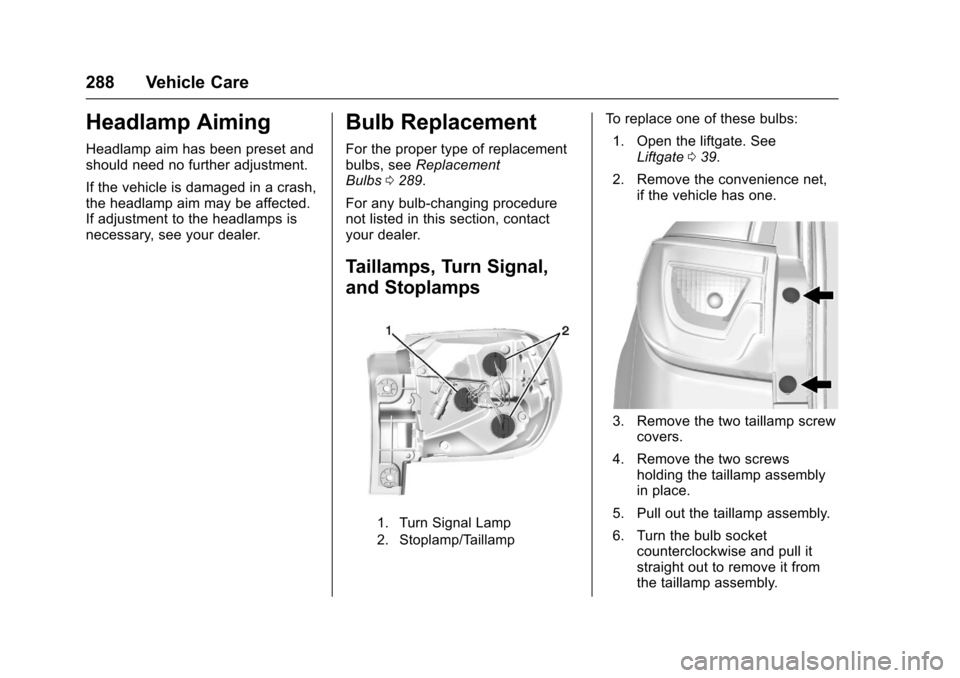
Taillamps, Turn Signal,
and Stoplamps
1. Turn Signal Lamp
2. Stoplamp/Taillamp
To replace one of these bulbs: 1. Open the liftgate. See Liftgate 039.
2. Remove the convenience net, if the vehicle has one.
3. Remove the two taillamp screwcovers.
4. Remove the two screws holding the taillamp assembly
in place.
5. Pull out the taillamp assembly.
6. Turn the bulb socket counterclockwise and pull it
straight out to remove it from
the taillamp assembly.
Page 290 of 394

Chevrolet Traverse Owner Manual (GMNA-Localizing-U.S./Canada/Mexico-
9955676) - 2017 - crc - 3/29/16
Vehicle Care 289
7. Pull the old bulb straight out ofthe bulb socket.
8. Push the new bulb straight into the bulb socket.
9. Push the taillamp assembly back into its original location.
When reinstalling the taillamp
assembly, make sure the pin
on the taillamp assembly lines
up and is inserted correctly into
the opening of the vehicle.
10. Reinstall the two screws that hold the taillamp assembly in
place.
11. Reinstall the two taillamp screw covers.
License Plate Lamp
To replace one of these bulbs:
1. Open the liftgate. See Liftgate 039.
2. Push the left end of the lamp
assembly toward the right.
3. Turn the lamp assembly down to remove it from the liftgate.
4. Turn the bulb socket (1)counterclockwise to remove it
from the lamp assembly (3).
5. Pull the bulb (2) straight out of the bulb socket.
6. Push the replacement bulb straight into the bulb socket
and turn the bulb socket
clockwise to install it into the
lamp assembly.
7. Turn the lamp assembly into the liftgate engaging the clip
side first.
8. Push on the lamp side opposite the clip until the lamp assembly
snaps into place.
Replacement Bulbs
Exterior Lamp Bulb
Number
License Plate Lamp 194 LL
Rear Turn
Signal Lamp 7443 NA
Taillamp/Stop Lamp 7444 LL
For replacement bulbs not listed
here, contact your dealer.
Page 294 of 394

Chevrolet Traverse Owner Manual (GMNA-Localizing-U.S./Canada/Mexico-
9955676) - 2017 - crc - 3/29/16
Vehicle Care 293
FusesUsage
FPM Fuel pump power module
HORN Horn
HTD MIR Heated exterior rearview mirror
HTD
STR WHL Heated steering
wheel
HUMIDITY/ MAF Humidity sensor/
MAF sensor
HVAC BLWR HVAC blower LT HI BEAM Left high-beam headlamp
LT LO BEAM Left low-beam headlamp
LT PRK Left parking lamp
LT TRLR
STOP/TRN Left trailer
stoplamp/Turn
signal lamp
ODD COILS Injector Coils –odd
PWR L/GATE Power liftgate
PWR
OUTLET Power outlet Fuses
Usage
RR APO Rear accessory power outlet
RR DEFOG Rear defogger RR HVAC Rear climate control system
RT HI BEAM Right high-beam headlamp
RT LO BEAM Right low-beam headlamp
RT PRK Right parking lamp
RT TRLR
STOP/TRN Right trailer
stoplamp/Turn
signal lamp
RVC SNSR Regulated voltage control sensor
S/ROOF/
SUNSHADE Sunroof
SERVICE Service repair SPARE –
STOP LAMP Stoplamps
STRTR StarterTCM Transmission control module Fuses
Usage
TRANS Transmission TRLR
BCK/UP Trailer reverse
lamps
TRLR BRK Trailer brake lamps TRLR
PRK LAMP Trailer parking
lamps
TRLR PWR Trailer power WPR/WSW Windshield wiper/ Washer
Relays Usage
A/C
CMPRSR CLTCH A/C clutch
AUX
VAC PUMP Auxiliary
vacuum pump
CRNK Switched power
FAN 1 Cooling fan 1
FAN 2 Cooling fan 2
FAN 3 Cooling fan 3
HI BEAM High-beam headlamps
Page 296 of 394

Chevrolet Traverse Owner Manual (GMNA-Localizing-U.S./Canada/Mexico-
9955676) - 2017 - crc - 3/29/16
Vehicle Care 295
The vehicle may not be equipped
with all of the fuses, relays, and
features shown.Fuses Usage
# GMC Non-HID = Low-beam
)GMC Non-HID =
High-shutter
) )Chevy = Fog lamps
) ) )Buick China = Rear
fog lamps
AIRBAG Airbag AMP Amplifier
BCK
UP/STOP Reverse lamps/
Stoplamps
BCM Body control module
CNSTR VENT Canister vent
CTSY Courtesy lamps
DR LCK Door locks DRL/
LO BEAM Daytime running
lamps relay/
Low-beam
headlamps relay Fuses Usage
DSPLY Display
FRT WSW Front windshield washer
HTD/
COOL SEAT Heated/Cooling
seats
HVAC HVAC
INADV PWR INT LAMPS Inadvertent power/
Interior light pipe
lamps
INFOTMNT/ MSM Infotainment/
Memory seat
module
LT TRN SIG Left turn signal lamp
OBS
DET/URS Rear park assist/
Side blind zone
alert/Forward
collision alert/
Universal remote
system
PDM Power mirrors/ Liftgate release
PWR MODE Power mode PWR MIR Power mirrors Fuses Usage
RDO Radio
REAR WPR Rear wiper
RT TRN SIG Right turn signal lamp
STR WHL ILLUM Steering wheel
illumination
USB CHRG USB charging