2017 CHEVROLET SUBURBAN odometer
[x] Cancel search: odometerPage 167 of 465
Chevrolet Tahoe/Suburban Owner Manual (GMNA-Localizing-U.S./Canada/
Mexico-9955986) - 2017 - crc - 7/5/16
166 Instruments and Controls
Vehicle Messages
Messages displayed on the DIC
indicate the status of the vehicle or
some action that may be needed to
correct a condition. Multiple
messages may appear one after
another.
The messages that do not require
immediate action can be
acknowledged and cleared by
pressing
Vor the trip odometer
reset stem on the base cluster.
The messages that require
immediate action cannot be cleared
until that action is performed.
All messages should be taken
seriously and clearing the message
does not correct the problem.
The following are the possible
messages and some information
about them.
Battery Voltage and
Charging Messages
BATTERY LOW START
VEHICLE
When the vehicle’ s battery is
severely discharged, this message
will display and four chimes will
sound. Start the vehicle
immediately. If the vehicle is not
started and the battery continues to
discharge, the climate controls,
heated seats, and audio systems
will shut off and the vehicle may
require a jump start. These systems
will function again after the vehicle
is started.
BATTERY SAVER ACTIVE
This message displays when the
battery voltage drops below
expected levels and features are
disabled. Turn off all unnecessary
accessory features.
SERVICE BATTERY
CHARGING SYSTEM
On some vehicles, this message
displays if there is a problem with
the battery charging system. Under
certain conditions, the charging
system light may also turn on in the
instrument cluster. See Charging
System Light 0151. Driving with this
problem could drain the battery.
Turn off all unnecessary
accessories. Have the electrical
system checked as soon as
possible. See your dealer.
TRANSPORT MODE ON
This message is displayed when the
vehicle is in transport mode. Some
features can be disabled while in
this mode, including Remote
Keyless Entry (RKE), remote start,
and the vehicle alarm system. Take
the vehicle to your dealer for service
to turn transport mode off.
Page 329 of 465
Chevrolet Tahoe/Suburban Owner Manual (GMNA-Localizing-U.S./Canada/
Mexico-9955986) - 2017 - crc - 7/5/16
328 Vehicle Care
On some vehicles, when the system
has calculated that oil life has been
diminished, a CHANGE ENGINE
OIL SOON message comes on to
indicate that an oil change is
necessary. SeeEngine Oil
Messages 0169. Change the oil as
soon as possible within the next
1 000 km (600 mi). It is possible that,
if driving under the best conditions,
the oil life system might indicate that
an oil change is not necessary for
up to a year. The engine oil and
filter must be changed at least once
a year and, at this time, the system
must be reset. For vehicles without
the CHANGE ENGINE OIL SOON
message, an oil change is needed
when the OIL LIFE REMAINING
percentage is near 0%. Your dealer
has trained service people who will
perform this work and reset the
system. It is also important to check
the oil regularly over the course of
an oil drain interval and keep it at
the proper level.
If the system is ever reset
accidentally, the oil must be
changed at 5 000 km (3,000 mi) since the last oil change.
Remember to reset the oil life
system whenever the oil is changed.
How to Reset the Engine Oil
Life System
Reset the system whenever the
engine oil is changed so that the
system can calculate the next
engine oil change. Always reset the
engine oil life to 100% after every oil
change. It will not reset itself. To
reset the engine oil life system:
1. Display the OIL LIFE REMAINING on the DIC. If the
vehicle does not have DIC
buttons, the vehicle must be in
P (Park) to access this display.
See Driver Information Center
(DIC) (Base Level) 0158 or
Driver Information Center (DIC)
(Uplevel) 0160.
2. Press and hold
V, or the trip
odometer reset stem if the
vehicle does not have DIC
buttons, for several seconds.
The oil life will change
to 100%. The oil life system can also be reset
as follows:
1. Turn the ignition to ON/RUN with the engine off.
2. Fully press the accelerator pedal slowly three times within
five seconds.
3. Display the OIL LIFE REMAINING on the DIC. If the
display shows 100%, the
system is reset.
If the vehicle has a CHANGE
ENGINE OIL SOON message and it
comes back on when the vehicle is
started and/or the OIL LIFE
REMAINING is near 0%, the engine
oil life system has not been reset.
Repeat the procedure.
Automatic Transmission
Fluid
For a heavy-duty Suburban, see the
Suburban Heavy-Duty Package
supplement.
Page 375 of 465
Chevrolet Tahoe/Suburban Owner Manual (GMNA-Localizing-U.S./Canada/
Mexico-9955986) - 2017 - crc - 7/5/16
374 Vehicle Care
passenger side front tire, passenger
side rear tire, and driver side rear.
See your dealer for service or to
purchase a relearn tool. A TPMS
relearn tool can also be purchased.
See Tire Pressure Monitor Sensor
Activation Tool at
www.gmtoolsandequipment.com or
call 1-800-GM TOOLS
(1-800-468-6657).
There are two minutes to match the
first tire/wheel position, and
five minutes overall to match all four
tire/wheel positions. If it takes
longer, the matching process stops
and must be restarted.
The TPMS sensor matching
process is:1. Set the parking brake.
2. Turn the ignition to ON/RUN with the engine off or place the
vehicle power mode in ON/
RUN/START.
3. Uplevel DIC Only: Make sure the Tire Pressure info page
option is turned on. The info
pages on the DIC can be
turned on and off through the Settings menu. See
Driver
Information Center (DIC) (Base
Level) 0158 orDriver
Information Center (DIC)
(Uplevel) 0160.
4. If the vehicle has an uplevel DIC, use the DIC controls on
the right side of the steering
wheel to scroll to the Tire
Pressure screen under the DIC
info page.
If the vehicle has a base level
DIC, use the trip odometer
reset stem to scroll to the Tire
Pressure screen.
5. If the vehicle has an uplevel DIC, press and hold
Vin the
center of the DIC controls.
If the vehicle has a base level
DIC, press and hold the trip
odometer reset stem for about
five seconds. A message
asking if the process should
begin should appear. Select
yes and press the trip
odometer reset stem to confirm
the selection. The horn sounds twice to
signal the receiver is in relearn
mode and the TIRE
LEARNING ACTIVE message
displays on the DIC screen.
6. Start with the driver side front tire.
7. Place the relearn tool against the tire sidewall, near the valve
stem. Then press the button to
activate the TPMS sensor.
A horn chirp confirms that the
sensor identification code has
been matched to this tire and
wheel position.
8. Proceed to the passenger side front tire, and repeat the
procedure in Step 7.
9. Proceed to the passenger side rear tire, and repeat the
procedure in Step 7.
10. Proceed to the driver side rear tire, and repeat the procedure
in Step 7. The horn sounds two
times to indicate the sensor
identification code has been
matched to the driver side rear
tire, and the TPMS sensor
Page 382 of 465
Chevrolet Tahoe/Suburban Owner Manual (GMNA-Localizing-U.S./Canada/
Mexico-9955986) - 2017 - crc - 7/5/16
Vehicle Care 381
Some aluminum wheels can be
repaired. See your dealer if any of
these conditions exist.
Your dealer will know the kind of
wheel that is needed.
Each new wheel should have the
same load-carrying capacity,
diameter, width, offset, and be
mounted the same way as the one it
replaces.
Replace wheels, wheel bolts, wheel
nuts, or Tire Pressure Monitor
System (TPMS) sensors with new
GM original equipment parts.
{Warning
Using the wrong replacement
wheels, wheel bolts, or wheel
nuts can be dangerous. It could
affect the braking and handling of
the vehicle. Tires can lose air,
and cause loss of control, causing
a crash. Always use the correct
wheel, wheel bolts, and wheel
nuts for replacement.
Caution
The wrong wheel can also cause
problems with bearing life, brake
cooling, speedometer or
odometer calibration, headlamp
aim, bumper height, vehicle
ground clearance, and tire or tire
chain clearance to the body and
chassis.
Used Replacement Wheels
{Warning
Replacing a wheel with a used
one is dangerous. How it has
been used or how far it has been
driven may be unknown. It could
fail suddenly and cause a crash.
When replacing wheels, use a
new GM original equipment
wheel.
Tire Chains
{Warning
If the vehicle has 265/65R18,
P265/65R18, P275/55R20,
or P285/45R22 size tires, do not
use tire chains. There is not
enough clearance. Tire chains
used on a vehicle without the
proper amount of clearance can
cause damage to the brakes,
suspension, or other vehicle
parts. The area damaged by the
tire chains could cause loss of
control and a crash.
Use another type of traction
device only if its manufacturer
recommends it for the vehicle's
tire size combination and road
conditions. Follow that
manufacturer's instructions. To
avoid vehicle damage, drive slow
and readjust or remove the
traction device if it is contacting
the vehicle. Do not spin the
wheels.(Continued)
Page 425 of 465
Chevrolet Tahoe/Suburban Owner Manual (GMNA-Localizing-U.S./Canada/
Mexico-9955986) - 2017 - crc - 7/5/16
424 Service and Maintenance
Maintenance Records
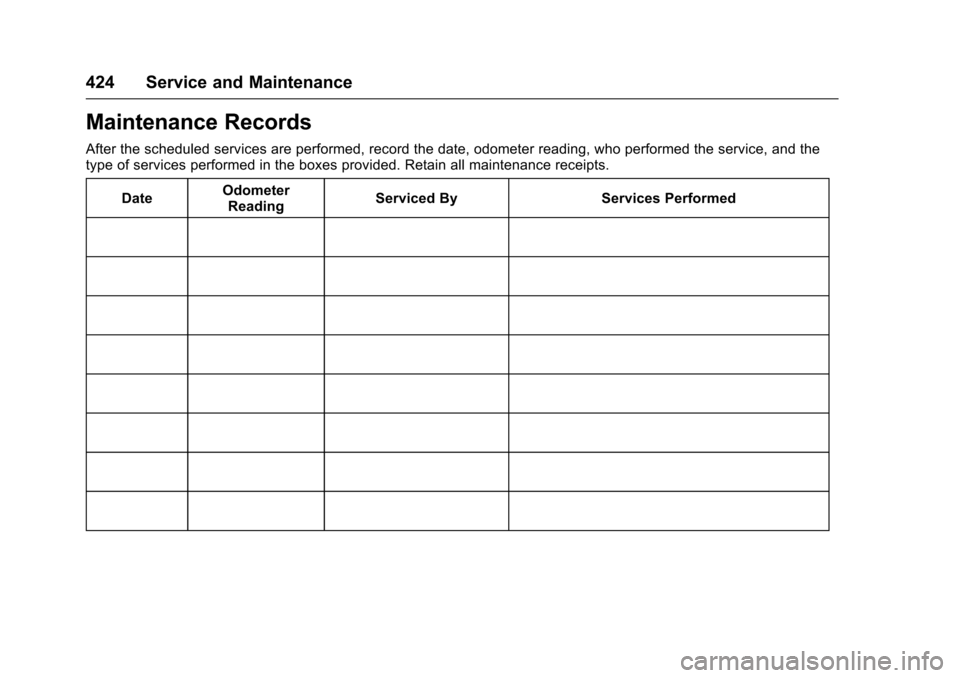
After the scheduled services are performed, record the date, odometer reading, who performed the service, and the
type of services performed in the boxes provided. Retain all maintenance receipts.Date Odometer
Reading Serviced By Services Performed
Page 434 of 465
Chevrolet Tahoe/Suburban Owner Manual (GMNA-Localizing-U.S./Canada/
Mexico-9955986) - 2017 - crc - 7/5/16
Customer Information 433
.Find the
Chevrolet-recommended
maintenance services.
GM Mobility
Reimbursement Program
This program is available to
qualified applicants for cost
reimbursement of eligible
aftermarket adaptive equipment
required for the vehicle, such as
hand controls or a wheelchair/
scooter lift for the vehicle.
For more information on the limited
offer, visit www.gmmobility.com or
call the GM Mobility Assistance
Center at 1-800-323-9935. Text
Telephone (TTY) users, call
1-800-833-9935. General Motors of Canada also has
a Mobility Program. Visit www.gm.ca
or call 1-800-GM-DRIVE (463-7483)
for details. TTY users call
1-800-263-3830.
Roadside Assistance
Program
For U.S.-purchased vehicles, call
1-800-243-8872. (Text Telephone
(TTY): 1-888-889-2438.)
For Canadian-purchased vehicles,
call 1-800-268-6800.
Service is available 24 hours a day,
365 days a year.
Calling for Assistance
When calling Roadside Assistance,
have the following information
ready:
.
Your name, home address, and
home telephone number.
. Telephone number of your
location.
. Location of the vehicle.
. Model, year, color, and license
plate number of the vehicle. .
Odometer reading, Vehicle
Identification Number (VIN), and
delivery date of the vehicle.
. Description of the problem.
Coverage
Services are provided for the
duration of the vehicle’s powertrain
warranty.
In the U.S., anyone driving the
vehicle is covered. In Canada, a
person driving the vehicle without
permission from the owner is not
covered.
Roadside Assistance is not a part of
the New Vehicle Limited Warranty.
General Motors North America and
Chevrolet reserve the right to make
any changes or discontinue the
Roadside Assistance program at
any time without notification.
General Motors North America and
Chevrolet reserve the right to limit
services or payment to an owner or
driver if they decide the claims are
made too often, or the same type of
claim is made many times.
Page 458 of 465

Chevrolet Tahoe/Suburban Owner Manual (GMNA-Localizing-U.S./Canada/
Mexico-9955986) - 2017 - crc - 7/5/16
Index 457
FlexFuelE85 . . . . . . . . . . . . . . . . . . . . . . . . . . . 300
Floor Mats . . . . . . . . . . . . . . . . . . . . . . 409
Fluid Automatic Transmission . . . . . . 328
Brakes . . . . . . . . . . . . . . . . . . . . . . . . 339
Four-Wheel DriveTransfer Case . . . . . . . . . . . . . . . 267
Power Steering . . . . . . . . . . . . . . . 338
Washer . . . . . . . . . . . . . . . . . . . . . . . 338
Fog Lamps . . . . . . . . . . . . . . . . . . . . . 194
Bulb Replacement . . . . . . . . . . . . 348
Folding Mirrors . . . . . . . . . . . . . . . . . . 58
Forward Automatic Braking . . . . . 293
Forward Collision Alert (FCA) System . . . . . . . . . . . . . . . . . 291
Four-Wheel Drive . . . . . . . . . . 267, 341
Frequency Statement Radio . . . . . . . . . . . . . . . . . . . . . . . . . 439
Front Axle . . . . . . . . . . . . . . . . . . . . . . 341
Front Fog Lamp Light . . . . . . . . . . . . . . . . . . . . . . . . . . 157
Front Seats Adjustment . . . . . . . . . . . . . . . . . . . . . 67
Heated and Ventilated . . . . . . . . . . 72
Front Turn Signal Lamps . . . . . . . 348
Fuel . . . . . . . . . . . . . . . . . . . . . . . . . . . . 298 Additives . . . . . . . . . . . . . . . . . . . . . 300 Fuel (cont'd)
Economy Driving . . . . . . . . . . . . . . . 30
Filling a Portable Fuel
Container . . . . . . . . . . . . . . . . . . . 302
Filling the Tank . . . . . . . . . . . . . . . 301
Foreign Countries . . . . . . . . . . . . 299
Gauge . . . . . . . . . . . . . . . . . . . . . . . . 145
Low Fuel Warning Light . . . . . . . 156
Management, Active . . . . . . . . . . 261
Requirements, California . . . . . 299
System Messages . . . . . . . . . . . . 170
Full-Size Spare Tire . . . . . . . . . . . . 392
Fuses . . . . . . . . . . . . . . . . . . . . . . . . . . 351 Engine Compartment Fuse
Block . . . . . . . . . . . . . . . . . . . . . . . . 352
Instrument Panel Fuse Block . . . . . . . . . . . . . . . . . . . 356, 359
Rear Compartment Fuse
Block . . . . . . . . . . . . . . . . . . . . . . . . 361
G
Garage Door Opener . . . . . . . . . . . 185Programming . . . . . . . . . . . . . . . . . 185
Gauges
Engine CoolantTemperature . . . . . . . . . . . . . . . . 147
Engine Oil Pressure . . . . . . . . . . 146
Fuel . . . . . . . . . . . . . . . . . . . . . . . . . . 145
Odometer . . . . . . . . . . . . . . . . . . . . . 145 Gauges (cont'd)
Speedometer . . . . . . . . . . . . . . . . . 145
Tachometer . . . . . . . . . . . . . . . . . . . 145
Trip Odometer . . . . . . . . . . . . . . . . 145
Voltmeter . . . . . . . . . . . . . . . . . . . . . 148
Warning Lights and
Indicators . . . . . . . . . . . . . . . . . . . 140
General Information Service and Maintenance . . . . . .411
Towing . . . . . . . . . . . . . . . . . . . . . . . . 303
Vehicle Care . . . . . . . . . . . . . . . . . . 320
Glass Replacement . . . . . . . . . . . . . 346
Glove Box . . . . . . . . . . . . . . . . . . . . . . 125
GM Mobility Reimbursement Program . . . . . . . . . . . . . . . . . . . . . . . 433
H
Halogen Bulbs . . . . . . . . . . . . . . . . . . 347
Hazard Warning Flashers . . . . . . . 193
Head Restraints . . . . . . . . . . . . . . . . . 66
Head-up Display . . . . . . . . . . . . . . . . 162
Headlamps . . . . . . . . . . . . . . . . . . . . . 348Aiming . . . . . . . . . . . . . . . . . . . . . . . . 347
Automatic . . . . . . . . . . . . . . . . . . . . . 192
Bulb Replacement . . . . . . . . . . . . 347
Daytime RunningLamps (DRL) . . . . . . . . . . . . . . . . 192
Flash-to-Pass . . . . . . . . . . . . . . . . . 191
Page 461 of 465

Chevrolet Tahoe/Suburban Owner Manual (GMNA-Localizing-U.S./Canada/
Mexico-9955986) - 2017 - crc - 7/5/16
460 Index
Messages (cont'd)Vehicle . . . . . . . . . . . . . . . . . . . . . . . 166
Vehicle Reminder . . . . . . . . . . . . . 177
Washer Fluid . . . . . . . . . . . . . . . . . 177
Mirror Child-View . . . . . . . . . . . . . . . . . . . . . . 60
Mirrors Automatic DimmingRearview . . . . . . . . . . . . . . . . . . . . . . 60
Blind Spot . . . . . . . . . . . . . . . . . . . . . . 58
Convex . . . . . . . . . . . . . . . . . . . . . . . . . 57
Folding . . . . . . . . . . . . . . . . . . . . . . . . . 58
Heated . . . . . . . . . . . . . . . . . . . . . . . . . 58
Manual Rearview . . . . . . . . . . . . . . . 60
Power . . . . . . . . . . . . . . . . . . . . . . . . . . 57
Tilt in Reverse . . . . . . . . . . . . . . . . . . 59
Mirrors, Interior Rearview . . . . . . . . 60
Monitor System, Tire Pressure . . . . . . . . . . . . . . . . . . . . . . 371
Multi-band Antenna . . . . . . . . . . . . . 208
N
Navigation OnStar®. . . . . . . . . . . . . . . . . . . . . . 445
Net, Convenience . . . . . . . . . . . . . . 127
New Vehicle Break-In . . . . . . . . . . . 251
Noise Control System . . . . . . . . . . 343
O
Object Detection System Messages . . . . . . . . . . . . . . . . . . . . . 171
Odometer . . . . . . . . . . . . . . . . . . . . . . . 145 Trip . . . . . . . . . . . . . . . . . . . . . . . . . . . 145
Off-Road . . . . . . . . . . . . . . . . . . . . . . . 238 Driving . . . . . . . . . . . . . . . . . . . . . . . . 238
Recovery . . . . . . . . . . . . . . . . . . . . . 237
Oil Engine . . . . . . . . . . . . . . . . . . . . . . . . 325
Engine Oil Life System . . . . . . . 327
Engine Oil Pressure Gauge . . . 146
Messages . . . . . . . . . . . . . . . . . . . . 169
Older Children, Restraints . . . . . . 104
Online Owner Center . . . . . . . . . . . 432
OnStar . . . . . . . . . . . . . . . . . . . . . . . . . 441
OnStar
®Additional
Information . . . . . . . . . . . . . . . . . . . . 448
OnStar
®Connections . . . . . . . . . . . 445
OnStar®Diagnostics . . . . . . . . . . . . 447
OnStar®Emergency . . . . . . . . . . . . 444
OnStar®Navigation . . . . . . . . . . . . . 445
OnStar®Overview . . . . . . . . . . . . . . 443
OnStar®Security . . . . . . . . . . . . . . . 444
Operation Fog Lamps . . . . . . . . . . . . . . . . . . . 194
Ordering Service Publications . . . . . . . . . . 438 Outlets
Power . . . . . . . . . . . . . . . . . . . . . . . . 136
Overheating, Engine . . . . . . . . . . . . 336
Overview . . . . . . . . . . . . . . . . . . . . . . . 199
P
Park Shifting Into . . . . . . . . . . . . . . . . . . . 259
Shifting Out of . . . . . . . . . . . . . . . . 260
Parking Brake . . . . . . . . . . . . . . . . . . . . . . . . . 273
Brake and P (Park)Mechanism Check . . . . . . . . . . 345
Extended . . . . . . . . . . . . . . . . . . . . . 261
Over Things That Burn . . . . . . . 260
Parking Assist . . . . . . . . . . . . . . . . . . 288
Parking or Backing Assistance Systems . . . . . . . . . . 288
Passenger Airbag Status Indicator . . . . . . . . . . . . . . . . . . . . . . 150
Passenger Compartment Air
Filter . . . . . . . . . . . . . . . . . . . . . . . . . . 232
Passenger Sensing System . . . . . 98
Perchlorate Materials Requirements, California . . . . . . 321
Personalization
Vehicle . . . . . . . . . . . . . . . . . . . . . . . 178
Phone Bluetooth . . . . . . . . . . . 214, 215, 219