2017 CHEVROLET SUBURBAN clock
[x] Cancel search: clockPage 228 of 465

Chevrolet Tahoe/Suburban Owner Manual (GMNA-Localizing-U.S./Canada/
Mexico-9955986) - 2017 - crc - 7/5/16
Climate Controls 227
Front Climate Controls
Automatic Operation
The system automatically controls
the fan speed, air delivery, air
conditioning, and recirculation in
order to heat or cool the vehicle to
the desired temperature.
When AUTO is lit, all four functions
operate automatically. Each function
can also be manually set and the
setting is displayed. Functions not
manually set will continue to be
automatically controlled, even if the
AUTO indicator is not lit.
To place the system in
automatic mode:1. Press AUTO.
2. Set the driver and passenger temperature.
To find your comfort setting,
start with 22 °C (72 °F) and
allow the system time to
stabilize. Then adjust the
temperature as needed for best
comfort. To improve fuel efficiency and to
cool the vehicle faster, recirculation
may be automatically selected in
warm weather.
The recirculation light will not come
on when automatically controlled.
Press
@to manually select
recirculation; press it again to select
outside air.
Do not cover the solar sensor on the
top of the instrument panel near the
windshield. This sensor regulates
air temperature based on sun load.
See “Sensors” later in this section.
Manual Operation
O:Press to turn the climate control
system on or off. The airflow will be
blocked from entering in all air
delivery modes, except defrost.
9: Turn clockwise or
counterclockwise to increase or
decrease the fan speed. Press
AUTO to return to automatic
operation. The maximum auto fan speed can
be adjusted. See
“Climate and Air
Quality” underVehicle
Personalization 0178.
Driver and Passenger
Temperature Control : The
temperature can be adjusted
separately for the driver and
passenger.
Turn the knob clockwise or
counterclockwise to increase or
decrease the driver or passenger
temperature setting.
SYNC : Press to link the passenger
and rear climate temperature
settings to the driver setting. The
SYNC indicator light will turn on.
When the passenger or rear climate
settings are adjusted, the SYNC
indicator light turns off.
Air Delivery Mode Control : Press
Y,\,[, or-to change the
direction of the airflow. An indicator
light comes on in the selected mode
button.
Page 231 of 465

Chevrolet Tahoe/Suburban Owner Manual (GMNA-Localizing-U.S./Canada/
Mexico-9955986) - 2017 - crc - 7/5/16
230 Climate Controls
The climate control system uses the
information from these sensors to
maintain comfort settings by
adjusting the outlet temperature, fan
speed, and air delivery mode. The
system may also supply cooler air to
the side of the vehicle facing the
sun. The recirculation mode will also
be used as needed to maintain cool
outlet temperatures.
Rear Climate Control
System
The rear climate control system is
located on the rear of the center
console storage. The rear climate
settings can be adjusted with this
system.
1. Fan Control
2. AUTO (Automatic Operation)
3. MODE (Air Delivery ModeControl)
4. TEMP (Temperature Control)
5. Heated Rear Seats (If Equipped)
If the dual automatic climate control
system rear climate control lockout
feature is locked, the rear climate
control settings can only be
adjusted from the front seat.
Automatic Operation
AUTO : Press AUTO to
automatically control the
temperature, air delivery, and fan
speed for rear seat passengers. A is
indicated in the display when
automatic operation is active.
If any of the rear climate control
settings are manually adjusted, full
automatic operation is cancelled.
Press AUTO to return to full
automatic operation.
The display only indicates climate
control functions when the system is
in rear independent mode.
Manual Operation
9: Turn clockwise or
counterclockwise to increase or
decrease the fan speed. Turn
completely counterclockwise to turn
the fan/power off.
TEMP : Turn clockwise or
counterclockwise to increase or
decrease the airflow temperature
into the passenger area. If the
SYNC button is pressed on the front
Page 271 of 465
Chevrolet Tahoe/Suburban Owner Manual (GMNA-Localizing-U.S./Canada/
Mexico-9955986) - 2017 - crc - 7/5/16
270 Driving and Operating
Shifting Out of 4n
To shift:1. The vehicle must be stopped or moving less than 5 km/h
(3 mph) with the transmission
in N (Neutral) and the ignition in
ON/RUN. It is best for the
vehicle to be moving
1.6 to 3.2 km/h (1 to 2 mph).
2. Turn the knob to 4
m, AUTO,
or 2
m. Wait for the 4m, AUTO,
or 2
mindicator light to stop
flashing before shifting the
transmission into gear.
Caution
Shifting the transmission into gear
before the requested mode
indicator light has stopped
flashing could damage the
transfer case.
If the transmission is in gear and/or
moving more than 5 km/h (3 mph),
the 4
m, AUTO, or 2mindicator light
will flash for 30 seconds but will not complete the shift. With the vehicle
moving less than 5 km/h (3 mph),
and the transmission in N (Neutral),
attempt the shift again.
Shifting Into N (Neutral)
To shift into N (Neutral):
1. Park the vehicle on a level surface.
2. Set the parking brake and press and hold the brake
pedal. See Parking
Brake 0273.
3. Start the vehicle or turn the ignition to ON/RUN.
4. Shift the transmission to N (Neutral).
5. Shift the transfer case to 2
m.
6. Turn the transfer case knob clockwise to N (Neutral) until it
stops and hold it there until the
N (Neutral) light starts blinking.
This will take at least
10 seconds. Then slowly
release the knob to the 4
n
position. The N (Neutral) light will come on when the transfer
case shift to N (Neutral) is
complete.
7. With the engine running, verify that the transfer case is in
N (Neutral) by shifting the
transmission to R (Reverse),
then shift the transmission to
D (Drive). There should be no
movement of the vehicle while
shifting the transmission.
8. Turn the engine off, and the ignition to ACC/ACCESSORY.
9. Place the transmission shift lever in P (Park). See
Recreational Vehicle
Towing 0396.
10. Turn the ignition to LOCK/OFF.
Shifting Out of N (Neutral)
To shift out of N (Neutral): 1. Set the parking brake and apply the brake pedal.
2. Turn the ignition to ON/RUN with the engine off.
3. Shift the transmission to N (Neutral).
Page 336 of 465
Chevrolet Tahoe/Suburban Owner Manual (GMNA-Localizing-U.S./Canada/
Mexico-9955986) - 2017 - crc - 7/5/16
Vehicle Care 335
the FULL COLD mark. If it is not,
there may be a leak in the cooling
system.
If coolant is visible but the coolant
level is not at or above the FULL
COLD mark, see“How to Add
Coolant to the Coolant Surge Tank,”
following.
How to Add Coolant to the
Coolant Surge Tank
{Warning
You can be burned if you spill
coolant on hot engine parts.
Coolant contains ethylene glycol
and it will burn if the engine parts
are hot enough. Do not spill
coolant on a hot engine.
Caution
This vehicle has a specific
coolant fill procedure. Failure to
follow this procedure could cause
the engine to overheat and be
severely damaged.
{Warning
Steam and scalding liquids from a
hot cooling system can blow out
and burn you badly. Never turn
the cap when the cooling system,
including the surge tank pressure
cap, is hot. Wait for the cooling
system and surge tank pressure
cap to cool.
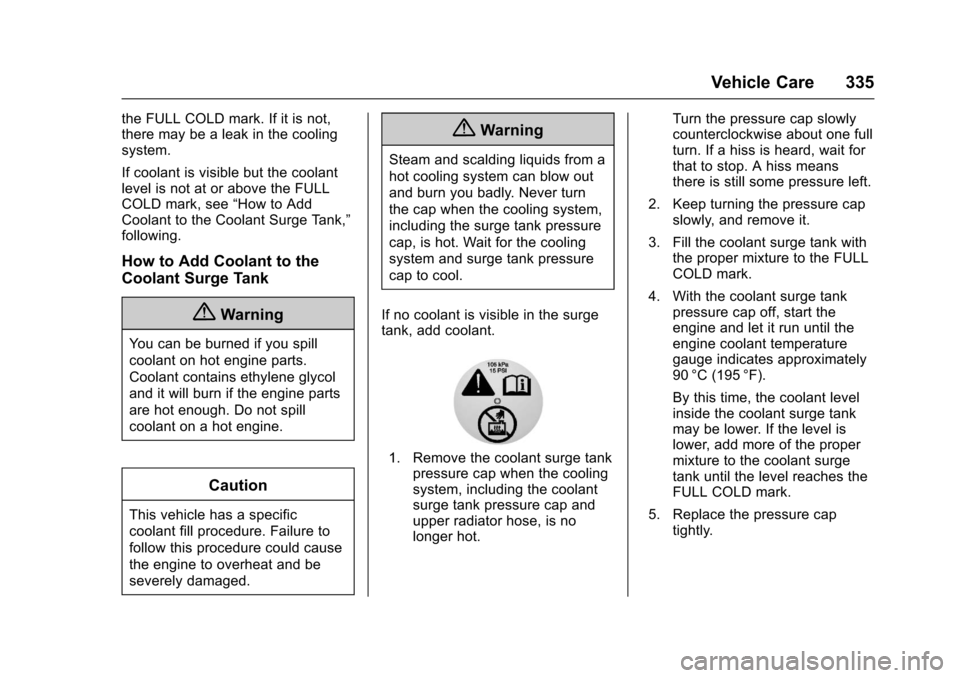
If no coolant is visible in the surge
tank, add coolant.
1. Remove the coolant surge tank pressure cap when the cooling
system, including the coolant
surge tank pressure cap and
upper radiator hose, is no
longer hot. Turn the pressure cap slowly
counterclockwise about one full
turn. If a hiss is heard, wait for
that to stop. A hiss means
there is still some pressure left.
2. Keep turning the pressure cap slowly, and remove it.
3. Fill the coolant surge tank with the proper mixture to the FULL
COLD mark.
4. With the coolant surge tank pressure cap off, start the
engine and let it run until the
engine coolant temperature
gauge indicates approximately
90 °C (195 °F).
By this time, the coolant level
inside the coolant surge tank
may be lower. If the level is
lower, add more of the proper
mixture to the coolant surge
tank until the level reaches the
FULL COLD mark.
5. Replace the pressure cap tightly.
Page 349 of 465
Chevrolet Tahoe/Suburban Owner Manual (GMNA-Localizing-U.S./Canada/
Mexico-9955986) - 2017 - crc - 7/5/16
348 Vehicle Care
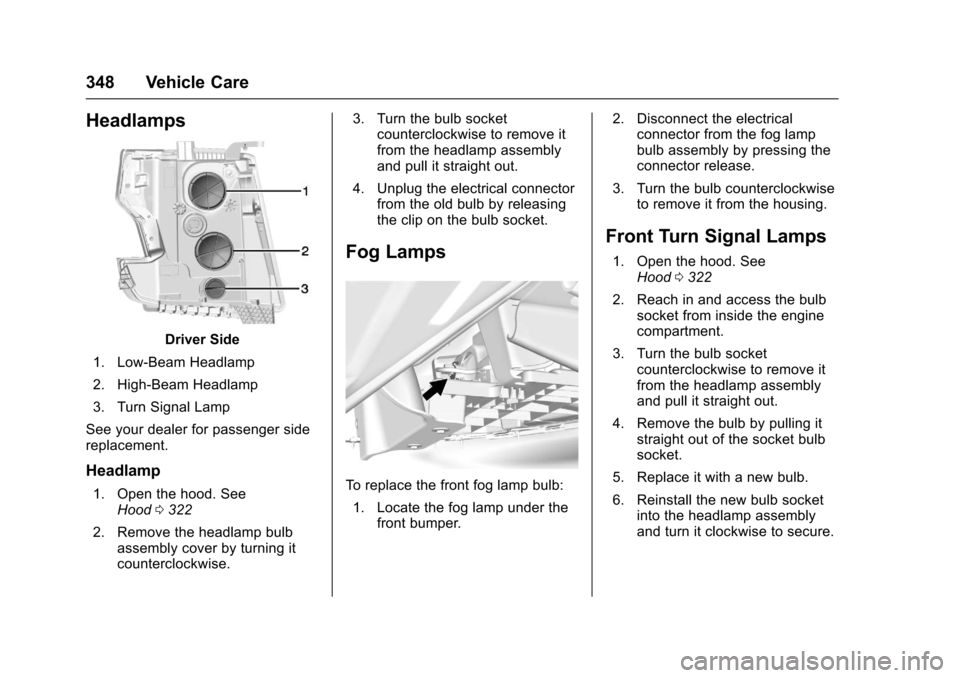
Headlamps
Driver Side
1. Low-Beam Headlamp
2. High-Beam Headlamp
3. Turn Signal Lamp
See your dealer for passenger side
replacement.
Headlamp
1. Open the hood. See Hood 0322
2. Remove the headlamp bulb assembly cover by turning it
counterclockwise. 3. Turn the bulb socket
counterclockwise to remove it
from the headlamp assembly
and pull it straight out.
4. Unplug the electrical connector from the old bulb by releasing
the clip on the bulb socket.
Fog Lamps
To replace the front fog lamp bulb:
1. Locate the fog lamp under the front bumper. 2. Disconnect the electrical
connector from the fog lamp
bulb assembly by pressing the
connector release.
3. Turn the bulb counterclockwise to remove it from the housing.
Front Turn Signal Lamps
1. Open the hood. See
Hood 0322
2. Reach in and access the bulb socket from inside the engine
compartment.
3. Turn the bulb socket counterclockwise to remove it
from the headlamp assembly
and pull it straight out.
4. Remove the bulb by pulling it straight out of the socket bulb
socket.
5. Replace it with a new bulb.
6. Reinstall the new bulb socket into the headlamp assembly
and turn it clockwise to secure.
Page 350 of 465
Chevrolet Tahoe/Suburban Owner Manual (GMNA-Localizing-U.S./Canada/
Mexico-9955986) - 2017 - crc - 7/5/16
Vehicle Care 349
Taillamps, Turn Signal,
Stoplamps, and Back-Up
Lamps
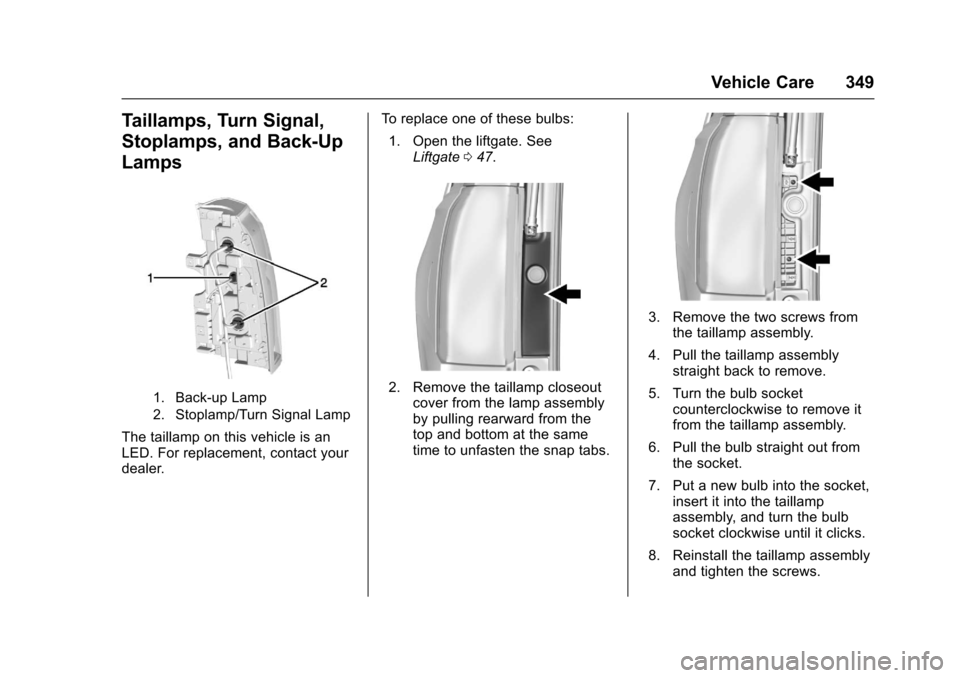
1. Back-up Lamp
2. Stoplamp/Turn Signal Lamp
The taillamp on this vehicle is an
LED. For replacement, contact your
dealer.To replace one of these bulbs:
1. Open the liftgate. See Liftgate 047.
2. Remove the taillamp closeout
cover from the lamp assembly
by pulling rearward from the
top and bottom at the same
time to unfasten the snap tabs.
3. Remove the two screws fromthe taillamp assembly.
4. Pull the taillamp assembly straight back to remove.
5. Turn the bulb socket counterclockwise to remove it
from the taillamp assembly.
6. Pull the bulb straight out from the socket.
7. Put a new bulb into the socket, insert it into the taillamp
assembly, and turn the bulb
socket clockwise until it clicks.
8. Reinstall the taillamp assembly and tighten the screws.
Page 351 of 465
Chevrolet Tahoe/Suburban Owner Manual (GMNA-Localizing-U.S./Canada/
Mexico-9955986) - 2017 - crc - 7/5/16
350 Vehicle Care
9. Reinstall the taillamp cover bysnapping it into place.
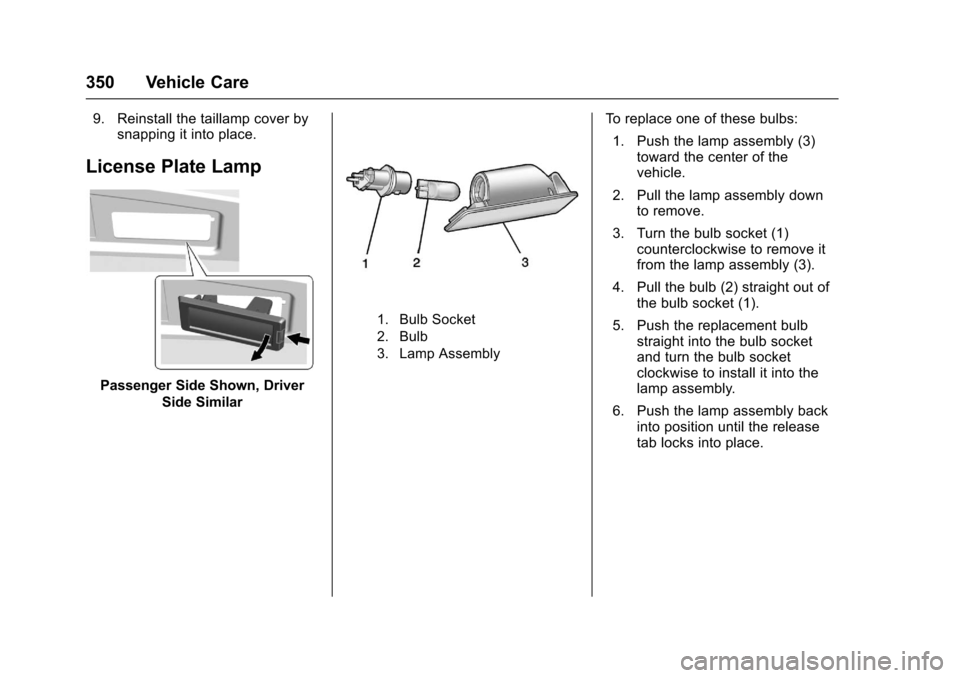
License Plate Lamp
Passenger Side Shown, Driver
Side Similar
1. Bulb Socket
2. Bulb
3. Lamp Assembly
To replace one of these bulbs:
1. Push the lamp assembly (3) toward the center of the
vehicle.
2. Pull the lamp assembly down to remove.
3. Turn the bulb socket (1) counterclockwise to remove it
from the lamp assembly (3).
4. Pull the bulb (2) straight out of the bulb socket (1).
5. Push the replacement bulb straight into the bulb socket
and turn the bulb socket
clockwise to install it into the
lamp assembly.
6. Push the lamp assembly back into position until the release
tab locks into place.
Page 385 of 465
Chevrolet Tahoe/Suburban Owner Manual (GMNA-Localizing-U.S./Canada/
Mexico-9955986) - 2017 - crc - 7/5/16
384 Vehicle Care
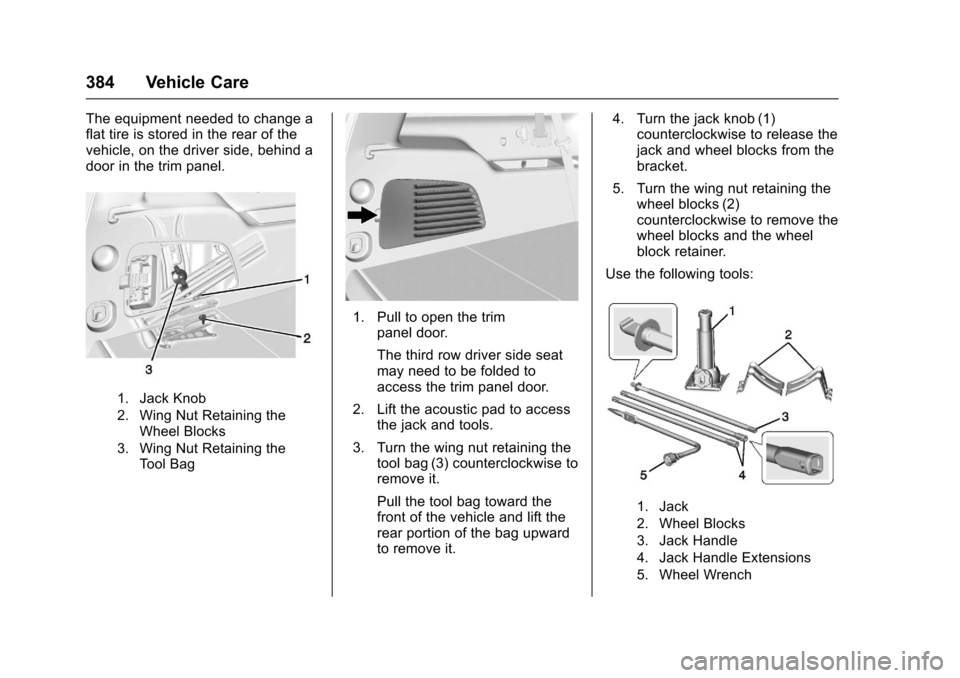
The equipment needed to change a
flat tire is stored in the rear of the
vehicle, on the driver side, behind a
door in the trim panel.
1. Jack Knob
2. Wing Nut Retaining theWheel Blocks
3. Wing Nut Retaining the Tool Bag
1. Pull to open the trim panel door.
The third row driver side seat
may need to be folded to
access the trim panel door.
2. Lift the acoustic pad to access the jack and tools.
3. Turn the wing nut retaining the tool bag (3) counterclockwise to
remove it.
Pull the tool bag toward the
front of the vehicle and lift the
rear portion of the bag upward
to remove it. 4. Turn the jack knob (1)
counterclockwise to release the
jack and wheel blocks from the
bracket.
5. Turn the wing nut retaining the wheel blocks (2)
counterclockwise to remove the
wheel blocks and the wheel
block retainer.
Use the following tools:
1. Jack
2. Wheel Blocks
3. Jack Handle
4. Jack Handle Extensions
5. Wheel Wrench