2017 CHEVROLET SS power steering
[x] Cancel search: power steeringPage 140 of 400

Chevrolet SS Sedan Owner Manual (GMNA-Localizing-U.S.-10122752) -2017 - crc - 8/31/16
Infotainment System 139
Cleaning High Gloss Surfaces
and Vehicle Information and
Radio Displays
For vehicles with high glosssurfaces or vehicle displays, use amicrofiber cloth to wipe surfaces.Before wiping the surface with themicrofiber cloth, use a soft bristlebrush to remove dirt that couldscratch the surface. Then use themicrofiber cloth by gently rubbing toclean. Never use window cleanersor solvents. Periodically hand washthe microfiber cloth separately,using mild soap. Do not use bleachor fabric softener. Rinse thoroughlyand air dry before next use.
Caution
Do not attach a device with a
suction cup to the display. This
may cause damage and would
not be covered by the warranty.
Software Updates
See www.chevrolet.com for softwareupdates.
Radio
AM-FM Radio
Playing the Radio
VOL/O:
.Press to turn the radio on or off.
.Turn to increase or decrease thevolume of the active source.
The steering wheel controls canalso be used to adjust the volume.SeeSteering Wheel Controls0134.
To p l a y t h e i n f o t a i n m e n t s y s t e m w i t hthe ignition off, seeRetainedAccessory Power (RAP)0232.
Audio Source
Press SRCE on the center stack orSRC on the steering wheel controlsto display and scroll through theavailable sources AM, FM, SiriusXM(if equipped), Pandora (if equipped),Stitcher, USB, and Bluetooth Audio.
Infotainment System Settings
Tone Settings
To a c c e s s t h e t o n e s e t t i n g s , t o u c hthe Tone Settings icon on the HomePage. Tone settings are specific toeach source.
To a d j u s t t h e s e t t i n g s :
.Bass: Touch + or✓to changethe level.
.Mid (Midrange): Touch + or✓tochange the level.
.Treble: Touch + or✓to changethe level.
.EQ: Touch or turn the TUNE/MENU knob to cycle through thepreset EQ options.
.Fade: Touch F or R for moresound from the front or rearspeakers. The middle positionbalances the sound between thefront and rear speakers.
.Balance: Touch L or R for moresound from the left or rightspeakers. The middle positionbalances the sound between theleft and right speakers.
Page 190 of 400

Chevrolet SS Sedan Owner Manual (GMNA-Localizing-U.S.-10122752) -2017 - crc - 8/31/16
Infotainment System 189
Voice Recognition
Voice recognition allows forhands-free operation of theinfotainment system features.
Voice recognition can be used whenthe radio is on or when RetainedAccessory Power (RAP) is active.SeeRetained Accessory Power(RAP)0232.Thesystemmaintainsaminimumvolumelevel.
Using Voice Recognition
1. Pressb/gon the steering
wheel. The audio systemmutes. A voice prompt states,“Please say a command.”Waituntil the tone is heard beforespeaking.
If there is no tone, make surethat the volume is turned up.
While voice recognition is
active, the system displays ag
symbol in the top right of theinfotainment display.
2. Clearly speak one of thecommands listed later in thissection.
Pressb/gtwice on the steering
wheel to skip the voice promptmessages.
Canceling Voice Recognition
1. Press and release$/ion
the steering wheel control tocancel a command, if thesystem response does notmatch the voice command,or say“Goodbye”or“Cancel.”
2. The system replies,“Goodbye.”
Helpful Hints for Speaking
Commands
.When multiple commands areavailable, choose the commandthat works best for you.
.Words in parentheses areoptional. For example, for thecommand“Tune FM(frequency),”saying“Tune FM87.7”or“Tune FM”are bothvalid commands.
.When the command isrecognized, the system willeither perform the function orask to confirm the choice.
.When the system does notrecognize the command, thesystem says“pardon.”
.If experiencing difficulty with thesystem recognizing a command,confirm that the command iscorrect. Try saying the commandclearly or wait for a brief momentafter the tone.
.Background noise such as aclimate control fan positioned onhigh, open windows, and veryloud outside noises, even if thewindows are closed, can causevoice commands to bemisunderstood.
.The system is able to recognizecommands in differentlanguages, such as English,Canadian French, and Spanish.The system only recognizescommands based on thelanguage selected.
.To i n c r e a s e o r d e c r e a s e t h evoice volume during a voicerecognition session, turn thevolume knob of the radio,or press the volume steeringwheel control. If the volume is
Page 196 of 400
Chevrolet SS Sedan Owner Manual (GMNA-Localizing-U.S.-10122752) -2017 - crc - 8/31/16
Infotainment System 195
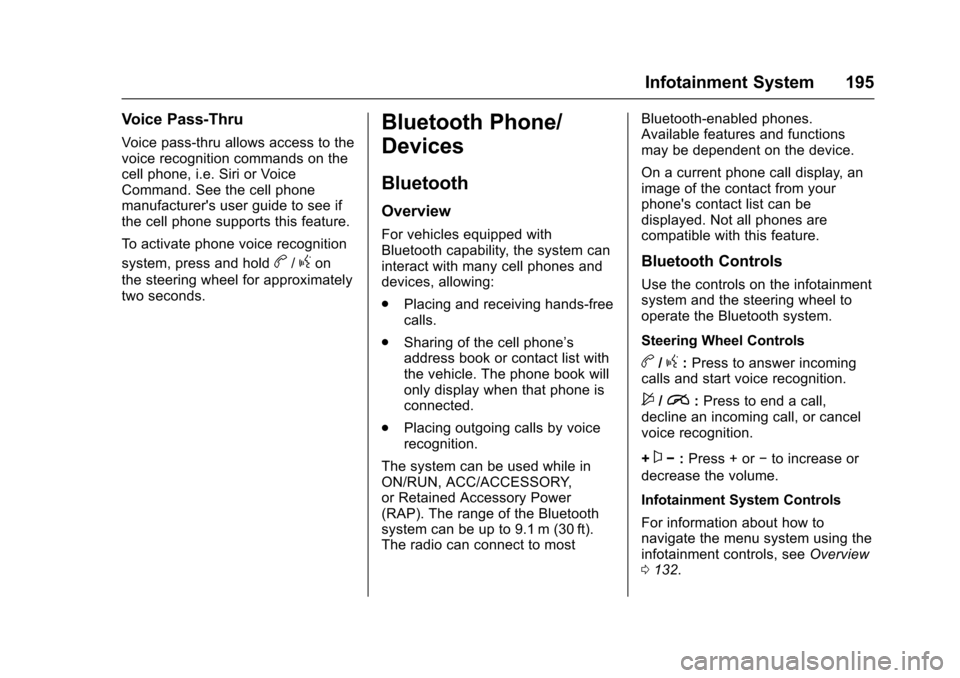
Voice Pass-Thru
Voice pass-thru allows access to thevoice recognition commands on thecell phone, i.e. Siri or VoiceCommand. See the cell phonemanufacturer's user guide to see ifthe cell phone supports this feature.
To a c t i v a t e p h o n e v o i c e r e c o g n i t i o n
system, press and holdb/gon
the steering wheel for approximatelytwo seconds.
Bluetooth Phone/
Devices
Bluetooth
Overview
For vehicles equipped withBluetooth capability, the system caninteract with many cell phones anddevices, allowing:
.Placing and receiving hands-freecalls.
.Sharing of the cell phone’saddress book or contact list withthe vehicle. The phone book willonly display when that phone isconnected.
.Placing outgoing calls by voicerecognition.
The system can be used while inON/RUN, ACC/ACCESSORY,or Retained Accessory Power(RAP). The range of the Bluetoothsystem can be up to 9.1 m (30 ft).The radio can connect to most
Bluetooth-enabled phones.Available features and functionsmay be dependent on the device.
On a current phone call display, animage of the contact from yourphone's contact list can bedisplayed. Not all phones arecompatible with this feature.
Bluetooth Controls
Use the controls on the infotainmentsystem and the steering wheel tooperate the Bluetooth system.
Steering Wheel Controls
b/g:Press to answer incomingcalls and start voice recognition.
$/i:Press to end a call,decline an incoming call, or cancelvoice recognition.
+x✓:Press + or✓to increase or
decrease the volume.
Infotainment System Controls
For information about how tonavigate the menu system using theinfotainment controls, seeOverview0132.
Page 217 of 400

Chevrolet SS Sedan Owner Manual (GMNA-Localizing-U.S.-10122752) -2017 - crc - 8/31/16
216 Driving and Operating
Driving and
Operating
Driving Information
Distracted Driving . . . . . . . . . . . . 217Defensive Driving . . . . . . . . . . . . . 217Drunk Driving . . . . . . . . . . . . . . . . . 218Control of a Vehicle . . . . . . . . . . . 218Braking . . . . . . . . . . . . . . . . . . . . . . . 218Steering . . . . . . . . . . . . . . . . . . . . . . 218Off-Road Recovery . . . . . . . . . . . 219Loss of Control . . . . . . . . . . . . . . . 219Track Events and CompetitiveDriving . . . . . . . . . . . . . . . . . . . . . . 220Driving on Wet Roads . . . . . . . . 222Hill and Mountain Roads . . . . . 223Winter Driving . . . . . . . . . . . . . . . . 224If the Vehicle Is Stuck . . . . . . . . 225Vehicle Load Limits . . . . . . . . . . . 226
Starting and Operating
New Vehicle Break-In . . . . . . . . . 229Ignition Positions . . . . . . . . . . . . . 229Starting the Engine . . . . . . . . . . . 231Retained AccessoryPower (RAP) . . . . . . . . . . . . . . . . 232Shifting Into Park (AutomaticTransmission) . . . . . . . . . . . . . . . 232Shifting out of Park . . . . . . . . . . . 233
Parking . . . . . . . . . . . . . . . . . . . . . . . 234Parking over ThingsThat Burn . . . . . . . . . . . . . . . . . . . 234Extended Parking . . . . . . . . . . . . 235
Engine Exhaust
Engine Exhaust . . . . . . . . . . . . . . 235Running the Vehicle WhileParked . . . . . . . . . . . . . . . . . . . . . . 236
Automatic Transmission
Automatic Transmission . . . . . . 236Manual Mode . . . . . . . . . . . . . . . . . 238
Manual Transmission
Manual Transmission . . . . . . . . . 240
Brakes
Antilock BrakeSystem (ABS) . . . . . . . . . . . . . . . 241Electric Parking Brake . . . . . . . . 242Brake Assist . . . . . . . . . . . . . . . . . . 244Hill Start Assist (HSA) . . . . . . . . 244
Ride Control Systems
Traction Control/ElectronicStability Control . . . . . . . . . . . . . 245Driver Mode Control . . . . . . . . . . 247Track Driver Mode . . . . . . . . . . . . 249Limited-Slip Rear Axle . . . . . . . . 251
Cruise Control
Cruise Control . . . . . . . . . . . . . . . . 251
Driver Assistance Systems
Driver Assistance Systems . . . 253Assistance Systems forParking or Backing . . . . . . . . . . 254Assistance Systems forDriving . . . . . . . . . . . . . . . . . . . . . . 259Forward Collision Alert (FCA)System . . . . . . . . . . . . . . . . . . . . . . 259Side Blind ZoneAlert (SBZA) . . . . . . . . . . . . . . . . 261Lane DepartureWarning (LDW) . . . . . . . . . . . . . 263
Fuel
Fuel . . . . . . . . . . . . . . . . . . . . . . . . . . 264California FuelRequirements . . . . . . . . . . . . . . . 265Fuels in Foreign Countries . . . 266Fuel Additives . . . . . . . . . . . . . . . . 266Filling the Tank . . . . . . . . . . . . . . . 266Filling a Portable FuelContainer . . . . . . . . . . . . . . . . . . . 267
Trailer Towing
Trailer Towing . . . . . . . . . . . . . . . . 268
Conversions and Add-Ons
Add-On ElectricalEquipment . . . . . . . . . . . . . . . . . . 268
Page 219 of 400
Chevrolet SS Sedan Owner Manual (GMNA-Localizing-U.S.-10122752) -2017 - crc - 8/31/16
218 Driving and Operating
Drunk Driving
Death and injury associated withdrinking and driving is a globaltragedy.
{Warning
Drinking and then driving is very
dangerous. Your reflexes,
perceptions, attentiveness, and
judgment can be affected by even
asmallamountofalcohol.You
can have a serious—or even
fatal—collision if you drive after
drinking.
Do not drink and drive or ride with
adriverwhohasbeendrinking.
Ride home in a cab; or if you are
with a group, designate a driver
who will not drink.
Control of a Vehicle
Braking, steering, and acceleratingare important factors in helping tocontrol a vehicle while driving.
Braking
Braking action involves perceptiontime and reaction time. Deciding topush the brake pedal is perceptiontime. Actually doing it isreaction time.
Average driver reaction time isabout three-quarters of a second. Inthat time, a vehicle moving at100 km/h (60 mph) travels 20 m(66 ft), which could be a lot ofdistance in an emergency.
Helpful braking tips to keep in mindinclude:
.Keep enough distance betweenyou and the vehicle in frontof you.
.Avoid needless heavy braking.
.Keep pace with traffic.
If the engine ever stops while thevehicle is being driven, brakenormally but do not pump thebrakes. Doing so could make thepedal harder to push down. If theengine stops, there will be somepower brake assist but it will beused when the brake is applied.
Once the power assist is used up, itcan take longer to stop and thebrake pedal will be harder to push.
Steering
Electric Power Steering
The vehicle has electric powersteering. It does not have powersteering fluid. Regular maintenanceis not required.
If power steering assist is lost dueto a system malfunction, the vehiclecan be steered, but may requireincreased effort.
See your dealer if there is aproblem.
If the steering wheel is turned until itreaches the end of its travel and isheld against that position for anextended period of time, powersteering assist may be reduced.
If the steering assist is used for anextended period of time, powerassist may be reduced.
Normal use of the power steeringassist should return when thesystem cools down.
Page 231 of 400

Chevrolet SS Sedan Owner Manual (GMNA-Localizing-U.S.-10122752) -2017 - crc - 8/31/16
230 Driving and Operating
working, the vehicle may be near astrong radio antenna signal causinginterference to the Keyless Accesssystem. SeeRemote Keyless Entry(RKE) System Operation025.
To s h i f t o u t o f P ( P a r k ) , t h e v e h i c l emust be in ACC/ACCESSORY orON/RUN and the brake pedal mustbe applied.
Stopping the Engine/OFF (NoIndicator Lights) :When thevehicle is stopped, press ENGINESTART/STOP once to turn theengine off.
If the vehicle is in P (Park), theignition will turn off, and RetainedAccessory Power (RAP) will remainactive. SeeRetained AccessoryPower (RAP)0232.
Automatic Transmission
If the vehicle is not in P (Park), theignition will return to ACC/ACCESSORY and display amessage in the Driver InformationCenter (DIC). SeeTr a n s m i s s i o nMessages011 9.Whenthevehicleis shifted into P (Park), the ignitionsystem will switch to OFF.
Manual Transmission
If the vehicle is stationary, theignition will turn OFF, and RetainedAccessory Power (RAP) will remainactive. SeeRetained AccessoryPower (RAP)0232.
Do not turn the engine off when thevehicle is moving. This will cause aloss of power assist in the brakeand steering systems and disablethe airbags.
If the vehicle must be shut off in anemergency:
1. Brake using a firm and steadypressure. Do not pump thebrakes repeatedly. This maydeplete power assist, requiringincreased brake pedal force.
2. Shift the vehicle to N (Neutral).This can be done while thevehicle is moving. After shiftingto N (Neutral), firmly apply thebrakes and steer the vehicle toasafelocation.
3. Come to a complete stop. Shiftto P (Park) with an automatictransmission, or Neutral with amanual transmission. Turn theignition to OFF.
4. Set the parking brake. SeeElectric Parking Brake0242.
{Warning
Turning off the vehicle while
moving may cause loss of power
assist in the brake and steering
systems and disable the airbags.
While driving, only shut the
vehicle off in an emergency.
If the vehicle cannot be pulled over,and must be shut off while driving,press and hold ENGINE START/STOP for longer than two seconds,or press twice in five seconds.
ACC/ACCESSORY (AmberIndicator Light) :This mode allowsyou to use some electricalaccessories when the engine is off.
Page 243 of 400

Chevrolet SS Sedan Owner Manual (GMNA-Localizing-U.S.-10122752) -2017 - crc - 8/31/16
242 Driving and Operating
If driving safely on a wet road and itbecomes necessary to slam on thebrakes and continue braking toavoid a sudden obstacle, acomputer senses the wheels areslowing down. If one of the wheelsis about to stop rolling, the computerwill separately work the brakes ateach wheel.
ABS can change the brake pressureto each wheel, as required, fasterthan any driver could. This can helpyou steer around the obstacle whilebraking hard.
As the brakes are applied, thecomputer keeps receiving updateson wheel speed and controlsbraking pressure accordingly.
Remember: ABS does not changethe time needed to get a foot up tothe brake pedal or always decreasestopping distance. If you get tooclose to the vehicle in front of you,there will not be enough time toapply the brakes if that vehiclesuddenly slows or stops. Alwaysleave enough room up ahead tostop, even with ABS.
Using ABS
Do not pump the brakes. Just holdthe brake pedal down firmly and letABS work. You may hear the ABSpump or motor operating and feelthe brake pedal pulsate. This isnormal.
Braking in Emergencies
ABS allows you to steer and brakeat the same time. In manyemergencies, steering can helpmore than even the very bestbraking.
Electric Parking Brake
The vehicle has an Electric ParkingBrake (EPB). The switch is on thecenter console. The EPB canalways be activated, even if theignition is off. To prevent drainingthe battery, avoid repeated cycles ofthe EPB when the engine is notrunning.
The system has a red parking brakestatus light and an amber parkingbrake warning light. SeeElectricParking Brake Light0103andService Electric Parking Brake Light0103.Therearealsoparkingbrake-related Driver InformationCenter (DIC) messages. SeeBrakeSystem Messages011 3.Incaseofinsufficient electrical power, the EPBcannot be applied or released.
Before leaving the vehicle, checkthe red parking brake status light toensure that the parking brake isapplied.
EPB Apply
To a p p l y t h e E P B :
1. Be sure the vehicle is at acomplete stop.
Page 249 of 400
Chevrolet SS Sedan Owner Manual (GMNA-Localizing-U.S.-10122752) -2017 - crc - 8/31/16
248 Driving and Operating
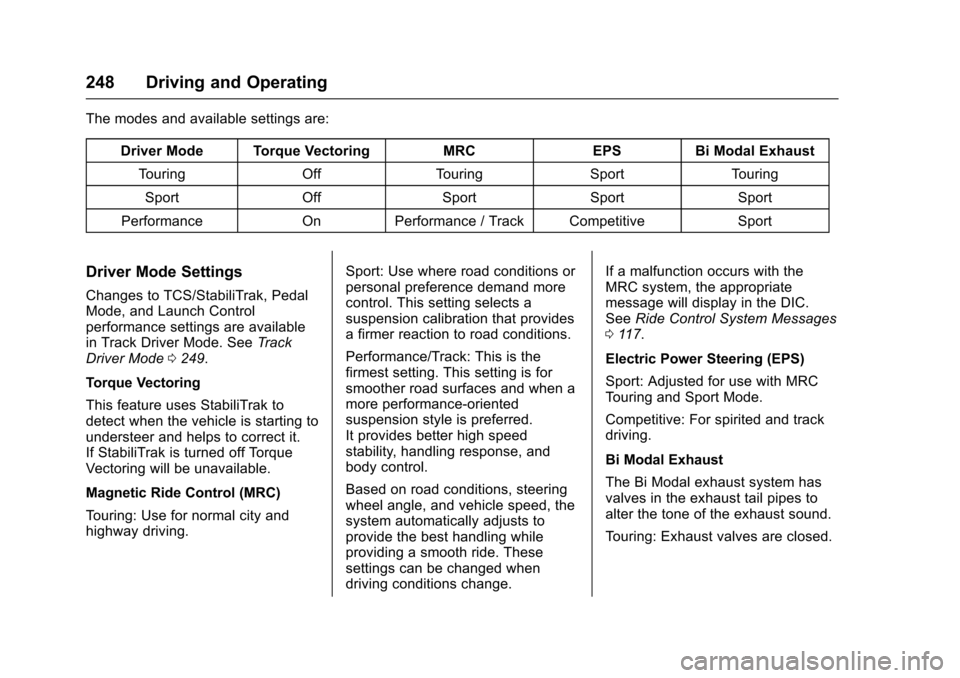
The modes and available settings are:
Driver Mode Torque VectoringMRCEPSBi Modal Exhaust
To u r i n gOffTo u r i n gSportTo u r i n g
SportOffSportSportSport
PerformanceOnPerformance / Track CompetitiveSport
Driver Mode Settings
Changes to TCS/StabiliTrak, PedalMode, and Launch Controlperformance settings are availablein Track Driver Mode. SeeTr a c kDriver Mode0249.
Torque Vectoring
This feature uses StabiliTrak todetect when the vehicle is starting toundersteer and helps to correct it.If StabiliTrak is turned off TorqueVectoring will be unavailable.
Magnetic Ride Control (MRC)
To u r i n g : U s e f o r n o r m a l c i t y a n dhighway driving.
Sport: Use where road conditions orpersonal preference demand morecontrol. This setting selects asuspension calibration that providesafirmerreactiontoroadconditions.
Performance/Track: This is thefirmest setting. This setting is forsmoother road surfaces and when amore performance-orientedsuspension style is preferred.It provides better high speedstability, handling response, andbody control.
Based on road conditions, steeringwheel angle, and vehicle speed, thesystem automatically adjusts toprovide the best handling whileproviding a smooth ride. Thesesettings can be changed whendriving conditions change.
If a malfunction occurs with theMRC system, the appropriatemessage will display in the DIC.SeeRide Control System Messages011 7.
Electric Power Steering (EPS)
Sport: Adjusted for use with MRCTo u r i n g a n d S p o r t M o d e .
Competitive: For spirited and trackdriving.
Bi Modal Exhaust
The Bi Modal exhaust system hasvalves in the exhaust tail pipes toalter the tone of the exhaust sound.
To u r i n g : E x h a u s t v a l v e s a r e c l o s e d .