2017 CHEVROLET SONIC fuel
[x] Cancel search: fuelPage 101 of 342

Chevrolet Sonic Owner Manual (GMNA-Localizing-U.S./Canada-10122660) -2017 - crc - 5/13/16
100 Instruments and Controls
Instruments and
Controls
Controls
Steering Wheel Adjustment . . . 101Steering Wheel Controls . . . . . . 101Heated Steering Wheel . . . . . . . 102Horn . . . . . . . . . . . . . . . . . . . . . . . . . . 102Windshield Wiper/Washer . . . . 102Rear Window Wiper/Washer . . . . . . . . . . . . . . . . . . . . . 103Compass . . . . . . . . . . . . . . . . . . . . . 104Clock . . . . . . . . . . . . . . . . . . . . . . . . . 104Power Outlets . . . . . . . . . . . . . . . . 105
Warning Lights, Gauges, and
Indicators
Warning Lights, Gauges, andIndicators . . . . . . . . . . . . . . . . . . . 106Instrument Cluster . . . . . . . . . . . . 107Speedometer . . . . . . . . . . . . . . . . . 109Odometer . . . . . . . . . . . . . . . . . . . . . 109Trip Odometer . . . . . . . . . . . . . . . . 109Ta c h o m e t e r . . . . . . . . . . . . . . . . . . . 1 0 9Fuel Gauge . . . . . . . . . . . . . . . . . . . 109Safety Belt Reminders . . . . . . . . 110Airbag Readiness Light . . . . . . . 110Passenger Airbag StatusIndicator . . . . . . . . . . . . . . . . . . . . . 111
Charging System Light . . . . . . . 112Malfunction Indicator Lamp(Check Engine Light) . . . . . . . . 112Service Vehicle Soon Light . . . 114Owner Manual Indicator . . . . . . 114Brake System WarningLight . . . . . . . . . . . . . . . . . . . . . . . . 114Antilock Brake System (ABS)Warning Light . . . . . . . . . . . . . . . 115Operate Pedal Light . . . . . . . . . . 115Up-Shift Light . . . . . . . . . . . . . . . . . 115Power Steering WarningLight . . . . . . . . . . . . . . . . . . . . . . . . 115Lane Departure Warning(LDW) Light . . . . . . . . . . . . . . . . . 116Forward Collision Alert (FCA)Warning Light . . . . . . . . . . . . . . . 116Vehicle Ahead Indicator . . . . . . . 116Ultrasonic Parking SensorLight . . . . . . . . . . . . . . . . . . . . . . . . 116Traction Off Light . . . . . . . . . . . . . 117StabiliTrak®OFF Light . . . . . . . . 117Traction Control System (TCS)/StabiliTrak®Light . . . . . . . . . . . . 117Engine Coolant TemperatureWarning Light . . . . . . . . . . . . . . . 118Tire Pressure Light . . . . . . . . . . . 118Engine Oil Pressure Light . . . . . 118Low Fuel Warning Light . . . . . . . 119Immobilizer Light . . . . . . . . . . . . . 119
Reduced Engine PowerLight . . . . . . . . . . . . . . . . . . . . . . . . 120High-Beam On Light . . . . . . . . . . 120Front Fog Lamp Light . . . . . . . . . 120Lamps On Reminder . . . . . . . . . 120Cruise Control Light . . . . . . . . . . 120Door Ajar Light . . . . . . . . . . . . . . . 121Trunk Ajar Light . . . . . . . . . . . . . . 121
Information Displays
Driver InformationCenter (DIC) . . . . . . . . . . . . . . . . 121
Vehicle Messages
Vehicle Messages . . . . . . . . . . . . 126Engine Oil Messages . . . . . . . . . 127Tire Messages . . . . . . . . . . . . . . . . 127
Vehicle Personalization
Vehicle Personalization . . . . . . . 127
Page 110 of 342
Chevrolet Sonic Owner Manual (GMNA-Localizing-U.S./Canada-10122660) -2017 - crc - 5/13/16
Instruments and Controls 109
Speedometer
The speedometer shows thevehicle's speed in either kilometersper hour (km/h) or miles perhour (mph).
Odometer
The odometer shows how far thevehicle has been driven, in eitherkilometers or miles.
Trip Odometer
The trip odometer shows how farthe vehicle has been driven sincethe trip odometer was last reset.
The trip odometer is accessed andreset through the Driver InformationCenter (DIC). SeeDriverInformation Center (DIC)0121.
Tachometer
The tachometer displays the enginespeed in revolutions perminute (rpm).
Caution
If the engine is operated with the
rpm’sinthewarningareaatthe
high end of the tachometer, the
vehicle could be damaged, and
the damage would not be covered
by the vehicle warranty. Do not
operate the engine with the rpm’s
in the warning area.
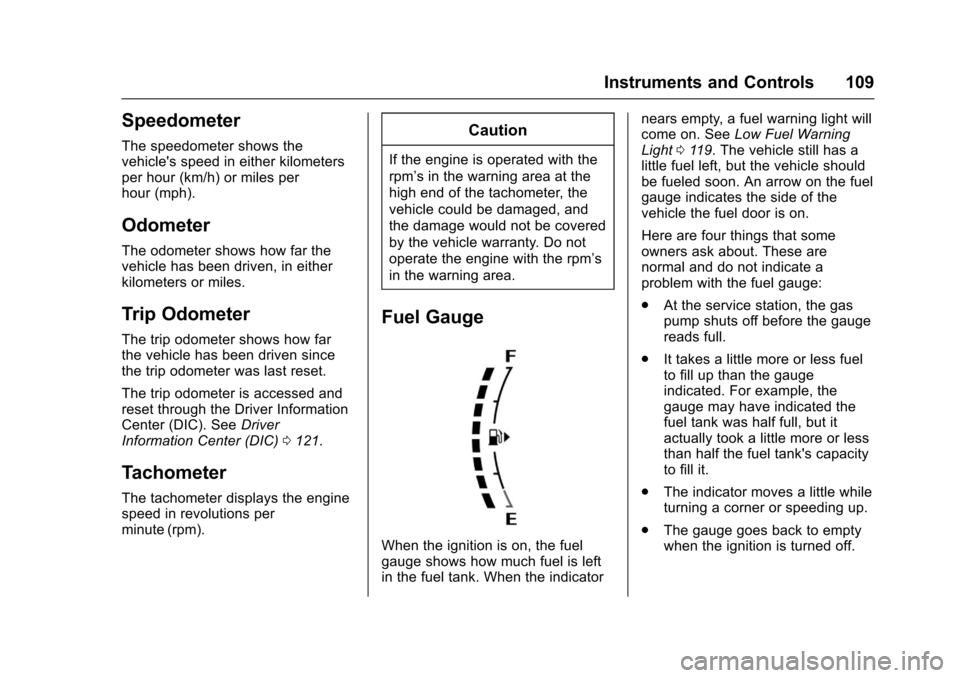
Fuel Gauge
When the ignition is on, the fuelgauge shows how much fuel is leftin the fuel tank. When the indicator
nears empty, a fuel warning light willcome on. SeeLow Fuel WarningLight011 9.Thevehiclestillhasalittle fuel left, but the vehicle shouldbe fueled soon. An arrow on the fuelgauge indicates the side of thevehicle the fuel door is on.
Here are four things that someowners ask about. These arenormal and do not indicate aproblem with the fuel gauge:
.At the service station, the gaspump shuts off before the gaugereads full.
.It takes a little more or less fuelto fill up than the gaugeindicated. For example, thegauge may have indicated thefuel tank was half full, but itactually took a little more or lessthan half the fuel tank's capacityto fill it.
.The indicator moves a little whileturning a corner or speeding up.
.The gauge goes back to emptywhen the ignition is turned off.
Page 113 of 342

Chevrolet Sonic Owner Manual (GMNA-Localizing-U.S./Canada-10122660) -2017 - crc - 5/13/16
112 Instruments and Controls
Charging System Light
This light will come on briefly whenthe ignition is turned on, and theengine is not running, as a check toshow it is working.
It should go out when the engine isstarted. If it stays on, or comes onwhile driving, there may be aproblem with the electrical chargingsystem. Have it checked by yourdealer. Driving while this light is oncould drain the battery. If a shortdistance must be driven with thelight on, turn off all accessories,such as the radio and airconditioner, to help reduce the drainon the battery.
Malfunction Indicator
Lamp (Check Engine
Light)
This light is part of the vehicle’semission control on-boarddiagnostic system. If this light is onwhile the engine is running, amalfunction has been detected andthe vehicle may require service. Thelight should come on to show that itis working when the ignition is inON/RUN with the engine notrunning. SeeIgnition Positions (KeyAccess)0182orIgnition Positions(Keyless Access)0183.
Malfunctions are often indicated bythe system before any problem isnoticeable. Being aware of the lightand seeking service promptly whenit comes on may prevent damage.
Caution
If the vehicle is driven continually
with this light on, the emission
control system may not work as
well, the fuel economy may be
lower, and the vehicle may not
run smoothly. This could lead to
costly repairs that might not be
covered by the vehicle warranty.
Caution
Modifications to the engine,
transmission, exhaust, intake,
or fuel system, or the use of
replacement tires that do not
meet the original tire
specifications, can cause this light
to come on. This could lead to
costly repairs not covered by the
vehicle warranty. This could also
affect the vehicle’sabilitytopass
an Emissions Inspection/
Maintenance test. See
Accessories and
Modifications0214.
Page 114 of 342

Chevrolet Sonic Owner Manual (GMNA-Localizing-U.S./Canada-10122660) -2017 - crc - 5/13/16
Instruments and Controls 113
If the light is flashing :Amalfunction has been detected thatcould damage the emission controlsystem and increase vehicleemissions. Diagnosis and servicemay be required.
To h e l p p r e v e n t d a m a g e , r e d u c evehicle speed and avoid hardaccelerations and uphill grades.
If the light continues to flash, find asafe place to park. Turn the vehicleoff and wait at least 10 secondsbefore restarting the engine. If thelight is still flashing, follow theprevious guidelines and see yourdealer for service as soon aspossible.
If the light is on steady :Amalfunction has been detected.Diagnosis and service may berequired.
Check the following:
.Alooseormissingfuelcapmaycause the light to come on. SeeFilling the Tank0209.Afewdriving trips with the capproperly installed may turn thelight off.
.Poor fuel quality can causeinefficient engine operation andpoor driveability, which may goaway once the engine is warmedup. If this occurs, change thefuel brand. It may require atleast one full tank of the properfuel to turn the light off. SeeFuel0207.
If the light remains on, see yourdealer.
Emissions Inspection and
Maintenance Programs
If the vehicle requires an EmissionsInspection/Maintenance test, thetest equipment will likely connect tothe vehicle's Data LinkConnector (DLC).
The DLC is under the instrumentpanel to the left of the steeringwheel. Connecting devices that are
not used to perform an EmissionsInspection/Maintenance test or toservice the vehicle may affectvehicle operation. SeeAdd-OnElectrical Equipment0211.Seeyour dealer if assistance is needed.
The vehicle may not passinspection if:
.The light is on when the engineis running.
.The light does not come onwhen the ignition is in ON/RUNwith the engine not running.
.Critical emission control systemshave not been completelydiagnosed. If this happens, thevehicle would not be ready forinspection and might requireseveral days of routine drivingbefore the system is ready forinspection. This can happen ifthe 12-volt battery has recentlybeen replaced or run down, or ifthe vehicle has been recentlyserviced.
See your dealer if the vehicle willnot pass or cannot be made readyfor the test.
Page 116 of 342

Chevrolet Sonic Owner Manual (GMNA-Localizing-U.S./Canada-10122660) -2017 - crc - 5/13/16
Instruments and Controls 115
Antilock Brake System
(ABS) Warning Light
This light comes on briefly when theengine is started.
If the light stays on, turn the ignitionto LOCK/OFF or if the light comeson, stop as soon as possible andturn the ignition off. Then start theengine again to reset the system.If the light still stays on, or comeson again while driving, the vehicleneeds service. See your dealer.If the regular brake system warninglight is not on, the brakes will stillwork, but the antilock brakes will notwork. If the regular brake systemwarning light is also on, the antilockbrakes will not work and there is aproblem with the regular brakes.SeeBrake System WarningLight011 4.
The ABS warning light will come onbriefly when the ignition is turned toON/RUN. This is normal. If the lightdoes not come on then, have it fixedso it will be ready to warn if there isaproblem.
Operate Pedal Light
This light comes on when the clutchor brake pedal needs to be appliedto start the vehicle.
Up-Shift Light
For manual transmission vehicles,there is an up-shift light that comeson in the lower DIC area. It showswhen to shift to the next higher gearfor best fuel economy.
SeeManual Transmission0193.
Power Steering Warning
Light
This light comes on briefly when theignition is turned to ON/RUN as acheck to show it is working.
If it does not come on have thevehicle serviced by your dealer.
If this light stays on, or comes onwhile driving, the system may not beworking. If this happens, see yourdealer for service.
Page 120 of 342
Chevrolet Sonic Owner Manual (GMNA-Localizing-U.S./Canada-10122660) -2017 - crc - 5/13/16
Instruments and Controls 119
Caution (Continued)
level is within the operating range
and the oil pressure is still low,
have the vehicle serviced. Always
follow the maintenance schedule
for changing engine oil.
This light should come on briefly asthe engine is started. If it does notcome on, have the vehicle servicedby your dealer.
If the light comes on and stays on, itmeans that oil is not flowing throughthe engine properly. The vehiclecould be low on oil and might havesome other system problem. Seeyour dealer.
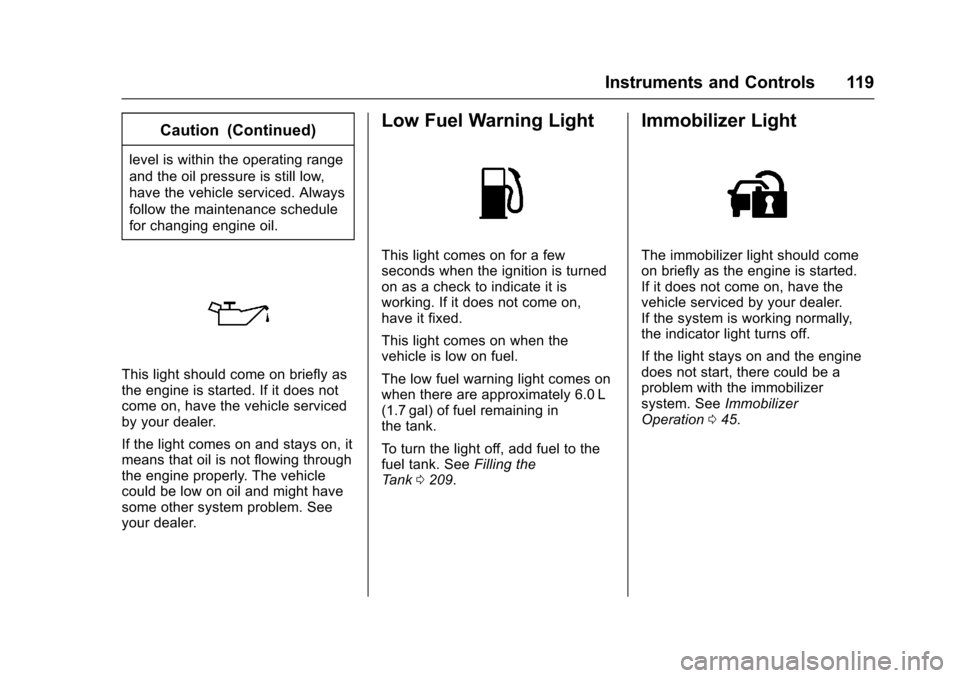
Low Fuel Warning Light
This light comes on for a fewseconds when the ignition is turnedon as a check to indicate it isworking. If it does not come on,have it fixed.
This light comes on when thevehicle is low on fuel.
The low fuel warning light comes onwhen there are approximately 6.0 L(1.7 gal) of fuel remaining inthe tank.
To t u r n t h e l i g h t o f f , a d d f u e l t o t h efuel tank. SeeFilling theTa n k0209.
Immobilizer Light
The immobilizer light should comeon briefly as the engine is started.If it does not come on, have thevehicle serviced by your dealer.If the system is working normally,the indicator light turns off.
If the light stays on and the enginedoes not start, there could be aproblem with the immobilizersystem. SeeImmobilizerOperation045.
Page 122 of 342
Chevrolet Sonic Owner Manual (GMNA-Localizing-U.S./Canada-10122660) -2017 - crc - 5/13/16
Instruments and Controls 121
Door Ajar Light
This light comes on when a door isopen or not securely latched. Beforedriving, check that all doors areproperly closed.
Trunk Ajar Light
This light comes on when the trunkis ajar.
Information Displays
Driver Information
Center (DIC)
The DIC displays information aboutthe vehicle. It also displays warningmessages if a system problem isdetected. SeeVehicle Messages0126.AllmessagesappearintheDIC display in the instrument panelcluster.
DIC Operation and Displays
On some models, the trip odometerreset stem is used to operate theDIC. On other models, the controlsfor the DIC are on the turn signallever.
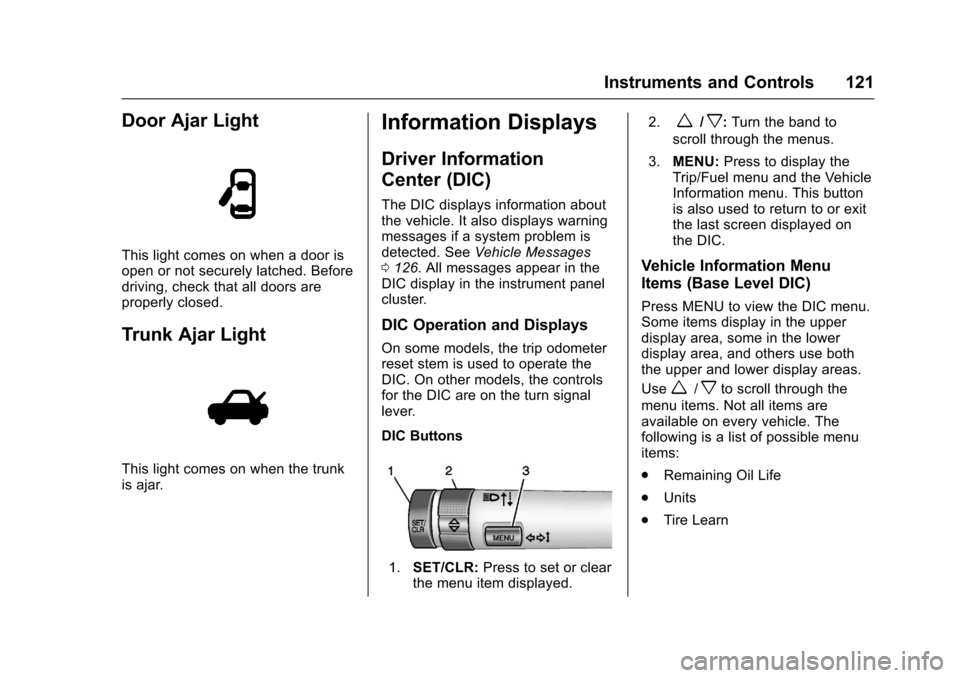
DIC Buttons
1.SET/CLR:Press to set or clearthe menu item displayed.
2.w/x:Turn the band to
scroll through the menus.
3.MENU:Press to display theTrip/Fuel menu and the VehicleInformation menu. This buttonis also used to return to or exitthe last screen displayed onthe DIC.
Vehicle Information Menu
Items (Base Level DIC)
Press MENU to view the DIC menu.Some items display in the upperdisplay area, some in the lowerdisplay area, and others use boththe upper and lower display areas.
Usew/xto scroll through the
menu items. Not all items areavailable on every vehicle. Thefollowing is a list of possible menuitems:
.Remaining Oil Life
.Units
.Tire Learn
Page 123 of 342

Chevrolet Sonic Owner Manual (GMNA-Localizing-U.S./Canada-10122660) -2017 - crc - 5/13/16
122 Instruments and Controls
Remaining Oil Life
This menu is not available while thevehicle is moving. This displayshows an estimate of the oil's
remaining useful life. If 99:%is
displayed, that means 99% of thecurrent oil life remains.
When the remaining oil life is low,
the:%CHANGEmessagewill
appear on the display. The oilshould changed as soon aspossible. SeeEngine Oil0220.Inaddition to the engine oil life systemmonitoring the oil life, additionalmaintenance is recommended in theMaintenance Schedule. SeeMaintenance Schedule0290.
Remember, the Oil Life display mustbe reset after each oil change. It willnot reset itself. Also, be careful notto reset the Oil Life displayaccidentally at any time other thanwhen the oil has just been changed.It cannot be reset accurately untilthe next oil change. To reset theengine oil life system, press SET/CLR while the Oil Life display isactive. SeeEngine Oil LifeSystem0222.
Units
This menu is not available while thevehicle is moving. Press SET/CLRwhile the unit display is active and
movew/xto change units when
UNIT SET is displayed. Press SET/CLR to confirm the setting. Select 1,2, or 3 for the unit display. 1 ismetric units, 2 is Imperial units, and3isUSunits.Thiswillchangethedisplays on the cluster and DIC tothe type of measurements selected.
Tire Learn
This display allows for matching ofthe TPMS sensors. The display willshow a vehicle with the approximatepressures of all four tires. Tirepressure is displayed in eitherkilopascal (kPa) or pounds persquare inch (psi). SeeTire PressureMonitor System0257andTirePressure Monitor Operation0258.
Trip/Fuel Menu Items (Base
Level DIC)
Press MENU until the Trip/Fuel
menu is displayed. Usew/xto
scroll through the menu items. On
some models, use the trip odometerreset stem to scroll through themenu. Not all items are available onevery vehicle. The following is a listof possible menu items:
.Trip Odometer
.Fuel Range
.Average Vehicle Speed
.Instantaneous Fuel Economy
.Average Fuel Economy
.Timer
Trip Odometer
This display shows the currentdistance traveled, in eitherkilometers (km) or miles (mi), sincethe last reset for the trip odometer.The trip odometer can be reset tozero by pressing SET/CLR orpressing and holding the tripodometer reset stem while the tripodometer display is showing.
Fuel Range
This display shows the approximatedistance the vehicle can be drivenwithout refueling. The fuel rangeestimate is based on an average of