2017 CHEVROLET SONIC cruise control
[x] Cancel search: cruise controlPage 176 of 342
Chevrolet Sonic Owner Manual (GMNA-Localizing-U.S./Canada-10122660) -2017 - crc - 5/13/16
Driving and Operating 175
The vehicle may straighten out.Be ready for a second skid if itoccurs.
.Slow down and adjust yourdriving according to weatherconditions. Stopping distancecan be longer and vehiclecontrol can be affected whentraction is reduced by water,snow, ice, gravel, or othermaterial on the road. Learn torecognize warning clues—suchas enough water, ice, or packedsnow on the road to make amirrored surface—and slowdown when you have any doubt.
.Try to avoid sudden steering,acceleration, or braking,including reducing vehicle speedby shifting to a lower gear. Anysudden changes could causethe tires to slide.
Remember: Antilock brakes helpavoid only the braking skid.
Driving on Wet Roads
Rain and wet roads can reducevehicle traction and affect yourability to stop and accelerate.
Always drive slower in these typesof driving conditions and avoiddriving through large puddles anddeep-standing or flowing water.
{Warning
Wet brakes can cause crashes.
They might not work as well in a
quick stop and could cause
pulling to one side. You could
lose control of the vehicle.
After driving through a large
puddle of water or a car/vehicle
wash, lightly apply the brake
pedal until the brakes work
normally.
Flowing or rushing water creates
strong forces. Driving through
flowing water could cause the
vehicle to be carried away. If this
happens, you and other vehicle
occupants could drown. Do not
ignore police warnings and be
very cautious about trying to drive
through flowing water.
Hydroplaning
Hydroplaning is dangerous. Watercan build up under the vehicle'stires so they actually ride on thewater. This can happen if the road iswet enough and you are going fastenough. When the vehicle ishydroplaning, it has little or nocontact with the road.
There is no hard and fast rule abouthydroplaning. The best advice is toslow down when the road is wet.
Other Rainy Weather Tips
Besides slowing down, other wetweather driving tips include:
.Allow extra following distance.
.Pass with caution.
.Keep windshield wipingequipment in good shape.
.Keep the windshield washer fluidreservoir filled.
.Have good tires with propertread depth. SeeTires0248.
.Turn off cruise control.
Page 178 of 342
Chevrolet Sonic Owner Manual (GMNA-Localizing-U.S./Canada-10122660) -2017 - crc - 5/13/16
Driving and Operating 177
clear roads in shaded areas.The surface of a curve or anoverpass can remain icy whenthe surrounding roads are clear.Avoid sudden steeringmaneuvers and braking whileon ice.
.Turn off cruise control.
Blizzard Conditions
Stop the vehicle in a safe place andsignal for help. Stay with the vehicleunless there is help nearby.If possible, use RoadsideAssistance. SeeRoadsideAssistance Program0311.Togethelp and keep everyone in thevehicle safe:
.Turn on the hazard warningflashers.
.Tie a red cloth to an outsidemirror.
{Warning
Snow can trap engine exhaust
under the vehicle. This may
cause exhaust gases to get
inside. Engine exhaust contains
carbon monoxide (CO), which
cannot be seen or smelled. It can
cause unconsciousness and even
death.
If the vehicle is stuck in snow:
.Clear snow from the base ofthe vehicle, especially anyblocking the exhaust pipe.
.Open a window about 5 cm(2 in) on the vehicle sidethat is away from the wind,to bring in fresh air.
.Fully open the air outlets onor under the instrumentpanel.
.Adjust the climate controlsystem to circulate the airinside the vehicle and set
(Continued)
Warning (Continued)
the fan speed to the highestsetting. See“ClimateControl Systems.”
For more information about CO,
seeEngine Exhaust0190.
To s a v e f u e l , r u n t h e e n g i n e f o rshort periods to warm the vehicleand then shut the engine off andpartially close the window. Movingabout to keep warm also helps.
If it takes time for help to arrive,when running the engine, push theaccelerator pedal slightly so theengine runs faster than the idlespeed. This keeps the batterycharged to restart the vehicle and tosignal for help with the headlamps.Do this as little as possible, tosave fuel.
Page 198 of 342
Chevrolet Sonic Owner Manual (GMNA-Localizing-U.S./Canada-10122660) -2017 - crc - 5/13/16
Driving and Operating 197
Hill Start Assist (HSA)
This vehicle has a Hill Start Assist(HSA) feature, which may be usefulwhen the vehicle is stopped on agrade sufficient enough to activateHSA. This feature is designed toprevent the vehicle from rolling,either forward or rearward, duringvehicle drive off. After the drivercompletely stops and holds thevehicle in a complete standstill on agrade, HSA will be automaticallyactivated. During the transitionperiod between when the driverreleases the brake pedal and startsto accelerate to drive off on a grade,HSA holds the braking pressure foramaximumoftwosecondstoensure that there is no rolling. Thebrakes will automatically releasewhen the accelerator pedal isapplied within the two-secondwindow. It will not activate if thevehicle is in a drive gear and facingdownhill, or if the vehicle is facinguphill and in R (Reverse).
Ride Control Systems
Traction Control/
Electronic Stability
Control
System Operation
The vehicle has a Traction ControlSystem (TCS) and StabiliTrak®,anelectronic stability control system.These systems help limit wheel slipand assist the driver in maintainingcontrol, especially on slippery roadconditions.
TCS activates if it senses that anyof the drive wheels are spinning orbeginning to lose traction. When thishappens, TCS applies the brakes tothe spinning wheels and reducesengine power to limit wheel spin.
StabiliTrak activates when thevehicle senses a difference betweenthe intended path and the directionthe vehicle is actually traveling.StabiliTrak selectively appliesbraking pressure to any one of the
vehicle wheel brakes to assist thedriver in keeping the vehicle on theintended path.
If cruise control is being used andtraction control or StabiliTrak beginsto limit wheel spin, cruise control willdisengage. Cruise control may beturned back on when roadconditions allow.
Both systems come onautomatically when the vehicle isstarted and begins to move. Thesystems may be heard or felt whilethey are operating or whileperforming diagnostic checks. Thisis normal and does not mean thereis a problem with the vehicle.
It is recommended to leave bothsystems on for normal drivingconditions, but it may be necessaryto turn TCS off if the vehicle getsstuck in sand, mud, ice, or snow.SeeIf the Vehicle Is Stuck0178and“Turning the Systems Off andOn”later in this section.
Page 200 of 342
Chevrolet Sonic Owner Manual (GMNA-Localizing-U.S./Canada-10122660) -2017 - crc - 5/13/16
Driving and Operating 199
To t u r n T C S a n d S t a b i l i T r a k o n
again, press and releaseg.The
traction off lightiand StabiliTrak
OFF lightgin the instrument cluster
turn off.
Adding accessories can affect thevehicle performance. SeeAccessories andModifications0214.
Cruise Control
If the vehicle is equipped with cruisecontrol, a speed of about 40 km/h(25 mph) or more can be maintainedwithout keeping your foot on theaccelerator. Cruise control does notwork at speeds below 40 km/h(25 mph).
{Warning
Cruise control can be dangerous
where you cannot drive safely at
asteadyspeed.Donotuse
cruise control on winding roads or
in heavy traffic.
Cruise control can be dangerous
on slippery roads. On such roads,
fast changes in tire traction can
cause excessive wheel slip, and
you could lose control. Do not use
cruise control on slippery roads.
If the vehicle's Traction ControlSystem (TCS) or StabiliTrak systembegins to limit wheel spin whileusing cruise control, the cruisecontrol will automatically disengage.
SeeTr a c t i o n C o n t r o l / E l e c t r o n i cStability Control0197.Ifacollisionalert occurs when cruise control isactivated, cruise control isdisengaged. SeeForward CollisionAlert (FCA) System0204.Whenroad conditions allow you to safelyuse it again, the cruise control canbe turned back on.
If the brakes are applied, cruisecontrol disengages.
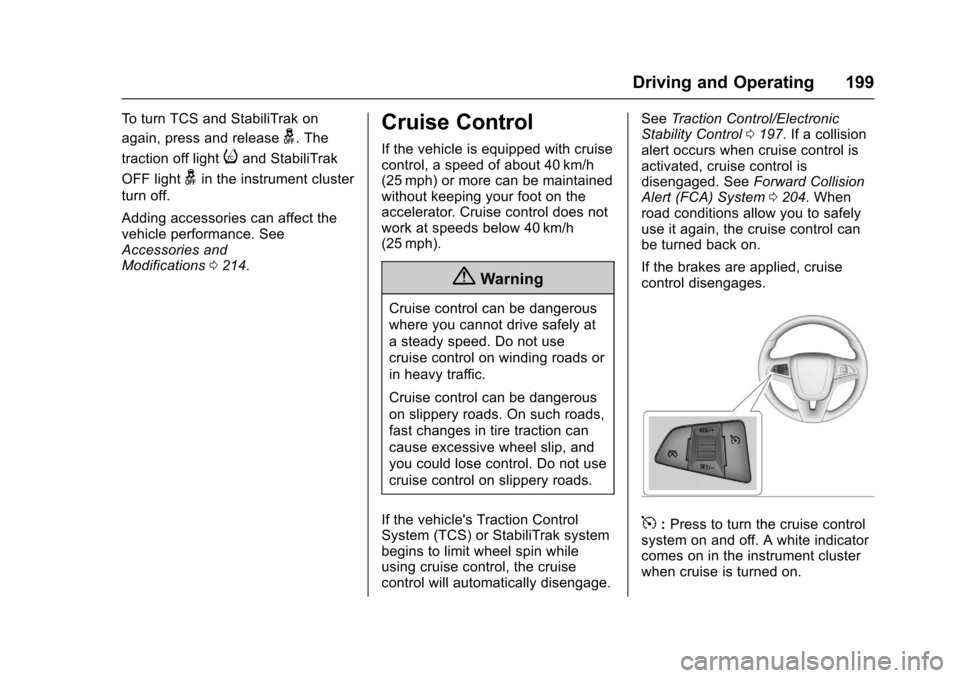
5:Press to turn the cruise controlsystem on and off. A white indicatorcomes on in the instrument clusterwhen cruise is turned on.
Page 201 of 342
Chevrolet Sonic Owner Manual (GMNA-Localizing-U.S./Canada-10122660) -2017 - crc - 5/13/16
200 Driving and Operating
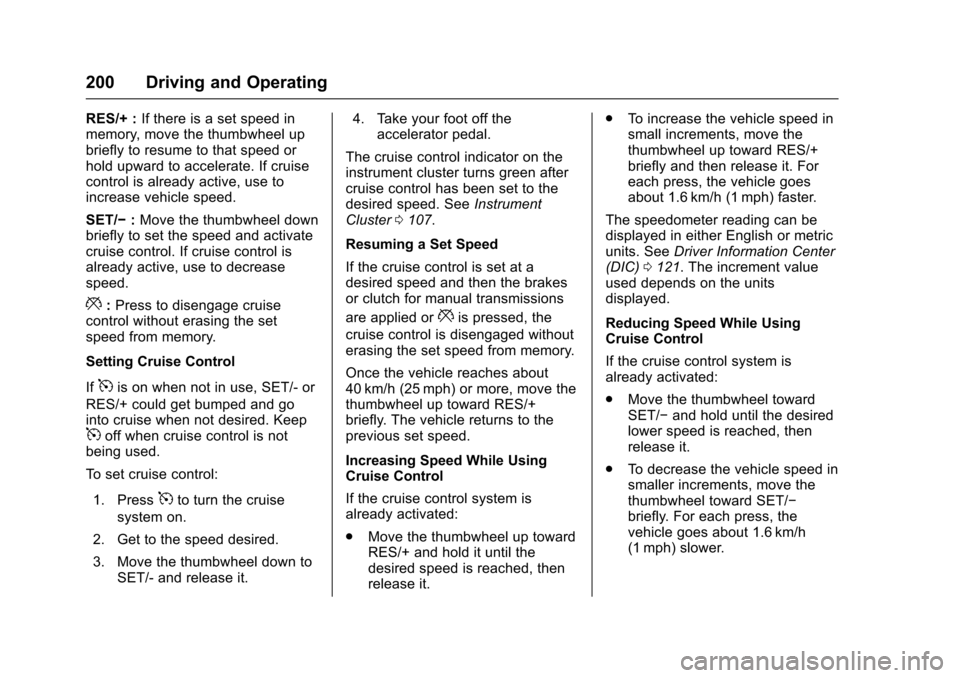
RES/+ :If there is a set speed inmemory, move the thumbwheel upbriefly to resume to that speed orhold upward to accelerate. If cruisecontrol is already active, use toincrease vehicle speed.
SET/✓:Move the thumbwheel downbriefly to set the speed and activatecruise control. If cruise control isalready active, use to decreasespeed.
*:Press to disengage cruisecontrol without erasing the setspeed from memory.
Setting Cruise Control
If5is on when not in use, SET/- or
RES/+ could get bumped and gointo cruise when not desired. Keep5off when cruise control is notbeing used.
To s e t c r u i s e c o n t r o l :
1. Press5to turn the cruise
system on.
2. Get to the speed desired.
3. Move the thumbwheel down toSET/- and release it.
4. Take your foot off theaccelerator pedal.
The cruise control indicator on theinstrument cluster turns green aftercruise control has been set to thedesired speed. SeeInstrumentCluster0107.
Resuming a Set Speed
If the cruise control is set at adesired speed and then the brakesor clutch for manual transmissions
are applied or*is pressed, the
cruise control is disengaged withouterasing the set speed from memory.
Once the vehicle reaches about40 km/h (25 mph) or more, move thethumbwheel up toward RES/+briefly. The vehicle returns to theprevious set speed.
Increasing Speed While UsingCruise Control
If the cruise control system isalready activated:
.Move the thumbwheel up towardRES/+ and hold it until thedesired speed is reached, thenrelease it.
.To i n c r e a s e t h e v e h i c l e s p e e d i nsmall increments, move thethumbwheel up toward RES/+briefly and then release it. Foreach press, the vehicle goesabout 1.6 km/h (1 mph) faster.
The speedometer reading can bedisplayed in either English or metricunits. SeeDriver Information Center(DIC)0121.Theincrementvalueused depends on the unitsdisplayed.
Reducing Speed While UsingCruise Control
If the cruise control system isalready activated:
.Move the thumbwheel towardSET/✓and hold until the desiredlower speed is reached, thenrelease it.
.To d e c r e a s e t h e v e h i c l e s p e e d i nsmaller increments, move thethumbwheel toward SET/✓briefly. For each press, thevehicle goes about 1.6 km/h(1 mph) slower.
Page 202 of 342
Chevrolet Sonic Owner Manual (GMNA-Localizing-U.S./Canada-10122660) -2017 - crc - 5/13/16
Driving and Operating 201
The speedometer reading can bedisplayed in either English or metricunits. SeeDriver Information Center(DIC)0121.Theincrementvalueused depends on the unitsdisplayed.
Passing Another Vehicle WhileUsing Cruise Control
Use the accelerator pedal toincrease the vehicle speed. Whenyou take your foot off the pedal, thevehicle slows down to the previousset cruise control speed. Whilepressing the accelerator pedal orshortly following the release tooverride cruise control, brieflymoving the thumbwheel towardSET/- will result in cruise control setto the current vehicle speed.
Using Cruise Control on Hills
How well cruise control works onhills depends on the vehicle speed,load, and the steepness of the hills.When going up steep hills, youmight have to step on theaccelerator pedal to maintain thevehicle speed. When goingdownhill, you might have to brake orshift to a lower gear to keep your
speed down. If the brake pedal isapplied, cruise control willdisengage.
Ending Cruise Control
There are four ways to end cruisecontrol:
.To d i s e n g a g e c r u i s e c o n t r o l ,step lightly on the brake pedal orclutch for manual transmission.
.Press*.
.Shift the transmission toN(Neutral).
.To t u r n o f f c r u i s e c o n t r o l ,
press5.
Erasing Speed Memory
The cruise control set speed is
erased from memory if5is pressed
or if the ignition is turned off.
Driver Assistance
Systems
Rear Vision
Camera (RVC)
This vehicle may have the RVCsystem. Read this entire sectionbefore using it.
The RVC system can assist thedriver when backing up bydisplaying a view of the area behindthe vehicle.
{Warning
The camera(s) do not display
children, pedestrians, bicyclists,
crossing traffic, animals, or any
other object outside of the
cameras’field of view, below the
bumper, or under the vehicle.
Shown distances may be different
from actual distances. Do not
drive or park the vehicle using
only these camera(s). Always
check behind and around the
(Continued)
Page 206 of 342
Chevrolet Sonic Owner Manual (GMNA-Localizing-U.S./Canada-10122660) -2017 - crc - 5/13/16
Driving and Operating 205
Warning (Continued)
closely, FCA may not provide a
warning with enough time to help
avoid a crash. It also may not
provide any warning at all. FCA
does not warn of pedestrians,
animals, signs, guardrails,
bridges, construction barrels,
or other objects. Be ready to take
action and apply the brakes. See
Defensive Driving0172.
FCA can be disabled with the FCAsteering wheel control.
Detecting the Vehicle Ahead
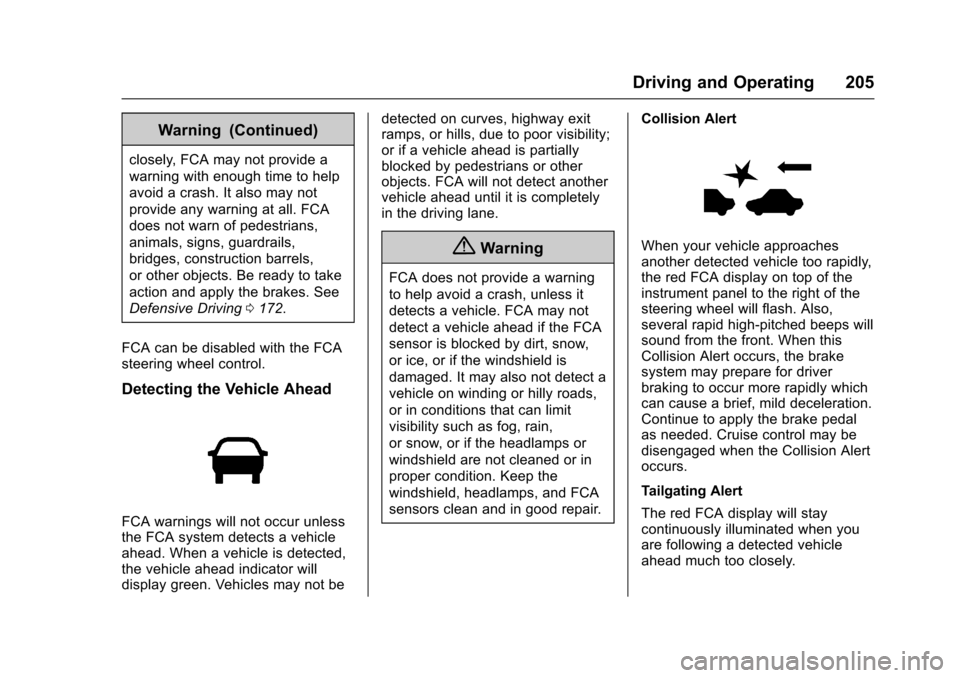
FCA warnings will not occur unlessthe FCA system detects a vehicleahead. When a vehicle is detected,the vehicle ahead indicator willdisplay green. Vehicles may not be
detected on curves, highway exitramps, or hills, due to poor visibility;or if a vehicle ahead is partiallyblocked by pedestrians or otherobjects. FCA will not detect anothervehicle ahead until it is completelyin the driving lane.
{Warning
FCA does not provide a warning
to help avoid a crash, unless it
detects a vehicle. FCA may not
detect a vehicle ahead if the FCA
sensor is blocked by dirt, snow,
or ice, or if the windshield is
damaged. It may also not detect a
vehicle on winding or hilly roads,
or in conditions that can limit
visibility such as fog, rain,
or snow, or if the headlamps or
windshield are not cleaned or in
proper condition. Keep the
windshield, headlamps, and FCA
sensors clean and in good repair.
Collision Alert
When your vehicle approachesanother detected vehicle too rapidly,the red FCA display on top of theinstrument panel to the right of thesteering wheel will flash. Also,several rapid high-pitched beeps willsound from the front. When thisCollision Alert occurs, the brakesystem may prepare for driverbraking to occur more rapidly whichcan cause a brief, mild deceleration.Continue to apply the brake pedalas needed. Cruise control may bedisengaged when the Collision Alertoccurs.
Tailgating Alert
The red FCA display will staycontinuously illuminated when youare following a detected vehicleahead much too closely.
Page 334 of 342

Chevrolet Sonic Owner Manual (GMNA-Localizing-U.S./Canada-10122660) -2017 - crc - 5/13/16
Index 333
Child Restraints (cont'd)
Lower Anchors and Tethers
for Children . . . . . . . . . . . . . . . . . . . 84
Older Children . . . . . . . . . . . . . . . . . . 77
Securing . . . . . . . . . . . . . . . . . . . . 91, 93
Systems . . . . . . . . . . . . . . . . . . . . . . . . 81
Circuit Breakers . . . . . . . . . . . . . . . . 242
Cleaning
Exterior Care . . . . . . . . . . . . . . . . . 280
Interior Care . . . . . . . . . . . . . . . . . . 285
Climate Control Systems . . . . . . . 166
Air Conditioning . . . . . . . . . . . . . . 166
Heating . . . . . . . . . . . . . . . . . . . . . . . 166
Clock . . . . . . . . . . . . . . . . . . . . . . . . . . . 104
Cluster, Instrument . . . . . . . . . . . . . 107
Clutch, Hydraulic . . . . . . . . . . . . . . . 224
Collision Damage Repair . . . . . . . 314
Compact Spare Tire . . . . . . . . . . . . 274
Compartment . . . . . . . . . . . . . . . . . . . . 98
Load . . . . . . . . . . . . . . . . . . . . . . . . . . . . 98
Compartments
Storage . . . . . . . . . . . . . . . . . . . . . . . . . 97
Compass . . . . . . . . . . . . . . . . . . . . . . . 104
Connections
OnStar®...................... 323
Control
Traction and Electronic
Stability . . . . . . . . . . . . . . . . . . . . . 197
Control of a Vehicle . . . . . . . . . . . . . 173
Convex Mirrors . . . . . . . . . . . . . . . . . . 46
Coolant
Engine . . . . . . . . . . . . . . . . . . . . . . . . 227
Engine Temperature
Warning Light . . . . . . . . . . . . . . . . 118
Cooling . . . . . . . . . . . . . . . . . . . . . . . . . 166
Cooling System . . . . . . . . . . . . . . . . . 226
Courtesy Lamps . . . . . . . . . . . . . . . . 138
Courtesy Transportation
Program . . . . . . . . . . . . . . . . . . . . . . . 313
Cover
Cargo . . . . . . . . . . . . . . . . . . . . . . . . . . . 98
Cruise Control . . . . . . . . . . . . . . . . . . 199
Light . . . . . . . . . . . . . . . . . . . . . . . . . . 120
Customer Assistance . . . . . . . . . . . 310
Offices . . . . . . . . . . . . . . . . . . . . . . . . 309
Te x t Te l e p h o n e ( T T Y )
Users . . . . . . . . . . . . . . . . . . . . . . . 310
Customer Information
Service Publications
Ordering Information . . . . . . . . 316
Customer Satisfaction
Procedure . . . . . . . . . . . . . . . . . . . . . 307
D
Damage Repair, Collision . . . . . . . 314
Danger, Warning, and Caution . . . . 3
Data Collection
OnStar . . . . . . . . . . . . . . . . . . . . . . . 320
Data Recorders, Event . . . . . . . . . 319
Daytime Running
Lamps (DRL) . . . . . . . . . . . . . . . . . . 135
Defensive Driving . . . . . . . . . . . . . . . 172
Delayed Locking . . . . . . . . . . . . . . . . . 39
Devices
Auxiliary . . . . . . . . . . . . . . . . . . . . . . 155
Diagnostics
OnStar®...................... 325
Distracted Driving . . . . . . . . . . . . . . . 172
Dome Lamps . . . . . . . . . . . . . . . . . . . 138
Door
Ajar Light . . . . . . . . . . . . . . . . . . . . . 121
Delayed Locking . . . . . . . . . . . . . . . . 39
Locks . . . . . . . . . . . . . . . . . . . . . . . . . . . 38
Drive Belt Routing, Engine . . . . . . 306
Driver Information
Center (DIC) . . . . . . . . . . . . . . . . . . 121
Driving
Defensive . . . . . . . . . . . . . . . . . . . . . 172
Drunk . . . . . . . . . . . . . . . . . . . . . . . . . 172
For Better Fuel Economy . . . . . . . 24
Hill and Mountain Roads . . . . . . 176