2017 CHEVROLET IMPALA park assist
[x] Cancel search: park assistPage 231 of 378

Chevrolet Impala Owner Manual (GMNA-Localizing-U.S./Canada-9921197) -
2017 - crc - 3/30/16
230 Driving and Operating
1. View Displayed by theCamera
2. Corners of the Rear Bumper
Displayed images may be farther or
closer than they appear. The area
displayed is limited and objects that
are close to either corner of the
bumper or under the bumper do not
display.
A warning triangle may display on
the RVC screen to show that Rear
Parking Assist (RPA) has detected
an object. This triangle changes
from amber to red and increases in
size the closer the object.
{Warning
The camera(s) do not display
children, pedestrians, bicyclists,
crossing traffic, animals, or any
other object outside of the
cameras’ field of view, below the
bumper, or under the vehicle.
Shown distances may be different
from actual distances. Do not
drive or park the vehicle using
only these camera(s). Always
check behind and around the
vehicle before driving. Failure to
use proper care may result in
injury, death, or vehicle damage.
Parking Assist
With RPA, as the vehicle backs up
at speeds of less than 8 km/h
(5 mph), the sensors on the rear
bumper may detect objects up to
2.5 m (8 ft) behind the vehicle within
a zone 25 cm (10 in) high off the
ground and below bumper level.
These detection distances may be
shorter during warmer or humid
weather. Blocked sensors will not detect
objects and can also cause false
detections. Keep the sensors clean
of mud, dirt, snow, ice, and slush;
and clean sensors after a car wash
in freezing temperatures.
{Warning
The Parking Assist system does
not detect children, pedestrians,
bicyclists, animals, or objects
located below the bumper or that
are too close or too far from the
vehicle. It is not available at
speeds greater than 8 km/h
(5 mph). To prevent injury, death,
or vehicle damage, even with
parking assist, always check the
area around the vehicle and
check all mirrors before moving
forward or backing.
Page 232 of 378
Chevrolet Impala Owner Manual (GMNA-Localizing-U.S./Canada-9921197) -
2017 - crc - 3/30/16
Driving and Operating 231
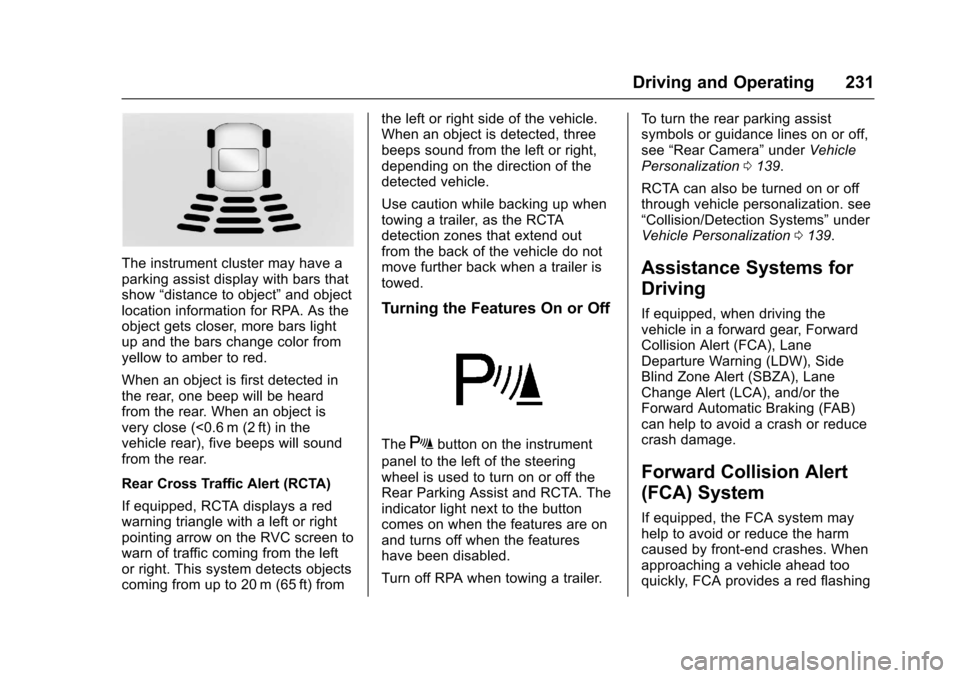
The instrument cluster may have a
parking assist display with bars that
show“distance to object” and object
location information for RPA. As the
object gets closer, more bars light
up and the bars change color from
yellow to amber to red.
When an object is first detected in
the rear, one beep will be heard
from the rear. When an object is
very close (<0.6 m (2 ft) in the
vehicle rear), five beeps will sound
from the rear.
Rear Cross Traffic Alert (RCTA)
If equipped, RCTA displays a red
warning triangle with a left or right
pointing arrow on the RVC screen to
warn of traffic coming from the left
or right. This system detects objects
coming from up to 20 m (65 ft) from the left or right side of the vehicle.
When an object is detected, three
beeps sound from the left or right,
depending on the direction of the
detected vehicle.
Use caution while backing up when
towing a trailer, as the RCTA
detection zones that extend out
from the back of the vehicle do not
move further back when a trailer is
towed.
Turning the Features On or Off
TheXbutton on the instrument
panel to the left of the steering
wheel is used to turn on or off the
Rear Parking Assist and RCTA. The
indicator light next to the button
comes on when the features are on
and turns off when the features
have been disabled.
Turn off RPA when towing a trailer. To turn the rear parking assist
symbols or guidance lines on or off,
see
“Rear Camera” underVehicle
Personalization 0139.
RCTA can also be turned on or off
through vehicle personalization. see
“Collision/Detection Systems” under
Vehicle Personalization 0139.
Assistance Systems for
Driving
If equipped, when driving the
vehicle in a forward gear, Forward
Collision Alert (FCA), Lane
Departure Warning (LDW), Side
Blind Zone Alert (SBZA), Lane
Change Alert (LCA), and/or the
Forward Automatic Braking (FAB)
can help to avoid a crash or reduce
crash damage.
Forward Collision Alert
(FCA) System
If equipped, the FCA system may
help to avoid or reduce the harm
caused by front-end crashes. When
approaching a vehicle ahead too
quickly, FCA provides a red flashing
Page 244 of 378
Chevrolet Impala Owner Manual (GMNA-Localizing-U.S./Canada-9921197) -
2017 - crc - 3/30/16
Driving and Operating 243
Trailer Towing
General Towing
Information
Only use towing equipment that has
been designed for the vehicle.
Contact your dealer or trailering
dealer for assistance with preparing
the vehicle for towing a trailer. Read
the entire section before towing a
trailer.
For towing a disabled vehicle, see
Towing the Vehicle0314. For
towing the vehicle behind another
vehicle such as a motor home, see
Recreational Vehicle Towing 0314.
Driving Characteristics
and Towing Tips
Driving with a Trailer
When towing a trailer:
.
Become familiar with the state
and local laws that apply to
trailer towing. .
Do not tow a trailer during the
first 800 km (500 mi) to prevent
damage to the engine, axle,
or other parts.
. Then during the first 800 km
(500 mi) of trailer towing, do not
drive over 80 km/h (50 mph) and
do not make starts at full throttle.
. Vehicles can tow in D (Drive).
Shift the transmission to a lower
gear if the transmission shifts
too often under heavy loads and/
or hilly conditions.
. Do not use Adaptive Cruise
Control when towing.
. The Forward Automatic Braking
System should be set to Off
when towing. See Forward
Automatic Braking (FAB) 023.
. Turn off Park Assist when
towing.
{Warning
When towing a trailer, exhaust
gases may collect at the rear of
the vehicle and enter if the
liftgate, trunk/hatch, or rear-most
window is open.
When towing a trailer:
. Do not drive with the
liftgate, trunk/hatch,
or rear-most window open.
. Fully open the air outlets on
or under the instrument
panel.
. Also adjust the climate
control system to a setting
that brings in only outside
air. See “Climate Control
Systems” in the Index.
For more information about
carbon monoxide, see Engine
Exhaust 0211.
Towing a trailer requires a certain
amount of experience. The
combination you are driving is
longer and not as responsive as the
Page 266 of 378
Chevrolet Impala Owner Manual (GMNA-Localizing-U.S./Canada-9921197) -
2017 - crc - 3/30/16
Vehicle Care 265
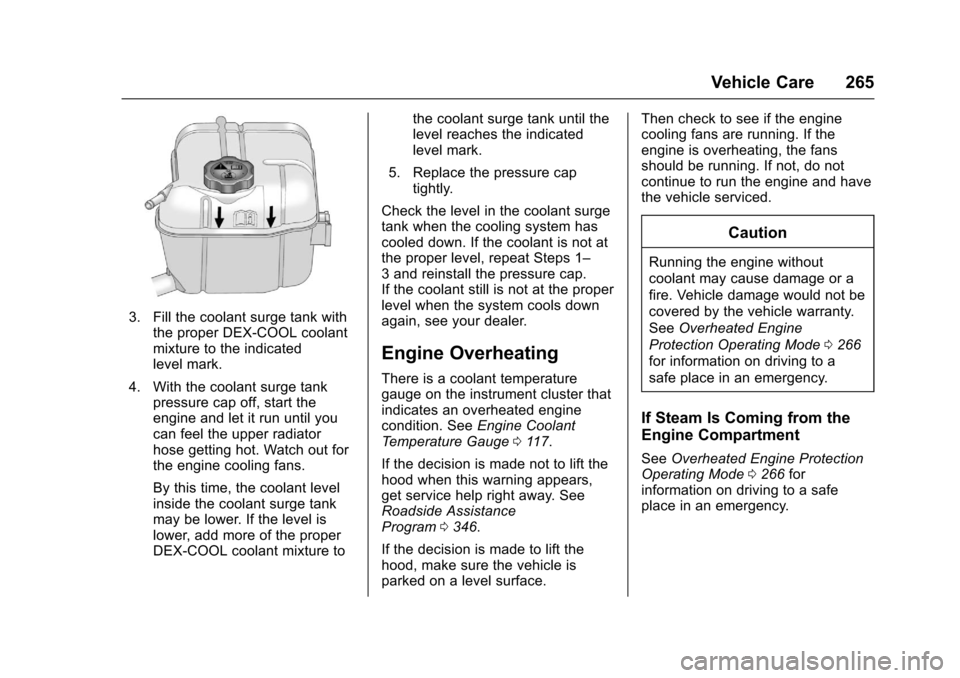
3. Fill the coolant surge tank withthe proper DEX-COOL coolant
mixture to the indicated
level mark.
4. With the coolant surge tank pressure cap off, start the
engine and let it run until you
can feel the upper radiator
hose getting hot. Watch out for
the engine cooling fans.
By this time, the coolant level
inside the coolant surge tank
may be lower. If the level is
lower, add more of the proper
DEX-COOL coolant mixture to the coolant surge tank until the
level reaches the indicated
level mark.
5. Replace the pressure cap tightly.
Check the level in the coolant surge
tank when the cooling system has
cooled down. If the coolant is not at
the proper level, repeat Steps 1–
3 and reinstall the pressure cap.
If the coolant still is not at the proper
level when the system cools down
again, see your dealer.
Engine Overheating
There is a coolant temperature
gauge on the instrument cluster that
indicates an overheated engine
condition. See Engine Coolant
Temperature Gauge 0117.
If the decision is made not to lift the
hood when this warning appears,
get service help right away. See
Roadside Assistance
Program 0346.
If the decision is made to lift the
hood, make sure the vehicle is
parked on a level surface. Then check to see if the engine
cooling fans are running. If the
engine is overheating, the fans
should be running. If not, do not
continue to run the engine and have
the vehicle serviced.
Caution
Running the engine without
coolant may cause damage or a
fire. Vehicle damage would not be
covered by the vehicle warranty.
See
Overheated Engine
Protection Operating Mode 0266
for information on driving to a
safe place in an emergency.
If Steam Is Coming from the
Engine Compartment
See Overheated Engine Protection
Operating Mode 0266 for
information on driving to a safe
place in an emergency.
Page 305 of 378
Chevrolet Impala Owner Manual (GMNA-Localizing-U.S./Canada-9921197) -
2017 - crc - 3/30/16
304 Vehicle Care
{Warning
Driving on a flat tire will cause
permanent damage to the tire.
Re-inflating a tire after it has been
driven on while severely
underinflated or flat may cause a
blowout and a serious crash.
Never attempt to re-inflate a tire
that has been driven on while
severely underinflated or flat.
Have your dealer or an authorized
tire service center repair or
replace the flat tire as soon as
possible.
{Warning
Lifting a vehicle and getting under
it to do maintenance or repairs is
dangerous without the
appropriate safety equipment and
training. If a jack is provided with
the vehicle, it is designed only for
changing a flat tire. If it is used for
anything else, you or others could(Continued)
Warning (Continued)
be badly injured or killed if the
vehicle slips off the jack. If a jack
is provided with the vehicle, only
use it for changing a flat tire.
If a tire goes flat, avoid further tire
and wheel damage by driving slowly
to a level place, well off the road,
if possible. Turn on the hazard
warning flashers. See Hazard
Warning Flashers 0151.
{Warning
Changing a tire can be
dangerous. The vehicle can slip
off the jack and roll over or fall
causing injury or death. Find a
level place to change the tire. To
help prevent the vehicle from
moving:
1. Set the parking brake firmly. (Continued)
Warning (Continued)
2. Put an automatictransmission in P (Park) or a
manual transmission in
1 (First) or R (Reverse).
3. Turn off the engine and do not restart while the vehicle
is raised.
4. Do not allow passengers to remain in the vehicle.
5. Place wheel blocks, if equipped, on both sides of
the tire at the opposite
corner of the tire being
changed.
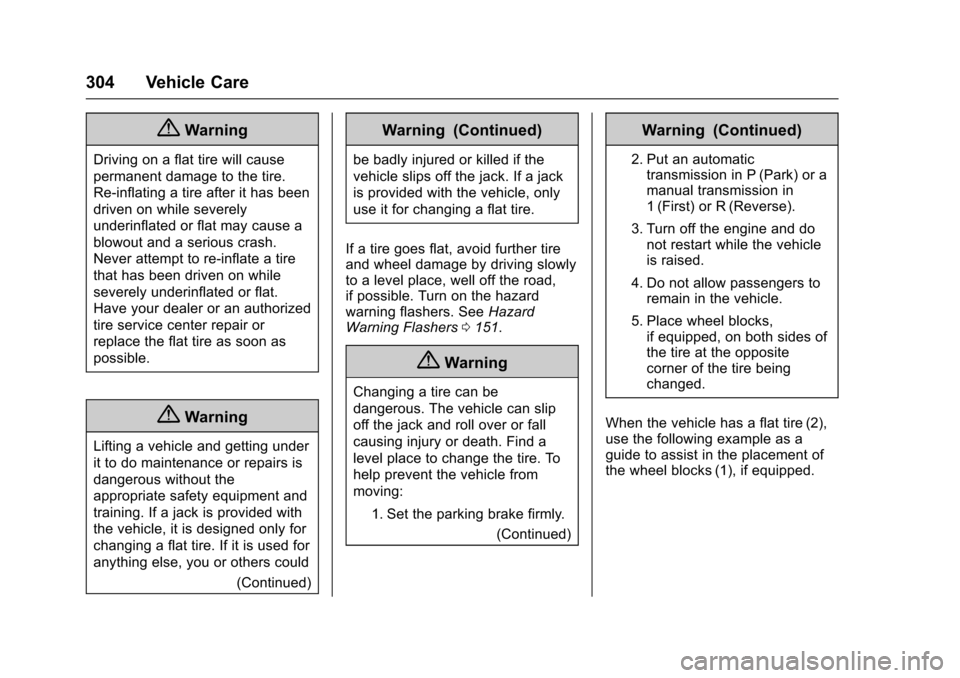
When the vehicle has a flat tire (2),
use the following example as a
guide to assist in the placement of
the wheel blocks (1), if equipped.
Page 363 of 378

Chevrolet Impala Owner Manual (GMNA-Localizing-U.S./Canada-9921197) -
2017 - crc - 3/30/16
362 OnStar
to the vehicle in a crash, or wireless
phone network congestion or
jamming—may prevent service.
See Radio Frequency
Statement 0352.
Services for People with
Disabilities
Advisors provide services to help
Subscribers with physical disabilities
and medical conditions.
Press
Qto help:
. Locate a gas station with an
attendant to pump gas.
. Find a hotel, restaurant, etc.,
that meets accessibility needs.
. Provide directions to the closest
hospital or pharmacy in urgent
situations.
TTY Users
OnStar has the ability to
communicate to deaf,
hard-of-hearing, or speech-impaired
customers while in the vehicle. The
available dealer-installed TTY
system can provide in-vehicle access to all OnStar services,
except Virtual Advisor and OnStar
Turn-by-Turn Navigation.
OnStar Personal Identification
Number (PIN)
A PIN is needed to access some
OnStar services. The PIN will need
to be changed the first time when
speaking with an Advisor. To
change the OnStar PIN, contact an
OnStar Advisor by pressing
Qor
calling 1-888-4ONSTAR.
Warranty
OnStar equipment may be
warranted as part of the vehicle
warranty.
Languages
The vehicle can be programmed to
respond in multiple languages.
Press
Qand ask for an Advisor.
Advisors are available in English,
Spanish, and French. Available
languages may vary by country.
Potential Issues
OnStar cannot perform Remote
Door Unlock or Stolen Vehicle
Assistance after the vehicle has
been off continuously for 10 days
without an ignition cycle. If the
vehicle has not been started for
five days, OnStar can contact
Roadside Assistance or a locksmith
to help gain access to the vehicle.
Global Positioning
System (GPS)
. Obstruction of the GPS can
occur in a large city with tall
buildings; in parking garages;
around airports; in tunnels and
underpasses; or in an area with
very dense trees. If GPS signals
are not available, the OnStar
system should still operate to
call OnStar. However, OnStar
could have difficulty identifying
the exact location.
. In emergency situations, OnStar
can use the last stored GPS
location to send to emergency
responders.
Page 368 of 378

Chevrolet Impala Owner Manual (GMNA-Localizing-U.S./Canada-9921197) -
2017 - crc - 3/30/16
Index 367
ArmrestRear Seat . . . . . . . . . . . . . . . . . . . . . . 62
Assistance Program, Roadside . . . . . . . . . . . . . . . . . . . . . . 346
Assistance Systems for Driving . . . . . . . . . . . . . . . . . . . . . . . . 231
Assistance Systems for
Parking and Backing . . . . . . . . . . 229
Audio Theft-Deterrent Feature . . . . . . . 157
Automatic
Dimming Mirrors . . . . . . . . . . . . . . . . 47
Door Locks . . . . . . . . . . . . . . . . . . . . . 40
Forward Braking . . . . . . . . . . . . . . 234
Headlamp System . . . . . . . . . . . . 151
Transmission . . . . . . . . . . . . . . . . . 212
Transmission Fluid . . . . . . . . . . . 259
Automatic Transmission Manual Mode . . . . . . . . . . . . . . . . . 214
Shift Lock Control FunctionCheck . . . . . . . . . . . . . . . . . . . . . . . 270
Auxiliary Jack . . . . . . . . . . . . . . . . . . . 168
Avoiding Untrusted Media Devices . . . . . . . . . . . . . . . . . . . . . . . 165B
Backglass Antenna . . . . . . . . . . . . . 164
BatteryExterior Lighting BatterySaver . . . . . . . . . . . . . . . . . . . . . . . 155
Load Management . . . . . . . . . . . . 154
Power Protection . . . . . . . . . . . . . 155
Voltage and Charging Messages . . . . . . . . . . . . . . . . . . . 130
Battery - North America . . . . 269, 311
Blade Replacement, Wiper . . . . . 271
Bluetooth
Overview . . . . . . . . . . . 169, 171, 175
Brake
Parking, Electric . . . . . . . . . . . . . . 215
System Warning Light . . . . . . . . 122
Brakes . . . . . . . . . . . . . . . . . . . . . . . . . . 267 Antilock . . . . . . . . . . . . . . . . . . . . . . . 215
Assist . . . . . . . . . . . . . . . . . . . . . . . . . 217
Fluid . . . . . . . . . . . . . . . . . . . . . . . . . . 268
System Messages . . . . . . . . . . . . 131
Braking . . . . . . . . . . . . . . . . . . . . . . . . . 193 Automatic Forward . . . . . . . . . . . 234
Break-In, New Vehicle . . . . . . . . . . 202
Bulb Replacement . . . . . . . . . . . . . . 277
Halogen Bulbs . . . . . . . . . . . . . . . . 273
Headlamp Aiming . . . . . . . . . . . . . 272
Headlamps . . . . . . . . . . . . . . . . . . . 273 Bulb Replacement (cont'd)
Headlamps, Front Turn
Signal, Sidemarker, and
Parking Lamps . . . . . . . . . . . . . . 273
High Intensity Discharge (HID) Lighting . . . . . . . . . . . . . . . 273
License Plate Lamps . . . . . . . . . 276
Taillamps, Turn Signal, Stoplamps, and Back-up
Lamps . . . . . . . . . . . . . . . . . . . . . . 275
Buying New Tires . . . . . . . . . . . . . . . 299
C
Calibration . . . . . . . . . . . . . . . . . . . . . . 108
California Fuel Requirements . . . . . . . . . . . 239
Perchlorate MaterialsRequirements . . . . . . . . . . . . . . . 250
California
Proposition
65 Warning . . . . . . . . . . 250, 269, 311
Canadian Vehicle Owners . . . . . . . . 2
Capacities and Specifications . . . . . . . . . . . . . . . . . 339
Carbon Monoxide Engine Exhaust . . . . . . . . . . . . . . . .211
Trunk . . . . . . . . . . . . . . . . . . . . . . . . . . . 41
Winter Driving . . . . . . . . . . . . . . . . 197
Page 370 of 378

Chevrolet Impala Owner Manual (GMNA-Localizing-U.S./Canada-9921197) -
2017 - crc - 3/30/16
Index 369
Door (cont'd)Delayed Locking . . . . . . . . . . . . . . . . 40
Locks . . . . . . . . . . . . . . . . . . . . . . . . . . . 38
Power Locks . . . . . . . . . . . . . . . . . . . . 40
Drive Belt Routing, Engine . . . . . . 341
Driver Assistance Systems . . . . . 228
Driver Information Center (DIC) . . . . . . . . . . . . . . . . . . 128
Driving
Assistance Systems . . . . . . . . . . 231
Characteristics andTowing Tips . . . . . . . . . . . . . . . . . 243
Defensive . . . . . . . . . . . . . . . . . . . . . 193
Drunk . . . . . . . . . . . . . . . . . . . . . . . . . 193
For Better Fuel Economy . . . . . . . 27
Hill and Mountain Roads . . . . . . 196
If the Vehicle is Stuck . . . . . . . . . 198
Loss of Control . . . . . . . . . . . . . . . 195
Off-Road Recovery . . . . . . . . . . . 194
Track Events and Competitive . . . . . . . . . . . . . . . . . 195
Vehicle Load Limits . . . . . . . . . . . 199
Wet Roads . . . . . . . . . . . . . . . . . . . 196
Winter . . . . . . . . . . . . . . . . . . . . . . . . 197
Dual Automatic Climate Control System . . . . . . . . . . . . . . . . 185E
E85 or FlexFuel . . . . . . . . . . . . . . . . 240
Electric Parking Brake . . . . . . . . . . 215
Electric Parking Brake Light . . . . 123
Electrical Equipment,Add-On . . . . . . . . . . . . . . . . . . . . . . . 247
Electrical System Engine Compartment FuseBlock . . . . . . . . . . . . . . . . . . . . . . . . 278
Fuses . . . . . . . . . . . . . . . . . . . . . . . . 278
Instrument Panel Fuse
Block . . . . . . . . . . . . . . . . . . . . . . . . 281
Overload . . . . . . . . . . . . . . . . . . . . . 277
Emergency
OnStar
®. . . . . . . . . . . . . . . . . . . . . . 357
Engine Air Cleaner/Filter . . . . . . . . . . . . . 260
Check and Service EngineSoon Light . . . . . . . . . . . . . . . . . . 120
Compartment Overview . . . . . . . 253
Coolant . . . . . . . . . . . . . . . . . . . . . . . 262
Coolant Temperature Gauge . . . . . . . . . . . . . . . . . . . . . . .117
Cooling System . . . . . . . . . . . . . . . 261
Cooling System Messages . . . 132
Drive Belt Routing . . . . . . . . . . . . 341
Exhaust . . . . . . . . . . . . . . . . . . . . . . .211
Heater . . . . . . . . . . . . . . . . . . . . . . . . 208 Engine (cont'd)
Oil Life System . . . . . . . . . . . . . . . 258
Oil Messages . . . . . . . . . . . . . . . . . 133
Oil Pressure Light . . . . . . . . . . . . 126
Overheated Protection
Operating Mode . . . . . . . . . . . . . 266
Overheating . . . . . . . . . . . . . . . . . . 265
Power Messages . . . . . . . . . . . . . 133
Running While Parked . . . . . . . . 212
Starting . . . . . . . . . . . . . . . . . . . . . . . 206
Entry Lighting . . . . . . . . . . . . . . . . . . . 154
Equipment, Towing . . . . . . . . . . . . . 247
Event Data Recorders . . . . . . . . . . 354
Exit Lighting . . . . . . . . . . . . . . . . . . . . 154
Extended Parking . . . . . . . . . . . . . . . 211
Extender, Safety Belt . . . . . . . . . . . . 67
Exterior Lamp Controls . . . . . . . . . 149
Exterior Lamps Off Reminder . . . 150
Exterior Lighting Battery Saver . . . . . . . . . . . . . . . . . . . . . . . . . 155
F
FeaturesMemory . . . . . . . . . . . . . . . . . . . . . . . . . 12
Filter, Engine Air Cleaner . . . . . . . . . . . 260
Flash-to-Pass . . . . . . . . . . . . . . . . . . . 150
Flashers, Hazard Warning . . . . . . 151
Flat Tire . . . . . . . . . . . . . . . . . . . . . . . . 303