2017 CHEVROLET CRUZE USB port
[x] Cancel search: USB portPage 177 of 405
Chevrolet Cruze Owner Manual (GMNA-Localizing-U.S./Canada/Mexico-
9803785) - 2017 - CRC - 4/13/16
176 Infotainment System
.Do not use the USB terminal to
charge USB accessory
equipment. The heat generated
may cause performance issues
or damage.
. Music files to which Digital Right
Management (DRM) is applied
cannot be played.
. USB storage device that are in
capacity with a limit of 5,000
files, such as music, photo,
video, 15 stages of folder
structure. Normal usage cannot
be guaranteed for a storage
device that exceeds this limit.
The iPod/iPhone can play all
music files that are supported.
The music file lists will only
display up to 5,000 files on the
screen. These files are sorted in
alphabetical order.
. Some iPod/iPhone product
models may not support the
connectivity or functionality of
this product. .
Only connect the iPod/iPhone
with connection cables
supported by iPod/iPhone
products. Other connection
cables cannot be used.
. The iPod/iPhone may be
damaged if it is connected to the
vehicle with the ignition on.
When not in use, disconnect the
iPod/iPhone.
. When the iPod/iPhone is
connected to the USB port by
using the iPod/iPhone cable, the
Bluetooth music is not
supported.
. The iPod/iPhone playback
functions and the information
displayed may be different when
played on the infotainment
system.
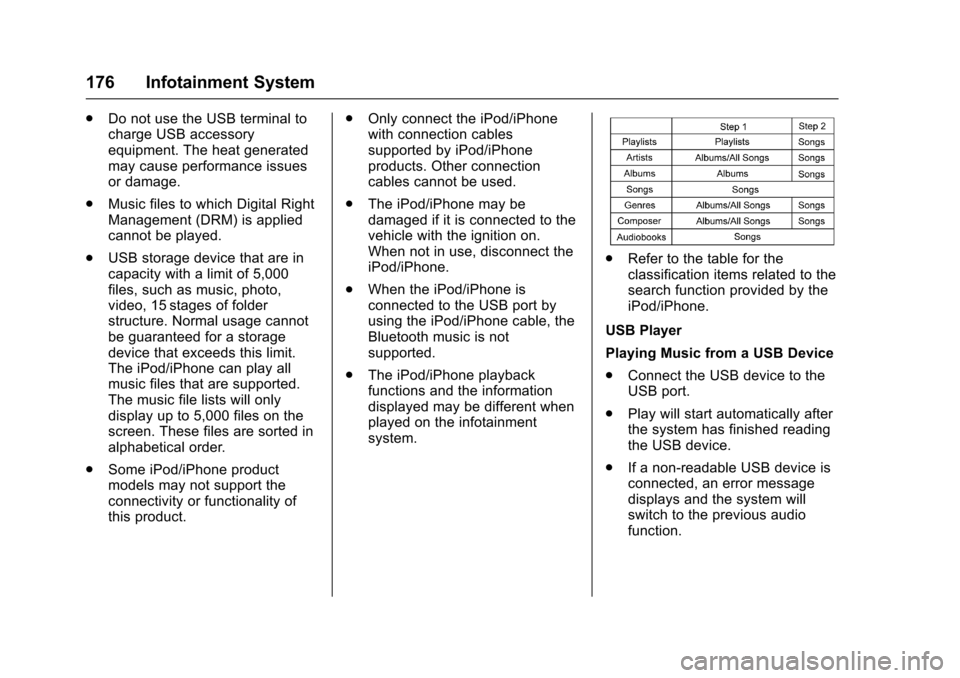
.Refer to the table for the
classification items related to the
search function provided by the
iPod/iPhone.
USB Player
Playing Music from a USB Device
. Connect the USB device to the
USB port.
. Play will start automatically after
the system has finished reading
the USB device.
. If a non-readable USB device is
connected, an error message
displays and the system will
switch to the previous audio
function.
Page 179 of 405
Chevrolet Cruze Owner Manual (GMNA-Localizing-U.S./Canada/Mexico-
9803785) - 2017 - CRC - 4/13/16
178 Infotainment System
MTP (Media Transfer Protocol)
.Connect an MTP supported
device.
. Play will start automatically after
the system has finished reading
the MTP device.
. If a non-readable MTP device is
connected, an error message
displays and the system will
switch to the previous audio
function.
iPod/iPhone Player
This feature is limited to models
supporting the iPod/iPhone
connection.
Playing Music Files
. Connect the iPod/iPhone to the
USB port.
. Play will start from the previously
played point after the system
has finished reading the USB
device.
. If a non-readable USB device is
connected, an error message
displays and the system will
switch to the previous audio
function. If the iPod/iPhone is already
connected:
1. Press
{.
2. Touch AUDIO.
3. Touch Source.
4. Touch iPod.
To stop the device and select
another media source, touch
Source, then select the other
source.
To remove the device, select
another function, then remove the
device.
Pause
. Touch
jto pause.
. Touch
rto resume.
Changing to Next/Previous Song
. Touch
lto change to the
next song.
. Touch
gwithin two seconds of
the playback time to play the
previous file. Returning to the Beginning of the
Current File
Touch
gafter two seconds of the
playback time.
Scanning Forward or Backward
Touch and hold
gorlduring
playback to rewind or fast forward.
Release the button to resume
playback at normal speed.
Playing a File Randomly
Touch
Zduring playback.
. ON: Plays all files randomly.
. OFF: Returns to normal
playback.
Using the iPod Menu
. Touch Menu during playback.
. Touch the appropriate
play mode.
Browse Music 1. Touch Browse Music.
2. Touch the desired music.
Page 180 of 405
Chevrolet Cruze Owner Manual (GMNA-Localizing-U.S./Canada/Mexico-
9803785) - 2017 - CRC - 4/13/16
Infotainment System 179
Tone Settings
.Touch Tone Settings. The Tone
Settings menu is displayed. See
“Tone Settings” under“Radio
Controls” inOperation 0169.
Auto Volume
. Touch Auto Volume. The Auto
Volume menu is displayed. See
“Auto Volume” under“Radio
Controls” inOperation 0169.
Picture System Information
The infotainment system can view
picture files stored on a USB
storage device and devices that
support Media Transfer
Protocol (MTP).
.
Supported file extensions: .jpg,
.bmp, .png, .gif.
. Animated GIF files are not
supported.
. Some files may not operate due
to a different recording format or
the condition of the file.
Viewing Pictures 1. Connect the USB device to the USB port. 2. Touch the screen to open to full
screen. Touch the screen again
to return to the previous
screen.
If the USB device is already
connected:
1. Press
{.
2. Touch GALLERY.
Some features are disabled while
the vehicle is in motion.
Viewing a Slide Show
1. Touch
zfrom the picture
screen.
2. Touch the screen to cancel the slide show during the slide
show playback.
Viewing a Previous or Next
Picture
Touch
SorTfrom the picture
screen.
Rotating a Picture
Touch
wfrom the picture screen. Enlarging a Picture
Touch
xfrom the picture screen.
Using the USB Picture Menu 1. Touch MENU from the picture screen.
2. Touch the appropriate menu: .Slide Show Time: Allows
selection of the slide show
interval.
. Clock, Temp. Display:
Allows selection of On or
Off to show the clock and
temperature on the full
screen.
. Display Settings: Adjusts
for Brightness and Contrast.
3. Touch
0to exit.
Page 186 of 405
Chevrolet Cruze Owner Manual (GMNA-Localizing-U.S./Canada/Mexico-
9803785) - 2017 - CRC - 4/13/16
Infotainment System 185
Do not change the track too quickly
when playing Bluetooth music.
Conditions that may occur when
playing Bluetooth music:
.It takes time to transmit data
from the Bluetooth device to the
infotainment system.
. If the cell phone or Bluetooth
device is not in the waiting
screen mode, it may not
automatically play.
. The infotainment system
transmits the order to play from
the Bluetooth device in the
Bluetooth music play mode.
If this is done in a different
mode, then the device transmits
the order to stop. Depending on
the Bluetooth device options,
this order to play/stop may take
time to activate.
. If the Bluetooth music playback
is not functioning, then check to
see if the Bluetooth device is in
the waiting screen mode.
. Sounds may be cut off during
the Bluetooth music playback. .
The infotainment system outputs
the audio from the cell phone or
Bluetooth device as it is
transmitted.
Apple CarPlay and
Android Auto
If equipped, Android Auto™ and/or
Apple CarPlay™ capability may be
available through a compatible
smartphone. If available, a
PROJECTION icon will appear as
Android Auto or Car Play on the
Home Page of the infotainment
display.
To use Android Auto and/or Apple
CarPlay:
1. Download the Android Auto app to your phone from the
Google™ Play store. There is
no app required for Apple
CarPlay. Use the latest
available operation system.
2. Connect your Android phone or Apple iPhone by using the
compatible phone USB cable
and plugging into a USB data
port. For best performance, use the device’
s factory-provided
USB cable. Aftermarket or
third-party cables may
not work.
The PROJECTION icon on the
Home Page will change to Android
Auto or Apple CarPlay depending
on the phone. Android Auto and/or
Apple CarPlay may automatically
launch upon USB connection. If not,
touch the ANDROID AUTO and/or
APPLE CARPLAY icon on the
Home Page to launch.
For further information on how
to set up Android Auto and Apple
CarPlay in the vehicle, see
www.my.chevrolet.com for U.S. and
Canada only or Customer
Assistance Offices 0371.
Android Auto is provided by Google
and is subject to Google’s terms
and privacy policy. CarPlay is
provided by Apple and is subject to
Apple’ s terms and privacy policy.
For Android Auto support see
https://support.google.com/
androidauto or Apple CarPlay
support at https://www.apple.com/
ios/carplay/. Apple or Google may
Page 401 of 405

Chevrolet Cruze Owner Manual (GMNA-Localizing-U.S./Canada/Mexico-
9803785) - 2017 - CRC - 4/13/16
400 Index
Oil (cont'd)Pressure Light . . . . . . . . . . . . . . . . 132
Older Children, Restraints . . . . . . . 86
Online Owner Center . . . . . . . . . . . 372
OnStar
®Additional
Information . . . . . . . . . . . . . . . . . . . . 388
OnStar
®Connections . . . . . . . . . . . 385
OnStar®Diagnostics . . . . . . . . . . . . 387
OnStar®Emergency . . . . . . . . . . . . 384
OnStar®Navigation . . . . . . . . . . . . . 385
OnStar®Overview . . . . . . . . . . . . . . 383
OnStar®Security . . . . . . . . . . . . . . . 384
Operation Fog Lamps . . . . . . . . . . . . . . . . . . . 162
Infotainment System . . . . . . . . . . 169
Ordering Service Publications . . . . . . . . . . 378
Outlets
Power . . . . . . . . . . . . . . . . . . . . . . . . .112
Overheating, Engine . . . . . . . . . . . . 281
Overview . . . . . . . . . . . . . . . . . . . . . . . 168
P
Park Shifting Into . . . . . . . . . . . . . . . . . . . 219
Shifting Out of . . . . . . . . . . . . . . . . 220
Parking . . . . . . . . . . . . . . . . . . . . . . . . . 221 Brake . . . . . . . . . . . . . . . . . . . . . . . . . 234 Parking (cont'd)
Brake and P (Park)
Mechanism Check . . . . . . . . . . 287
Extended . . . . . . . . . . . . . . . . . . . . . 221
Over Things That Burn . . . . . . . 221
Parking Assist . . . . . . . . . . . . . . . . . . 240
Parking or Backing Assistance Systems . . . . . . . . . . 240
Passenger Airbag Status
Indicator . . . . . . . . . . . . . . . . . . . . . . 125
Passenger Compartment Air Filter . . . . . . . . . . . . . . . . . . . . . . . . . . 197
Passenger Sensing System . . . . . 79
Perchlorate Materials Requirements, California . . . . . . 264
Personalization Vehicle . . . . . . . . . . . . . . . . . . . . . . . 150
Phone
Apple CarPlay andAndroid Auto . . . . . . . . . . . . . . . . 185
Bluetooth . . . . . . . . . . . . . . . . 180, 181
Hands-Free . . . . . . . . . . . . . . . . . . . 186
Port
USB . . . . . . . . . . . . . . . . . . . . . . . . . . 174
Power Door Locks . . . . . . . . . . . . . . . . . . . . . 45
Mirrors . . . . . . . . . . . . . . . . . . . . . . . . . . 53
Outlets . . . . . . . . . . . . . . . . . . . . . . . .112 Power (cont'd)
Protection, Battery . . . . . . . . . . . . 165
Retained Accessory (RAP) . . . 219
Seat Adjustment . . . . . . . . . . . . . . . . 62
Windows . . . . . . . . . . . . . . . . . . . . . . . 55
Pregnancy, Using Safety Belts . . . 71
Privacy Vehicle Data Recording . . . . . . . 381
Program
Courtesy Transportation . . . . . . 375
Proposition 65 Warning,
California . . . . . . . . . . . .264, 285, 336
R
Radio Frequency Statement . . . . 379
Radio Reception . . . . . . . . . . . . . . . . 173
RadiosAM-FM Radio . . . . . . . . . . . . . . . . . 170
Satellite . . . . . . . . . . . . . . . . . . . . . . . 171
Reading Lamps . . . . . . . . . . . . . . . . . 163
Rear Seats . . . . . . . . . . . . . . . . . . . . . . 65
Rear Vision Camera (RVC) . . . . . 240
Rearview Mirrors . . . . . . . . . . . . . . . . 54 Automatic Dimming . . . . . . . . . . . . . 54
Reclining Seatbacks . . . . . . . . . . . . . 62
Recommended Fluids and Lubricants . . . . . . . . . . . . . . . . . . . . . 361
Page 404 of 405

Chevrolet Cruze Owner Manual (GMNA-Localizing-U.S./Canada/Mexico-
9803785) - 2017 - CRC - 4/13/16
Index 403
Tires (cont'd)Wheel Alignment and Tire
Balance . . . . . . . . . . . . . . . . . . . . . 319
Wheel Replacement . . . . . . . . . . 319
When It Is Time for New
Tires . . . . . . . . . . . . . . . . . . . . . . . . 315
Winter . . . . . . . . . . . . . . . . . . . . . . . . 302
Towing General Information . . . . . . . . . . 261
Recreational Vehicle . . . . . . . . . . 339
Vehicle . . . . . . . . . . . . . . . . . . . . . . . 339
Traction Control System (TCS)/StabiliTrak
®Light . . . . . . . . . . . . 131
Off Light . . . . . . . . . . . . . . . . . . . . . . 130
Traction Control/Electronic Stability Control . . . . . . . . . . . . . . . 235
Trademarks and License
Agreements . . . . . . . . . . . . . . . . . . . 188
Transmission Automatic . . . . . . . . . . . . . . . . . . . . . 228
Fluid, Automatic . . . . . . . . . . . . . . 275
Fluid, Manual . . . . . . . . . . . . . . . . . 275
Messages . . . . . . . . . . . . . . . . . . . . 148
Transportation Program, Courtesy . . . . . . . . . . . . . . . . . . . . . . 375
Trip Odometer . . . . . . . . . . . . . . . . . . 121
Trunk . . . . . . . . . . . . . . . . . . . . . . . . . . . . 47 Turn and Lane-Change
Signals . . . . . . . . . . . . . . . . . . . . . . . . 162
U
Uniform Tire Quality Grading . . . 318
Up-Shift Light . . . . . . . . . . . . . . . . . . . 129
USB Port . . . . . . . . . . . . . . . . . . . . . . . 174
Using This Manual . . . . . . . . . . . . . . . . 2
V
Vehicle
Alarm System . . . . . . . . . . . . . . . . . . 50
Canadian Owners . . . . . . . . . . . . . . . 2
Control . . . . . . . . . . . . . . . . . . . . . . . 201
Identification Number (VIN) . . . 365
Load Limits . . . . . . . . . . . . . . . . . . . 206
Messages . . . . . . . . . . . . . . . . . . . . 140
Personalization . . . . . . . . . . . . . . . 150
Reminder Messages . . . . . . . . . . 148
Remote Start . . . . . . . . . . . . . . . . . . . 42
Security . . . . . . . . . . . . . . . . . . . . . . . . 50
Speed Messages . . . . . . . . . . . . . 149
Towing . . . . . . . . . . . . . . . . . . . . . . . . 339
Vehicle Ahead Indicator . . . . . . . . 130
Vehicle Care Storing the Tire Sealantand Compressor Kit . . . . . . . . . 329 Vehicle Care (cont'd)
Tire Pressure . . . . . . . . . . . . . . . . . 308
Vehicle Data Recording and Privacy . . . . . . . . . . . . . . . . . . . . . . . . 381
Ventilation, Air . . . . . . . . . . . . . . . . . . 197
Visors . . . . . . . . . . . . . . . . . . . . . . . . . . . 57
W
Wait to Start Light . . . . . . . . . . . . . . 131
Warning Brake System Light . . . . . . . . . . . 128
Caution and Danger . . . . . . . . . . . . . 3
Lane Departure (LDW) . . . . . . . 247
Warning Lights, Gauges, and
Indicators . . . . . . . . . . . . . . . . . . . . . 115
Warnings Hazard Flashers . . . . . . . . . . . . . . 161
Washer Fluid . . . . . . . . . . . . . . . . . . . 282
Water in Fuel . . . . . . . . . . . . . . . . . . . 255
What Fuel to Use in Canada . . . . 252
What Fuel to Use in the U.S. . . . 251
Wheels Alignment and Tire Balance . . 319
Different Size . . . . . . . . . . . . . . . . . 317
Replacement . . . . . . . . . . . . . . . . . 319
When It Is Time for New Tires . . . . . . . . . . . . . . . . . . . . . . . . . . 315
Where to Put the Restraint . . . . . . 91
Wi-Fi . . . . . . . . . . . . . . . . . . . . . . . . . . . 385