2017 CHEVROLET CITY EXPRESS key
[x] Cancel search: keyPage 182 of 348
Chevrolet Express Owner Manual (GMNA-Localizing-U.S./Canada/Mexico-
9967827) - 2017 - crc - 9/26/16
Driving and Operating 181
Warning (Continued)
It is dangerous to get out of the
vehicle if the shift lever is not fully
in P (Park) with the parking brake
firmly set. The vehicle can roll.
Do not leave the vehicle when the
engine is running. If you have left
the engine running, the vehicle
can move suddenly. You or others
could be injured. To be sure the
vehicle will not move, even when
you are on fairly level ground,
always set the parking brake and
move the shift lever to P (Park).
SeeShifting Into Park 0180.
If you are towing a trailer, see
Driving Characteristics and
Towing Tips 0202.
If you have to leave the vehicle with
the engine running, be sure the
vehicle is in P (Park) and the
parking brake is firmly set. After the
shift lever is moved into P (Park),
hold the regular brake pedal down.
Then, see if you can move the shift
lever away from P (Park) without first pulling it toward you. If you can,
it means that the shift lever was not
fully locked into P (Park).
Torque Lock
If you are parking on a hill and you
do not shift the transmission into
P (Park) properly, the weight of the
vehicle can put too much force on
the parking pawl in the
transmission. It might be difficult to
pull the shift lever out of P (Park).
This is called torque lock. To
prevent torque lock, set the parking
brake and then shift into P (Park)
properly before you leave the driver
seat. To find out how, see
Shifting
Into Park 0180.
When you are ready to drive, move
the shift lever out of P (Park) before
releasing the parking brake.
If torque lock does occur, you might
need to have another vehicle push
yours a little uphill to take some of
the pressure from the parking pawl
in the transmission. Then you
should be able to pull the shift lever
out of P (Park).
Shifting out of Park
The vehicle has an automatic
transmission shift lock control
system. You have to fully apply the
brakes before you can shift from
P (Park) when the ignition is in ON/
RUN or ACC/ACCESSORY. See
Automatic Transmission 0183.
The shift lock control system is
designed to:
. Prevent the ignition key from
being removed unless the shift
lever is in P (Park).
. Prevent movement of the shift
lever out of P (Park), unless the
ignition is in ON/RUN or ACC/
ACCESSORY and the regular
brake pedal is applied.
The shift lock control system is
always functional except in the case
of a dead battery or low voltage
(less than 9 V) battery.
If the vehicle has an uncharged
battery or a battery with low voltage,
try charging or jump starting the
battery. See Jump Starting - North
America 0282.
Page 186 of 348

Chevrolet Express Owner Manual (GMNA-Localizing-U.S./Canada/Mexico-
9967827) - 2017 - crc - 9/26/16
Driving and Operating 185
By doing this, the vehicle shifts
down to the next gear and has
more power.
D (Drive) can be used when towing
a trailer, carrying a heavy load,
or driving on steep hills. You might
want to shift the transmission to a
lower gear selection if the
transmission shifts too often.
Downshifting the transmission in
slippery road conditions could result
in skidding. See “Skidding”under
Loss of Control 0167.
The vehicle has a shift stabilization
feature that adjusts the transmission
shifting to the current driving
conditions in order to reduce rapid
upshifts and downshifts. This shift
stabilization feature is designed to
determine, before making an
upshift, if the engine is able to
maintain vehicle speed by analyzing
things such as vehicle speed,
throttle position, and vehicle load.
If the shift stabilization feature
determines that a current vehicle
speed cannot be maintained, the
transmission does not upshift and
instead holds the current gear. In some cases, this could appear to
be a delayed shift, however the
transmission is operating normally.
The transmission uses adaptive
shift controls. Adaptive shift controls
continually compare key shift
parameters to pre-programmed
ideal shifts stored in the
transmission’s computer. The
transmission constantly makes
adjustments to improve vehicle
performance according to how the
vehicle is being used, such as with
a heavy load or when the
temperature changes. During this
adaptive shift control process,
shifting might feel different as the
transmission determines the best
settings.
The shift quality of a new vehicle
may not be ideal because the
adaptive shift control process may
not have determined the best
settings for a particular shift or
condition. Shift quality will improve
with continued driving.
When temperatures are very cold,
the transmission's gear shifting
could be delayed, providing morestable shifts until the engine warms
up. Shifts could be more noticeable
with a cold transmission. This
difference in shifting is normal.
M :
This position lets drivers select
the range of gears appropriate for
current driving conditions. If the
vehicle has this feature, see “Range
Selection Mode” underManual
Mode 0186.
3 : This position is also used for
normal driving. It reduces vehicle
speed more than D (Drive) without
using the brakes. You might choose
3 (Third) instead of D (Drive) when
driving on hilly, winding roads; when
towing a trailer, so there is less
shifting between gears; and when
going down a steep hill. See “Range
Selection Mode” underManual
Mode 0186.
2 : This position reduces vehicle
speed even more than 3 (Third)
without using the brakes. You can
use 2 (Second) on hills. It can help
control vehicle speed as you go
down steep mountain roads, but
then you would also want to use the
Page 187 of 348
Chevrolet Express Owner Manual (GMNA-Localizing-U.S./Canada/Mexico-
9967827) - 2017 - crc - 9/26/16
186 Driving and Operating
brakes off and on. See“Range
Selection Mode” underManual
Mode 0186.
If you manually select 2 (Second) in
an automatic transmission, the
transmission will start in
second gear. You can use this
feature for reducing the speed of the
rear wheels when trying to start the
vehicle from a stop on slippery road
surfaces.
1 : This position reduces vehicle
speed without using the brakes.
You can use it for major/severe
downgrades where the vehicle
would otherwise accelerate due to
steepness of grade. When you shift
to 1 (First) it provides the lowest
gear appropriate to current road
speed and continues to downshift
as the vehicle slows, eventually
downshifting to 1 (First) gear. The
transmission can be held in 1 (First)
gear using Range Selection Mode
or the shift lever. See “Range
Selection Mode” underManual
Mode 0186.Caution
Spinning the tires or holding the
vehicle in one place on a hill
using only the accelerator pedal
may damage the transmission.
The repair will not be covered by
the vehicle warranty. If the vehicle
is stuck, do not spin the tires.
When stopping on a hill, use the
brakes to hold the vehicle in
place.
Normal Mode Grade Braking
This mode is enabled when the
vehicle is started, but is not enabled
in Range Selection Mode. It assists
in maintaining desired vehicle
speeds when driving on downhill
grades by using the engine and
transmission to slow the vehicle.
The first time the system activates
for each ignition key cycle, a DIC
message will be displayed. See
Transmission Messages 0118.
To disable or enable Normal Mode
Grade Braking within the current
ignition key cycle, press and hold the Tow/Haul button for
three seconds. A DIC message
displays. See
Transmission
Messages 0118.
For other forms of grade braking,
see Tow/Haul Mode 0187 and
Cruise Control 0192.
Manual Mode
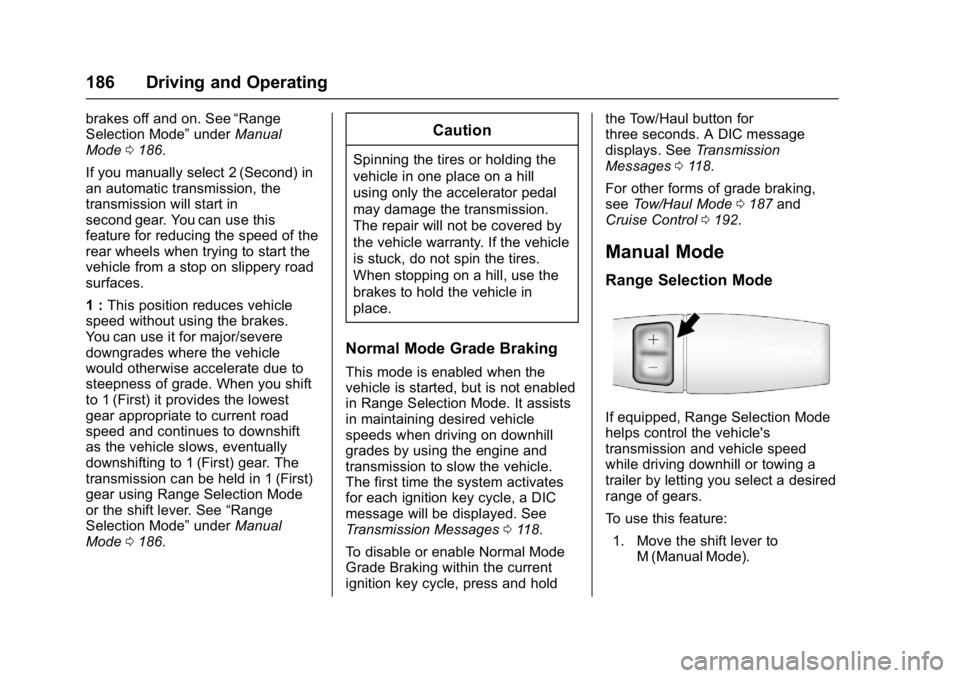
Range Selection Mode
If equipped, Range Selection Mode
helps control the vehicle's
transmission and vehicle speed
while driving downhill or towing a
trailer by letting you select a desired
range of gears.
To use this feature:
1. Move the shift lever to M (Manual Mode).
Page 189 of 348
Chevrolet Express Owner Manual (GMNA-Localizing-U.S./Canada/Mexico-
9967827) - 2017 - crc - 9/26/16
188 Driving and Operating
Tow/Haul Mode Grade Braking
Tow/Haul Mode Grade Braking is
only enabled while the Tow/Haul
Mode is selected and the vehicle is
not in the Range Selection Mode.
See“Tow/Haul Mode” listed
previously and Manual Mode0186.
Tow/Haul Mode Grade Braking
assists in maintaining desired
vehicle speeds when driving on
downhill grades by using the engine
and transmission to slow the
vehicle.
To disable or enable Tow/Haul Mode
Grade Braking within the current
ignition key cycle, press and hold
the Tow/Haul button for
three seconds. A DIC message will
be displayed. See Transmission
Messages 0118.
See Towing Equipment 0210.
For other forms of grade braking,
see Automatic Transmission 0183
and Cruise Control 0192.
Brakes
Antilock Brake
System (ABS)
This vehicle has an Antilock Brake
System (ABS), an advanced
electronic braking system that helps
prevent a braking skid.
When the vehicle begins to drive
away, ABS checks itself.
A momentary motor or clicking noise
may be heard while this test is going
on, and it may even be noticed that
the brake pedal moves a little. This
is normal.
If there is a problem with ABS, this
warning light stays on. See Antilock
Brake System (ABS) Warning Light
0 104. If driving safely on a wet road and it
becomes necessary to slam on the
brakes and continue braking to
avoid a sudden obstacle, a
computer senses the wheels are
slowing down. If one of the wheels
is about to stop rolling, the computer
will separately work the brakes at
each wheel.
ABS can change the brake pressure
to each wheel, as required, faster
than any driver could. This can help
you steer around the obstacle while
braking hard.
As the brakes are applied, the
computer keeps receiving updates
on wheel speed and controls
braking pressure accordingly.
Remember: ABS does not change
the time needed to get a foot up to
the brake pedal or always decrease
stopping distance. If you get too
close to the vehicle in front of you,
there will not be enough time to
apply the brakes if that vehicle
suddenly slows or stops. Always
leave enough room up ahead to
stop, even with ABS.
Page 195 of 348
Chevrolet Express Owner Manual (GMNA-Localizing-U.S./Canada/Mexico-
9967827) - 2017 - crc - 9/26/16
194 Driving and Operating
.Vehicles with a 6-speed
automatic transmission have
Cruise Grade Braking to help
maintain driver selected speed.
Cruise Grade Braking is enabled
when the vehicle is started and
cruise control is active. It is not
enabled in Range Selection Mode.
It assists in maintaining driver
selected speed when driving on
downhill grades by using the engine
and transmission to slow the
vehicle.
To disable and enable Cruise Grade
Braking for the current ignition key
cycle, press and hold the Tow/Haul
button for three seconds. A DIC
message displays. See
Transmission Messages 0118.
When the brakes are applied the
cruise control is disengaged. Ending Cruise Control
There are four ways to end cruise
control:
.
Step lightly on the brake pedal.
. Press
[.
. Shift the transmission to
N (Neutral).
. To turn off cruise control,
press
I.
Erasing Speed Memory
The cruise control set speed is
erased from memory if
Iis
pressed or if the vehicle is
turned off.
Driver Assistance
Systems
Rear Vision
Camera (RVC)
If equipped, the RVC system is
designed to help the driver when
backing up by displaying a view of
the area behind the vehicle.
{Warning
The camera(s) do not display
children, pedestrians, bicyclists,
crossing traffic, animals, or any
other object outside of the
cameras’ field of view, below the
bumper, or under the vehicle.
Shown distances may be different
from actual distances. Do not
drive or park the vehicle using
only these camera(s). Always
check behind and around the
vehicle before driving. Failure to
use proper care may result in
injury, death, or vehicle damage.
Page 196 of 348

Chevrolet Express Owner Manual (GMNA-Localizing-U.S./Canada/Mexico-
9967827) - 2017 - crc - 9/26/16
Driving and Operating 195
Vehicles without Navigation
System
When the vehicle is on and shifted
into R (Reverse), the video image
appears on the inside rearview
mirror. The video image disappears
after the vehicle is shifted out of
R (Reverse).
Vehicles with Navigation
System
When the vehicle is shifted into
R (Reverse), the video image
appears on the navigation screen.
After a delay, the navigation screen
displays the previous screen after
the vehicle is shifted out of
R (Reverse).
The delay that is received after
shifting out of R (Reverse) is
approximately 10 seconds. Return to
the previous screen sooner by
performing one of the following:
.Press a hard key on the
navigation system.
. Shift into P (Park).
. Reach a vehicle speed of
8 km/h (5 mph). Symbols and Guidelines
The navigation system may have a
feature that allows for viewing
parking assist symbols and/or
guidelines on the navigation screen
while using the RVC. The Rear
Parking Assist (RPA) system must
not be disabled to use the caution
symbols. If RPA has been disabled
and the symbols have been turned
on, the Rear Parking Assist
Symbols Unavailable error message
may display. See
Parking Assist
0 197.
The symbols appear near objects
detected by the RPA system. The
symbol may cover the object when
viewing the navigation screen. The
guideline overlay can help the driver
align the vehicle when backing into
a parking spot.
To turn the symbols or guidelines on
or off:
1. Shift into P (Park).
2. Press MENU to enter the configure menu options. Turn
the Multifunction knob until the
Display feature is highlighted and press the Multifunction
knob; or press the Display
screen button.
3. Select the Rear Camera Options screen button. The
Rear Camera Options screen
displays.
4. Touch the Symbols or Guidelines screen button. The
screen button will be
highlighted when the feature
is on.
RVC Location
The camera is next to the license
plate.
Page 216 of 348
Chevrolet Express Owner Manual (GMNA-Localizing-U.S./Canada/Mexico-
9967827) - 2017 - crc - 9/26/16
Vehicle Care 215
Tire Chains . . . . . . . . . . . . . . . . . . . 272
If a Tire Goes Flat . . . . . . . . . . . . 273
Tire Changing . . . . . . . . . . . . . . . . 274
Full-Size Spare Tire . . . . . . . . . . 282
Jump Starting
Jump Starting - NorthAmerica . . . . . . . . . . . . . . . . . . . . . 282
Towing the Vehicle
Towing the Vehicle . . . . . . . . . . . 286
Recreational VehicleTowing . . . . . . . . . . . . . . . . . . . . . . 286
Appearance Care
Exterior Care . . . . . . . . . . . . . . . . . 288
Interior Care . . . . . . . . . . . . . . . . . . 293
Floor Mats . . . . . . . . . . . . . . . . . . . . 296
General Information
For service and parts needs, visit
your dealer. You will receive
genuine GM parts and GM-trained
and supported service people.
Genuine GM parts have one of
these marks:
California Proposition
65 Warning
WARNING: Most motor vehicles,
including this one, as well as many
of its service parts and fluids,
contain and/or emit chemicals
known to the State of California to cause cancer and birth defects or
other reproductive harm. Engine
exhaust, many parts and systems,
many fluids, and some component
wear by-products contain and/or
emit these chemicals.
See
Battery - North America 0236
and Jump Starting - North America
0 282.
California Perchlorate
Materials Requirements
Certain types of automotive
applications, such as airbag
initiators, safety belt pretensioners,
and lithium batteries contained in
Remote Keyless Entry transmitters,
may contain perchlorate materials.
Special handling may be necessary.
For additional information, see
www.dtsc.ca.gov/hazardouswaste/
perchlorate.
Page 223 of 348
Chevrolet Express Owner Manual (GMNA-Localizing-U.S./Canada/Mexico-
9967827) - 2017 - crc - 9/26/16
222 Vehicle Care
system might indicate that an oil
change is not necessary for up to a
year. The engine oil and filter must
be changed at least once a year
and, at this time, the system must
be reset. Your dealer has trained
service people who will perform this
work and reset the system. It is also
important to check the oil regularly
over the course of an oil drain
interval and keep it at the proper
level.
If the system is ever reset
accidentally, the oil must be
changed at 5 000 km (3,000 mi)
since the last oil change.
Remember to reset the oil life
system whenever the oil is changed.
How to Reset the Engine Oil
Life System
Reset the system whenever the
engine oil is changed so that the
system can calculate the next
engine oil change. To reset the
system:1. Turn the ignition key to ON/ RUN with the engine off. 2. Fully press and release the
accelerator pedal slowly three
times within five seconds.
3. Turn the key to LOCK/OFF.
If the CHANGE ENGINE OIL SOON
message comes back on when the
vehicle is started, the engine oil life
system has not reset. Repeat the
procedure.
Automatic Transmission
Fluid
When to Check and Change
Automatic Transmission Fluid
It is usually not necessary to check
the transmission fluid level. The only
reason for fluid loss is a
transmission leak or overheated
transmission. If a small leak is
suspected, use the following
procedures to check the fluid level.
However, if there is a large leak, it
may be necessary to have the
vehicle towed to a dealer and have
it repaired before driving the vehicle
further. Change the fluid and filter at the
intervals listed in
Maintenance
Schedule 0298, and be sure to use
the transmission fluid listed in
Recommended Fluids and
Lubricants 0306.
How to Check Automatic
Transmission Fluid
Because this operation can be
difficult, it is recommended to have
this check done at your dealer,
which can monitor the transmission
temperature. The transmission fluid
level increases with temperature. To
obtain a highly accurate fluid level
check, the transmission temperature
must be measured.
If it is decided to check the fluid
level, be sure to follow all the
instructions here, or a false reading
on the dipstick may occur.
Caution
Too much or too little fluid can
damage the transmission. Too
much can mean that some of the
(Continued)