2017 CHEVROLET BOLT EV ECU
[x] Cancel search: ECUPage 24 of 361

Chevrolet Bolt EV Owner Manual (GMNA-Localizing-U.S./Canada/Mexico-
10122739) - 2017 - CRC - 10/3/16
In Brief 23
Warning (Continued)
Contact Customer Assistance as
soon as possible to determine
whether an inspection is needed.
SeeCustomer Assistance Offices
0 325.
See Battery - North America 0257
for important safety information.
If an airbag has inflated, see What
Will You See after an Airbag
Inflates? 073.
Only a trained service technician
with the proper knowledge and tools
should inspect, test, or replace the
high voltage battery. See your
dealer if the high voltage battery
needs service.
See Battery - North America 0257.
Charging
This section explains the process
for charging the high voltage battery.
Do not allow the vehicle to remain in
temperature extremes for long
periods without being driven or
plugged in. It is recommended that the vehicle be plugged in when
temperatures are below 0 °C (32 °F)
and above 32 °C (90 °F) to
maximize high voltage battery life.
When using a 120-volt AC electrical
outlet, it will take approximately
50 hours to charge the vehicle with
the 12 amp AC current setting,
allowing approximately 6 km (4 mi)
for every hour of charging.
When using a 240-volt charging
station, it will take approximately
9.5 hours to charge the vehicle with
the 32 amp setting, allowing
approximately 40 km (25 mi) for
every hour of charging.
Charge times will vary based on
battery condition and outside
temperature. See
Programmable
Charging 0124 for charge mode
selection.
The charging system may run fans
and pumps that result in sounds
from the vehicle while it is turned
off. Additional unexpected clicking
sounds may be caused by the
electrical devices used while
charging. While the charge cord is plugged
into the vehicle, the vehicle cannot
be driven.
Charging Override
A CHARGING OVERRIDE/
INTERRUPTION OCCURRED
message may display to indicate
that a charging override or
interruption has occurred.
See
Plug-In Charging 0231 and
Programmable Charging 0124.
AC Charging
AC Charge Cord Vehicle Plug
Start Charge
A portable charge cord used to
charge the vehicle high voltage
battery is stored in the rear
cargo area.
Page 32 of 361

Chevrolet Bolt EV Owner Manual (GMNA-Localizing-U.S./Canada/Mexico-
10122739) - 2017 - CRC - 10/3/16
In Brief 31
Roadside Assistance
Program
U.S.: 1-888-811-1926
TTY Users (U.S. Only):
1-888-889-2438
Canada: 1-800-268-6800
As the owner of a new Chevrolet,
you are automatically enrolled in the
Roadside Assistance program. This
program provides security and
convenience in the event of an
on-road failure or emergency
situation. Service is provided
24 hours a day, 365 days a year for
the duration of the vehicle’s
powertrain warranty.
SeeRoadside Assistance Program
0 327 orRoadside Assistance
Program 0329.
Page 33 of 361
Chevrolet Bolt EV Owner Manual (GMNA-Localizing-U.S./Canada/Mexico-
10122739) - 2017 - CRC - 10/3/16
32 Keys, Doors, and Windows
Keys, Doors, and
Windows
Keys and Locks
Keys . . . . . . . . . . . . . . . . . . . . . . . . . . . 32
Remote Keyless Entry (RKE)System . . . . . . . . . . . . . . . . . . . . . . . 33
Remote Keyless Entry (RKE) System Operation . . . . . . . . . . . . 33
Remote Start . . . . . . . . . . . . . . . . . . 39
Door Locks . . . . . . . . . . . . . . . . . . . . 41
Power Door Locks . . . . . . . . . . . . . 42
Delayed Locking . . . . . . . . . . . . . . . 42
Automatic Door Locks . . . . . . . . . 42
Lockout Protection . . . . . . . . . . . . . 43
Safety Locks . . . . . . . . . . . . . . . . . . . 43
KeyPass . . . . . . . . . . . . . . . . . . . . . . . 44
Doors
Liftgate . . . . . . . . . . . . . . . . . . . . . . . . 46
Vehicle Security
Vehicle Security . . . . . . . . . . . . . . . . 46
Vehicle Alarm System . . . . . . . . . 46
Immobilizer . . . . . . . . . . . . . . . . . . . . 47
Immobilizer Operation . . . . . . . . . 47
Exterior Mirrors
Convex Mirrors . . . . . . . . . . . . . . . . 48
Power Mirrors . . . . . . . . . . . . . . . . . . 49
Folding Mirrors . . . . . . . . . . . . . . . . . 49
Interior Mirrors
Interior Rearview Mirrors . . . . . . . 49
Manual Rearview Mirror . . . . . . . . 49
Automatic Dimming Rearview Mirror . . . . . . . . . . . . . . . . . . . . . . . . . 49
Rear Camera Mirror . . . . . . . . . . . . 50
Windows
Windows . . . . . . . . . . . . . . . . . . . . . . . 51
Power Windows . . . . . . . . . . . . . . . 52
Sun Visors . . . . . . . . . . . . . . . . . . . . . 53
Keys and Locks
Keys
{Warning
Leaving children in a vehicle with
a Remote Keyless Entry (RKE)
transmitter is dangerous and
children or others could be
seriously injured or killed. They
could operate the power windows
or other controls or make the
vehicle move. The windows will
function with the RKE transmitter
in the vehicle, and children or
others could be caught in the path
of a closing window. Do not leave
children in a vehicle with an RKE
transmitter.
Page 46 of 361
Chevrolet Bolt EV Owner Manual (GMNA-Localizing-U.S./Canada/Mexico-
10122739) - 2017 - CRC - 10/3/16
Keys, Doors, and Windows 45
‐Full Week of Time Based
Delayed Charging Status
‐ Disable Rate Based and
Delayed Charging Status
‐ High Voltage Charging System
Fault (Unable to Charge)
‐ High Voltage Charger Power
Level
‐ High Voltage Battery Charge
Cord Connected Indication
‐ Charge Complete
‐ Usable State of Charge
‐ High Voltage Depletion Mode
Range
‐ High Voltage Battery State of
Charge Status
Pairing
A smartphone must be paired to the
KeyPass Module and then it must
be connected to the vehicle before it
can be used.
Setup Information
. Up to three smartphones can be
set up and connected to the
vehicle. .
Setup is disabled when the
vehicle is moving.
. Pairing only needs to be
completed once per smartphone,
unless the pairing information on
the smartphone changes or the
smartphone is deleted.
Setup Process 1. Enable the KeyPass function through vehicle
personalization. See Vehicle
Personalization 0142.
2. Download the myChevrolet app to the smartphone from the
appropriate app store.
3. The vehicle must be on and in P (Park).
4. Open the App and touch Search for New Vehicles.
5. Choose your vehicle and touch Done.
6. Aim the smartphone camera at the QR code on the
infotainment display to scan
the security key. If the camera
is not working, the QR code
can be entered manually. 7. The infotainment display
provides confirmation that the
pairing process was completed
successfully.
. Select Settings from the Home
Page on the infotainment
display.
. Select KeyPass.
. Select Manage KeyPass
Devices.
Deleting a Paired Smartphone 1. Select Settings from the Home Page on the infotainment
display.
2. Select KeyPass.
3. Select Manage KeyPass Devices.
4. Touch Delete next to the smartphone to be deleted, and
follow the prompts.
Page 47 of 361
Chevrolet Bolt EV Owner Manual (GMNA-Localizing-U.S./Canada/Mexico-
10122739) - 2017 - CRC - 10/3/16
46 Keys, Doors, and Windows
Doors
Liftgate
Caution
To avoid damage to the liftgate or
liftgate glass, make sure the area
above and behind the liftgate is
clear before opening it.
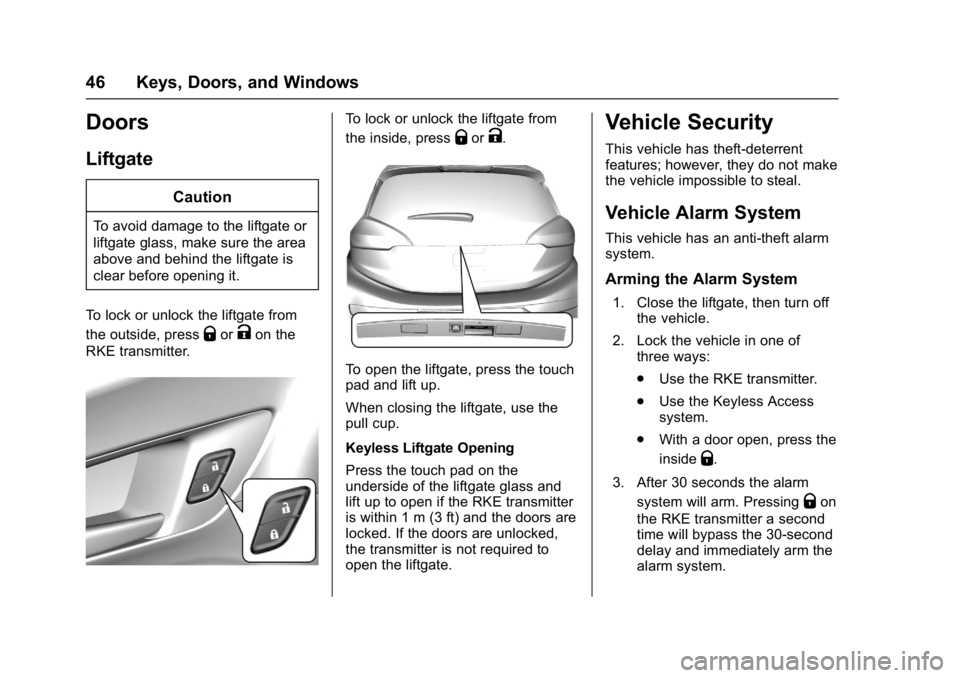
To lock or unlock the liftgate from
the outside, press
QorKon the
RKE transmitter.
To lock or unlock the liftgate from
the inside, press
QorK.
To open the liftgate, press the touch
pad and lift up.
When closing the liftgate, use the
pull cup.
Keyless Liftgate Opening
Press the touch pad on the
underside of the liftgate glass and
lift up to open if the RKE transmitter
is within 1 m (3 ft) and the doors are
locked. If the doors are unlocked,
the transmitter is not required to
open the liftgate.
Vehicle Security
This vehicle has theft-deterrent
features; however, they do not make
the vehicle impossible to steal.
Vehicle Alarm System
This vehicle has an anti-theft alarm
system.
Arming the Alarm System
1. Close the liftgate, then turn off the vehicle.
2. Lock the vehicle in one of three ways:
.Use the RKE transmitter.
. Use the Keyless Access
system.
. With a door open, press the
inside
Q.
3. After 30 seconds the alarm system will arm. Pressing
Qon
the RKE transmitter a second
time will bypass the 30-second
delay and immediately arm the
alarm system.
Page 48 of 361
Chevrolet Bolt EV Owner Manual (GMNA-Localizing-U.S./Canada/Mexico-
10122739) - 2017 - CRC - 10/3/16
Keys, Doors, and Windows 47
The vehicle alarm system will not
arm if the doors are locked with
the key.
If the driver door is opened without
first unlocking with the RKE
transmitter, the horn will chirp and
the lights will flash to indicate
pre-alarm. If the vehicle is not
started, or the door is not unlocked
by pressing
Kon the RKE
transmitter during the 10-second
pre-alarm, the alarm will be
activated.
If a door or the liftgate is opened
without first disarming the system,
the turn signals will flash and the
horn will sound for about
30 seconds. The alarm system will
then re-arm to monitor for the next
unauthorized event.
Disarming the System
Do one of the following to disarm
the alarm system or turn off the
alarm if it has been activated:
. Press
Kon the RKE transmitter.
. Unlock the vehicle using the
Keyless Access system. .
Start the vehicle.
To avoid setting off the alarm by
accident:
. Lock the vehicle after all
occupants have left the vehicle.
. Always unlock a door with the
RKE transmitter.
Unlocking the driver door with the
key will not disarm the system or
turn off the alarm.
How to Detect a Tamper
Condition
IfKis pressed on the RKE
transmitter and the horn chirps and
the lights flash three times, an alarm
occurred previously while the alarm
system was armed.
If the alarm has been activated, a
message will appear on the DIC.
See Security Messages 0140.
Immobilizer
See Radio Frequency Statement
0 336.
Immobilizer Operation
This vehicle has a passive
theft-deterrent system.
The system does not have to be
manually armed or disarmed.
The vehicle is automatically
immobilized when the transmitter
leaves the vehicle.
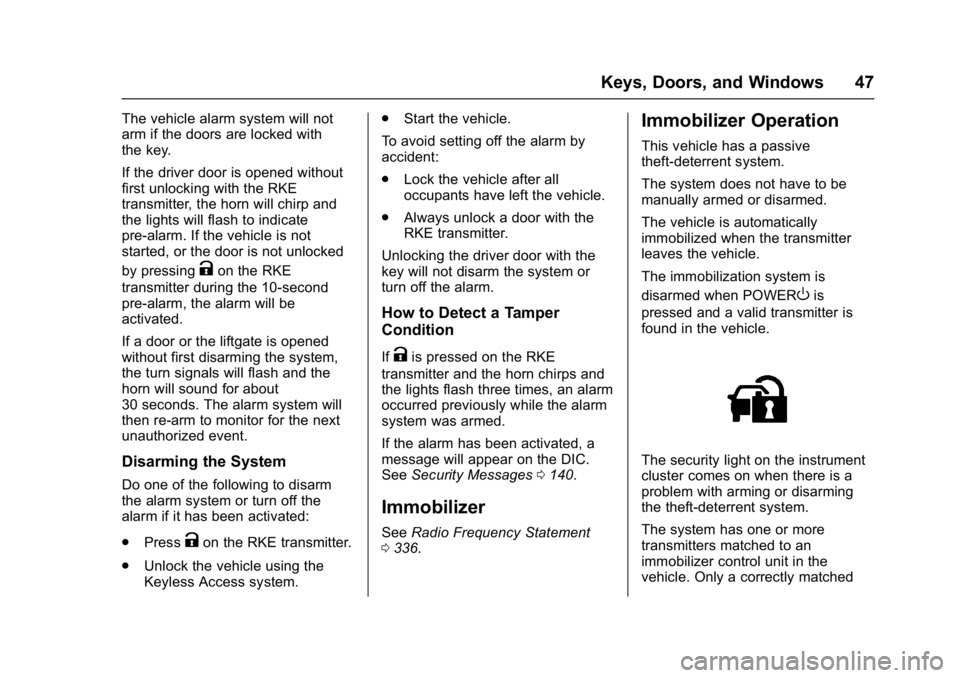
The immobilization system is
disarmed when POWER
Ois
pressed and a valid transmitter is
found in the vehicle.
The security light on the instrument
cluster comes on when there is a
problem with arming or disarming
the theft-deterrent system.
The system has one or more
transmitters matched to an
immobilizer control unit in the
vehicle. Only a correctly matched
Page 49 of 361
Chevrolet Bolt EV Owner Manual (GMNA-Localizing-U.S./Canada/Mexico-
10122739) - 2017 - CRC - 10/3/16
48 Keys, Doors, and Windows
transmitter will start the vehicle.
If the transmitter is damaged, you
may not be able to start the vehicle.
When trying to start the vehicle, the
security light comes on briefly when
the vehicle is turned on.
If the vehicle does not start and the
security light stays on, there is a
problem with the system. Turn the
vehicle off and try again.
If the RKE transmitter appears to be
undamaged, try another transmitter,
or place the transmitter in the
transmitter pocket.See
“Starting the Vehicle with a Low
Transmitter Battery” underRemote
Keyless Entry (RKE) System
Operation 033.
If the vehicle does not start with the
other transmitter or with the
transmitter placed in the transmitter
pocket, the vehicle needs service.
See your dealer who can service
the theft-deterrent system and have
a new transmitter programmed to
the vehicle.
Do not leave the transmitter or
device that disarms or deactivates
the theft-deterrent system in the
vehicle.Exterior Mirrors
Convex Mirrors
{Warning
A convex mirror can make things,
like other vehicles, look farther
away than they really are. If you
cut too sharply into the right lane,
you could hit a vehicle on the
right. Check the inside mirror or
glance over your shoulder before
changing lanes.
The passenger side mirror is convex
shaped. A convex mirror's surface is
curved so more can be seen from
the driver seat.
Page 55 of 361
Chevrolet Bolt EV Owner Manual (GMNA-Localizing-U.S./Canada/Mexico-
10122739) - 2017 - CRC - 10/3/16
54 Seats and Restraints
Seats and
Restraints
Head Restraints
Head Restraints . . . . . . . . . . . . . . . 55
Front Seats
Seat Adjustment . . . . . . . . . . . . . . . 56
Reclining Seatbacks . . . . . . . . . . . 57
Heated Front Seats . . . . . . . . . . . . 58
Rear Seats
Rear Seats . . . . . . . . . . . . . . . . . . . . 60
Rear Seat Armrest . . . . . . . . . . . . . 61
Heated Rear Seats . . . . . . . . . . . . 62
Safety Belts
Safety Belts . . . . . . . . . . . . . . . . . . . . 62
How to Wear Safety BeltsProperly . . . . . . . . . . . . . . . . . . . . . . 63
Lap-Shoulder Belt . . . . . . . . . . . . . 64
Safety Belt Use During Pregnancy . . . . . . . . . . . . . . . . . . . . 66
Safety Belt Extender . . . . . . . . . . . 67
Safety System Check . . . . . . . . . . 67
Safety Belt Care . . . . . . . . . . . . . . . 67
Replacing Safety Belt System Parts after a Crash . . . . . . . . . . . 68
Airbag System
Airbag System . . . . . . . . . . . . . . . . . 68
Where Are the Airbags? . . . . . . . 70
When Should an AirbagInflate? . . . . . . . . . . . . . . . . . . . . . . . 71
What Makes an Airbag
Inflate? . . . . . . . . . . . . . . . . . . . . . . . 72
How Does an Airbag Restrain? . . . . . . . . . . . . . . . . . . . . . 73
What Will You See after an Airbag Inflates? . . . . . . . . . . . . . . 73
Passenger Sensing System . . . 74
Servicing the Airbag-Equipped Vehicle . . . . . . . . . . . . . . . . . . . . . . . 79
Adding Equipment to the Airbag-Equipped Vehicle . . . . . 79
Airbag System Check . . . . . . . . . . 80
Replacing Airbag System Parts after a Crash . . . . . . . . . . . . . . . . . 80
Child Restraints
Older Children . . . . . . . . . . . . . . . . . 81
Infants and Young Children . . . . 82
Child Restraint Systems . . . . . . . 85
Where to Put the Restraint . . . . . 86
Lower Anchors and Tethers forChildren (LATCH System) . . . . 87
Replacing LATCH System Parts After a Crash . . . . . . . . . . . . . . . . . 95 Securing Child Restraints (With
the Safety Belt in the
Rear Seat) . . . . . . . . . . . . . . . . . . . 95
Securing Child Restraints (With the Safety Belt in the
Front Seat) . . . . . . . . . . . . . . . . . . . 97